
Data recovery on vintage hard drives like the Western Digital WD800EB starts with identifying the failure type – electronic, firmware, or mechanical. Each requires a different approach, and misdiagnosis can make things worse. Here’s a quick guide to help you assess your situation and decide on the next step.
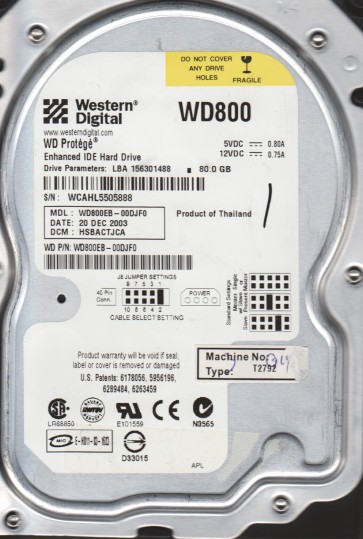
The Western Digital WD800EB is a legacy 80GB IDE/PATA hard drive from the Caviar EB series, utilizing 3.5-inch form factor, ATA-6 interface, and a 5400 RPM spindle speed. It typically employs an integrated controller board and a single platter design. Known for its reliability in older desktop systems, it is susceptible to age-related degradation including stiction, spindle motor seizure, and controller card corrosion. Key characteristics include a Western Digital Marvell-based main controller, a SMOOTH LSI read channel, and a proprietary adaptive servo system.
Common Failure Types
1. Mechanical Failure: Spindle Motor Seizure
Symptom: Drive does not spin up; emits a slight hum or a series of clicks as the actuator arm moves but the platters remain stationary. Cause: Dried or solidified lubricant in the bearing assembly after years of inactivity or heat cycles. Over time, the bearing resists rotation, locking the motor.
2. Firmware Corruption: Translator Module Damage
Symptom: Drive spins up normally, sounds healthy, but is not recognized by BIOS reports the model number as garbage characters or a “PASSWORD” lock message. Cause: Corruption of the primary or secondary P-List and G-List defect tables or the System Area Firmware Module (SAFW) due to a power surge, an abrupt loss of power during write operations, or a degrading SA sector. This renders the logical block addressing (LBA) mapping unusable.
3. Logical Corruption: File System Damage
Symptom: Drive is recognized in BIOS and possibly in the OS correctly, but the file system shows as RAW, unallocated, or prompts to format. Cause: Accidental formatting, virus attack, partial overwrite of the NTFS boot sector, or a malicious program corrupting the Master File Table (MFT). This is a software-level issue and not physical drive damage.
4. Head Crash / Stiction
Symptom: Loud repetitive screeching or scratching sound followed by cease of operation; or the drive locks up and refuses to spin with a faint “stuck” sound. Cause: Physical contact between the read/write head and the platter surface. In the WD800EB, stiction often occurs when the drive rests for a long period and the lubricant on the platter becomes sticky, preventing the head from lifting off. A head crash permanently damages the magnetic media.
5. External Controller Board Failure
Symptom: Drive is completely dead (no sound, no spin) or cycles on and off repeatedly. Cause: A blown TVS diode, failed voltage regulator, or break in the SMD capacitor on the PCB. Often identifiable by visible burn marks or a smell of burnt electronics.
Potential Recovery Paths
DIY Methods
For Controller Board Failure: Locate an exact donor WD800EB with the same DCM (Drive Configuration Module) code and HDA number. Swap the entire logic board (ensure no jumper setting conflicts). If the problem was solely a blown TVS diode, replacing the diode itself may suffice; however, swapping the entire board is more reliable. For Logical Corruption: Use a data recovery tool like TestDisk or R-Studio. Connect the drive as a secondary drive via an IDE-to-USB adapter. Run the tool in administrator mode to scan and rebuild the partition table or extract files sector by sector. Do not format the drive. For Stiction (Limited DIY): Some advanced hobbyists attempt the “spinning” method by briefly applying torque to the exposed motor hub after removing the top cover, but this carries a very high risk of head crash. It is only recommended if data is non-critical.
Professional Services
For Spindle Motor Seizure: A professional lab performs a platter transplant. The entire stack of platters is transferred to a donor drive mechanism in a Class 100 or better cleanroom. This is the only viable method for mechanical seizure. For Firmware Corruption: Specialized tools like PC-3000 or MRT Ultra are used to force the drive into firmware mode, read the system area, and repair or rebuild the translator modules. This requires precision tools and knowledge of the Western Digital family-specific commands. For Head Crash: A cleanroom platter transplant is also required, but with additional complexity as the crashed media may have caused contamination. The heads and platters are replaced. Recovery rate drops significantly if the crash created deep scratches. For Password Lock: Professional tools can unlock the ATA security lock by either generating the master password via serial number or performing a firmware-level unlock bypass, often without data loss.
What Not to Do
Do not run disk checking utilities like chkdsk /f or SpinRite on a drive that is making abnormal clicking or screeching noises; this will further damage the platter surface. Do not open the hard drive enclosure in a non-cleanroom environment. Even a single speck of dust can wedge between the read/write head and platter, causing a catastrophic head crash. Do not apply maximum force to manually rotate the platters if the spindle motor is seized; this can bend the motor shaft or distort the platters. Do not connect a drive with a visibly burnt PCB to a power supply without first checking for short circuits; this can blow the power supply or damage the host adapter. Do not apply freezer or heat methods as temporary fixes for mechanical issues; the condensation from freezing can corrode the actuator arm contacts, and heat can expand the spindle bearings into the motor housing, making them even tighter.
Summary
The WD800EB is an aging IDE drive with failure modes primarily rooted in age-related mechanical wear, firmware decay, and external circuit damage. Logical issues are the easiest to handle with software tools. Mechanical spindle seizure and head crashes require professional cleanroom platter transplants. The most critical warning is never to operate a drive with audible mechanical distress, as it destroys the magnetic media. For any physical or firmware issue, immediate professional consultation is strongly recommended over DIY attempts, unless the data has zero value.