Articles

How you should deal with the hard disk which contains important data

If you have problems with a hard disk which contains important (valuable) data:

* any kind of manipulation with the hard disk or with software could hinder data retrieval or could cause an enormous increase of the retrieval costs.

* do not use any software, even if some guys (internet) told you to do so

* do not run chkdsk or defragmentation, even if you are told to do so

* do not open a hard disk if you don’t have the knowledge, training and the tools (even then you may expect to lose the data)

* contact a (local) DR company; supply them with complete information

* perhaps some data recovery forum could guide you to find the right Data Recovery company

Four solutions for you:
1. you are the typical user who knows all better than a pro – then try DIY – it’s your data

2. you store your hdd in a safe place for some time – until you got the money

3. you put the hdd into the garbage – you will stay poor and won’t get enough money

4. you look for a pro – even here in the data recovery forum – get an estimate on “money for data basis”

How you should deal with the hard disk which contains important data Read More »

How to remove Seagate Momentus 5400.4 password

You can do it with SE_DIV http://sediv2008.narod.ru/Easy1014.rar
Choose Family=Momentus 5400.4
Model=your model
COM=your COM
press Connect and insert power to hdd.
You’ ll see IN COM Shell:
—————–
Reset
4096k x 16 DRAM
CORSAIR – 1_Disk S-00 11-08-07_16:25

Buzz HM SFI
!
(P)SATA Reset
(H)SATA Reset
——————
press Ctrl-Z

You’ ll see
—————-

T>
—————
Go to Read/Write
press button Full Detect
You’ ll see

SPT = 337
remember it.
Go to Read SA
Type System Tracks
Type Checked All
Press Detect

You’ll see
PLEAS READ ALL CAREFULLY BEFOR START:

1) Push button OK.
2) Turn Off Power HDD.
3) Wait HDD speed down until stop one.
Pause during 5-10 seconds.
4) Turn On Power HDD.

Do it!
You’ll see
Vendor Track = F91D
remember it
Go to Read/Write
Type Read Sectors
Begin Track=F91D
Head=0
Begin Sector=6
Sector Count=7
Buffer Adr.=4B0

press Read
and attach your Trk_F91D Hd_0 Sct_6(7).bin

How to remove Seagate Momentus 5400.4 password Read More »

Resolve O LBA, Seagate 7200.11 BIOS don’t recognize (Part II)

PART 2

If your HDD 7200.11 is not recognize by BIOS,

and after you connect him to COM1 and turn on power if you have this response for any command like:

Rst 0x10M
LED:000000CC FAddr:0025BF67
Ctrl + Z
F3 T>
LED:000000CC FAddr:0025BF67
your drive is busy!

power off your Hdd
slightly unscrew one screw near to motor connection to PCB and put plastic visit card! Or you can remove PCB.
Effect is the same…
power on your hdd,

Ctrl +Z

F3 T>/2
F3 2>
F3 2>Z

Spin Down Complete
Elapsed Time 0.138 msecs
F3 2>

now you put PCB back, or pull visit card
enter this
F3 2>U
Spin Up Complete
Elapsed Time 7.242 seconds
F3 2>

F3 T>/1
F3 1>N1
this is a S.M.A.R.T. erase

after that POWER off HDD, it means that you plug off power to hdd,
power on hdd,
reenter
CTRL+Z on terminal
F3 T>i4,1,22
this is G-list erase

after that POWER off HDD, it means that you plug off power to hdd,
reenter
CTRL+Z on terminal
F3 T>m0,2,2,0,0,0,0,22 Enter

!!!IMPORTANT, don’t turn hdd power off, or comp off, wait about 30 sec to 2 minutes until it finished!!!

then you see something like this.

Max Wr Retries = 00, Max Rd Retries = 00, Max ECC T-Level = 14, Max Certify Rewrite Retries = 00C8 Max retries Wr = 00, Max Rd retries = 00, Max T-ECC Level = 14, Max certify Rewrite retries = 00C8
User Partition Format 10% complete, Zone 00, Pass 00, LBA 00004339, ErrCode 00000080, Elapsed Time 0 mins 05 secs User Partition Format 10% complete, Zone 00, Pass 00, LBA 00004339, ErrCode 00000080, Elapsed Time 0 mins 05 secs
User Partition Format Successful – Elapsed Time 0 mins 05 secs User Partition Successful Format – Elapsed Time 0 mins 05 secs

After that hit

F3 T>/2
and
F3 2>Z
Spin Down Complete
Elapsed Time 3.038 msecs

Turn off power from your HDD, od shutdown your comp.

That’s all!

WARNING: Please do NOT try this if you have valuable data on your drive. Do not blame anyone if something goes wrong. You do it at your own risk. Remember that if something goes wrong, it is extremely unlikely that anyone will be able to help you remotely. One wrong command via terminal could easily result in a completely bricked HDD (I really do mean bricked = no one will be able to recover it, even Seagate).
Resolve O LBA, Seagate 7200.11 BIOS don’t recognize (Part II) Read More »

Resolve O LBA, Seagate 7200.11 BIOS don’t recognize (Part I)

This tutorial is not for inexperienced users!!! Do NOT POWER OFF YOUR hdd, computer, during it, (EXCEPT IF I SAY SO)and you just to be sure connect your computer to UPS.

First you must have to build serial rs232 converter to TX,RX GND, you can use any data cable from your cell phone from Siemens 35 series custom build data cable buid on this picture with max232. Be sure that you put zener diode 2V7 at the picture..Because you could burn your Tx, Rx, on HDD-s PCB.

So, when you build, get your adapter, connect it to this pins on Seagate drive.
[ ”””””””’| |””””’ ] [ .. ..] —-> Rx.. Tx
You do not need to connect SERIAL-ATA CABEL
open hyper terminal or another type of terminal select Serial port example “COM1”
set bit rate to 38400bps
data bits 8
parity N
stop bits 1

it’s default settings except bps.
plug power to disk and after that you will see on terminal something like this:

PART 1

Rst 0x10M
hit Ctrl + Z to get “prompt”
F3 T>

now, if your BIOS recognize disk but there is 0 LBA,0 capacity

all you need is to hit this command:

F3 T>m0,2,2,0,0,0,0,22 Enter

!!!IMPORTANT, don’t turn hdd power off, or comp off, wait about 30 sec to 2 minutes until it finished!!!

then you see something like this.

Max Wr Retries = 00, Max Rd Retries = 00, Max ECC T-Level = 14, Max Certify Rewrite Retries = 00C8 Max retries Wr = 00, Max Rd retries = 00, Max T-ECC Level = 14, Max certify Rewrite retries = 00C8
User Partition Format 10% complete, Zone 00, Pass 00, LBA 00004339, Err Code 00000080, Elapsed Time 0 minutes 05 seconds User Partition Format 10% complete, Zone 00, Pass 00, LBA 00004339, Err Code 00000080, Elapsed Time 0 minutes 05 seconds
User Partition Format Successful – Elapsed Time 0 minutes 05 seconds User Partition Successful Format – Elapsed Time 0 minutes 05 seconds

After that hit

F3 T>/2
and
F3 2>Z
Spin Down Complete
Elapsed Time 3.038 msecs

Turn off power from your HDD, od shutdown your computer.

WARNING: Please do NOT try this if you have valuable data on your drive. Do not blame anyone if something goes wrong. You do it at your own risk. Remember that if something goes wrong, it is extremely unlikely that anyone will be able to help you remotely. One wrong command via terminal could easily result in a completely bricked HDD (I really do mean bricked = no one will be able to recover it, even Seagate).

WARNING: Please do NOT try this if you have valuable data on your drive. Do not blame anyone if something goes wrong. You do it at your own risk. Remember that if something goes wrong, it is extremely unlikely that anyone will be able to help you remotely. One wrong command via terminal could easily result in a completely bricked HDD (I really do mean bricked = no one will be able to recover it, even Seagate).

Resolve O LBA, Seagate 7200.11 BIOS don’t recognize (Part I) Read More »

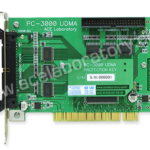
The features of Pirated PC3000 PCI

PC3000 PCIPC3000 PCI version, this Pirated product will not perform or functions:
1). Product will run a while with limited functionality and after a while it will stop working due to DATE/TIME, hard disk with bad sectors, any changes to the G-LIST will make the card unusable.

2). Certain functions will not work properly, often hang or crashes, Hard disk that comes with PC3000 PCI cloned must be Maxtor 4D040H2 or 6Y080L types, imagine these drives have full potential of breaking down, they purposely use these type of HDD so they can sell more pirated PC3000 PCI cloned.

3). Windows operating system in Chinese language so guess what…it will drive you crazy.

4). Hard Disk must be cloned again once the PC3000 PCI is locked due to piracy prevention is detected (e.g. Asking for renew license key), cloning procedure is totally time wasting.

5). If something goes wrong, Chinese seller will deny and ask you to get F##CK!

6). PC3000 PCI is updated regularly meaning that once you bought the pirated ones you can’t update the software. The Chinese will ask you to buy a new one instead. (That’s the trick…they will keep asking to buy a new updated PCI claiming it is better than the previous version, e.g. PC3000 PCI version 1.1, 2.2, 2.XX and so on), after a while they will tell you a new system is added so you don’t have to clone if something goes wrong, guess what? they will ask you to buy a new one again because your old one can’t be updated.

7). Average pirated copy of PC3000 PCI selling for around US$400 – US$600, every few months there is a new version comes out, so you keep spending $600, over the course of 1 year you can buy the new original PC3000 PCI with free updates for 1 year.

8). New original PC3000 PCI can run on any motherboard, Windows Operating systems English or other language, any types of CPU, HDD etc.

Hope this article helps people in deciding whether or not it’s worth buying the clones PC3000.

The features of Pirated PC3000 PCI Read More »

Few bad troubles on Seagate Barracuda 7.7200

For example: Seagate Barracuda 7.7200 40Gb. When scan it by MHDD almost all surface looks perfect, but drive have 1 bad block (or little bit more) in first sectors. How to fix the problem?

First rule: if data is important you must save it first, before do any “repair” or you can lose you data in this drive at any moment.

Now, then data saved we can start drive diagnostic. If drive have few bad blocks we can divide situation to the following case:

Universal:

1) software damaged – this is actually not damage, but sectors with incorrect ECC info, simply rewrite sectors to remove trouble.(MHDD erase waits will help)

2) actual damaged – well sometimes surface can be worn and we have actual damage. If we have not very much damage that we can try remap them. Try simple rewrite bad sector (most drives perform remap on write) or use MHDD remap on etc. (then bad sector remapped SMART Reallocated sector count attribute increased )

Seagate 7.7200:

3) head problem – drive firmware detect head problem and switch to “read only” mode. This can be diagnosed by following symptoms:

①. after drive power on, it take long time to become ready (BSY status cleared)

②. drive don’t write if you run MHDD “erase” (not fast erase, but normal erase) everything stopped after MHDD write 765 sectors. (Really nothing wrote at all, if you try writing disk sectors with disk editor, you see what nothing changed)

Such troubles most likely can’t be fixed by MHDD, because they caused by bad head. You should use the head replace tools to fix this problem.

Few bad troubles on Seagate Barracuda 7.7200 Read More »

Noise related to PCB in WD HDDs (Part II)

2- The Continuous Noise

Sometimes there is a continuous noise come from WD HDDs mainly with L-shape PCBs
with motor ICs ( Smooth 1.3) , (L6278 1.7) & (L6278 1.2).

The noise is like: Trrrrrrrrrrrrrr or Trrrr….Trrrr…Trrrrr

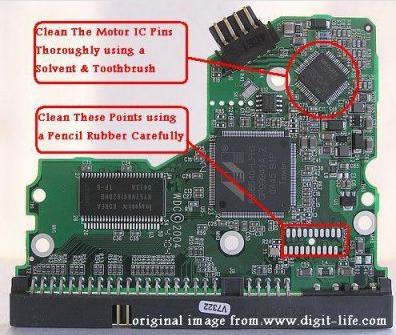
so all we have to do for fixing this problem is:

1) – clean the connection points which connect the head stack pins with the PCB using a pencil Rubber …carefully.

2) – clean the motor IC pins thoroughly using a solvent & Toothbrush then wipe it with a piece of smooth handkerchief to remove the dust & dirt from it.
Note- the two steps mentioned above solve the problem in few cases.

3) – if the two steps mentioned above didn’t fix the problem , you have to replace the motor IC cause it’s damaged.
Note- in case of Motor ICs (L6278 1.7) & (L6278 1.2) first try to desolder them then resolder them again before u decide to replace them with a new ones … this sometimes work , but if it didn’t work … replace them directly.
– In case of Motor IC (Smooth 1.3) you must replace it directly.

The image below Shows you where to clean:

wd pcb

Noise related to PCB in WD HDDs (Part II) Read More »

Noise related to PCB in WD HDDs (Part I)

Now discuss the Causes & Solutions of Two Main types of Noise which is occurred in WD HDDs (Especially Related To L-shape PCBs).

Clicking Noise and Continuous Noise:

1- The Clicking Noise
when you power on the hard drive u will hear a noise like (click,click….click,click…click,click)
this noise may be related to the head stack or PCB, the first thing you have to do is to check the PCB By The following steps:

1)- first you have to clean the Whole PCB With a Solvent & Toothbrush then wipe it with a piece of smooth handkerchief to remove the dust & dirt from it.
Caution: Cleaning of the PCB must be done carefully to avoid removal of any small electronic components.

2)- Check the Resistor (R120), [the right value of this Resistor is (0.12 Ohm)], you may adjust your multimeter to Resistor Measuring Mode to determine its Value, if its damaged you have to replace it. but before that, you have to check Transistor Q3 , it’s a 6 pins transistor , for measuring this transistor you may adjust your multimeter to Diode Mode,[ the right Value will be: (first two pins = 0.000 , second two pins =0.000 , Third two pins = nearly over 600)]
if Q3 is Damaged it will burn ur R120 after u replace it , so be sure that Q3 is ok before replacing R120 & u may also Check Transistor Q6 by the previous method to be completely sure it’s safe to replace R120.
Note: ( to be sure of The right values of these electronic components u may compare the values u have measured with the values of a working PCB’s Components)

3)- Check The Coils (such as L2 & L7) – adjust your multimeter to diode mode then the right value must be ( 0.000 ) for any coil as u all know.

4) – inspect the whole PCB for any removed component (such as small capacitors or Resistors) … the removal of these small components may occurred while forced cleaning of the PCB…. so be careful while cleaning it.

5) – in rare cases the firmware microchip may be damaged.

Noise related to PCB in WD HDDs (Part I) Read More »

Most Popular Freeware for HDD Diagnostics (MHDD)

mhddMHDD is the most popular freeware program for low-level HDD diagnostics.

MHDD supports these interfaces: IDE, Serial ATA, and SCSI. Also there is a possibility to access USB storage; there are drivers for emulation (USB->SCSI).

This software can make precise diagnostic of the mechanical part of a drive, view SMART attributes, and perform Low-level format, bad sector repair, different tests and tens of other functions.

More information on: http://hddguru.com/content/en/software/2005.10.02-MHDD/

Most Popular Freeware for HDD Diagnostics (MHDD) Read More »

Scroll to Top