2- The Continuous Noise
Sometimes there is a continuous noise come from WD HDDs mainly with L-shape PCBs
with motor ICs ( Smooth 1.3) , (L6278 1.7) & (L6278 1.2).
The noise is like: Trrrrrrrrrrrrrr or Trrrr….Trrrr…Trrrrr
so all we have to do for fixing this problem is:
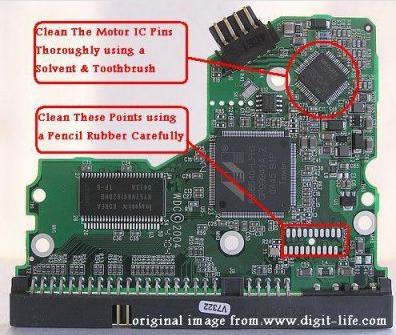
1) – clean the connection points which connect the head stack pins with the PCB using a pencil Rubber …carefully.
2) – clean the motor IC pins thoroughly using a solvent & Toothbrush then wipe it with a piece of smooth handkerchief to remove the dust & dirt from it.
Note- the two steps mentioned above solve the problem in few cases.
3) – if the two steps mentioned above didn’t fix the problem , you have to replace the motor IC cause it’s damaged.
Note- in case of Motor ICs (L6278 1.7) & (L6278 1.2) first try to desolder them then resolder them again before u decide to replace them with a new ones … this sometimes work , but if it didn’t work … replace them directly.
– In case of Motor IC (Smooth 1.3) you must replace it directly.
The image below Shows you where to clean: