Here you can download Quantum Firmware collections, you can make use of them as donor for your damaged Quantum hard drives or Quantum Firmware update!
Quantum Firmware Download

Blog about data recovery, hard disk drive repair and computer forensic.
Here you can download Fujitsu firmware collections, you can make use of them as donor for your damaged Fujitsu hard drives or Fujitsu firmware update!
Fujitsu V60+/Z60/Z60+ Family FW Update (MHV models)
mpg3204at-a80-80c4,mpg3204at-882-80c2
mpg3204at-880-9117,mpg3204at-682-80c2
mpg3204at-680-80c4,mpg3204at-582-80c2
mpg3204at-482-80c2,mpg3204at-280-80c4
mpg3204at-1a9-80b5,MPG3204AT 82-80C2
MPG3204AT -FB ID: YFIP PART NO. CA05761-B72300FB SER. NO. VH44P1804YLE DATE 2001-08 882-80C2 PCB: CA21273-B12X 009CF
mpg3204ah-a00-c3c7,mpg3204ah-900-c3c7
mpg3204ah-900-c3c5, mpg3204ah-800-c3c5
mpg3204ah-700-d290,mpg3204ah-700-c3c5
mpg3204ah-636-42b5,mpg3204ah-600-d290
mpg3204ah-600-c3c5,mpg3204ah-536-42b5
mpg3204ah-436-42b5,mpg3204ah-236-42b5
mpg3102at-ca9-9206,mpg3102at-b89-9206
mpg3102at-b89-9111,MPG3102AT-80c2
mpg3102at-382-80c2,mpg3102at-282-80c2
mpg3102at-1a9-80b5,MPF3102AT
MPD3130AT_DD-04-44,FUJITSU MHT2040AT-0022-NQ08T4726H3F
MHS2040 – B88-8004,MHS2040 – 48F-8004
MHS2040 – 28F-8004,MHS2040 – 020D-8004
MHS2040 – 020D-3005,PC3000PCI FUJITSU MHS2030AT-8307-NL13T3114AWV DCM: NIDEC T23025E4
MHS2020 – C8D-8004,MHR2020 – 802-40BA
MHR2020 – 502-55BA,MHN2300 – C10-7255
MHN2200 – 110-7255,MHN2100 – B13-7256
MHN2100 – 910-7255,MHM2200 – B0E-3B27
MHM2200 – 90E-3822,MHM2200 – 40E-5823
MHM2200 – 0B0E-3B27,MHK2060 – 418-D834
MHK2060 – 417-D834,MHH2048 – A0E-B815
MHG2102 – C0E-B015,MHF2043 – 702-A518
FUJITSU MHT2060AT 0022,FUJITSU MHT2040AT 009B
FUJITSU MHT2020AT 009A,FUJITSU MHS2020AT E 8406
Fujitsu Firmware Download
Here you can download Samsung firmware collections, you can make use of them as donor for your damaged Samsung hard drives or samsung firmware update!
Samsung Selfscan Module (Full)
Samsung ROM
Samsung P120S SP2X04C Series Hard Disk Drive firmware
Samsung HDD-Firmware RQ100-06
Samsung Disk SP23908 Update Program
SV0411N-VANGOPLUS-UA100-11
SHD3122A-BC101-DX1AX
SAMSUNG-SP2014N-VC100-33-S088J1QY616013
SAMSUNG-SP0842N-FW-BH100-35
SAMSUNG-SP0411N-TW100-13-S01JJ1BLC17496
SAMSUNG-MP0402H-UC100-14-S03WJ30Y129033
Samsung-Hdd-Firmware-Rq100-06
Samsung Firmware Download
 Have you ever heared a clicking noise from your hard drive? Do you want to know how to diagnose and recover your hard drive from this noise? Recently i found a professional recovery company (DataCent.com) which is good at recoverying data from thses hard drive clicks such as bellows:
Western Digital
1. Western Digital desktop drive with bad heads clunking.
2. Western Digital 500GB desktop drive with bad heads slowly clicks a few times and spins down.
3. Western Digital 250GB desktop drive with head crash clicks a few times, then spins down.
4. Western Digital 250GB desktop drive with stuck spindle can’t spin up, chatters.
5. Western Digital laptop drive with bad heads making clicking sound.
6. Western Digital 200GB desktop drive with bad preamplifier chip (located on the headstack) clicks a few times, spins down.
7. Western Digital desktop drive with unstable heads clicks a few times and stops spinning.
8. Western Digital laptop hard drive with stuck spindle trying to spin up with siren.
9. Western Digital 500GB desktop hard drive with bad bearings can’t gain full rotational spee
Seagate
1. Seagate desktop drive with degrading heads making thrashing, then clicking sound.
2. Seagate desktop drive with bad heads slowly clicks and beeps on spin up.
3. Seagate laptop drive with bad heads making clicking/knocking sound.
4. Seagate desktop drive with seized spindle trying to spin up.
5. Seagate Momentus laptop drive with bad heads making nasty drilling noise.
Maxtor
1. Maxtor desktop drive with bad heads making clicking/knocking/beeping noise.
2. Maxtor drive with bad heads making steady clicking/knocking sound.
3. Maxtor desktop drive with stuck spindle playing futuristic cell phone melody.
4. Maxtor drive with stuck spindle and musical siren again.
Samsung
1. Samsung 80GB desktop hard drive with bad heads making fast clicking sound.
2. Samsung desktop hard drive with bad heads clicks, then spins down.
3. Samsung 40GB desktop hard drive with bad head knocks a few times.
4. Samsung desktop drive with degrading media making scratching sound when hitting bad sectors.
Hitachi/IBM
1. Hitachi laptop drive with bad heads clicks once on spin up, then beeps.
2. IBM desktop drive with degrading media making scratching sound when hitting area with bad sectors.
3. Hitachi/IBM laptop drive with bad heads making clicking sound.
4. IBM 40GB desktop hard drive with degrading media/heads rattles and squeals on spin up.
5. Hitachi 60GB laptop drive with stuck spindle can’t spin up, makes humming/buzzing noise.
Toshiba
1. Toshiba laptop hard drive with stuck spindle trying to spin up(heard if taken close to your ear).
2. Toshiba laptop drive with degrading bearings making grinding sound.
3. Toshiba laptop drive with bad bearings making loud grinding sound.
4. Toshiba laptop drive with bad bearings making nasty drilling/screaming sound.
5. Toshiba laptop drive with bad heads making clicking/sweeping sound on boot up.
Fujitsu
1. Fujitsu laptop drive with bad heads making clicking/knocking noise.
2. Fujitsu laptop hard drive with bad heads making sweeping sound.
3. Fujitsu 40gb desktop drive with bad media making scratching noise.
Quantum
1. Quantum desktop drive with bad heads making clunking sound.
Mirrored Cache
A cache memory that has duplicate data from another controller. In the event of failure of the original controller, the second controller can take the cached data and place it on the disk array.
Mirrored Hard Drive
Two hard drives the computer sees as one unit. Information is stored simultaneously on each drive. If one hard disk drive fails, the other contains all of the cached data and the system can continue operating.
Mirroring
The complete duplication of data on one disk drive to another disk drive, this duplication occurs simultaneously with each write operation: each disk will be the mirror image of the other (also known as RAID Level 1, see RAID Levels). All Mylex RAID controllers support mirroring.
MTBF
Mean time between failure. Used to measure computer component average reliability/life expectancy. MTBF is not as well-suited for measuring the reliability of array storage systems as MTDL, MTTR or MTDA (see below) because it does not account for an array’s ability to recover from a drive failure. In addition, enhanced enclosure environments used with arrays to increase uptime can further limit the applicability of MTBF ratings for array solutions.
MTDA
Mean time between data access (or availability). The average time before non-redundant components fail, causing data inaccessibility without loss or corruption.
MTDL
Mean time to data loss. The average time before the failure of an array component causes data to be lost or corrupted.
MTTR
Mean time to repair. The average time required to bring an array storage subsystem back to full fault tolerance.
Member (disk)
A disk that is in use as a member of a disk array.
Latency
1. The time between the making of an I/O request and completion of the request’s execution.
2. Short for rotational latency, the time between the completion of a seek and the instant of arrival of the first block of data to be transferred at the disk’s read/write head.
Logical Drive
The logical devices presented to the operating system. System drives are presented as available disk drives, each with a capacity specified by the Mylex RAID controller. See also Storage Device.
Immediate RAID Availability
See Background Initialization
In-Line Terminator
A plug attached to the end of a SCSI cable in order to initiate active termination. Used when SCSI devices on the cable do not have built-in termination. See also Active Termination.
Interface
A hardware or software protocol that manages the exchange of data between the hard disk drive and the computer. The most common interfaces for small computer systems are ATA (also known as IDE) and SCSI.
Internal RAID Controller
A controller circuit board that resides inside a computer or server. An internal RAID controller resides on a bus, such as the PCI bus.
Examples of internal RAID controllers include the Mylex AcceleRAID and eXtremeRAID families.
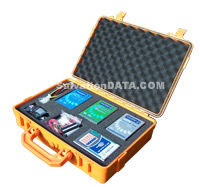 1. What is “HD Doctor Suite”?
HD Doctor Drive Restoration Suite is an integrated hardware-software combined system that fixes firmware issues for drives of all major manufacturers and popular drive families.
2. Why you need “HD Doctor Suite”?
Being a data recovery professional, surely you have such kind of experience: You have to deal with data recovery from a drive with mechanical drive failures. How would you do then? Some of you may have success with electronic (PCB) problems by replacing PCB parts or directly the whole. But what will be the next when it doesn’t do anything good (even worse)? The firmware problems which need to be handled with these tools are causing 60 percent of all drive failures-up to 80 percent for some models.
3. What can Data Compass do?
Data recovery from physically damaged HDDs is what Data Compass designed for.
* Data recovery from HDDs with severe multiple BAD sectors, which appear because of platter surface scratch or malfunction or instability of the magnetic head assembly (MHA).
* Data recovery from HDDs that start to produce “clicking” sounds, which may be caused by corruption of sector servo labels or a MHA malfunction. If some heads or surfaces are damaged it is possible (before installation of MHA replacement) to create a copy of data using the remaining good surfaces or drive heads.
* Data recovery from HDDs with corrupted portions in the dynamic system of LBA – PCHS translation.
* Availability of tools for logical analysis of FAT and NTFS file systems in the software complex allows data recovery in cases, when a drive is functional and only logical data structure is corrupted.
* When used with malfunctioning drives, Data Compass complex often allows selective extraction of data necessary to your customers without reading all data from a drive (“recover data by file” without creating a complete disk image) saving a lot of time. In some cases, when drive malfunctions cause constant self-damage (like scratches on disks or instable MHA) these are the only means to accomplish this task. With the ShadowDisk technology adopted, users need not to worry about the drive degradation problem.
4. What is the highlights of “HD Doctor Suite”?
* Cost-effective design for data recovery companies, you do not need to setup a clean room or purchase the rumorous servo writers, or other expensive equipment.
* Comprehensive drive diagnostics carried out with ease and fast speed towards PCB, head stack, SA, firmware modules and media, the vendor-special diagnostics mode provide exact results to help you decide possible recovery methods. Specialized utilities allow more comprehensive and deeper diagnostics towards the SA and firmware recovery by activating the vendor-special restoration flow.
* Unlike tools developed by some other software companies and the vendors, HD Doctor repairs your drive without damaging the user data, while others only repair drive by erasing/damaging all the user data. HD Doctor is specially designed all its functions into three risk levels: RED, BLACK and GREEN, so to indicate what you can do and what you can’t do during the drive restoration process in case you need to maintain all user data intact.
* Software that comes with HD Doctor runs on Microsoft Windows XP/2000. We integrated lots of operation scripts to be functional buttons to reduce the operation steps for easy-to-use purpose, you don’t need to be an expert or go for training.
* View and edit HD Password using manufacturer protocols for all supported manufacturers. Unlike other products who claimed password removal by Brute Force & Dictionary Attack (which actually remove nothing but wasting your time), we actually “see” the password directly.
* Embedded Engineer Note records the engineer’s operations and reviews, on a case basis.
* HD Doctor comes with a full range of adapters for the most common drive types (2.5″ and 3.5″, PATA and SATA, RS-232 cable, jumpers, programmer…).
* Free upgrade of software and supporting list will be provided to all the customers once available.
* Software is designed to support hard drives based on firmware structure and technology used rather than model number. This enables the HD Doctor to support more hard drive models, including some that are brand new on the market.
* Firmware repository maintained officially and by third parties is continually updated for new drives added to the support list, and you can download them as needed from us.
* “One-Click” auto firmware repair for most common firmware failures: for example, G-list overflow, P-list corruption, SMART module corruption and more. Your data becomes one click away.
* Special design enables you to repair even HDD from different manufacturers at the same time.
* Compared with other software’s complex re-activation process for installation, upgrade or transfer of license to a new host computer; HD Doctor can be run on multiple PCs with one license after activation via USB 2.0 interface, enabling you to perform on-site recoveries.
* Hardware Write Protection switch is embedded, which blocks any possible command that may do harm to the user data.
* Both the complete suite and the partial suite include the HD Doctor console, HD Doctor software, a range of adapters, and you get access to downloads, user forum, and free technical support..
5. Useful Links
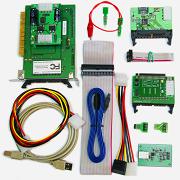 1. What is “PC 3000 System”?
PC-3000 Drive Restoration System is a Phase I tool, dealing with drive restoration and its two critical steps: harddisk diagnostic and harddrive repair.
2. Why you need “PC 3000 System”?
As a data recovery professional, chances are you have ways to deal with mechanical drive failures. You may even have some success with electronic problems using jury-rigged tools and trial and error. But can you handle the firmware problems that cause 50 percent of all drive failures-up to 90 percent for some models?
3. What is the highlights of “PC 3000 System”?
* Designed specifically for the needs of data recovery businesses, PC-3000 does not require clean rooms, servo writers, or other expensive equipment.
* Universal utilities give you faster drive diagnostics, and let you decide on possible methods for recovery. Specialized utilities allow deeper diagnostics and firmware recovery in a drive’s vendor-specific mode.
* Unlike software repair utilities distributed by software development companies and drive manufacturers, PC-3000 repairs the drive and treats user data with respect. And unlike manufacturer’s test and repair software, PC-3000 comes with manuals and provides methods for drive restoration in a user data intact environment.
* Software that comes with PC-3000 features a user-friendly Microsoft Windows XP/2000 interface.
* PC-3000 comes with a range of adapters for the most common drive types, and firmware libraries are continually updated for new drives and patches, and you can download them as needed from DeepSpar.
* PC-3000 has built-in features to treat particular drives for their most common failures: for example, firmware damage in G-list and P-list corruption in Maxtor; SMART counters overflow in Western Digital, Fujitsu MPG issues and more.
* The PC-3000 kit includes a PC-3000 PCI card, PC-3000 software, a range of adapters, and gives you access to downloads, user forum, and technical support.
4. Useful Links
NEW: PC-3000 UDMA is now available. This latest version supports working in UDMA modes for vastly increased speed. (PC-3000 UDMA also combines the capabilities of both PC-3000 PCI and PC-3000 ISA.)