Articles

Best Cheap Harddrive for Games

I’d like to know what the cheapest 7200 rpm hardrive is that’s good for games. Space isn’t really an issue, maybe 160gb minimum.

Needs to have at least 1t of space and make little noise and stay relatively cool and under about 80 dollars.

To pick the best hard drives for gaming PC, we need to look at the main criteria that will affect the performance of a hard disk.

Generally, desktop hard drives can be installed in either 2.5″ or 3.5″ internal drive bays. Usually desktop HDDs spin at three different speed, 5400, 5900 and 7200 RPM which can be connected to motherboard by IDE/SATA cable. Also there are 10,000 and 15,000 RPM enterprise hard drives for workstation/server computers which are more expensive and usually have Serial Attached SCSI (SAS) connector.

Go to amazon and newegg and search for what you want. A lot of people like WD black drives for their 5 year warranty.

Best Cheap Harddrive for Games Read More »

iPhone Data Recovery

iphonedatarecovery 1. About iPhone Data Recovery

iPhones can suffer from glitches, which can result in the phone crashing and needing to be restored. When this occurs, the restore process will wipe the device clean of any data. Data can be restored, however, and the process is simple through iTunes.

Function
Each time the user syncs his iPhone with iTunes, the device will back up unless the backup process is interrupted.

Significance
The backup process will create a disk image of all personal data on the device. When a restored iPhone is connected, iTunes will ask if the user wants to restore using this disk image.

Features
The following data will be backed up and ready to restore in the event of a crash: contacts, settings, applications, text messages, email messages, recent and missed call lists, any mobile Safari favorites, notes saved, set alarm and most preferences.

Misconceptions
Unlike failures in other phones, the iPhone’s syncing process (and the regular backup) prevents the loss of data.

Prevention/Solution
Prevent the need to restore by only installing applications through the App Store. Unauthorized applications through other means can cause the phone to fail or need to be restored in some cases.

Warning
Never interrupt the backup process. You never know when you may need the backup you just interrupted.

2. How to Recover iPhone Data

If you lose the data on your iPhone, all is not lost. Thanks to some free programs and Apple, there is a good chance you can recover your data. These steps walk you through the process.

  1. Refrain from copying more files onto your iPhone when you think you have lost files. You need to run a scan to see whether your files are still there so you can recover them.
  2. Download a program that is capable of searching the files on the hard drive of your iPhone. These programs are available for free on the Internet. Once such program is recover4All Pro.
  3. Allow the program to run so that it can scan and recover all of your files. This can take up to 3 hours because it scans the entire hard drive of the iPhone.
  4. Connect your iPhone to the computer you usually use to sync them if the above method does not work.
  5. Hit the Summery tab in iTunes, and click Restore.
  6. Select, when requested, the option that offers to restore your previous settings. Because your files will be backed up on your computer, your data should be restored.

iPhone Data Recovery Read More »

Top 10 Data Recovery Softwares on Download.com 2012

1. Pandora Recovery
Find, preview and restore permanently deleted files. Version 2.1.1

2. Easeus Data Recovery Wizard Free Edition
Recover deleted files and recover data from formatted/lost partitions. Version 5.6.1

3. PC Inspector File Recovery
Recover lost or damaged files. Version 4

4. MiniTool Power Data Recovery Free Edition
Recover your deleted files, lost data and partitions. Version 6.6

5. PC Inspector Smart Recovery
Bring back deleted pictures from any digital camera media.

6. Data Recovery
Restore accidentally deleted FAT12, FAT16, FAT32, and NTFS files. Version 2.3.1

7. VaioSoft Recovery Manager
Recover, duplicate, and back up files lost due to system failure, deletion, or corruption. Version 1.5

8. Easeus Deleted File Recovery
Recover deleted files even after trashing data in Windows trash bin. Version 3.0.1

9. eData Unerase Personal
Recover lost or deleted files from hard disks and removable media drives. Version 3

10. R-Linux Free Recovery
Recover files from existing logical disks when file records are lost. Version 4.5 build 134117

Top 10 Data Recovery Softwares on Download.com 2012 Read More »

How to Become a Forensic Computer Professional

computerforensicprofessional A computer forensic professional collects electronic evidence and provides information to an investigation team. Being a computer forensic professional requires you to have skills to help criminal investigators solve computer crimes. You should have knowledge of criminology, business law and computer data analysis.

If you like crime scene investigation shows or the thought of cracking encrypted computer security codes excites you, then a career in computer forensics might be right up your alley. The requirements to become a computer forensics professional can vary. An associate or bachelor’s degree are two of the more common paths to a career in this field, but graduate degree programs are becoming more common. Forensic computer analysts made an average salary between $47,117 and $79,667 in 2010, according to PayScale.

  1. Obtain an associate or a bachelor’s degree. Having a degree in computer science or accounting will be more beneficial in finding a computer forensics job than having a criminology or criminal justice degree, says the U.S. Bureau of Labor Statistics. Associate and bachelor’s degree programs in the field of computer forensics are offered at schools such as ITT Technical Institute and Westwood College.
  2. Apply for positions with law enforcement agencies. Most law enforcement agencies will require you to pass an extensive background check and a series of written and psychological tests before they will hire you.
  3. Attend courses at a police academy. Although you can work in computer forensics as a civilian analyst, having insight into the criminal investigation process and police detective techniques can provide you with invaluable insight on how the criminal mind works and possibly provide you with a better understanding of how to access information that may be hidden on computer systems.
  4. Gain experience through hands-on training. Most computer forensics professionals learn about the specifics of their trade through the computer forensics training program offered by the law enforcement agency they work for, according to the U.S. Bureau of Labor Statistics. In fact, the bureau also notes that many utilize this training as a way to break into the field before moving on to the private sector.
  5. Obtain certification as a computer forensics investigator. Agencies and organizations such as the International Society of Forensic Computer Examiners offers certifications in the field that will give you the credentials that will set you apart from your competition for jobs or clients. Certification from the Society requires you to complete additional computer forensics training, have a minimum of 18 months of verified experience in the field and engage in self-study in digital forensics. Once your qualifications have been verified, you can then take the certification exam.

Be sure that the school that you enroll in is accredited. Be sure that you earn maintain an acceptable grade point average at the school you are enrolled in. Some two-year programs require that you complete 60 credit hours and earn nothing less than a 2.0 GPA. Ask the college you are applying to if you need to submit to a criminal background check. You may be excluded from admission to a post-secondary school if you have a previous felony conviction.

How to Become a Forensic Computer Professional Read More »

Learn Computer Forensics on Your Own

Expertise in examining computers and networks for evidence can not only lead to a well-paying career, it can be an exciting field to work in. Many people who work in computer forensics have received training through their employer as a law-enforcement professional or corporate sponsored training. This does not mean that someone can’t learn these skills on their own. Thanks to online training, hands-on practice, and dozens of books on the subject, anyone with an interest in computer forensics can learn the skill set needed for this job.

  1. Learn the basics. Before getting started in computer forensics, you need to have a foundation in what it entails.
  2. Download forensic software and see how it works. There are many different tools available that don’t cost anything; some of these can be found at Open Source Forensics. These solutions provide a perfect opportunity for someone to learn how to use different forensic software.
  3. Create virtual machines to use as target computers when learning the software. Virtual machine software, like VirtualBox allows you to create a virtual computing environment that you can use for testing.
  4. Locate online forensics training. Once you have a grasp of computer forensics, it is time to take your training to the next level. There are many tutorials that can be found online that will help you better learn the different forensic software. Additionally, you can look into training packages that for a price will teach specific skills and software.
  5. Read books on forensics. There are many different books written on the subject that cover software packages like EnCase, methodologies used in forensic cases, and certification study manuals.

Obtaining certification in computer forensics can show potential clients and employers that you have expertise in the field.

Check with law enforcement agencies in your area to see if you can shadow them on investigations.

Understand the chain of custody when dealing with computer evidence.

Certain states require someone who is performing a computer forensic investigation to be a licensed private investigator. Make sure you understand the laws of your state before you move forward with an investigation.

Learn Computer Forensics on Your Own Read More »

Storage Controller

I have a Ultra/66 PCI to IDE adapter developed by Promise technologies. I am trying to install it on my system and would like to have a boot-able HD connected to it. I think it might be a little more difficult than just installing a driver to my OS since it would have to boot an OS separate from the one the HD. Would this require some mod to my bios to be able to boot from a pci slot?

As per the specs: “Features LBA and Extended Interrupt13h drive installation in controller onboard BIOS”. It will work if your system can detect it. Most 10-12 years old systems should be able to boot from it (10-12 years old or more).

Storage Controller Read More »

Cache or SATA III 6GB/S Connections, What is more Important?

Hello, i am creating new PC i am confuse with hard drive selection i have two option to chose from please help me which is better ?

(1) from WD with SATA III with 16 mb cache
(2) from wd with SATA II with 32mb cache

below is my configuration
Intel core i5 2320
Intel DZ68DB mother board
16gb corsair DDR3 1333
ASUS DVD writer

Cache is more important than SATA connection with regards to HDDs.

HDDs can be SATA III “compatible”, not SATA III “capable”.
A single HDD cannot spin fast enough to saturate a SATA II port, let alone a SATA III port.

Cache or SATA III 6GB/S Connections, What is more Important? Read More »

HDD to HDD Internal Transfer Rates

Only recently though, have I seen this problem really metastasize; reduced transfer rates during multiple HDD to HDD file transfers.

First of all, I understand that sending files “single-stream” from one HDD to another in a single transfer allows for the most direct Read/Write instance, and thus the fastest rates, and that queuing multiple transfers slows that down because the drives are having to do a lot more platter skating, but what I have a hard time understanding is where is ALL that bandwidth overhead going?

For instance, I may be running a HDD to HDD transfer and hitting 130M/s, but when I cue another transfer, they may both settle to less than 40M/s, which leaves a transfer rate discrepancy of more than 40M/s just -gone-. I couldn’t seriously be losing this just to seek times across platters? Could I?

Even on some “single stream” transfers, data is still spread across multiple platters, and I don’t see a degradation in speed.

Another example is when running transfers between four completely unrelated drives.

I may be running transfers between drive A to drive B, one drive on channel 1 and the other on channel 2, and when I run a transfer from drive C to drive D (Say on channel 3 and channel 1, respectively) the -entire- list of transfers bottoms out in speed, with a large discrepancy of missing bandwidth once they all settle down into their anemic rates.

I thought this could be a case of buffer under-run, but across the entire system?

All of my drives are SATAII or better, and all have 32MB or better, all running on 7200RPMs.

Does anyone know what’s going on here? Am I missing something?

I think your forgetting your mainboard has to process this info too. your south bridge has to deal with data from the HDD’s and could be slowing the bottleneck slowing the process.

when making 2 transferes between 2 HDD’s the heads have more work to do and their 2 seperate jobs so they conflict for resources. when you make a single transfere, the data streams smoothly, start to finish and the heads dont need to jump around wrighting data. when making 2 transferes, on one disk the south bridge must decide what the HDD does for each job and the hdd has to deal with 2 sets of instructions. theoretically 2 jobs should take half the wright speed each but when you take into account the processing needed and the ineficiancy of the heads jumping back and forth working 2 jobs you loose wright speed.

Now, making 2 transfere’s on 4 disks. i suspect that is more your south bridge bottlenecking the large volume of data being streamed to it combined with the time it takes to process it all and keep running a OS.

basically your computer is only as fast as the slowest needed part for any given action.

just for good messure, when making 2 transfere’s with 4 HDD’s, monitor your CPU and RAM usage to eliminated the possability of them causing the slow downs.

also defrag you HDD’s, your drives will jump back and forth filling in blank space left behind from deleted files or apps, this causes delays as the heads need to move about more.

im no expert but thats the basic idea behind it. hope that answers your question or atleast helps you get a better grasp on what is involved in the process.


HDD to HDD Internal Transfer Rates Read More »

Hard Drive Wipe Tool: Active KillDisk

Anyone know of any program that will completely wipe a hard drive and make files unrecoverable? I have 3 comp from work I have to do this to, and need some info on a good program to do it with. Thanks

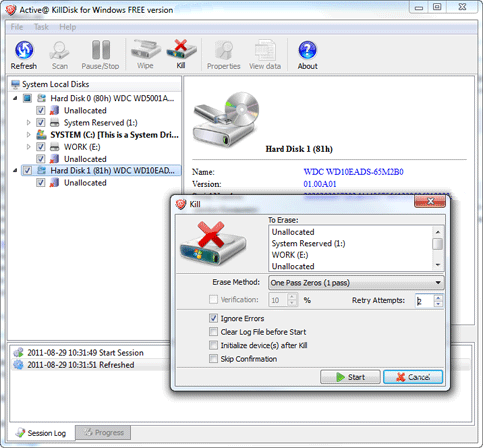
Active@ KillDisk: Powerful and compact software that allows you to destroy all data on hard disks, USB drives and floppy disks completely, excluding any possibility of future recovery of deleted files and folders. It’s a hard drive and partition eraser utility.

killdisk

Hard Drive Wipe Tool: Active KillDisk

Active@ KillDisk Key Features:

  • Support for wiping Apple HFS+ & Linux Ext2/Ext3/Ext4;
  • New! Erasing/Wiping Certificate can be saved as PDF;
  • Supports 17 security standards;
  • Detects and displays information about all partitions, hard disks and floppy drives currently connected to your computer;
  • Wipes out all floppies and hard disk drives completely by secure overwriting data on physical level using [One Pass Zeros] data destruction method;
  • Erases partitions, logical drives and even not used disk space;
  • Erasing report is created and can be saved as a file;
  • File systems (FAT, FAT32, NTFS, etc) on the drive do not matter, detected physical drive is erased using low-level disk access

How to Use KillDisk Hard Drive Eraser:

1: Create a bootable floppy disk or a CD (or both) that has system troubleshooting programs, as well as the boot disk version of KillDisk before doing any permanent deletion. Images for floppies and CDs are available on KillDisk’s website.

2: Insert your bootable disk and restart your computer. When the DOS prompt appears type “killdisk.”

3: Select the drive you wish to erase or wipe. Information for the selected drive is available on the right side of the screen. More information is available by pushing “Ctrl + S,” which shows the disk sectors or “Enter,” which shows the file system.

4: Press “F10” to permanently and irrevocably erase all information on the selected drive.

5: Push “F9” to clean all information outside of the current file system. This means that the files on the computer remain unchanged but older, often deleted, files are gone forever.

6: Confirm your choice. Both methods require you to press their button again (either F10 or F9), then enter a supplied command word before it begins.

7: Wait while the program executes the erase or wipe. Once it begins, you can stop the process by pressing “Esc,” but any erased data is gone.

Active@ KillDisk Customer Review:

This does exactly what I need it to do – COMPLETELY ERASE MY HARD DRIVE. This is great for fresh installs or re-deployments of machines. Also works great if you wish to sell/recycle your hard drive to remove all traces of information. Yes, the paid version allows for more intrusive/destructive measures.

Hard Drive Wipe Tool: Active KillDisk Read More »

How to install a hard drive

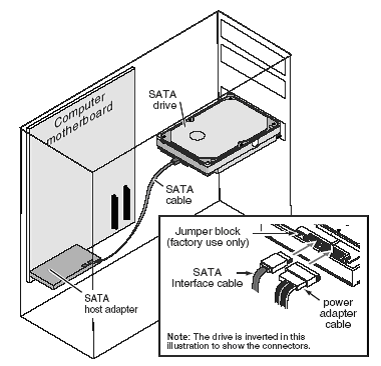
I just installed a SSD w/ windows 7 and I scraped a hard drive from my old computer and removed partitions and it works perfectly because windows could see it when It asked where I wanted to download windows to.

The problem now is that I have a 500gb hard drive plugged in that I can see in my bios set up. But I cannot see it or save any information on it when I am in windows. Any one have any ideas? Really appreciate any help, thanks so much in advance!

Go to disc management in windows and format the drive for NTFS. It will then be functionable.

How to install a hard drive Read More »

Scroll to Top