Hard Drive Firmware

A Hard Drive can be compared to a small computer. It employs microprocessors to control both the physical behaviour of the various electro-mechanical components, and the logical operations that store and retrieve data as an arrangement of the magnetic particles on the disk surface. This operation is completely independent of the operation of the host PC. Like any computer, the hard drive needs its own software to control the operation of the microprocessors, but unlike a PC this software is limited to the drive’s operational functionality, and is not (and under normal circumstances cannot be) changed by the user. This hard drive ‘software’ is, as a result, more usually referred to as ‘Firmware’. The firmware carries out a range of functions, from what might be termed ‘Analogue’ functions such as controlling the spinning of the disc and positioning of the read/write heads, as well as the ‘Digital’ functions used to pass data files to and from the PC, keeping track of the location and parameters of the data files stored, and many, many more. Without firmware the drive is simply a collection of electronic components.

Just as the software on a PC can have problems, so the firmware can also cause a hard drive to fail if it becomes lost or corrupted. Statistical analysis shows that up to 60% of hard drive problems are due to firmware failure. Firmware problems can arise from a range of causes:

·Instability or failure of electronic components
·Accidental or inadvertent removal of power to the drive
·Deterioration of the magnetic response of the data recording surfaces

The latter cause is virtually inevitable over time, and the deterioration will accelerate the longer or more intensively the drive is used. Additionally the disk manufacturing process is not 100% perfect and as a result disks will commonly leave the factory already having problems with certain areas of the disk. These areas where the drive has problems correctly reading data from the disk are known as ‘Bad Sectors’. Sectors that fail simply because the data stored on them has become corrupted are known as ‘Logical’ bad sectors and these can be ‘repaired’ by re-recording the data correctly or in the correct format, however areas with problems arising from the magnetic response of the disk surface failing are known as ‘Physical’ bad sectors, and these cannot be repaired. Bad sectors of either kind can occur both in the data storage area of drive, but also in a ‘reserved’ area dedicated to storage of part of the drive firmware called the ‘Service Area’. User data area bad sectors can cause the loss or corruption of data files or reduced performance of the drive, bad sectors in the firmware area can lead to the drive failing completely. As the firmware area needs to be accessed every time the computer is switched on and every time drive is accessed, the chance of bad sectors becoming a problem in this area is consequently higher.

Read More

Western Digital PCB 2060-701675-001 REV P1

Swap Western Digital Circuit Board 2060-701675-001 REV P1 to recover data from damaged hard drives due to PCB failure. 2060-701675-001 REV P1 is the board number on this PCB. If your HDD’s PCB has problems, the drive usually cannot boot up or there may be an inaccurate display in the BIOS of the hard drive’s information. Also power may not get to the hard drive and as a result it will not spin up.

Western Digital PCB 2060-701675-001 REV P1:

Board No.: 2060-701675-001 REV P1
Main Controller IC: 88i9045-TFJ2

Western digital pcb board 2060-701675-001 has 2 different types:

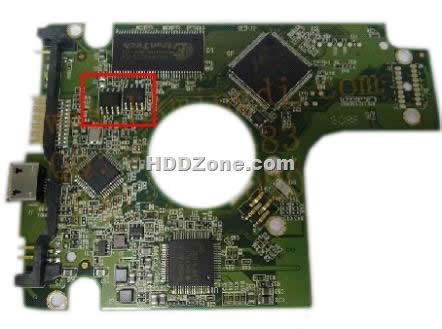
One has 2 BIOS, as the below photo:

When you swap this western digital PCB, you should move both the BIOS(U12&U14 chips) from your original wd PCB’s BIOS to the replacement board.

Western Digital PCB 2060-701675-001 REV P1

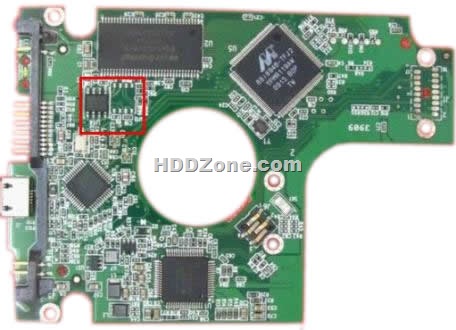
Other one just has 1 BIOS, as the below photo:

Western Digital PCB 2060-701675-001 REV P1

Western digital pcb 2060-701675-004 REV P1 also has the 2 different types as WD 2060-701675-001 REV P1 2.5″ one.

More Western Digital 2.5″ Laptop PCB please visit HDDzone.com.

Read More

Ipod Manuals

These are lastest ipod manuals you can free download~
iPod nano Armband (4th generation)
Nike + iPod User Guide (including safety information)
iPhone and iPod touch Enterprise Deployment Guide
iPod classic (120GB) User Guide
iPod nano (4th generation) User Guide
iPod touch Important Product Info & Safety Guide (with iPhone 2.1 Software)
iPod touch User Guide (with iPhone 2.1 Software)
iPod touch Important Product Info & Safety Guide (with iPhone 2.0 Software)
iPod touch User Guide (with iPhone 2.0 Software)
AppleCare Protection Plan for iPod
iPod touch Features Guide
iPod touch Important Product Info Guide (with safety information)
iPod classic Features Guide
iPod nano (3rd generation) Features Guide
Apple Component AV Cable for iPod
iPod shuffle (2nd generation) Features Guide (Manual)
iPod Hi-Fi User’s Guide
iPod Hi-Fi Safety and Regulatory Compliance Information (Manual)
iPod Safety Guide (Manual)
iPod nano (2nd generation) Dock (Manual)
iPod nano Safety Guide (Manual)
Fifth Generation iPod Late 2006 Features Guide
iPod nano (2nd generation) Lanyard Headphones (Manual)
iPod nano (2nd generation) Features Guide (Manual)
iPod USB Power Adapter (Manual)
iPod nano Features Guide
iPod Features Guide
iPod mini (2nd generation) User’s Guide
iPod with color display User’s Guide
iPod shuffle User’s Guide (Manual)

Read More

Seagate Acquired Storage Company LaCie

seagate-lacie Following their press releases issued on May 23, 2012 and June 14, 2012, Seagate Technology plc and LaCie S.A. announced the completion of the purchase by Seagate of all of the shares of Philippe Spruch and his affiliate, representing 64.5% of the outstanding shares of LaCie for a provisional price of €4.05 per share. The price payable to Philippe Spruch and his affiliate may be increased by 3%, to €4.17 per share, in the event that within six months following today’s date, Seagate holds at least 95% of the share capital and voting rights of LaCie.

The completion of the transaction follows the required clearances from the French Ministry of Finance and the US and German Antitrust Authorities.

As a result of the completion of the transaction, Seagate intends to file in the coming weeks with the FrenchAutorité des marches financiers an all-cash simplified tender offer on the remaining LaCie shares.

As previously announced, Ricol Lasteyrie & Associés has been appointed as independent expert by the Board of Directors of LaCie on May 23, 2012.

Following discussions with the Board of Directors of LaCie, in particular with the independent members, Seagate has increased the proposed offer price at which it will file its tender offer to €4.50 per LaCie share (without an additional 3% price supplement in the event that a squeeze-out procedure is implemented). Seagate may carry out a squeeze-out procedure at the same price of €4.50 per LaCie share if it were to hold at least 95% of the shares and voting rights of LaCie.

The Board of Directors welcomes the revised offer price and intends to support the revised offer as long as the final report of the independent expert affirms the valuation.

About Seagate
Seagate is a world leader in hard disk drives and storage solutions. Learn more at www.seagate.com.

About LaCie
With operations in the Americas, Europe and Asia, LaCie is the leading manufacturer of storage devices for PC, Apple, and Linux. LaCie has differentiated itself through sleek design and remarkable technical performance. Find out more about our products at www.lacie.com.

Read More

Glossary of Western Digital Hard Disk Drive (Letter J,K,L)

jumper
An electrically-conductive component placed over pairs of pins extending from the circuit board on the hard drive jumper block to connect them electronically. Jumper placement is one method of designating a hard drive as Master or Slave.

KB
Kilobyte. Usually, this is a unit of 1000 bytes. In computer memory, which is partitioned into sizes that are a power of 2, a kilobyte is equal to 210 or 1024 bytes.

LAN
Local area network. A system in which computer users in the same company or organization are linked to each other and often to centrally-stored collections of data in LAN servers.

landing zone
A location on the inner part of a disk to which heads move when commanded or when powered off. User data is not stored in the landing zone.

laser textured media
A treatment that minimizes friction and wear on a hard drive. The precision and consistency of this process contributes to the robustness of WD drives.

latency
The period of time that read/write heads wait for a disk to rotate to the correct position for accessing requested data. For a disk rotating at 5200 RPM, average latency is 5.8 milliseconds (one-half the revolution period).

LBA
Logical block addressing. A method of addressing sectors on a drive as a single group of logical block numbers rather than cylinder, head, and sector addressing (CHS). LBA allows accessing larger drives than is normally possible with CHS addressing.

LED
Light Emitting Diode. An electronic device that lights up when electricity is passed through it.

logical address
A storage address, which may not describe the physical location, for requesting data retrieval. A controller converts a request from a logical to a physical address and is able to retrieve data.

logical drive
A section of a hard disk that appears to be a separate drive in a directory structure. Up to 23 logical drives can be created on an extended partition of a hard disk, using letters A-Z with three reserved: A and B for diskette drives, and C for the first primary DOS partition. Logical drives are commonly used for group directories and files.

low-level formatting
A process, also called initialization, that prepares a hard drive to store data. Low-level formatting sets up the locations of sectors so that user data can be stored in them. Low-level formatting is performed at the WD factory; users need not perform low-level formatting on a WD drive.

LUL
See Ramp Load/Unload

Read More