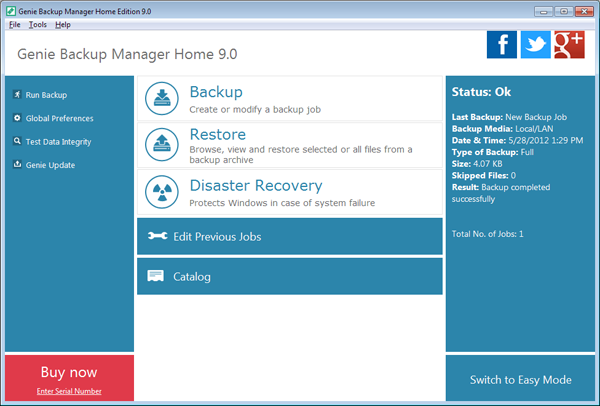
“Genie Backup Manager Professional has a clear simple interface which lets you manage the application without problems and in just a few minutes. As soon as you start working with it, you’ll see that behind it’s simple appearance lie some advanced options not found in higher-end products.” – Personal Computing World magazine
Genie Backup Manager Home 9.0
 Genie Backup Home 9.0 is a powerful tool for backing up whatever files or folders you consider important.
If you just want to run a quick and simple backup then you’ll appreciate the program’s list of common “Backup Items”. These include your Outlook emails, desktop, Registry, Windows settings and more, and including these in your backup can be as simple as checking a box.
Most of the time you’ll have your own ideas, of course, but it’s almost as easy to choose your own files and folders. Just check the My Folders box, browse the Explorer-type window and check the box next to whatever files or folders you’d like to protect.
The program supports multiple backup types (Full, Incremental, Mirror); your archive can be compressed, or encrypted, then saved to local, removable or LAN folders, FTP servers, or burned to CD, DVD or Blu-ray discs.
And you can then restore individual files or an entire backup later, from within the program. Or, if your system won’t start at all, a bootable Disaster Recovery disc can help you restore normal working order.
The main new features this time are relatively limited (Outlook 2010 support, backups to secure FTP, Windows 8 support). But there are lots of incremental improvements: an enhanced interface, better Volume Shadow Copy support, reduced RAM requirements, improved performance and so on. And that all helps to make a very likeable backup tool, packed with features yet extremely easy to use.
If you need more, though, it might be worth considering Backup Manager Pro 9.0, which adds more powerful encryption; extra scheduling options; the ability to run commands before and after a backup; differential backup support, the ability to back up to an Amazon S3 account, and more.
What’s new in Genie Backup Manager Home 9
- Enhanced FTP engine.
- Secure FTP (FTPS) Support.
- Added Outlook 2010 support
- Added Windows 8 support.
- New and enhanced interface.
- Enhanced Volume Shadow Copy support.
- Improved Disaster Recovery engine.
- New CD/DVD/Blu-ray burner.
- Enhanced Blu-ray support.
- Enhanced performance.
- Enhanced memory management; takes less memory resources
- Updated Genie Agent notifications
- Enhanced system schedule
- Added social integration elements.
Platforms: Windows 7 (32 bit), Windows 7 (64 bit), Windows 8, Windows Vista (32 bit), Windows Vista (64 bit), Windows XP