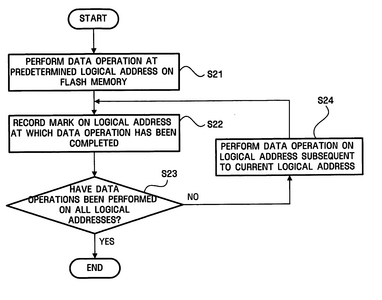
1. A data recovery apparatus used for a flash memory that includes data areas and index areas in which values indicating whether data stored in the respective data areas are valid are recorded, comprising: a controller that performs a data operation at each of a plurality of logical addresses, and if the data operations performed at the plurality of logical addresses are successful, records a mark value in a last index area of a plurality of index areas respectively corresponding to the plurality of logical addresses.
2. The data recovery apparatus of claim 1, wherein the data operation is first performed on a middle portion of the flash memory and then on other portions of the flash memory, and the mark value is recorded in one of the index areas corresponding to the middle portion of the flash memory.
3. The data recovery apparatus of claim 1, wherein said plurality of logical addresses are consecutive logical addresses.
4. A data recovery apparatus used for a flash memory that includes data areas and index areas in which values indicating whether data stored in the respective data areas are valid are recorded, comprising: a controller that determines whether data respectively stored at a plurality of logical addresses prior to a predetermined logical address, through a data operation, are valid based on a mark value recorded in an index area corresponding to the predetermined logical address.
5. The data recovery apparatus of claim 4, wherein the mark value is recorded in index areas respectively corresponding to first and last logical addresses of the plurality of logical addresses when performing the data operation first on a middle portion of the flash memory and then on other portions of the flash memory, and determining whether data respectively stored at at least one of the plurality of logical addresses between the first and last logical addresses are valid based on the index areas in which the mark value is stored.
6. The data recovery apparatus of claim 5, wherein it is determined whether data stored at the predetermined logical address is valid based on whether data exists at a logical address subsequent to the predetermined logical address.
7. The data recovery method of claim 4, wherein said plurality of logical addresses are a plurality of consecutive logical addresses.
8. A data recovery method used for a flash memory that includes data areas and index areas in which values indicating whether data stored in the respective data areas are valid are recorded, the data recovery method comprising: performing a data operation at each of a plurality of logical addresses; and recording a mark value in a last index area of a plurality of index areas respectively corresponding to the plurality of logical addresses.
9. The data recovery method of claim 8, wherein, in the recording of the mark value, if the data operation is performed first on a middle portion of the flash memory and then on other portions of the flash memory, the mark value is recorded in an index area corresponding to the middle portion of the flash memory.
10. The data recovery method of claim 8, wherein said plurality of logical addresses are a plurality of consecutive logical addresses.
11. A data recovery method used for a flash memory that includes data areas and index areas in which values indicating whether data stored in the respective data areas are valid are recorded, the data recovery method comprising: identifying a mark value recorded in an index area corresponding to a predetermined logical address; and determining whether data respectively stored at a plurality of logical addresses prior to the predetermined logical address, through a data operation, are valid based on the mark value.
12. The data recovery method of claim 11, wherein in the determining operation, it is determined whether the data respectively stored at the plurality of logical addresses are valid based on a mark value recorded in an index area corresponding to one of the plurality of logical addresses where the data operation has performed most recently.
13. The data recovery method of claim 12, wherein, in the determining operation, if the data operation is performed first on a middle portion of the flash memory and then on other portions of the flash memory, it is determined whether data stored in the flash memory are valid based on the mark value recorded in the index area corresponding to the middle portion of the flash memory.
14. The data recovery method of claim 12, wherein it is determined whether data stored at a predetermined logical address is valid based on whether data exists at a logical address subsequent to the predetermined logical address.
15. The data recovery method of claim 13, wherein it is determined whether data stored at a predetermined logical address is valid based on whether data exists at a logical address subsequent to the predetermined logical address.
16. The data recovery method of claim 12, wherein said plurality of logical addresses are a plurality of consecutive logical addresses.