Which RAID Mode Should You Choose?

1. Speed (RAID 0)

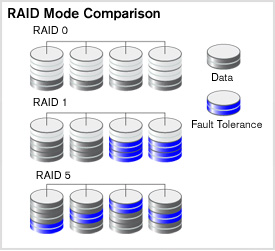
Set in high-performance mode (also called striped mode or RAID 0) the storage system gives you the power you need when you’re:raid 0
  • Designing huge graphics and need a lightning-fast Photoshop scratch space.
  • Recording large DV files while maintaining clean audio performance.
  • Editing DV or HD video and want a smooth work flow with no dropped frames.
  • Rendering complex 3D objects or special effects.
  • Performing disk-intensive database operations.
  • Driven to be the first geek on your block with a computer so fast it blows your
    socks off.
      Why is RAID 0 so fast? It’s a bit complicated, but suffice it to say that two or more heads, or in this case, drives, are better than one. Picture multiple hoses filling a bucket at the same time or several men bailing a boat and you can understand why two drives striped are

faster

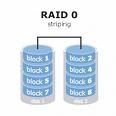
      than one. Data is saved (striped) across both drives and accessed in parallel by all the drives so you get

higher data transfer rates

      on large data accesses and

higher input/output rates

      on small data accesses.

Raid Mode

2. Data protection (RAID 1)

Set the system to data protection mode (also known as mirrored mode or RAID 1) and the capacity is divided in half. Half of the capacity is used to store your data and half is used for a duplicate copy.

Why do I want that kind of redundancy? It’s your data, your family pictures, your movie of baby’s first steps, your first novel. Is it important? You decide. If it is, then RAID mirroring is for you.

3. Data protection and speed (RAID 5)

In systems with three or more drives. we recommend that you set the system to RAID 5. This gives you the best of both worlds: fast performance by striping data across all drives; data protection by dedicating a quarter of each drive to fault tolerance leaving three quarters of the system capacity available for data storage.
Read More

The Truth about Data Recovery

The Truth about Data RecoveryComputers can, without a doubt, be complicated beasts; one minute they are doing exactly what you want them to do, and the next they are suddenly going off and doing their own thing.  And before you know it, your computer crashes, leaving you with missing files, an increased heart rate and a bad temper.  But before you’re ready to throw your computer out the window in anger, let’s take a few deep breathes and talk about what actually happens when a file accidentally deleted and explore possible ways of getting that information back again.

For starters, when you unintentionally delete a file and begin to have a panic attack once the file has disappeared, you can rest assured that your file is not lost forever (phew!). The file will not be immediately visible in the directory or folder that you (or the computer) thought you stored it in. Instead, the file gets re-named so that the path it was using can be overwritten and can then be found in a hidden index file. The good news is, it can be completely recovered from this file if needed. In fact, all data continues to be stored on your computer until it is completely overwritten. And just to clear something up, by overwritten, I do not mean different information. It takes a random mix of binary code (0 and 1) to completely obliterate a data or file’s information. This is why hard drives should be absolutely and completely destroyed to an unrecognizable pulp or at least be overwritten by using a program that exists to overwrite data. Do not just recycle your computer or sell it to someone else without getting rid of your data properly first, or you could come to regret it later. This is especially important if you have sensitive information or media on the computer!

So now that we have established that data recovery is possible, how is it done? Well, there are a number of cleverly devised free and paid versions of data recovery programs available, depending on what your data recovering needs are. For example, you may have just accidentally deleted a file. Recovering this is relatively simple when compared to trying to recover data from a damaged or corrupted file. Not only can you retrieve the data but you can also use the software to recover other types of deleted information such as emails or email attachments.

Some paid data recovery programs have a “no recovery – no fee” guarantee.  This may seem like a pretty high guarantee to offer, but if self-recovery or the free programs aren’t giving you the results you need, the paid programs might be better route to take.  Furthermore, the free programs may have a smaller range of capabilities; how/why your data was lost in to begin with will likely determine how it can be recovered. No matter how you lost your data and how hopeless you think the situation may be in returning that data to your computer, fear not. There are data recovery experts available to help you no matter how severe your data loss may (seem to) be!

Read More