Top 10 worst computer viruses (Nimda & MyDoom)

Computer Viruses4. Nimda
Iain Thomson: A week after the 11 September atrocities a new virus hit the internet in a big way. Nimda was one of the fastest propagating viruses in history, going from nowhere to become the most common virus online in 22 minutes, according to some reports.

The reason for this speed was that Nimda used every trick in the book to spread itself. It used email, open network shares, IIS vulnerabilities and even web sites to spread. It hit pretty much every version of Windows available and appeared all over the place.

In the paranoid days after the terrorist attack some speculated that this was a digital 11 September, and some security consultants got large speaking fees for suggesting just that. In fact, it was nothing of the sort and was just another attempt at large scale infection.

Shaun Nichols: In the days following the 11 September attacks, everyone was on edge and all types of threats were given plenty of attention. This, in part, helps to explain why Nimda got the attention it did.

Nimda not only played on hype; the worm was also especially virulent due to the sheer number of methods it used to propagate. In addition to spreading via email, Nimda used web site exploits to infect HTML pages and local machine exploits to spread between individual files.

The result was an extremely effective virus circulating at a time when people were more sensitive to all types of threats, both online and offline.

3. MyDoom
Shaun Nichols: Ah yes, the old ‘infect the host then resend to the entire address book’ attack method. Like many other attacks, MyDoom used the tried-and-true practice of spreading through email and address books.

But MyDoom went a step further and targeted peer-to-peer networks. The worm not only spread itself through address books but through the shared folder of users who ran the Kazaa file sharing application.

While definitely skilled programmers, MyDoom’s creators also seemed to be fans of good old-fashioned vigilante justice. One of the early tasks performed by infected users was to take part in a denial-of-service attack against SCO, the infamous software vendor that once tried to lay claim to the patents for Linux.

Iain Thomson: MyDoom was interesting because it was one of the first to use peer to peer as a transmission device, as Shaun notes.

Kazaa was at the peak of its popularity and was causing headaches for Hollywood and the security community. If I had £1 for each time a security expert ranted about the stupidity of using peer-to-peer networks I’d be a rich man. Downloading a file onto your computer from an untrusted source? Madness.

The attack on SCO was also fascinating. SCO was, and to an extent still is, the most hated IT company among users, even more than Microsoft at the time. A worm that attacked a company was something new and raised all sorts of possibilities.


Read More

Hard Disk Details(7)

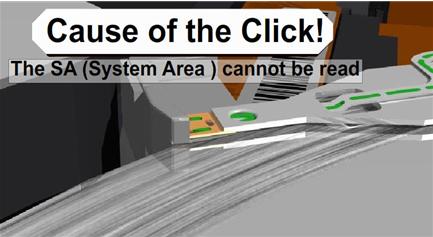
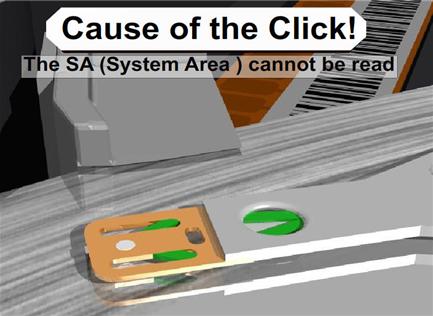
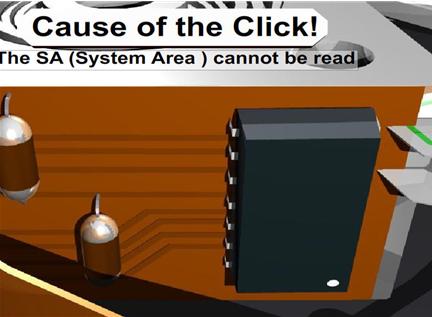
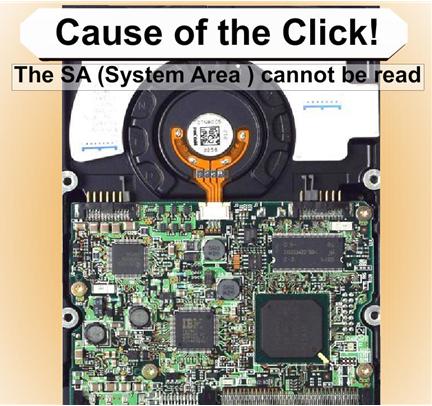
Slide 3791: The cause of the click is from four possible areas, all resulting in the SA not being able to be read.

1.    System Area of the drive cannot be read because the platter is scratched.

2.    The head itself has a problem and cannot read the SA area.

3.    Preamp on Actuator to the Head has gone bad and is not passing the correct signal to the electronics

4.   The firmware on the board is damaged and does not initialize. This is sometimes caused by static electricity walking across the carpet to install the drives, or there is a short on the board, and additionally I see where someone has allowed the board on the bottom of the drive to touch metal cause it to burn.

All will result in the same problem and will sound like the Click of Death. Recovery Software will not help you correct any of these until after you have repaired the drive and it is running again.

Correcting Problems
Now we move on to some of the things you can do about it on your own.  The click of death is a very difficult problem to solve and in some cases will not be able to be solved especially without some very high end and expensive equipment. But I will tell you what I have been able to fix without that equipment.

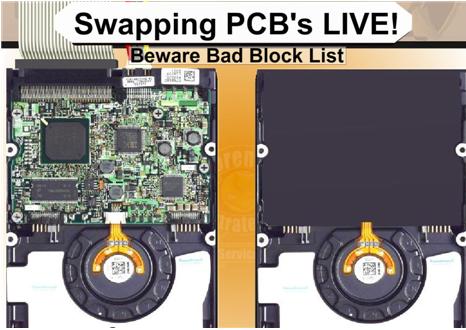
Slide 4009: Swapping the PCB (printed circuit board) Live to get around a SA area that cannot be read.

I have done this process several times successfully. It is not perfect but it is a possible chance you will have to recover your data. The first step is to get a hard drive as close to identical as the bad drive you have that is a working drive. At the bottom of this paper you will find help about matching hard drives and serial numbers. If the System Area is badly damaged or corrupt and for some reason the drive will not read the System Area you can attempt to do a live swap. What this means is that you can hook up the good drive, then you use software or windows and tell the drive to go to sleep.  This will cause the drive to spin down but will still be live and powered up and mounted.  Once the drive goes to sleep and the drive stops spinning you can unscrew the board, carefully so as not to let the screws roll around on the board, and disconnect the board and connect it to the bad drive. I suggest that once you do this, you go after the files you need very quickly. It’s possibly you will be able to make an image of the drive.  Keep in mind, that whatever bad blocks that the drive had assigned to the other drive will be bad here as well.  You could try to use some software to clear bad blocks before attempting this, however I don’t suggest it in most cases. That is because it is one more possible item that might cause failure. I would prefer to use the drive that was working and lose a few blocks. After you get what you can then you can attempt to make changes and go back for more data. This is a concept that works about 25% of the time.

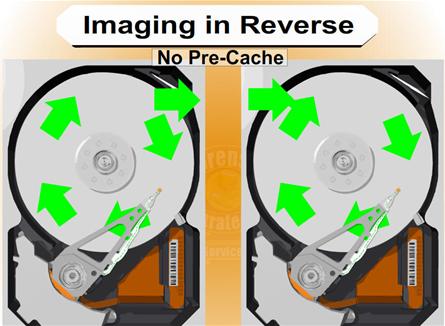
Slide 4199: Imaging in Reverse

In dealing with damaged hard drives, I have run into many problems with cache memory on the drive. The problems will often show up as timeouts or ECC failures as well. For example, I try to read from a drive with16 megs of ram for cache and receive errors but the drive is otherwise appears ok. If there is an error 16 megs away from the sector I am reading my drive will die. As of now there is no way to turn off this cache.  However, if you can image your drive backwards there is no cache. Memory on a drive only caches data forward. There are only three ways I know of to image a drive backwards. The first is free, and it is to use dd_rescue. dd_rescue has a special setting for imaging a drive backwards. There is also a special script for dd_rhelp to control dd_rescue for the purpose of data recovery. You can use this on Linux and it works on drives regardless of the operating system on the drive you are recovering from. Typically you will start at the MaxLBA number and work backwards down to 0 LBA. It works quite well and will work on a surprising number of drives that cannot be read any other way. Your other two choices are Media Tools Pro from RecoverSoft (http://www.recoversoft.com/) for Windows, which is about $400, or a piece of hardware which is extremely efficient at doing this type of recovery called Deepspar Disk Imager (http://www.deepspar.com/products-ds-disk-imager.html), which will cost between $3000 and $4000 depending on configuration. But you should contact each of these vendors for pricing, or use the free option!

Read More

Glossary of Hard Disk Drive Terminology (Letter R)

Radial Path
The straight-line path from the center of the disk to the outer edge of the disk.

Random Access Memory (RAM)
Memory that allows any storage location to be accessed randomly, as opposed to tape drives, which are sequential access devices.

Read Channel
Performs the data encoding and conversions the drive needs to write computer generated information onto a magnetic medium and then read that information back with a high degree of accuracy.

Read Verify
A data accuracy check performed by having the disk read data to the controller, which in turn checks for errors but does not pass the data on to the system.

Read/Write Head
See Head.

Recoverable Error
A read error that the drive can correct by ECC recovery or by re-reading the data.

Redundant Arrays of Independent Disks (RAID)
Groupings of hard drives in a single system to provide greater performance and data integrity.

R & D
Research and development.

RLL (Run Length Limited)
An encoding scheme used during write operations to facilitate data readback.

ROM (Read Only Memory)
Integrated circuit memory chip containing programs and data that the computer or host can read but cannot modify. The computer can read instructions out of ROM, but cannot store data in ROM.

Rotational Latency
The amount of delay in obtaining information from a disk due to the rotation of the disk. For a disk rotating at 5200 RPM, the average rotational latency is 5.8 milliseconds. See also Mechanical Latency.

RPM (Revolutions per Minute)
Rotational speed of the media (disk), also known as the spindle speed. Hard drives typically spin at one constant speed. The slower the RPM, the higher the mechanical latencies. Disk RPM is a critical component of hard drive performance because it directly impacts the rotational latency.

Read More

Glossary of Hard Disk Drive Terminology (Letter U)

Ultra SCSI
Provides 20 MB/s transfers over an 8-bit bus or 40 MB/s transfers over a 16-bit Wide SCSI bus. Also known as Fast-20 SCSI, this feature is most commonly found in SCSI-3 drives.

Ultra DMA/33
A high-speed host data transfer feature that transfers data at 33.3 MB per second.

Un-correctable Error
An error that cannot be overcome using Error Detection and Correction.

Unformatted Capacity
The total number of usable bytes on a disk, including the space that is required to record location, boundary definitions, and servo data. (See also formatted capacity.)

Unrecoverable Error
A read error that cannot be overcome by an ECC scheme or by rereading the data when host retries are enabled.

Untagged Queuing
The ability of the drive to receive a maximum of one I/O process from each initiator.

Upgrade
In hard drives, the replacement of a hard drive with one offering greatercapacity or performance, or both.

Read More

Glossary of Samsung Hard Disk Drive (Letter A)

Acoustic Noise
The level of sound the drive produces while operating, the smaller the number,the better

Access
The level of sound the drive produces while operating, the smaller the number,the better

Access time
Access time measures the time lapsed between the access command and the point in time where the head is positioned to read or write a specific sector (address), measured in milliseconds (ms). (The access time for HDDs is a combination of seek time, controller overhead, and rotational latency, i.e. time taken for desired sector to rotate under head for access)

Actuator
The mechanism that moves the head(s) to the correct cylinder. It generally comprises of two parts; a rotary voice coil and head gimble assembly. The actuator arm houses the head at the tip of its arm

Address
Assigning certain areas of a disk to particular data

Areal Density
Bit density; Bits per Inch (BPI) x Tracks per Inch (TPI). This reflects how dense the data is stored on the media of the HDD

ATA-3
Fast ATA (E-IDE), PIO Mode 4, S.M.A.R.T., Simple password, more sophisticated power management

Atapi
ATA packet interface, a communications protocol which allows the electronic controllers for IDE hard disk drives to handle up to four devices, including CD-ROMs and tape drives and tape drive, Atapi devices plug into the IDE Interface

Ultra-ATA
Merge of ATA-3 and Atapi into one, Strong command overlap

Ultra-ATA
A new, even higher performance Ultra DMA (transfer rate of 66 MB/s)

AV
Audio Visual. AV drives denotes drivers modified to enhance transfer rate performance for specific applications

Average Latency
The average amount of time it takes for the drive to rotate to the correct address, so that the head can begin reading or writing in its desired location (is derived from the spindle speed)

AVI
Audio video interleaved. A standard system, form Microsoft, for integrating sound and vision for Windows into a single file for hard disk or CD-ROM

Average Seek Time
The average time for a head to seek the address, calculated over a large number of random seeks

Read More