HDD Capital Spending in 2012 and Beyond

In order to repair the damage to the HDD supply chain from the 2011 Thailand floods as well as meet the increasing need for digital storage the hard disk drive industry must continue to make investments in capital equipment and production facilities.  Future increases in HDD areal density as well as increasing unit sales will drive significant capital spending investments that will impact the revenues of companies such as Anelva, Hitachi High Technologies, Innovative Instruments, Intevac, KLA Tencor, Teradyne, Xyratex, Veeco, and many others in the next few years.

The 2012 Hard Disk Drive Capital Equipment and Technology Report provides 207 pages of in-depth analysis of technology developments and capital equipment spending to sustain the growth and development of the hard disk drive industry.  Some highlights from the 2012 report include:

169% growth in HDD capital spending is expected from 2011 to 2016, driven by three factors:  unit shipment increases of 167%, the introduction of new HDD technologies such as HAMR and the replacement and repair of equipment damaged in the 2011 Thailand floods.

Between CQ4 2011 and CQ4 2012 over $1 B in capital spending is expected to repair or replace equipment and facilities damaged in the Thailand floods.

HDD and component companies have more cash to invest in equipment and technology development in 2012 and 2013, due to higher drive demand, limited drive supply and higher HDD prices.

Total industry spending on capital equipment in 2012 is expected to be about $2.4 B with 72% of this spent on process equipment, 21% on production test and 7% on metrology.

Average HDD capital equipment spending per year between 2008 and 2016 is estimated at about 7.2% of HDD industry revenue, with this percentage increasing in the last years of this period due to new technology introductions.

HDD areal density has slowed to 20-25% annually but 3.5-inch HDDs with storage capacities of 12 TB and 2.5-inch HDDs with 6 TB are expected by 2016.

Lower AD growth will drive more components per drive and thus more capital spending on head and media production equipment in coming years.

Industry consolidation and recovery from the Thailand shortages will result in higher HDD prices than 2011 at least until 2014 and likely HDD prices will flatten out about 10-15% higher than in 2011—this will help fund expensive new technology transitions by 2015-2016 and increase areal density growth rates to 40+% CAGR.

The normal capital equipment cycle will likely be re-established by 2014.  Capital purchases in 2014 and later will be driven by increasing unit demand (assumed 14% annual growth) as well as the introduction of heat assisted magnetic recording in 2015 and 2016.

The 2012 Hard Disk Drive Capital Equipment and Technology Report is now available from Coughlin Associates. To find out more about this report please see the brochure at http://www.tomcoughlin.com/techpapers.htm


Read More

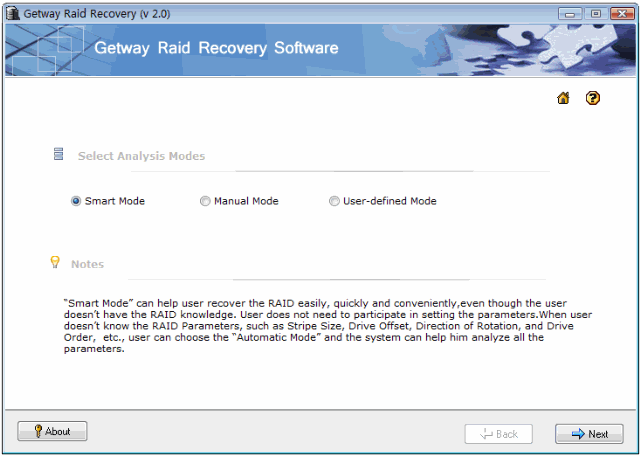
Raid Data Recovery Software: Getway Raid Recovery

Getway Raid Recovery File Name: Getway Raid Recovery
Version: 2.0
Publisher: Getway Recovery Ltd
Raid Supported: RAID 0, RAID 5, Raid 5E, Raid 5EE, Raid 6
Analyze Mode: Smart Mode,Manual Mode, User-defined Mode
Price: US $179.00

What can Getway Raid Recovery Do?
Getway Raid Recovery Software can help you recover data due to the following possible data loss situations: File Deletion; Accidental Array Format; MBR damage/ loss/ excursion; DBR damage; One or two RAID hard disk damage, etc. Getway Raid Recovery Software support “Smart Mode”, “Manual Mode” and ” User-defined Mode ” working modes.

Download:http://www.getwayrecovery.com/downloads/GetwayRaidRecovery.zip
Buy: http://www.getwayrecovery.com/purchase.html

Related Links:

  • Raid 5 Recovery Case Study
  • Raid 5EE Recovery Case Study
  • Find Out Raid Disk Order By 3 Steps
  • Screenshots Of Getway Raid Recovery Software
  • Online Manual Of Getway Raid Recovery Software
Read More

Linux Help Commands, Job Management, Process management

1. Linux Help Commands

Linux management apropos        apropos keyword – Show all commands with the keyword in their description. The same as the “man -k” command.

help        Bash shell help for the bash builtin command list. The help command gets help for a particular command.
man        Get help from the manual for a command.
man        man -k keyword – Show all commands with the keyword in their description
“man 2 kill” – Display page 2 of the kill command
manpath        Determine user’s searchpath for manpages.
info        Documentation on Linux commands and programs similar to the man pages but navigation is organized different.

2. Linux Job Management

at        Similar to cron but run only once.
atq        Lists the user’s pending jobs. If the user is the superuser, everybody’s jobs are listed.
atrm        Deletes at jobs.
atrun        Run jobs queued for later execution
batch        Executes commands when system load levels drop below 0.8 or value specified in atrun invocation.
cron        A deamon used to set commands to be run at specific times. Starts the commands in the crontab file. Used to clean up temporary files periodically in the /var/tmp and /tmp directories.
nice        Run a program with modified scheduling priority.
nohup        Run a command immune to hangups, with output to a non-tty.
watch       Execute a program periodically showing output full screen.

3. Linux Process management

bg        Starts a suspended process in the background
fg         Starts a suspended process in the foreground
gitps        A graphical process viewer and killer program.
jobs        Lists the jobs running
kill        Ex: “kill 34” – Effect: Kill or stop the process with the process ID number 34.
killall        Kill processes by name. Can check for and restart processes.
pidof        Find the process ID of a running program
ps        Get the status of one or more processes. Options:

* u (more info)
* a (see all)
* -l (technical info)

Meanings:

* PPID-parent process ID
* PID-process ID

ps ax |more to see all processes including daemons
pstree        Display the tree of running processes.
sa        Generates a summary of information about users’ processes that are stored in the /var/log/pacct file.
skill        Report process status.
snice        Report process status.
top        Display the processes that are using the most CPU resources.
CTRL-C        Kills the current job.
&         At the end of the command makes it run in the background.

Read More

Undelete Freewares

Undelete Freewares1. Freeware: Undelete Plus

  • License: Freeware (limited time)
  • OS: Win 95/98/Me/NT/2000/XP/2003/Vista
  • Publisher: Phoenix Technologies LTD.
  • File System support: supports all Windows file systems for hard and floppy drives including FAT12/16/32,NTFS/NTFS5 and image recovery from Compact Flash, Smart Media, Multi Media and Secure Digital cards.
  • Screenshot: http://www.undelete-plus.com/screens.html
  • Description: A quick and effective way to restore accidentally deleted files. It can also recover files that have been emptied from the Recycle Bin, permanently deleted files within Windows using the Shift + Delete, and files that have been deleted from within a Command Prompt.

2. Freeware: Undelete NOW!

  • License: Freeware (email required)
  • OS: Win 95/98/Me/NT/2000/XP/2003/Vista
  • Publisher: WCCL
  • File System support: Every kind of disk, including FAT 12/16/32 and NTFS (including compressed and encrypted) partitions. It supports regular hard disks, backup disks, USB drives, and any other disks shown in Windows Explorer.
  • Screenshot: http://www.undelete-now.com/undelete-now/screenshots.aspx
  • Description: Undelete NOW! recovers your lost files, no matter how they were deleted. Using powerful bit-by-bit scanning methods, you can be sure to get your files back quickly and easily.

3. Freeware: NTFS Undelete

  • License: Freeware (open source)
  • OS: 2000/2003/XP/Vista
  • Publisher: A-FF Labs
  • File System support: NTFS
  • Screenshot: http://ntfsundelete.com/img/screenshot.png
  • Description: NTFS Undelete is free and open source software that allows you to recover deleted files. It recovers files directly from hard drive, and it will work even if you empty Recycle Bin.

4. Freeware: EASEUS Deleted File Recovery

  • Version: 2.1.1
  • License: Freeware
  • OS: Windows 2000/2003/XP/VISTA
  • Publisher: CHENGDU YIWO Tech Development Co., Ltd.
  • File System support: Supports FAT 12, FAT 16, FAT 32 and NTFS file system.
  • Screenshot: http://www.easeus-deletedrecovery.com/screenshots.html
  • Description: EASEUS Deleted File Recovery is a fully functional freeware designed to recover deleted files from all types of media such as Hard Disk Drives, Floppy Drives, Smart Media, Compact Flash, Memory Sticks, and other types of removable media.

5. Freeware: Smart Data Recovery Enterprise

  • License: Freeware
  • OS: NT/2000/XP/2003/Vista
  • Publisher: Smart PC ® Solutions, Inc.
  • File System support: Supports FAT 12, FAT 16, FAT 32 and NTFS file system.
  • Screenshot: http://www.smartpctools.com/network_data_recovery/screens/netrecovery2.jpg
  • Description: Recover deleted files and data remotely over the network. Smart Data Recovery Enterprise is a free and easy data recovery solution for network administrators. Undelete files and data remotely without leaving a chair!

6. Freeware: Recover Files

  • Version: 2.1
  • License: Freeware
  • OS: Win 95/98/Me/NT/2000/XP/2003/Vista
  • Publisher: Undelete & Unerase, Inc.
  • File System support: Supports FAT 12, FAT 16, FAT 32 and NTFS file system.
  • Screenshot: http://www.undeleteunerase.com/screenshots.html
  • Description: A professional file recovery software that allows it’s user to recover accidentally deleted files. Even files removed from the Recycle Bin, network drive, compact flash card, portable drives, in a DOS window, or from Windows Explorer with the SHIFT key held down.

7. Freeware: DATA Unerase Personal Edition™

  • License: Freeware
  • OS: ME/NT/2000/XP/2003 and Vista
  • Publisher: OctaneSoft
  • File System support: FAT 12, FAT 16, FAT 32 and NTFS file system.
  • Screenshot: http://www.octanesoft.com/screenshots.php?prog=edata&page=2
  • Description: eDATA Unerase Personal Edition is software used to restore files that have been deleted through normal methods, including accidental deletions from the recycle bin. This is a freeware and basic version of eDATA Unerase. It recovers only deleted files located on local logical disks visible by host OS. This version will not find lost files.

8. Freeware: Recuva – File Recovery

  • Version: 1.24.399
  • License: Freeware
  • OS: Windows Vista, XP, 2003, 2000 and 98.
  • Publisher: Piriform Ltd.
  • File System support: FAT 12, FAT 16, FAT 32 and NTFS file system.
  • Screenshot: http://www.recuva.com/screenshots
  • Description: Recuva (pronounced “recover”) is a freeware Windows utility to restore files that have been accidentally deleted from your computer. This includes files emptied from the Recycle bin as well as images and other files that have been deleted by user error from digital camera memory cards or MP3 players. It will even bring back files that have been deleted by bugs, crashes and viruses!
Read More