Data Recovery Solution: Data Loss Dangers
Data Loss Dangers

As drives get smaller and smaller, drive heads come closer and closer to the rotating media. The results are more frequent equipment failures and more destructive data losses.

• A company attempts to restore lost data from carefully collected backups, only to discover the backups are unreadable.

• A RAID system’s cooling process collapses, causing its drives to overheat and fail.

• An MIS administrator completes a fix on a mirrored drive without shutting off the mirror, losing the reference point for the original data.

• A business adds a drive to its NetWare server, accidentally erasing the server’s partitions.

Data loss disasters like these are becoming increasingly commonplace. This is due, in part, to rapidly changing computer technologies.  The increase in data disasters also stems from the sheer volume of data generated by modern companies and the decentralized way that data is produced, collected, and stored. As distributed network models proliferate, and organizations continue to open their doors to the Internet, threats to data integrity and data security are compounded.

While data backups would seem to offer an effective shield against these threats, backups do not always provide comprehensive data protection. That is because the data backup plans developed by many companies are not fully realized or, worse yet, not followed.

What is more, individuals often fail to test the “restore” capabilities of their backup media. If the backups are faulty, a simple data loss can quickly become a data disaster. Finally, even if backups are successful, they only contain data collected during the most recent backup session. As a result, a data loss can potentially rob you of your most current data, despite your backup attempts.

The reality of data loss forces business executives to ask themselves some serious questions. For example:

  • Does a major data loss put your business interests at risk?
  • Does data loss expose your company to legal repercussions?
  • How susceptible are your data storage devices to corruptions and crashes?
  • What can be done to properly protect and recover critical data?

The importance of computer data to the daily operation of your organization requires you not only to ask these questions, but to successfully answer them as well.
Read More

Windows 7 – How do I force Excel (and other Microsoft Office products) to stop opening files in the same application?

Whenever I “double click” on an Excel file and another Excel file is open, the newly opened file automatically opens in the same application window as the previously opened Excel file. This isn’t limited to just Excel, as I’ve seen Word do this as well. This poses a problem when wanting to compare documents side…

Read More

PAYAM Data Recovery

Data Recovery In Australia: PAYAM Data RecoveryPAYAM Data Recovery is established in 1998 in Australia.

As a professional data recovery company in Australia, PAYAM specialises in retrieving data/computer files for individuals & businesses from all types of hard disk drives, RAID arrays, USB flash drives, digital camera memory cards, mobile phones and other data storage devices that have stopped working or suffered data loss due to file system corruption, data corruption or accidental file deletion/reformatting.

Hard Disk Problems PAYAM Data Recovery specialises in: Damaged Heads (Clicking), Seized spindle motor (Buzzing), Damaged PCB (No power), Bad Sectors (Read Errors), Firmware Corruption, Damaged file system, Deleted Files, Accidenitally formatted or Re-Imaged.

The name ‘Payam’ originates from Persia and is pronounced ‘Pay-Um’.  Their staff come from different backgrounds including Australia, Italy, Scotland, Siberia, Iran, Ireland, Malta and other backgrounds.

PAYAM Data Recovery Services:

  • Hard Drive Data Recovery
  • RAID Data Recovery
  • Emergency Data Recovery
  • Memory Card Data Recovery
  • USB Flash Drive Recovery
  • Data Destruction
  • Computer Forensics
  • Mobile Phone Data Recovery
  • Hard Disk Duplication

Contact PAYAM Data Recovery:

Website: www.payam.com.au
Telephone: 1300 328 273

PAYAM Data Recovery Centers:

North Sydney (Head Office): Level 3, 54 Miller Street, North Sydney NSW 2060
Telephone: (02) 9957 2288

Melbourne: Level 7, 606 St Kilda Road, Melbourne, VIC 3004
Telephone: (03) 9510 5753

Brisbane: Level 10, 379 Queen Street, Brisbane, QLD 4000
Telephone: (07) 3221 5988

Read More

Two mechanisms of defect relocation

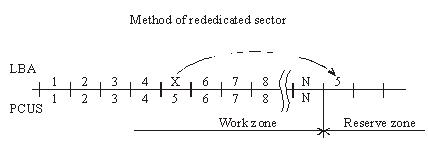
When the substitution (Assign) mechanism is used in a drive the latter records to the ID field of a BAD sector the flag of the relocated sector and writes to the data field the number of the reserved sector, i.e. the one, which should be accessed for data recording or reading. As a rule, it is the first available sector after user data area. (figure 2.).

Figure 2. Method of rededicated sector.
During data read/write operations accessing the defective sector drive controller will read the flag and assigned address and reposition the heads to the reserved zone in order to perform reading/writing from/to a good sector. Defective sectors in that case will disappear, but the drive will perform positioning to the reserved area each time it has to address a defective sector. The procedure is accompanied with clicking sounds and slight slow-down. The “Assign” procedure allows relocation only for defects in data fields. Errors pertaining to corruption of ID fields or servo fields cannot be relocated using the “Assign” method.

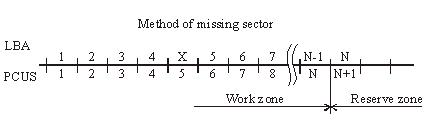
Another mechanism used for hiding defective sectors at manufacturing factories is skipping of defective sectors. When that method is used, the defective sector is skipped, its number is assigned to the following sector (and so on), and the last sector is shifted to the reserved zone. (figure 3.).

Figure 3. Method of missing sector.
Such method of sector hiding disrupts the continuous integrity of low-level format; the system of LBA conversion to PCHS should also take into account BAD sectors while skipping them. Therefore the method requires obligatory recalculation of translator tables and low-level formatting making it impossible to preserve user data if the method is employed. Exactly for that reason the said method of relocation is applied only in special factory mode of drive operation. It is used in the FUJFMT.EXE utility designed for relocation of defects in FUJITSU drives.

Read More

Hard Drive Compatible

I’m reinstating a very old computer I once used back in the days as use for a spare computer and I’m in need of a new hard drive.

I was wondering if all SATA hard drives are compatible with my computer since I consider myself barely computer savvy.

MB: GIGABYTE GA-M61PME-S2P AM2+/AM2 NVIDIA GeForce 6100 Micro ATX AMD Motherboard

PSU: APEVIA WIN-500XSPX 500W ATX12V / EPS12V Power Supply

I’m also wondering if my Nvidia Geforce GT 220 would work on this too since I just upgrade to another GPU on my main computer.

I don’t need those 250+ GB hard drives, just wondering if I can just go around and buy a cheap one just to make this computer functional.

I also have the OS CD available,both xp,visa and 7.(not pirated,they’re legal versions)

If I get a answer soon, I’m looking to buy this:

NIB HP 80GB SATA HDD Seagate Barracuda 7200 rpm
Brand new in factory wrap HP Seagate Barracuda 80GB SATA HDD. These drives are compatible with many HP servers including the Proliant ML110. This item is guaranteed not DOA and has never been installed in a server. These were spare drives and would be perfect for increasing the storage capacity in your HP server.

Any advice, or recommendations are welcomed. Have a nice day.

Your motherboard has SATA 3GB and PCIe X16 slot so any SATA HDD should work and your GT220 should work just as well. Your PSU although not the best will drive this fine.

Read More

Notebook reinstallation system automatic partition recovery is successful

Case:Samsung laptop, Windows operating system, customers used the CD -ROM reinstallation system, and found that all the original data was lost.The reason is that the one -click automatic partition function comes with the CD -ROM has transformed the hard disk to 4 partitions and formatted. It was originally 5 partitions. Solution:The engineer connected the mobile…

Read More