

Dealing with the Complexity of Storage Systems

In fact, even with all the advancements in storage technology, only about 20%* of back-up jobs are successful (*according to Enterprise Strategy Group).

Each year hundreds of new data storage products and technologies meant to make the job faster and easier are introduced, but with so many categories and options to consider, the complexity of storage instead causes confusion – which ultimately leads to lost time and the loss of the very data such new enhancements are meant to avoid.

Hence the question for most IT professionals who have invested hundreds of thousands of dollars in state-of-the-art storage technology remains, “How can data loss still happen and what am I supposed to do about it?”

Why Backups Still Fail
In a perfect world, a company would build their storage infrastructure from scratch using any of the new storage solutions and standardize on certain vendors or options. If everything remained unchanged, some incredibly powerful, rock-solid results could be achieved.

However, in the real world storage is messy. Nothing remains constant – newly created data is added at an unyielding pace while new regulations, such as Sarbanes-Oxley, mandate changes in data retention procedure. Since companies can rarely justify starting over from scratch, most tend to add storage in incremental stages – introducing new elements from different vendors at different times – hence the complexity of storage.

All this complexity can lead to a variety of backup failures that can catch companies unprepared to deal with the ramifications of data loss. One reason why backups fail is due to bad media. If a company has their backup tapes sitting on a shelf for years, the tapes could become damaged and unreadable. This is a common occurrence if backup tapes are not stored properly. Another reason why backups fail has to do with companies losing track of the software with which those backups were created. For a restore to be successful, most software packages require that the exact environment still be available. Finally, backups fail due to corruption in the backup process. Many times companies will change their data footprint but not change their backup procedure to keep up – so they are not backing up what they think they are. Without regular testing, all of these reasons are likely sources of failure.

What to Do When Your Backup Fails
No matter how much a company tries to speed operations and guard against problems with new products and technology, the threat of data loss remains and backup and storage techniques do not always provide the necessary recovery. When an hour of down time can result in millions of dollars lost, including data recovery in your overall disaster plan is critical, and may be the only way to restore business continuity quickly and efficiently. When a data loss situation occurs, time is the most critical component. Decisions about the most prudent course of action must be made quickly, which is why administrators must understand when to repair, when to restore and when to recover data.

When to Repair
This is as simple as running file repair tools (such as fsck or CHKDSK – file repair tools attempt to repair broken links in the file system through very specific knowledge of how that file system is supposed to look) in read-only mode first, since running the actual repair on a system with many errors could overwrite data and make the problem worse. Depending on the results of the read-only diagnosis, the administrator can make an informed decision to repair or recover. If they find a limited amount of errors, it is probably fine to go ahead and fix them as the repair tool will yield good results.

Note: if your hard drive makes strange noises at any point, immediately skip to the recovery option.

When to Restore
The first question an admin should ask is how fresh their last backup is and will a restore get them to the point where they can effectively continue with normal operations. There is a significant difference between data from the last backup and data from the point of failure, so it is important to make that distinction right away. Only a recovery can help if critical data has never been backed up. Another important question is how long it will take to complete the restore – if the necessary time is too long they might need to look at other options. A final consideration is how much data are they trying to restore. Restoring several terabytes of data, for example, will take a long time from tape backups.

When to Recover
The decision to recover comes down to whether or not a company’s data loss situation is critical and how much downtime they can afford. If they don’t have enough time to schedule the restore process, it is probably best to move forward with recovery. Recovery is also the best method if backups turn out to be too old or there is some type of corruption. The bottom line is, if other options are attempted and those options fail, it is best to contact a recovery company immediately. Some administrators will try multiple restores or repairs before trying recovery and will actually cause more damage to the data.

Read More

Repair Ubuntu installation

I accidently uninstalled (apt-get purge) lots of important system stuff, including gnome dekstop and whatever-is-responsible-for-internet-connetion, among other things. Is there any way to repair it? Without complete reinstall? I can access it via command line (terminal) more or less normally. move, copy files, etc., just no apt-get install due to no internet connection. So I…

Read More

Technologies used for maintaining HDD reliability

With all the complications HDD manufacturers are constantly trying to make user data storage more reliable. To accomplish that they use various methods and technologies in their drives.

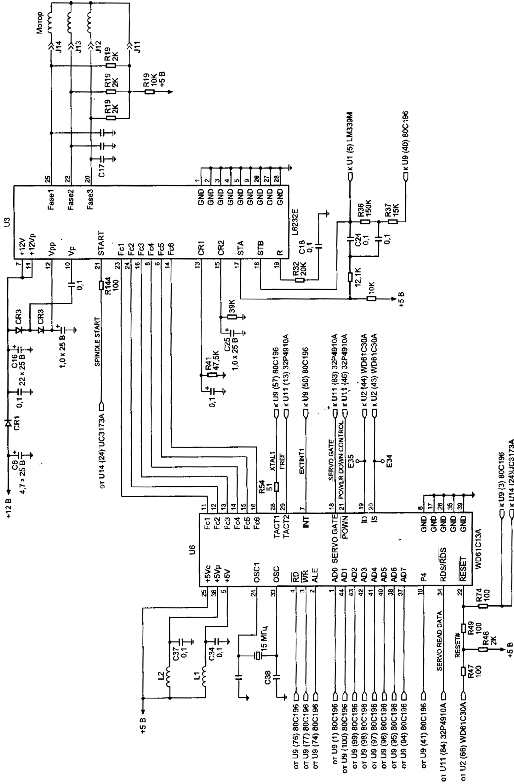
Figure 5. Control circuit of spindel of HDD (family WDAC 32500 and WDAC 33100)
S.M.A.R.T. (abbreviated Self-Monitoring, Analysis, and Reporting Technology) is intended to inform hard drive users about the status of its main parameters. Many motherboard BIOSes support analysis of those parameters at computer power-up and if some critical parameter exceeds its emergency limit an informational message is displayed during computer start-up. Of course, it does not mean that the drive will stop functioning, but the user should take some steps in that situation, for example, prepare a backup copy of valuable data. If computer BIOS does not contain an analyzer of S.M.A.R.T. attributes you can use an external diagnostic utility launched from within the operating system. The list of such utilities includes, for instance, SMART Vision available from http://www.acelab.ru/products/pc/traning.html.

For greater reliability practically all drives use a technology, which allows hiding and relocation of occurring defects immediately during operation. Some peculiarities of its implementation may vary with different drive models; however, they are all based upon the same principle. If the operating system attempts to access a sector, which cannot be read or written to, then the drive will replace it if possible (if there is sufficient reserved space) with a sector from the reserved zone (assign). The table of thus substituted sectors is stored in drive firmware zone and the drive loads it to controller ROM at power-up.

Impact sensors found in all drives also belong to technologies used for protection against malfunctions. It is a piezoelectric sensor producing an electric pulse at mechanical shock. Filtering of sensor pulses allows identification of obvious impacts. When a drive detects shock action, it parks magnetic heads. One peculiarity of impact sensor installation is the angle of its mounting relative to front case line. It is equal to 45O.

In recent models manufacturers have began to use widely temperature sensors in PCB and heads’ block. Temperature information is monitored by drive processor and the drive stops operation if the allowed value is exceeded. In some drive models temperature is output as S.M.A.R.T. attribute value and there are programs (usually available from the web pages of HDD manufacturers) which allow viewing it.

Read More

2060-771817-001 WD PCB Circuit Board

HDD Printed circuit board (PCB) with board number 2060-771817-001 is usually used on these Western Digital hard disk drives: WD7500KMVV-11TK7S2, DCM HHMT2HN, Western Digital 750GB USB 2.5 Hard Drive; WD5000BMVV-11SXZS2, DCM HVOT2BN, Western Digital 500GB USB 2.5 Hard Drive; WD10TMVV-11TK7S2, DCM HBMT2HNB, Western Digital 1TB USB 2.5 Hard Drive The 2060-771817-001 Western Digital PCB repair…

Read More

Glossary of Western Digital Hard Disk Drive (Letter T)

TB
Terabyte. One trillion bytes (1000 GB) of data.

TCP/IP
Transmission Control Protocol/Internet Protocol. A set of protocols for communication over interconnected networks. The standard for data transmission over networks.

TCQ
Tagged command queuing. Type of command queuing in which random reads and writes are intelligently ordered to read/write to/from the nearest disk sectors. Intelligently ordered (queued) commands avoid additional revolutions of the hard drive and greatly improve performance.

TFI
Thin-film inductive. A head technology using a thin-film inductive element to read and write data bits on the magnetic surface of a disk.

thin client architecture
A computer system in which data is stored centrally, with only limited storage capacity at its various points of use.

thin film
A coating deposited on a flat surface through a photolithographic process. Thin film is used on disk platters and read/write heads, as well as on the write elements of MR heads.

TLER
Time-limited error recovery. Technology that improves error handling coordination with RAID adapters and prevents drive fallout caused by lengthy error-recovery processes.

TLS
Transport Layer Security. Successor to SSL. See also SSL.

TPI
Tracks per inch. Also known as track density. The number of tracks written within each inch of a disk surface, used to measure how closely tracks are packed on a disk surface.

track
A concentric magnetic circle pattern on a disk surface used for storing and reading data.

track-to-track seek time
The time for a read/write head to move from one track to an adjacent track.

transfer rate
The rate at which a hard drive sends and receives data from a controller. Processing, head switches, and seeks must all be included in the transfer rate to accurately portray drive performance. The burst mode transfer rate is different from the transfer rate, as it refers only to the transfer of data into RAM.

triple interface
An external storage device with three interfaces available for connection to the computer.

TuMR
Tunneling magneto resistive (TuMR) heads. Next-generation head design that provides greater signal output which translates into greater signal to noise ratio, enabling higher storage densities.

two mirror mode
Mode available when four drives are installed in a device. In this mode, two independent RAID 1 volumes are created.

Read More

Windows Forensic Analysis DVD Toolkit, Second Edition

Windows Forensic Analysis DVD Toolkit, Second Edition Windows Forensic Analysis DVD Toolkit, Second Edition by Harlan Carvey.

Details:

  • Paperback: 512 pages
  • Publisher: Syngress; 2 edition (June 11, 2009)
  • Language: English
  • ISBN-10: 1597494224
  • ISBN-13: 978-1597494229
  • Product Dimensions: 9.2 x 7.5 x 1.1 inches
  • Shipping Weight: 2.0 pounds
  • Popular: 4.9 out of 5 starsDescription:

    Author Harlan Carvey has brought his best-selling book up-to-date to give you: the responder, examiner, or analyst the must-have tool kit for your job. Windows is the largest operating system on desktops and servers worldwide, which mean more intrusions, malware infections, and cybercrime happen on these systems. Windows Forensic Analysis DVD Toolkit, 2E covers both live and post-mortem response collection and analysis methodologies, addressing material that is applicable to law enforcement, the federal government, students, and consultants. The book is also accessible to system administrators, who are often the frontline when an incident occurs, but due to staffing and budget constraints do not have the necessary knowledge to respond effectively. The book’s companion DVD contains significant new and updated materials (movies, spreadsheet, code, etc.) not available any place else, because they are created and maintained by the author.

  • Best-Selling Windows Digital Forensic book completely updated in this 2nd Edition
  • Learn how to Analyze Data During Live and Post-Mortem Investigations
  • DVD Includes Custom Tools, Updated Code, Movies, and Spreadsheets!Reviews:

    “If your job requires investigating compromised Windows hosts, you must read Windows Forensic Analysis.”

    -Richard Bejtlich, Coauthor of Real Digital Forensics and Amazon.com Top 500 Book Reviewer

    The Registry Analysis chapter alone is worth the price of the book.”

    -Troy Larson, Senior Forensic Investigator of Microsoft’s IT Security Group

    “I also found that the entire book could have been written on just registry forensics. However, in order to create broad appeal, the registry section was probably shortened. You can tell Harlan has a lot more to tell.”

    -Rob Lee, Instructor and Fellow at the SANS Technology Institute, coauthor of Know Your Enemy: Learning About Security Threats, 2E

    Price:

    List Price: $69.95 Price: $47.08 You Save: $22.81

Read More