Hard Disk Details(8)

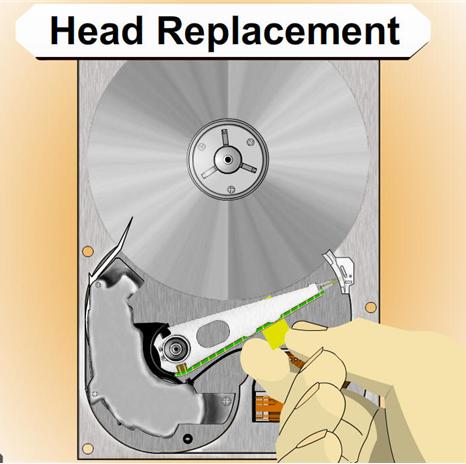
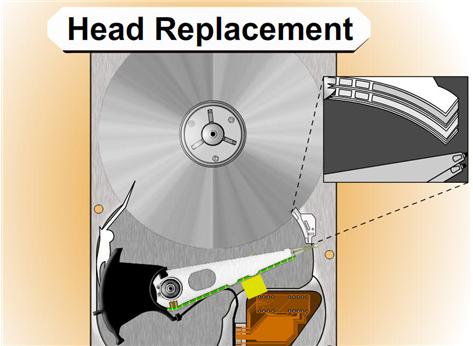
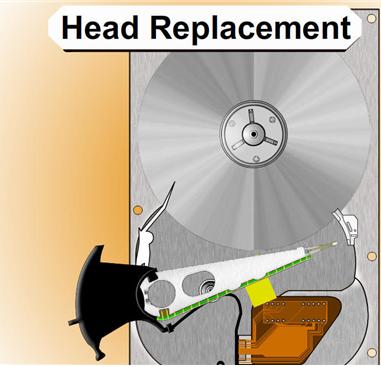
Slide 4259: Head Replacement Section
This is the only section from last year I kept and it is because this is directly related to fixing this click of death problem.

NOTE: If there is only one platter it might be easier to move the platter than to move the assembly. You have to make that choice.

List of items needed:
The first step is to get a hard drive as close to identical as the bad drive you have that is a working drive. At the bottom of this paper you will find help about matching hard drives and serial numbers.
You need a clean area to work on with as little dust floating around as possible.
You will need about 3 hours to do this carefully
A screwdriver set with T3-T8.  These are my favorite http://www.wihatools.com/200seri/278serie.htm
Post-it Notes
Other tools depending on the drive
Patience

Process for Head Replacement:
1.  You will need to disassemble the heads and other components from the drive to clear the room for the head and components.

2.    Disassemble the new hard drive, and carefully use folded paper to move the heads apart and to keep them apart as much as possible.

NOTE: If you are going to move the heads off of a drive platter you should always spin the motor in the direction away from the heads and the arm while you are moving the actuator arm to get the heads off. Move with care.

If you are storing the heads or going to put them down, you can try cutting sections of a drinking straw around the head itself. If the drive has a ramp it is very useful to help line up the heads to take them off and to put them back on.

*** There is often a screw under the assembly of the actuator arm that needs to be removed to move the heads.

3.    Carefully lift the assembly out of the drive and move it to the bad drive and reassemble. It will take about two hours to assemble correctly if you take your time. Do everything you can to get the heads lined up again.

NOTE: It is helpful to fold a piece of post-it notes in a V shape and to make the V towards the platters and the heads on each side of the V.  You can get the paper to slide onto the platter and turn the platters with a screwdriver while you gently move the heads back into place.

You must get them lined up and review it before you turn the drive back on or the heads may slide into place and hit the edge of the platter ripping them off and scratching the platter.  It is good to practice with another drive you do not care about before doing this.

Read More

Computer Forensics: Incident Response Essentials

Computer Forensics: Incident Response Essentials

Computer Forensics: Incident Response Essentials by Warren G. Kruse, Jay G. Heiser

Details:

  • Paperback: 416 pages
  • Publisher: Addison-Wesley Professional (October 6, 2001)
  • Language: English
  • ISBN-10: 0201707195
  • ISBN-13: 978-0201707199
  • Product Dimensions: 9.1 x 7.3 x 0.9 inches
  • Shipping Weight: 1.4 pounds
  • Popular: image

Description:

Computer security is a crucial aspect of modern information management, and one of the latest buzzwords is incident response–detecting and reacting to security breaches. Computer Forensics offers information professionals a disciplined approach to implementing a comprehensive incident-response plan, with a focus on being able to detect intruders, discover what damage they did, and hopefully find out who they are.

There is little doubt that the authors are serious about cyberinvestigation. They advise companies to “treat every case like it will end up in court,” and although this sounds extreme, it is good advice. Upon detecting a malicious attack on a system, many system administrators react instinctively. This often involves fixing the problem with minimal downtime, then providing the necessary incremental security to protect against an identical attack. The authors warn that this approach often contaminates evidence and makes it difficult to track the perpetrator. This book describes how to maximize system uptime while protecting the integrity of the “crime scene.”

The bulk of Computer Forensics details the technical skills required to become an effective electronic sleuth, with an emphasis on providing a well-documented basis for a criminal investigation. The key to success is becoming a “white hat” hacker in order to combat the criminal “black hat” hackers. The message is clear: if you’re not smart enough to break into someone else’s system, you’re probably not smart enough to catch someone breaking into your system. In this vein, the authors use a number of technical examples and encourage the readers to develop expertise in Unix/Linux and Windows NT fundamentals. They also provide an overview of a number of third-party tools, many of which can be used for both tracking hackers and to probe your own systems.

The authors explain their investigative techniques via a number of real-world anecdotes. It is striking that many of the same hacks detailed in Cliff Stoll’s classic The Cuckoo’s Egg are still in use over 10 years later–both on the criminal and investigative fronts. It is up to individual companies whether or not to pursue each attempted security violation as a potential criminal case, but Computer Forensics provides a strong argument to consider doing so. –Pete Ostenson

Price:

List Price: $54.99 Price: $34.64 You Save: $20.35

Read More

Simpletech USB External Hard Disk Drive

Simpletech usb external hard disk driveThe external hard drives can be portable and connects to the computer system from external. Cable is used for connecting the external hard drives to computer system; it supports the IDE, SCSI and USB. The other bus standards are also compatible.  For windows operating system, the internal hard drives were used in the computer systems during the last years of the twentieth century. On the other hand the external drives were mostly used on Apple Macintosh during the twentieth century.

The USB SimpleTech external hard disc drive is the best solution to fulfill the high capacity data storage medium for transferring the data. It provides high performance with low cost per gigabyte and therefore, it creates good value and customer satisfaction. The design of the SimpleTech USB external hard disc drive is very stylish and its size is also small. On top of the external drive are 4 Light emitting diodes in the form of a circle, these LED are used as a “capacity meter”.

The 25% of total capacity of the external drive is represented by each of the LED. These Light emitting diodes show the used storage space. When the free storage space is lesser than 10%, then the LEDs flash in red color giving an indication to the user. When copying is being done then the LEDs also flash at that time.

The external USB hard disks gain popularity as the backup storage needs increased with the introduction of the internet. The data was to be protected from threats of viruses and unauthorized usage. Therefore, the use of USB disk drives increased. The design and the internal structure are very much similar of both the internal and the external hard disks and are mounted on disc enclosure.

The Linux, UNIX and Windows all the 3 leading operating systems support the USB external hard disk drives. All these operating systems provide the partitioning and the disc formatting tools for the external hard drives. The Operating system can also be installed on the external drives, in this way the applications and programs can run on the computer. The file systems like the NTFS and FAT can also run on the USB external hard disks. In the Windows2000, Windows Vista and WindowsXP the Disk Management Console tool can be used for the partition and formatting of the USB external hard discs. For UNIX operating system the boot camp and the disk utility can be used for this purpose. And for the Linux operating system, the qtparted or the gparted can be used for formatting and partitioning purpose. The small sized external drives are also known as the “pocket drives”.

The flash drives are smaller in size than the pocket hard disks, but they USB external hard drives can transfer and store huge volumes of data. The data storage capacity of the pocket external drives is about 4GB to 8GB. The pocket USB external hard drive is little bit bigger in size than the USB flash drive. There are built in drivers of the pocket external hard disk drives in the operating systems of modern computers. The SimpleTech USB external hard disc drive has recording capacity of 320GB, 750GB and up to 1 Terabyte.

Read More

Computer Forensics Defined

“Computer Forensics deals with the preservation, identification, extraction and documentation of computer evidence.”*

“Computer forensics has also been described as the autopsy of a computer hard disk drive because specialized software tools and techniques are required to analyze the various levels at which computer data is stored after the fact.”*

Recovering Information the naked eye can no longer see.

Read More