Norton Online Backup

Norton Online Backup Norton Online Backup automatically protect and remotely store your files at their secured data centers. Norton Online Backup also provides you convenience by giving you more ways to securely access and share your files anytime you have an internet connection.

Norton Online Backup Overview:
Storage: 25GB
Operating System: Windows 7 / XP/ XP Pro / Vista /Mac OS X v10.5+
Delivery: Download
Price: $49.99/Year (Protect up to 5 PCs)
Coupon Code: 15NORTONSTORE (Get 15% off)

Norton Online Backup Main Features:

  • Delivers easy-to-use, professional-grade, backup protection for your files
  • Lets you access your files from any Internet-connected computer
  • Makes transferring files between computers a breeze
  • Works with both Windows and Mac computers
  • Simplifies file sharing
  • Lets you search backup sets for specific files by keyword
  • Saves older versions of your backed up files

How does Norton Online Backup works:
Download and install Norton Online Backup client to get started protecting documents, music, videos and digital photos with automated online backup that’s easy to use.

Norton Online Backup Reviews:

Useful Links:

Low price on Amazon.com: $19.99 (Save $30.00. This is the cheapest price. Norton Online Backup 2.0 1User/25GB )

Norton Online Backup Read More »

Glossary of Western Digital Hard Disk Drive (Letter V,W,Z)

Viterbi Detection
An algorithm used in read channel technology that detects an entire sequence of data bits at once and determines the most likely sequence of data bits by comparing an actual sequence of data bit samples with possible sequences of data bit samples to accurately detect data written to disk.

voice coil
An actuator motor. The force of a magnetic rotary voice coil produces a movement of the head that is proportionate to the force exerted by the coil.

WAN
Wide Area Network. A computer network that crosses metropolitan, regional, or national boundaries.

WD AV
The trade name for WD’s line of hard drives for audio/video applications.

WD AV-GP
Trade name for WD’s line of eco-friendly audio/video hard drives that deliver power savings as the primary attribute.

WD Backup™
Easy-to-use software for immediate and scheduled data backups and restoring of files.

WD Caviar®
The trade name for WD’s line of hard drives for desktop personal computers.

WD Caviar® Black™
Trade name for WD’s line of high performance desktop drives.

WD Caviar® Blue™
Trade name for WD’s line of desktop drives designed for everyday computing.

WD Caviar® Green™
Trade name for WD’s line of eco-friendly desktop hard drives that deliver power savings as the primary attribute.

WD Discovery™
WD software application that allows the host computer to find one or more WD network storage systems in the same network segment.

WD GreenPower Technology™
WD technology that yields lower operating temperatures for increased reliability and low acoustics for ultra-quiet PCs and external drives.

WD Passport®
The trade name for WD’s line of portable external hard drives.

WD Raptor®
The trade name for WD’s line of Enterprise hard drives.

WD Raptor® X
The trade name for WD’s line of Gamer hard drives.

WD RE
The trade name for WD’s line of RAID Edition desktop hard drives.

WD RE4
The trade name for WD’s line of RAID Edition "designed for Enterprise" desktop hard drives.

WD RE4-GP
Trade name for WD’s latest generation of eco-friendly enterprise hard drives that deliver power savings as the primary attribute.

WD Scorpio®
The trade name for WD’s line of 2.5-inch internal hard drives.

WD Scorpio® Black™
Trade name for WD’s line of high performance notebook drives.

WD Scorpio® Blue™
Trade name for WD’s line of notebook drives designed for everyday computing.

WD ShareSpace™
Trade name for WD’s 4-bay network storage system.

WD SmartWare™
WD’s easy-to-use backup and encryption software that visually presents data in a control center, providing peace of mind that precious photos, videos and files are securely protected.

WD Sync™
WD sychronization and encryption software.

WD VelociRaptor™
The trade name for WD’s line of 10,000 RPM, 2.5-inch enterprise hard drives.

WhisperDrive™
A WD acoustic technology that significantly reduces hard drive noise levels.

Winchester disk
The former code name for an early IBM hard disk model, sometimes still used to refer to the technology and design of most traditional hard drives.

Windows®
An operating system for desktop computers.

word
Two bytes that are processed together in a single operation.

workstation
A personal computer with exceptional capacity and performance capabilities for use mainly in engineering, design, and audiovisual applications, which demand immediate access to data and the ability to manipulate it in technically sophisticated ways.

write
The recording of flux reversals onto the magnetic surface of a disk.

write cache
High speed RAM used to buffer data transfers from a host to a hard drive.

write verify
A feature which verifies that data written to a disk is readable. Immediately after writing data to a disk, a drive with this feature verifies that it can read the data just written. If the drive is unable to read the data, it writes the data to another area of the disk and attempts to write verify again.

zoned recording
Increases the number of sectors on the outer tracks of a drive, since the circumference of outside tracks is greater. This type of recording affords more disk capacity, because there can be more sectors on larger outer tracks than would be possible if the number of sectors per track were constant for the whole drive.


Glossary of Western Digital Hard Disk Drive (Letter V,W,Z) Read More »

Seagate Barracuda 7200.12 Hard Drive PCB

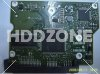
Buy Seagate Barracuda 7200.12 hard drive PCB on HDDZone.com with low price, fast shipping and top-rated customer service! All kinds of Seagate Barracuda 7200.12 hard drive PCB for your Data Recovery and HDD Repair Needs!

Seagate Barracuda 7200.12 Hard Drive PCBSeagate Barracuda 12 PCB ST31000528AS 100535537
Name: ST31000528AS
Board Number: 100535537
Main Controller IC: V60131/B5502C20
HDD Motor Combo IC: SH6968B
Seagate Barracuda 7200.12 Hard Drive PCBSeagate Barracuda 12 PCB 100535704
Board Number: 100535704
Main Controller IC: B5502C30
HDD Motor Combo IC: SH6964BD
Seagate Barracuda 7200.12 Hard Drive PCBSeagate Barracuda 12 PCB ST31000528AS 100536501 REV A
Name: ST31000528AS
Board Number: 100536501 REV A
Main Controller IC: B5502C20/V60131
HDD Motor Combo IC: SH6968B

Note:

  • These are just PCB(Printed Circuit Boards), not the whole HDD(Hard Disk Drive) .
  • All boards have been fully tested before shipment, no refund and exchange policy.
  • It is a buyer responsibility to know if the board is adequate for his hard drive model.
  • Hard drive failures are NOT always caused by circuit board failure. We cannot guarantee your drive to be repaired by replacing the board.

HDDZone.com: Seagate barracuda 7200.12 Hard Drive PCB

Seagate Barracuda 7200.12 Hard Drive PCB Read More »

Seagate Introduces the world’s First 1.5TB Portable External Drive

New FreeAgent® GoFlex™ Ultra-Portable External Drive Packs a Punch with Unprecedented Amount of Storage, Blazingly Fast USB 3.0 Connection and Pre-loaded Films.

September 21, 2010 – Seagate launched the world’s first 1.5 terabyte (TB) 2.5-inch portable external hard drive. Available immediately, the new 1.5TB FreeAgent® GoFlex™ ultra-portable drive delivers an all-in-one, technically advanced solution to help store, share and enjoy libraries of digital content in one’s preferred medium—whether on a Mac or PC, or a television, at home or on the go. With 1.5TB of capacity people can now store and carry up to 60 HD movies, 750 video games, thousands of photos or countless hours of digital music.

This ultra–upgradable, ultra–portable hard drive makes it ultra–easy for you to store, backup, encrypt and access your files anytime, anywhere.

Seagate introduces the world’s first 1.5TB portable, external hard drive with a Blazingly Fast USB 3.0 Connection and Pre-loaded Films.

“Today’s announcement is a ‘triple-crown’ of consumer technology—packaging record breaking capacity, blazingly fast USB 3.0 connectivity and the bonus of movie entertainment—making the 1.5TB GoFlex™ ultra-portable drive an unprecedented and innovative solution, bringing this solution to market on the heels of our 3TB GoFlex™ Desk drive and the Momentus® XT solid state hybrid drive is proof of Seagate’s continuing technology leadership and tradition of setting storage industry milestones.” – said Darcy Clarkson, vice president of Global Retail Sales and Marketing for Seagate.

Shipping now in the United States and rolling out globally later this year, all 1.5TB GoFlex ultra-portable drives¹ will ship with a USB 3.0 interface cable, accelerating the transfer speed of a drive up to 10x when connected to a USB 3.0 port, when compared to a USB 2.0 port. For example, a drive using a USB 3.0 connection can transfer a 25GB file in under five minutes versus the 14 minutes it would take using a traditional USB 2.0 drive². In addition, all GoFlex ultra portable drives will now also ship with the new Superspeed USB 3.0 cable, which will still continue to work with existing USB 2.0 ports.

“Consumers continue to push the growth of digital music, photos, and video content, and increasingly want access to this content from a variety of CE devices, including a PC, higher capacity disk drives in combination with higher bandwidth interfaces like USB 3.0 will help to make a greater number of large multimedia files more accessible from multiple devices in the home.” – says John Rydning, IDC’s research director for hard disk drives.

A key addition to the GoFlex™ family, the new 1.5TB GoFlex ultra-portable drive delivers ultimate flexibility in how people collect, protect, share and enjoy their digital libraries, all in a convenient compact package. In addition to coming bundled with USB 3.0 connectivity, the drive can be used with an array of add-on cables and accessories such as the GoFlex™ Net media sharing device and the GoFlex™ TV HD media player, that provide the flexibility to enjoy your content on a TV, a network, using a mobile device, or via the Internet.

All 1.5TB GoFlex ultra-portable drives are compatible with both the Windows® operating system and Mac® OS X computers. Each drive includes an NTFS driver for Mac, which allows the hard drive to store and access files from both Windows and Mac OS X computers without reformatting. The NTFS driver is simply installed once on the Mac® OS X computer, allowing it to read and write files on a Windows formatted³ drive.

The 1.5TB GoFlex ultra-portable drive with USB 3.0 adapter is available in black and can be purchased on Seagate.com and through select retailers for $249.99.

Seagate Introduces the world’s First 1.5TB Portable External Drive Read More »

Glossary of Western Digital Hard Disk Drive (Letter U)

Ultra ATA
A high-speed host data transfer feature that transfers data at up to 133 MB per second. See also Ultra DMA.

Ultra DMA
A protocol for transferring data between a hard drive through the bus to the computer’s RAM. Also known as Ultra ATA, Ultra ATA/66, Ultra ATA/100, and Ultra ATA/133.

Ultra/150 CQ
A technology that optimizes the sequence of data transfers from the host to the hard drive, providing increased data transfer efficiency and resulting in higher performance for enterprise applications.

uncorrectable error
An error that cannot be overcome using error detection and correction.

unformatted capacity
The total number of usable bytes on a disk, including the space that is required to record location, boundary definitions, and servo data. See also formatted capacity.

unrecoverable error
A read error that cannot be overcome by an ECC scheme or by re-reading data when host retries are enabled.

untagged queuing
The ability of a drive to receive a maximum of one input/output (I/O) process from each initiator.

upgrade
In hard drives, the replacement of a hard drive with one offering greater capacity or performance or both.

UPnP
Universal Plug n Play. A set of computer network protocols that simplify the implementation of networks in the home by allowing devices to connect seamlessly. See also protocol.

UPnP NAT traversal
Combines UPnP and NAT features.

UPS
Uninterruptable Power Supply. A standalone device that provides secondary power to connected equipment in the event of a power failure.

USB
Universal serial bus. A serial bus for connecting peripherals to a microcomputer. It connects external drives, printers, modems, mice, keyboards, etc., through a single, general-purpose port. It can automatically add and configure new devices without having to shut down and restart the system.

USB 2.0
Hi-Speed USB (USB 2.0) supports data transfer rates up to 480Mb/s. USB 2.0 is backward-compatible with USB 1.1. If you connect to a USB 1.1 device, data is transferred at USB 1.1 speed (up to 1.1 Mb/s).

USB 3.0
SuperSpeed USB (USB 3.0) supports data transfer rates of up to 5 Gb/s. USB 3.0 is backward-compatible with USB 2.0. If you connect to a USB 2.0 device, data is transferred at USB 2.0 speed (up to 480 Mb/s).

USB 3.0 HBA adapter
WD’s USB 3.0 PCI adapter card. Allows users to upgrade their PC to take advantage of the faster data transfer speeds available through the SuperSpeed USB 3.0 port.

Glossary of Western Digital Hard Disk Drive (Letter U) Read More »

Free Raid Data Recovery Software – ReclaiMe Free RAID Recovery

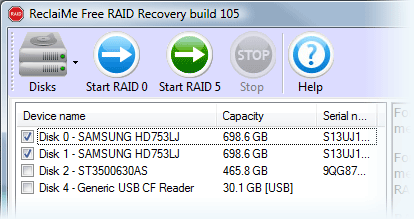
Free RAID recovery software to recover RAID 0, RAID 5, RAID 0+1, and RAID 1+0. Recovers array parameters such as disk order and parity location.

ReclaiMe Free RAID RecoveryFile Name: ReclaiMe Free RAID Recovery
Publisher: Reclaime.com
Raid Supported: RAID 0, RAID 5, RAID 0+1, RAID 1+0
Price: Free

What can ReclaiMe Free RAID Recovery Do?

1. Recover the following RAID parameters:

  • Start offset and block size;
  • Number of member disks;
  • Member disks and data order;
  • Parity position and rotation;

2. Once you recovered the parameters, you can

  • Run ReclaiMe data recovery software to recover data from the array;
  • Create the array image file;
  • Write the array to disk;
  • Save layout to the XML file;

How to recover RAID data by using ReclaiMe Free RAID Recovery?

1. Download, install, and launch ReclaiMe Free RAID Recovery software.
2. If it is needed, open or create disk image files of the member disks using the Disks button.
3. Decide on the type of your array

  • For RAID 0 select a minimum of two devices from the list and click Start RAID 0
  • For RAID 0+1 and 1+0, select all the available member disks and click Start RAID 0. It is required to select a minimum of two disks.
  • For RAID 5, select all the available member disks and click Start RAID 5. Minimum of two disks is required. ReclaiMe Free RAID Recovery software can recover RAID 5 with one disk missing.

4. Wait until the program completes detecting the parameters. It can take from a couple of minutes to several hours. The process completes when either Scan progress or Confidence is completely filled. Note that Scan progress always grows while Confidence may decrease.
5. At the step all the parameters have been already restored. Then you can select:

  • Run ReclaiMe to recover data. If ReclaiMe data recovery software has been already installed on the computer, then it is launched in RAID recovery mode and displays the partitions on the array. If you do not have ReclaiMe, you will be offered to download ReclaiMe data recovery software.
  • Save layout to the XML file. Save the recovered array parameters to the file in XML format. Note that you can open this file in ReclaiMe and start to recover data off the array using ReclaiMe RAID recovery mode.
  • Use with other data recovery software. Provides step-by-step instructions on how to transfer the recovered parameters to certain well-known data recovery tools. Note that the instructions are created for each particular case of RAID and you should follow them exactly. Should the need arise, the instructions can be copied to the clipboard using Copy to the clipboard button.

Before you start your RAID recovery, please consider the following:

  • If one of the member disks of RAID 5 or RAID 0+1 is physically damaged (produces unusual sounds, e.g. clicking or repeated spin-up and spin-down sounds), don’t use this disk for the recovery.
  • If you cannot avoid using a physically damaged disk, say, for RAID 0 recovery, try to create the disk image file – use Create disk image under Disks on the toolbar in ReclaiMe Free RAID Recovery software.
  • If you have a hardware RAID, you should
    1. Clearly label the member disks, the cables, and the controller ports, so that the original setup can be reassembled if need be.
    2. Disconnect the array member disks from the RAID controller and then attach them as a separate/standalone disks to a non-RAID controller. ReclaiMe Free RAID Recovey needs to access the disks separately to be able to reconstruct RAID parameters.
  • If you plan to recover data once the RAID parameters are restored, prepare a free disk space equal to the amount of data which you are going to recover.

Related Links:

  • Download: http://www.reclaime.com/dl/setup-raid-recovery.exe
  • Software Details: http://www.freeraidrecovery.com/Default.aspx

Recommended RAID Recovery Shareware: Getway RAID Recovery Software

Free Raid Data Recovery Software – ReclaiMe Free RAID Recovery Read More »

Seagate Self-Encrypting Laptop Hard Drive First To Win Key U.S. Government Certification

Seagate Self-Encrypting Laptop Hard Drive Seagate’s Momentus Laptop Hard Drive Earns FIPS 140-2 Certification, Clearing Way for Deployment of Drives by All U.S. Government Agencies and Regulated Industries such as Healthcare, Defense and Finance.

September 14, 2010, seagate announced that its groundbreaking Momentus ® Self-Encrypting Drive, the world’s first laptop hard drive with built-in encryption to protect against unauthorized access to information on lost or stolen mobile computers, has secured FIPS 140-2 certification from the U.S. National Institute of Standards and Technology (NIST).

The key government certification clears the way for deployments of Momentus Self-Encrypting Drives (SEDs) by all U.S. and Canadian federal agencies, many state and local governments, and regulated industries such as healthcare, finance and defense required to use FIPS-certified gear to help protect sensitive data on PCs and computer networks. Many utility, education and transportation entities also have adopted the FIPS (Federal Information Processing Standard) 140-2 standard to lock down confidential information. Foreign governments in addition to Canada also recognize FIPS-validated products. The Momentus SED is the first hard drive with native encryption to earn the FIPS certification.

“The FIPS 140-2 certification exemplifies Seagate’s commitment to security standards that enable the widespread adoption of encrypting hard drives for laptops and other computers as the explosive growth of laptop PCs puts more sensitive personal and business information at risk, today’s NIST approval gives our system builder and end-user customers the peace of mind that Momentus ® Self-Encrypting Drives deliver the full power of government-grade security.” – said Dave Mosley, executive vice president of Sales, Marketing and Product Line Management at Seagate.

The FIPS 140-2 seal of approval comes three years after NIST, the federal agency focused on promoting product innovation by establishing technical standards for government and business, certified the Advanced Encryption Standard (AES) chip built into the Momentus drive. Seagate has shipped more than a million of its self-encrypting laptop drives since their introduction in 2006.

See Seagate’s FIPS 140-2 certificate here: http://csrc.nist.gov/groups/STM/cmvp/documents/140-1/140crt/140crt1388.pdf .

More information on NIST and FIPS 140-2 is available on the NIST website:
http://csrc.nist.gov/groups/STM/cmvp/index.html

Seagate® Momentus® hard drives deliver high capacity and performance along with innovative technology, such as self-encryption and free-fall sensors. If you require feature-rich, reliable, robust and secure laptop storage, Momentus drives are for you.

More details: Seagate’s self-encryption Momentus Laptop hard drive

Seagate Self-Encrypting Laptop Hard Drive First To Win Key U.S. Government Certification Read More »

Glossary of Western Digital Hard Disk Drive (Letter T)

TB
Terabyte. One trillion bytes (1000 GB) of data.

TCP/IP
Transmission Control Protocol/Internet Protocol. A set of protocols for communication over interconnected networks. The standard for data transmission over networks.

TCQ
Tagged command queuing. Type of command queuing in which random reads and writes are intelligently ordered to read/write to/from the nearest disk sectors. Intelligently ordered (queued) commands avoid additional revolutions of the hard drive and greatly improve performance.

TFI
Thin-film inductive. A head technology using a thin-film inductive element to read and write data bits on the magnetic surface of a disk.

thin client architecture
A computer system in which data is stored centrally, with only limited storage capacity at its various points of use.

thin film
A coating deposited on a flat surface through a photolithographic process. Thin film is used on disk platters and read/write heads, as well as on the write elements of MR heads.

TLER
Time-limited error recovery. Technology that improves error handling coordination with RAID adapters and prevents drive fallout caused by lengthy error-recovery processes.

TLS
Transport Layer Security. Successor to SSL. See also SSL.

TPI
Tracks per inch. Also known as track density. The number of tracks written within each inch of a disk surface, used to measure how closely tracks are packed on a disk surface.

track
A concentric magnetic circle pattern on a disk surface used for storing and reading data.

track-to-track seek time
The time for a read/write head to move from one track to an adjacent track.

transfer rate
The rate at which a hard drive sends and receives data from a controller. Processing, head switches, and seeks must all be included in the transfer rate to accurately portray drive performance. The burst mode transfer rate is different from the transfer rate, as it refers only to the transfer of data into RAM.

triple interface
An external storage device with three interfaces available for connection to the computer.

TuMR
Tunneling magneto resistive (TuMR) heads. Next-generation head design that provides greater signal output which translates into greater signal to noise ratio, enabling higher storage densities.

two mirror mode
Mode available when four drives are installed in a device. In this mode, two independent RAID 1 volumes are created.

Glossary of Western Digital Hard Disk Drive (Letter T) Read More »

Western Digital Data Recovery Partners (The Americas)

If you utilize the data recovery services offered by the service provider named above, Western Digital will not void the warranty associated with the disk drive you purchased from a Western Digital reseller or distributor.

Platinum Data Recovery Partners:

1. ESS Data Recovery

ESS Data Recovery Data Recovery, RAID and iPod Recovery Services

ESS provides a complete set of data recovery packages, ranging from single user desktop and notebook offerings through more advanced network storage, server and RAID system recovery packages, across multiple operating systems.

Call now at 1.800.237.4200 for more details or submit a case online.

2. DriveSavers Data Recovery

Data Recovery: All storage devices, all operating systems, all types of disk-asters

DriveSavers Data RecoveryDriveSavers has been a Western Digital preferred data recovery partner since 1998. Their superior customer service is known worldwide and they offer the fastest, most reliable and only certified secure data recovery service available today. DriveSavers is the only service provider that is SAS 70 Type II compliant, ensuring that the privacy and integrity of your data will not be compromised during the recovery process.

For a free estimate, call 800.440.1904 or visit: www.drivesavers.com/wd.

3. Ontrack® Data Recovery

Ontrack® Data Recovery Ontrack Data Recovery operates more than 30 Data Recovery offices, including 19 facilities that feature technically-advanced labs to meet every data recovery need. With offices in more than 20 countries, over 150 engineers worldwide, and support in 13 languages.

Lost data? We can help. Call 1 800 872 2599 (US & Canada)

Preferred Data Recovery Partners (The Americas)

Western Digital Data Recovery Partners Western Digital Data Recovery Partners Western Digital Data Recovery Partners

Western Digital Data Recovery Partners Western Digital Data Recovery Partners Western Digital Data Recovery Partners

Western Digital Data Recovery Partners

How to become an data recovery partner for Western Digital?

Western Digital periodically reviews and updates its data recovery partner list. In order to be considered for placement on this list, you can mail a corporate overview and fact sheet along with information on your data recovery services to the following address:

Western Digital Data Recovery Partner Program
1 Morgan
Irvine, CA 92618

Western Digital Data Recovery Partners (The Americas) Read More »

Acronis True Image WD Edition Software

Acronis True Image WD Edition Software

Acronis True Image WD Edition Software helps you to completely clone your current system hard drive onto your new WD hard drive. Cloning makes an exact copy of your operating system, applications, data, preferences, and email settings. Everything will be present and operate exactly as it did on your old hard drive. Acronis True Image WD Edition now supports WD Advanced Format Drives and ensures that all partitions are optimally aligned.

Acronis True Image WD Edition Software Key Features:

  • Drive Cloning – Copies the source drive to a new WD drive, leaving all data on the source drive.
  • Drive Migration – Erase the source drive after the new WD drive has been imaged.
  • Drive Image Backup – The long-term usage of the Drive Kit software will be to provide full drive image backups of a source drive at any time. Backup drive images will be stored as a file, which can be copied to any direct attached drive, network attached storage drive or optical media (CD/DVD).
  • Drive Deployment – Enables users to prepare a WD drive so that selected folders or partitions can be excluded from the destination image.
  • Drive Image Recovery – The Recovery Manager enables users to restore a drive image from a direct or network attached drive. The Recovery Manager can also either erase just a portion of the drive to be used for the restored drive image, or all of the previous OS.
  • Create a Bootable Standalone Recovery Manager – With the Drive Kit software, users can create a bootable ISO image file, which contains the WD Drive Kit Standalone Recovery Manager software.
  • Recover a Drive Image from the Bootable Recovery Manager Software – The bootable Standalone Recovery Manager enables users to recover a drive image from either a CD/DVD drive, a direct attached drive, or a network attached drive.

Related Links:

  • Download Acronis True Image WD Edition Software
  • Acronis True Image WD Edition Software User Manual
  • Acronis True Image 2010

Supported Operating Systems: Windows XP/Vista/7

Acronis True Image WD Edition Software Read More »

Scroll to Top