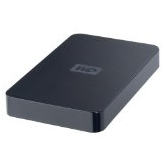
WD Elements 640 GB USB 2.0 Portable External Hard Drive

WD Elements 640 GB USB 2.0 Portable External Hard Drive Brand: Western Digital Series
Elements Model: WDBAAR6400ABK-NESN
Color: Midnight Black
Interface: USB 2.0
Capacity: 640GB
Form Factor: 2.5″
Dimensions: 5.00″ x 3.10″ x 0.60″
Weight: 0.44 lbs.
Manufacturer Warranty:
Parts: 1 year limited
Labor: 1 year limited

Easily portable. Designed with the same commitment to quality that made WD external drives the number one selling drives in the world, Western Digital’s WD Elements™ USB 2.0 portable hard drive is simple, easy-to-use, light and easy to carry. No need to carry a bulky power adapter; this drive get its power from the USB cable. Just plug it in to any USB port and start saving your photos, music, video, and files. Simply affordable; Easy to use; USB powered; Kit contents: USB 2.0 portable hard drive; USB cable; Quick Install Guide.

Features:

  • USB powered – These drives require no power adapter; they are powered directly through the USB cable.
  • Compact design – Weighing in at only a few ounces, these small drives fit easily into a pocket or purse.
  • Preformatted for PCs – Designed for use with Windows-based computers. Can be easily reformatted for use with Macs.

System Requirements:
Available USB port
Windows 7 / Vista / XP
Mac OS X Tiger or Leopard

List Price: $149.99

Read More

Seagate Barracuda 7200.11 Command Queuing

Seagate has a proven track record of consistently delivering reliable products in volume, and the new Barracuda 7200.11 family is no exception. Designed with up to four platters and the only second-generation perpendicular recording technology in the industry, the Barracuda 7200.11 drive offers the ideal balance of world-class technology and value, providing customers with an optimal overall solution. The capacity, reliability and performance of this drive, along with its 5-year limited warranty, ensure the longevity of digital content for years to come.

Key Features and Benefits

  • Delivers the industry’s highest capacity—up to 1.5 TB of storage (also 1 TB and 750, 640, 500, 320 and 160 GB)
  • Ships with the industry’s most reliable and proven perpendicular magnetic recording (PMR) technology
  • Delivers high performance
    • Up to 120 MB/s sustained data rate
    • 32-MB and 16-MB cache buffer (8 MB on 160 GB)
  • Environmentally friendly
    • Consumes up to 43 percent less power during idle than previous products, enabling customers to build low-power systems
    • Meets strict RoHS environmental requirements
  • Leverages best combination of technology (areal density, PMR) and proven components for volume availability
  • Ships with an industry-best 5-year limited warranty

Seagate Barracuda 7200.11 Drive—the Eco-Friendly Choice
The Seagate Barracuda 7200.11 drive delivers up to 43 percent power savings over the previous desktop generation without sacrificing drive and system performance levels, giving customers the ability to manufacture eco-friendly PC systems and external storage systems that meet energy-savings requirements.

Seagate hard drives have long been produced with the environment in mind, and not just with low power consumption. Like all other Seagate drives, the Barracuda 7200.11 product family complies with the Restriction of Hazardous Substance (RoHS) Directive—a regulation that limits the use of hazardous materials in electronic goods. Seagate also takes great pride in implementing numerous voluntary material restrictions for the good of the environment.

Seagate is committed to minimizing the impact of our products and operations on the environment, and producing energy-efficient, RoHS-compliant hard drives is just one element of that commitment. Our facilities are operated to be energy efficient and minimize our carbon footprint. For example, Seagate has implemented production efficiency measures, such as replacing or renovating less-efficient equipment, resulting in a 20 percent increase in production efficiency on a per-hard-drive basis. In just six months this delivered a savings of 158.93 million kWh, or enough energy to power nearly 15,000 U.S. homes for one year. Seagate also has deployed aggressive waste minimization and recycling programs in facilities worldwide.

Seagate employees are fully engaged in this environmental commitment and participate in many ways, from innovating eco-friendly hard drives, planting trees at company facilities and identifying eco-friendly manufacturing improvements to car-pooling and telecommuting.

With Seagate and the Barracuda 7200.11 drive, our customers can have the best of both worlds—top hard drive performance and the satisfaction of knowing they are using a high-capacity drive with a very small eco-footprint.


Read More

Hard Drive Data Recovery in Atlanta, USA

Hard Drive Data Recovery in Atlanta, USAThere are numerous contributing factors of data loss. Belows are the five common reasons of data loss. You should be aware of these things to avoid your valuable data from loss. If you have experienced data loss due to any of the reasons, you need for data recovery to recover your valuable data.

  • Hardware failure;
  • Firmware Corruption;
  • Partitions missing;
  • Accidental deletion and overwriting;
  • Operating System failure;

Data Recovery Services near Atlanta:

Secure Data Recovery Services of Atlanta GA
www.securedatarecovery.com/data-recovery-atlanta.html
201 17th Street, Suite 300 Atlanta, GA 30363
1-770-217-4955

Secure Data Recovery of Atlanta specialize in: Raid Recovery, Laptop Data Retrieval, Hard Drive Data Recovery, Mac Data Recovery, Email/File Data Recovery, SQL Data Recovery and Tape Recovery Services.

Data Recovery Atlanta
www.datarecoveryatlanta.com
235 Peachtree St. NE Suite 400 Atlanta, GA 30303
404.592.2042

Laptop, desktop, USB, RAID and external hard drive data recovery. We also recover thumb drives, sandisk cards, optical media, removable media and many other data storage devices and media

Atlanta Data Recovery Services
atlantadatarecovery.com
2250 Satellite Blvd, Suite 240 Duluth, GA 30097
1.888.481.9501

We provide hard disk recovery services for all storage media including: raid arrays, hard drives, tapes, opticals, removables, laptops & digital photos.

ACR Data Recovery
www.atl-datarecovery.com
4487-B Park Drive Norcross, GA 30093
770 925-4420

Use data recovery software for file recovery, and data recovery service for hard drive recovery and other disk recovery cases to recover data. See recovered data before purchasing software. Guaranteed quote upon request.

These are some of the hard drive data recovery service providers near atlanta, welcome to give your review for these services.

Read More

2060-771692-002 WD PCB Circuit Board

HDD Printed circuit board (PCB) with board number 2060-771692-002 is usually used on these Western Digital hard disk drives: WD5000BPVT-00HXZT1, DCM HHOTJHB, Western Digital 500GB SATA 2.5 Hard Drive; WD7500BPVT-60HXZT1, DCM HHCVJAB, Western Digital 750GB SATA 2.5 Hard Drive; WD7500BPVT-60HXZT1, DCM HACTJBB, Western Digital 750GB SATA 2.5 Hard Drive; WD7500BPVT-60HXZT1, DCM HBCVJHNB, Western Digital 750GB…

Read More

Technologies used for maintaining HDD reliability

With all the complications HDD manufacturers are constantly trying to make user data storage more reliable. To accomplish that they use various methods and technologies in their drives.

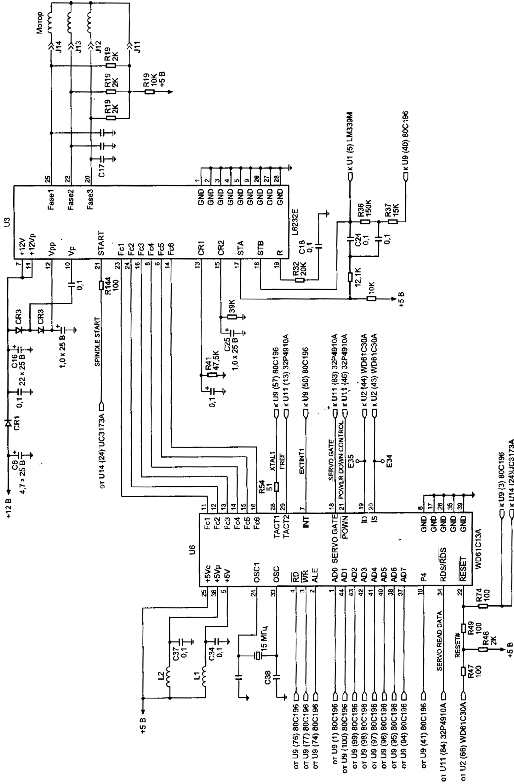
Figure 5. Control circuit of spindel of HDD (family WDAC 32500 and WDAC 33100)
S.M.A.R.T. (abbreviated Self-Monitoring, Analysis, and Reporting Technology) is intended to inform hard drive users about the status of its main parameters. Many motherboard BIOSes support analysis of those parameters at computer power-up and if some critical parameter exceeds its emergency limit an informational message is displayed during computer start-up. Of course, it does not mean that the drive will stop functioning, but the user should take some steps in that situation, for example, prepare a backup copy of valuable data. If computer BIOS does not contain an analyzer of S.M.A.R.T. attributes you can use an external diagnostic utility launched from within the operating system. The list of such utilities includes, for instance, SMART Vision available from http://www.acelab.ru/products/pc/traning.html.

For greater reliability practically all drives use a technology, which allows hiding and relocation of occurring defects immediately during operation. Some peculiarities of its implementation may vary with different drive models; however, they are all based upon the same principle. If the operating system attempts to access a sector, which cannot be read or written to, then the drive will replace it if possible (if there is sufficient reserved space) with a sector from the reserved zone (assign). The table of thus substituted sectors is stored in drive firmware zone and the drive loads it to controller ROM at power-up.

Impact sensors found in all drives also belong to technologies used for protection against malfunctions. It is a piezoelectric sensor producing an electric pulse at mechanical shock. Filtering of sensor pulses allows identification of obvious impacts. When a drive detects shock action, it parks magnetic heads. One peculiarity of impact sensor installation is the angle of its mounting relative to front case line. It is equal to 45O.

In recent models manufacturers have began to use widely temperature sensors in PCB and heads’ block. Temperature information is monitored by drive processor and the drive stops operation if the allowed value is exceeded. In some drive models temperature is output as S.M.A.R.T. attribute value and there are programs (usually available from the web pages of HDD manufacturers) which allow viewing it.

Read More