Salmon DNA used in Data Storage Device?

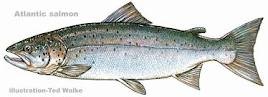
Salmon

Scientists have created a rudimentary data storage device using salmon DNA

Salmon … they’re good to eat, provide a livelihood for fishermen, are an important part of their ecosystem, and now it seems that they can store data. More specifically, their DNA can. Scientists from National Tsing Hua University in Taiwan and the Karlsruhe Institute of Technology in Germany have created a "write-once-read-many-times" (WORM) memory device, that combines electrodes, silver nanoparticles, and salmon DNA. While the current device is simply a proof-of-concept model, the researchers have stated that DNA could turn out to be a less expensive alternative to traditional inorganic materials such as silicon.

The device is made up of a thin film of salmon DNA that has been impregnated with silver atoms, then sandwiched between two electrodes. When UV light is shone onto the system, the atoms cluster together into nanoparticles.

Subsequently, when no or little voltage is applied to the electrodes, only a low electrical current is able to travel through the UV-irradiated DNA. This is the equivalent of the device’s "off" state. Because the material is unable to hold a charge under a high electrical field, however, once the voltage exceeds a certain threshold, a higher current is able to travel through the DNA. This represents the "on" state.

These changes in conductivity were found to be irreversible – once the device has initially been set to either "on" or "off" it stays that way, regardless of what voltages are subsequently applied. Even after up to 30 hours, it retains its conductivity.

The scientists are now hoping that their discovery could lead to new techniques for the design of optical storage devices.

This isn’t the first time that DNA has been suggested for such applications. Researchers at Imperial College London have created logic gates using DNA and bacteria, while American scientists have genetically engineered the bacterium E. coli to coax its DNA into computing the solution to a classic mathematical puzzle.

A paper on the salmon DNA research was recently published in the journal Applied Physics Letters.


Read More

RAID Array & Server Glossary of Computer Terms (Letter L)

Latency
1. The time between the making of an I/O request and completion of the request’s execution.
2. Short for rotational latency, the time between the completion of a seek and the instant of arrival of the first block of data to be transferred at the disk’s read/write head.

Logical Drive
The logical devices presented to the operating system. System drives are presented as available disk drives, each with a capacity specified by the Mylex RAID controller. See also Storage Device.

Read More

Free Compression, Split and ZIP programs

HJ-Split (Freeware file splitter for a variety of platforms)
Why split files? Think of a file of 20 Mb, and try to send this to a friend. Using email this does not succeed, it is simply too large, and how to put it onto a floppy? HJSplit will enable you to split the large file into smaller chunks, which can be much more easily sent and stored. Later on these chunks can be re-joined using HJSplit itself or HJJoin.

HJSplit is available for a large number of operating systems:Windows 95/98/NT/2000/XP, Linux, Java, OS/2, Windows 3.x, MS DOS, Amiga. For the MAC there is a compatible file joiner available.

Freebyte ZIP
A powerful freeware ZIP program with full Windows user-interface. It can zip and unzip files, create new zip files, directly view and sort zip file contents, make self-extracting archives, password protect and encrypt files, etc. etc. Runs on windows 95, 98, ME, 2000, NT and XP.

StuffIt
Mac file expander (program to open compressed files) for the MAC platform. Support for various file formats, like BinHex, MacBinary, zip, gzip, uu, tar. Lite version is freeware.

Read More

Technologies used for maintaining HDD reliability

With all the complications HDD manufacturers are constantly trying to make user data storage more reliable. To accomplish that they use various methods and technologies in their drives.

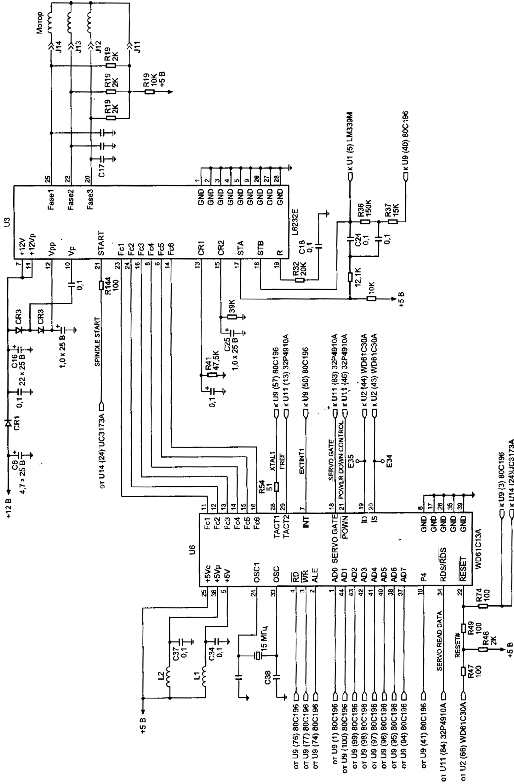
Figure 5. Control circuit of spindel of HDD (family WDAC 32500 and WDAC 33100)
S.M.A.R.T. (abbreviated Self-Monitoring, Analysis, and Reporting Technology) is intended to inform hard drive users about the status of its main parameters. Many motherboard BIOSes support analysis of those parameters at computer power-up and if some critical parameter exceeds its emergency limit an informational message is displayed during computer start-up. Of course, it does not mean that the drive will stop functioning, but the user should take some steps in that situation, for example, prepare a backup copy of valuable data. If computer BIOS does not contain an analyzer of S.M.A.R.T. attributes you can use an external diagnostic utility launched from within the operating system. The list of such utilities includes, for instance, SMART Vision available from http://www.acelab.ru/products/pc/traning.html.

For greater reliability practically all drives use a technology, which allows hiding and relocation of occurring defects immediately during operation. Some peculiarities of its implementation may vary with different drive models; however, they are all based upon the same principle. If the operating system attempts to access a sector, which cannot be read or written to, then the drive will replace it if possible (if there is sufficient reserved space) with a sector from the reserved zone (assign). The table of thus substituted sectors is stored in drive firmware zone and the drive loads it to controller ROM at power-up.

Impact sensors found in all drives also belong to technologies used for protection against malfunctions. It is a piezoelectric sensor producing an electric pulse at mechanical shock. Filtering of sensor pulses allows identification of obvious impacts. When a drive detects shock action, it parks magnetic heads. One peculiarity of impact sensor installation is the angle of its mounting relative to front case line. It is equal to 45O.

In recent models manufacturers have began to use widely temperature sensors in PCB and heads’ block. Temperature information is monitored by drive processor and the drive stops operation if the allowed value is exceeded. In some drive models temperature is output as S.M.A.R.T. attribute value and there are programs (usually available from the web pages of HDD manufacturers) which allow viewing it.

Read More