Articles

Western Digital Enters Solid State Drive Market

western digital Western Digital, a world leader in hard drive storage for computing and consumer electronics applications, announced that it has completed a $65 million cash acquisition of SiliconSystems, Inc., Aliso Viejo, Calif., a leading supplier of solid state drives for the embedded systems market.

Since its inception in 2002, SiliconSystems has sold millions of SiliconDrive® products to meet the high performance, industrial, embedded-computing, medical, military and aerospace markets. These markets accounted for approximately one third of worldwide solid-state drive revenues in 2008. SiliconSystems’ product portfolio includes solid-state drives with SATA, EIDE, PC Card, USB and CF interfaces in 2.5-inch, 1.8-inch, CF and other form factors. SiliconSystems has developed extensive intellectual property to address the stringent embedded systems market requirements to ensure data integrity, eliminate unscheduled downtime, protect application data and software and provide for data security and protection through its patented and patent-pending PowerArmor®, SiSMART®, SolidStor® and SiSecure™ technologies.

WD’s storage industry leadership, worldwide infrastructure, and technical and financial resources will enable further growth in SiliconSystems’ existing markets and customer relationships. SiliconSystems’ intellectual property and technical expertise will provide additional building blocks for future products to address emerging opportunities in WD’s existing markets.

“We are delighted to have the SiliconSystems team join WD,” said John Coyne, president and CEO of WD. “The combination will be modestly accretive to revenue and margins as a result of SiliconSystems’ existing position as a trusted supplier to the well-established $400 million market for embedded solid-state drives. SiliconSystems’ intellectual property and technical expertise will significantly accelerate WD’s solid-state drive development programs for the netbook, client and enterprise markets, providing greater choice for our customers to satisfy all their storage requirements.”

Integration into WD begins immediately, with SiliconSystems now becoming known as the WD Solid-State Storage business unit, complementing WD’s existing Branded Products, Client Storage, Consumer Storage and Enterprise Storage business units.

Western Digital Enters Solid State Drive Market Read More »

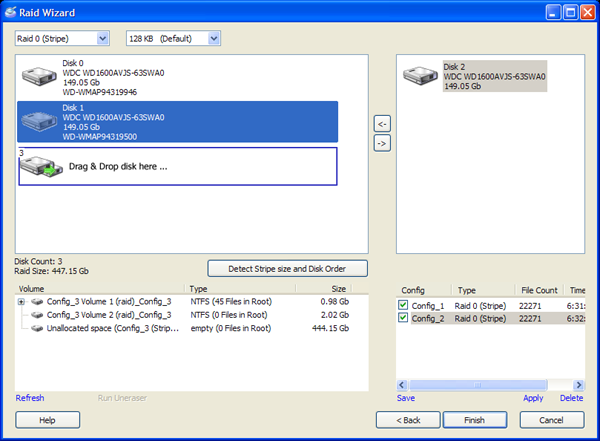
Raid Data Recovery Software: Getway Raid Recovery

Getway Raid Recovery File Name: Getway Raid Recovery
Version: 2.0
Publisher: Getway Recovery Ltd
Raid Supported: RAID 0, RAID 5, Raid 5E, Raid 5EE, Raid 6
Analyze Mode: Smart Mode,Manual Mode, User-defined Mode
Price: US $179.00

What can Getway Raid Recovery Do?
Getway Raid Recovery Software can help you recover data due to the following possible data loss situations: File Deletion; Accidental Array Format; MBR damage/ loss/ excursion; DBR damage; One or two RAID hard disk damage, etc. Getway Raid Recovery Software support “Smart Mode”, “Manual Mode” and ” User-defined Mode ” working modes.

Download:http://www.getwayrecovery.com/downloads/GetwayRaidRecovery.zip
Buy: http://www.getwayrecovery.com/purchase.html

Related Links:

  • Raid 5 Recovery Case Study
  • Raid 5EE Recovery Case Study
  • Find Out Raid Disk Order By 3 Steps
  • Screenshots Of Getway Raid Recovery Software
  • Online Manual Of Getway Raid Recovery Software

Raid Data Recovery Software: Getway Raid Recovery Read More »

Avoiding the assignment of duplicate MAC addresses to network interface devices (Part 2)

8. The method according to claim 7, further comprising the copy step of controlling to copy data stored in the temporary MAC address file to the MAC address file when an abnormality is determined to occur in the MAC address file.

9. An MAC address management method applied to an MAC address management apparatus having storage means for storing an MAC address file comprising a plurality of MAC addresses, comprising: the transmission step of controlling to read out one MAC address from the MAC address file and transmit the MAC address to a network interface device in order to assign an MAC address to the network interface device to be connected to a network; the reception step of controlling to receive an MAC address write completion notification indicating that the transmitted MAC address has been assigned to the network interface device; the rewrite step of controlling to rewrite MAC addresses of the MAC address file except for the transmitted MAC address, in a temporary MAC address file stored in an external storage device connected to the MAC address management apparatus, when said reception step receives the MAC address write completion notification; and the delete step of controlling to delete the transmitted MAC address from the MAC address file after said rewrite step rewrites the MAC addresses in the temporary MAC address file.

10. The method according to claim 9, further comprising the copy step of copying data stored in the temporary MAC address file of the external storage device to the MAC address file when an abnormality is determined to occur in the MAC address file.

11. A computer-readable storage medium which stores an MAC address management program for controlling an MAC address management apparatus having storage means for storing an MAC address file storing a plurality of MAC addresses and a temporary MAC address file, comprising codes of: the transmission step of controlling to read out one MAC address from the MAC address file and transmit the MAC address to a network interface device in order to assign an MAC address to the network interface device to be connected to a network; the reception step of controlling to receive an MAC address write completion notification indicating that the transmitted MAC address has been assigned to the network interface device; the rewrite step of controlling to rewrite, in the temporary MAC address file, MAC addresses of the MAC address file except for the transmitted MAC address, when said reception step receives the MAC address write completion notification; and the delete step of controlling to delete the transmitted MAC address from the MAC address file after said rewrite step rewrites the MAC addresses in the temporary MAC address file.

12. The medium according to claim 11, further comprising a code of the copy step of controlling to copy data stored in the temporary MAC address file to the MAC address file when an abnormality is determined to occur in the MAC address file.

13. A computer-readable storage medium which stores an MAC address management program for controlling an MAC address management apparatus having storage means for storing an MAC address file comprising a plurality of MAC addresses, comprising codes of: the transmission step of controlling to read out one MAC address from the MAC address file and transmit the MAC address to a network interface device in order to assign an MAC address to the network interface device to be connected to a network; the reception step of controlling to receive an MAC address write completion notification indicating that the transmitted MAC address has been assigned to the network interface device; the rewrite step of controlling to rewrite MAC addresses of the MAC address file except for the transmitted MAC address, in a temporary MAC address file stored in an external storage device connected to the MAC address management apparatus, when said reception step receives the MAC address write completion notification; and the delete step of controlling to delete the transmitted MAC address from the MAC address file after said rewrite step controls to rewrite the MAC addresses in the temporary MAC address file.

14. The medium according to claim 13, further comprising a code of the copy step of copying data stored in the temporary MAC address file of the external storage device to the MAC address file when an abnormality is determined to occur in the MAC address file.
Avoiding the assignment of duplicate MAC addresses to network interface devices (Part 2) Read More »

Backup VS Data Safety

data backup

Entry-level RAID controllers allow administrators to create secure multi-drive storage arrays to host a server’s operation system and vital data.

Many people don’t appreciate the value of backups and data safety until they experience what it means to lose data. Whether it is music, videos or photos at home or project files, customer data or other digital assets in the office, people don’t think of data safety – until it’s too late.

Imagine how you would feel if your vacation photos or videos of your wedding and daughter’s birth were destroyed? Such scenarios can lead to divorce court when your better half finds out. Or how would your boss react if his or her email and project files were lost due to a faulty hard drive? Your life might be spared, but you could still get fired.

No warranty in the world protects you from such an incident. Make no mistake about it: these things happen every day! If it’s your data, it’s your responsibility to protect it. And even if you’ve got a boss who eventually is responsible, he or she might still blame the loss of data on you. In the end, you can do no wrong by developing awareness of threats and paying attention to data safety.

Backup Vs. Data Safety

At this point we have to differentiate between a backup and basic data safety. Both mean something different and every business should rely on both regular backups and a safe data repository.

Performing a backup means copying files or complete system images from your hard drive onto another storage device, where the data is safe from hardware malfunction, viruses or accidental modification. If anything happens to your primary data, you can access the backup “snapshot” and restore whatever you need.

Any type of drive can be used for backups, but you should pay attention to data safety offered by the solution you pick. A hard drive, for example, cannot be considered a safe medium, as it uses mechanical components that may fail. A perfect backup is performed frequently, is written onto alternating media that are partially stored off-site and should be written onto media that is widely available.

When we talk about data safety, we specifically address the issue that every computer stores all key data on hard drives, and that every hard drive will eventually fail. The challenge is to create a storage subsystem that is unsusceptible to hard drive failures. This is where the five RAID storage controllers come into play.

AMCC, Areca, HighPoint, LSI Logic and Promise Technology offer PCI Express add-on cards that run up to four hard drives to create fast and secure storage array.

Backup VS Data Safety Read More »

Raid Data Recovery Software: RAID Reconstructor

RAID Reconstructor File Name: RAID Reconstructor
Version: 4.0
Publisher: Runtime Software
Raid Supported: RAID 0, RAID 5
Analyze Mode: Automatic mode
Price: US $99.00

What can DiskInternals Raid Recovery Do?
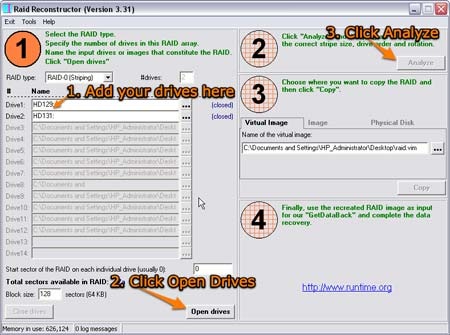
Even if you do not know the RAID parameters, such as start sector, drive order, block size and direction of rotation, RAID Reconstructor will analyze your drives and determine the correct values. You will then be able to create a copy of the reconstructed RAID in a virtual image (.vim), an image file (.img) or on a physical drive.

Download: http://www.runtime.org/raid.zip
Buy: http://www.runtime.org/buy_now.htm

Raid Data Recovery Software: RAID Reconstructor Read More »

Raid Data Recovery Software: DiskInternals Raid Recovery

diskinternalsraidrecoveryFile Name: DiskInternals Raid Recovery
Version: 1.5
Publisher: DiskInternals Research
Raid Supported: RAID 0, Raid 1, JBOD, RAID 5, 0+1, Dynamic Disks
Analyze Mode: Automatic and manual mode
Price:Personal License ($249.95 USD) Business License ($499.95 USD)

What can DiskInternals Raid Recovery Do?
• Recover damaged raid arrays
• Recover files from damaged disks
• Recover files from inaccessible drive
• Recover corrupt or damaged partition table.
• Restore disks after crash
• Unformat NTFS drives
• Recover files deleted by accident
• Recover Photos from the erased or formatted media
• Undelete files deleted from the Recycle Bin.

Download: http://www.diskinternals.com/download/Raid_Recovery.exe
Buy: http://www.diskinternals.com/order/raid.shtml

Raid Data Recovery Software: DiskInternals Raid Recovery Read More »

Avoiding the assignment of duplicate MAC addresses to network interface devices (Part 1)

1. An MAC address management apparatus for assigning an MAC address serving as an identification number unique to a network interface device to the network interface device to be connected to a network, comprising: MAC address storage means for storing an MAC address file and a temporary MAC address file, the MAC address file comprising a plurality of MAC addresses; transmission means for reading out one MAC address from the MAC address file and transmitting the MAC address to the network interface device in order to assign an MAC address to the network interface device; reception means for receiving an MAC address write completion notification indicating that the transmitted MAC address has been assigned to the network interface device; rewrite means for rewriting, in the temporary MAC address file, MAC addresses of the MAC address file except for the transmitted MAC address when said reception means receives the MAC address write completion notification; and delete means for deleting the transmitted MAC address from the MAC address file after said rewrite means rewrites the MAC addresses in the temporary MAC address file.

2. The apparatus according to claim 1, further comprising copy means for copying data stored in the temporary MAC address file to the MAC address file when an abnormality is determined to occur in the MAC address file.

3. An MAC address management apparatus for assigning an MAC address serving as an identification number unique to a network interface device to the network interface device to be connected to a network, comprising: MAC address storage means for storing an MAC address file comprising a plurality of MAC addresses; external storage means for controlling to store a temporary MAC address file in an external storage device connected to said MAC address management apparatus; transmission means for reading out one MAC address from the MAC address file and transmitting the MAC address to the network interface device in order to assign an MAC address to the network interface device; reception means for receiving an MAC address write completion notification indicating that the transmitted MAC address has been assigned to the network interface device; rewrite means for controlling to rewrite, in the temporary MAC address file of the external storage device, MAC addresses of the MAC address file except for the transmitted MAC address when said reception means receives the MAC address write completion notification; and delete means for deleting the transmitted MAC address from the MAC address file after said rewrite means controls to rewrite the MAC addresses in the temporary MAC address file.

4. The apparatus according to claim 3, further comprising copy means for copying data stored in the temporary MAC address file of the external storage device to the MAC address file when an abnormality is determined to occur in the MAC address file.

5. An MAC address management system comprising a network interface device to be connected to a network, and an MAC address management apparatus for assigning an MAC address serving as an identification number unique to the network interface device, said MAC address management apparatus having: MAC address storage means for storing an MAC address file and a temporary MAC address file, the MAC address file comprising a plurality of MAC addresses; transmission means for reading out one MAC address from the MAC address file and transmitting the MAC address to said network interface device in order to assign an MAC address to said network interface device; reception means for receiving an MAC address write completion notification indicating that the transmitted MAC address has been assigned to said network interface device; rewrite means for rewriting, in the temporary MAC address file, MAC addresses of the MAC address file except for the transmitted MAC address when said reception means receives the MAC address write completion notification; and delete means for deleting the transmitted MAC address from the MAC address file after said rewrite means rewrites the MAC address in the temporary MAC address file, and said network interface device having: MAC address reception means for receiving the assigned MAC address from said MAC address management apparatus; write/storage means for writing and storing the MAC address; and write completion notification transmission means for transmitting the MAC address write completion notification upon completion of a write of the MAC address.

6. An MAC address management system comprising a network interface device to be connected to a network, and an MAC address management apparatus for assigning an MAC address serving as an identification number unique to the network interface device, said MAC address management apparatus having: MAC address storage means for storing an MAC address file comprising a plurality of MAC addresses; external storage means for controlling to store a temporary MAC address file in an external storage device connected to said MAC address management apparatus; transmission means for reading out one MAC address from the MAC address file and transmitting the MAC address to the network interface device in order to assign an MAC address to said network interface device; reception means for receiving an MAC address write completion notification indicating that the transmitted MAC address has been assigned to said network interface device; rewrite means for controlling to rewrite, in the temporary MAC address file of the external storage device, MAC addresses of the MAC address file except for the transmitted MAC address when said reception means receives the MAC address write completion notification; and delete means for deleting the transmitted MAC address from the MAC address file after said rewrite means controls to rewrite the MAC addresses in the temporary MAC address file, and said network interface device having: MAC address reception means for receiving the assigned MAC address from said MAC address management apparatus; write/storage means for writing and storing the MAC address; and write completion notification transmission means for transmitting the MAC address write completion notification upon completion of a write of the MAC address.

7. An MAC address management method applied to an MAC address management apparatus having storage means for storing an MAC address file storing a plurality of MAC addresses and a temporary MAC address file, comprising: the transmission step of controlling to read out one MAC address from the MAC address file and transmit the MAC address to a network interface device in order to assign an MAC address to the network interface device to be connected to a network; the reception step of controlling to receive an MAC address write completion notification indicating that the transmitted MAC address has been assigned to the network interface device; the rewrite step of controlling to rewrite, in the temporary MAC address file, MAC addresses of the MAC address file except for the transmitted MAC address when said reception step receives the MAC address write completion notification; and the delete step of controlling to delete the transmitted MAC address from the MAC address file after said rewrite step rewrites the MAC addresses in the temporary MAC address file.

Avoiding the assignment of duplicate MAC addresses to network interface devices (Part 1) Read More »

Get Your Computer in Gear — Avoid Data Recovery

Avoid Data RecoveryFor many of us, computers are a lot like cars—we don’t absolutely need them, but they can make life a great deal more enjoyable and convenient, we get to do and see things by using them that we probably wouldn’t otherwise see and they both require regular maintenance to keep them in good working order. This is never more true than when talking about avoiding data recovery.


Avoid the Crash

Just like with motor vehicles, the best way to steer clear of data recovery and keep your computer in tip-top condition is to keep it from crashing. When your computer freezes up or crashes the potential for data loss increases exponentially. The following are just a few basic measures you can take to avoid a disastrous system crash:


  • Utilize Basic Disk Utilities – You have several tools built in to your operating system (defragmentation, disk cleanup, error checking) designed to help keep your computer running at maximum capacity. Just like changing the oil in your car, performing these small tasks every few months can make a world of difference.
  • Run System Updates – Keeping your computer’s operating system current with the latest updates is key for optimal performance. If you’re a Windows user, ignoring update prompts is like ignoring low and worn tires; the longer you go without addressing them, the greater your chances increase for a problem-and hence the possibility of lost data.
  • Protect Against Viruses and Spyware – Computer viruses are designed for destruction and some spyware, like adware, can cause your system to lock up-posing a high risk for data loss. Like potholes and other unseen road hazards, viruses and spyware often appear before it’s too late. By investing in some high-quality anti-virus software and anti-spyware software, you can avoid these dangers altogether.
  • Use a Surge Protector/Power Backup – Power surges and power outages are a fact of life; both can harm your computer and cause data loss. Double-check your power strip and make sure it is also a surge protector.

    Also, if you use your computer for work or some other important role, consider purchasing a power ba ckup unit. Although they cost a few bucks, power backups, like a spare tire, can keep your computer going long enough for you to avoid a major data loss situation, which in itself can be priceless.

  • Give Your Computer the Royal Treatment – Just as you’d baby an expensive car, your computer also needs tender loving care. Avoid jostling your computer when you need to move it-a good rule of thumb is to handle it as if were filled with champagne glasses.

    Avoid exposing your computer to direct sunlight and to extreme temperatures-heat is your computer’s worst enemy. You’ll also want to keep your computer in a place where the air is not too dry, as dry air tends to promote static electricity.

    Lastly, keep the inside of your PC case clean. To do this, make sure your computer case is not sitting directly on the floor. Dirt from carpets and dust bunnies are easily sucked into your computer’s case through cooling fans, settling on circuit boards and other major components. Also, every six months or so you (or someone experienced with computers) should open up your case and clean it out with a small handheld vacuum or compressed air.

By following these steps, you can avoid data recovery and keep your computer in gear and purring like a kitten as you speed down the information superhighway.

Get Your Computer in Gear — Avoid Data Recovery Read More »

RAID Recovery – Don’t Increase the Level of Difficulty

RAID Recovery More and more enthusiast users encounter the destroyed RAID arrays. Generally, data recovery from such a RAID array is possible, but keep in mind that the effort increases disproportionately. First of all, data has to be copied from a RAID drive onto a server, and the data set has to be put back together. The distribution of data into smaller blocks across one or more drives makes RAID 0 the worst possible type to recover. Increasing performance doesn’t necessarily do your data any good here! If a drive is completely defective, only small files, which ended up on only one of the RAID drives (despite the RAID stripe set), can be recovered (at 64 kB stripe size or smaller). RAID 5 offers parity data, which can be used for recovery as well.

RAID data configuration is almost always proprietary, since all RAID manufacturers set up the internals of their arrays in different ways. However, they do not disclose this information, so recovering from a RAID array failure requires years of experience. Where does one find parity bits of a RAID 5, before or after the payload? Will the arrangement of data and parity stay the same or will it cycle? This knowledge is what you are paying for.

Instead of accessing drives on a controller level, the file system level (most likely NTFS) is used, as logical drives will provide the basis for working on a RAID image. This allows the recovery specialist to put together bits and bytes after a successful recovery using special software. The recovery of known data formats is an important approach in order to reach towards a complete data recovery. Take a JPEG file for example – will you be able to recognize a picture after recovery? Or will you be able to open Word.exe, which is found on almost every office system? The selected file should be as large as possible, so it was distributed across all drives and you can know for sure that its recovery was successful.

Two dead hard drives in a RAID 5 are more likely to be restored than two single platters, since RAID still provides parity data.

RAID Recovery – Don’t Increase the Level of Difficulty Read More »

Hard Drive Damage Types

Hard Disk Repair

Data loss might also occur in small drives such as the Hitachi MicroDrive. Ontrack was unable to recover any data in the above right example.

Damage to a drive’s circuit board or defects of the drive heads occur fairly often. In both cases, to access hard drive data, a data recovery specialist will substitute the defective component with a working one. In the best case scenario you regain 100% of your data.

A so called head crash – where a write/read head physically hits the magnetic platter – is much more severe. Simply hitting your drive might cause contact, since the distance between the head and surface of drives is minimal nowadays. It is almost always safe to say that a damaged magnetized surface causes the loss of saved bits. The head might even repeatedly get caught at the area of defect, carrying off more material with each additional contact. This material will be distributed inside the drive, causing scratches or other damage. There is nothing a customer can do in case of an intense head crash, because the head is simply unable to move across the defective area any more.

Overvoltage on write/read heads causing the permanent destruction of data areas or magnetization will also result in irreversible data loss. This means the physical destruction of memory sectors, not the simple deletion of saved bits. Depending on the drive, the data recovery specialist might be able to recover some data. Recovering data from defect Hitachi drives is usually impossible, since the manufacturer does not provide any kind of firmware information. Various other products allow at least reading data from other platters.

Strange but true: even internal imbalances can cause trouble. Irregular data platter rotation due to broken bearings will result in unwanted track changes of which the drive is not aware; the result is sometimes total data hodgepodge. Bearing failure is usually the result of improper handling during transportation of the drive. The data recovery specialist will often be able to recover saved data by balancing the drive (slightly shifting and centrally rearranging the platters).

Logical mistakes do not require processing in the clean room. Usually, those mistakes are accidental misuse or deletion of files, where the drive itself has no malfunctions. Even if the problem lies within the drive, it might be a simple defective sector and nothing more severe. Every drive has defective sectors: a primary list will carry a list of bad sectors from the factory; the secondary, so called growing list, will be updated in the course of operation if more sectors become useless. This occurs rather often and is normal, but if your hard drive S.M.A.R.T. feature tells you that you better save some data fast, you’re in trouble. This often means that the growing list is full and an above-average number of sectors are dying.

Now let’s talk about an irreversible defect. Your hard drive will die if fire or another heat source heats it up beyond the Curie temperature of the magnetic material of your drive; this cases the magnetization to be neutralized completely. The Curie temperature depends on the material used in a hard drive; magneto-optical devices use with Curie point principle on purpose (heating via laser), but hard drives do not.

A user who tries to solve issues by himself can make things worse, this is the biggest problem with data recovery. According to statistics, Europeans are worse than Americans in trying to solve problems on their own. Situations also turn bad if, for example, administrators are afraid of their bosses’ reactions. Once, someone even sent a floppy drive instead of the defective hard drive – this is a clear indication of pressure placed on the person involved.

Hard Drive Damage Types Read More »

Scroll to Top