

How you should deal with the hard disk which contains important data

If you have problems with a hard disk which contains important (valuable) data:

* any kind of manipulation with the hard disk or with software could hinder data retrieval or could cause an enormous increase of the retrieval costs.

* do not use any software, even if some guys (internet) told you to do so

* do not run chkdsk or defragmentation, even if you are told to do so

* do not open a hard disk if you don’t have the knowledge, training and the tools (even then you may expect to lose the data)

* contact a (local) DR company; supply them with complete information

* perhaps some data recovery forum could guide you to find the right Data Recovery company

Four solutions for you:
1. you are the typical user who knows all better than a pro – then try DIY – it’s your data

2. you store your hdd in a safe place for some time – until you got the money

3. you put the hdd into the garbage – you will stay poor and won’t get enough money

4. you look for a pro – even here in the data recovery forum – get an estimate on “money for data basis”
Read More

Disk disconnection system automatically restarts server data recovery

Case:Dell Dell PowerEdge 2900 server, hard disk information: five 146GB SCSI hard disks, operating system: Windows2003 Server, file system: NTFS During the use of No. 1 disk, the system automatically restarts, the system cannot start.state Solution:Customers are well -known enterprises in the world who require the customer to solve the problem on the spot.The engineer…

Read More

Seagate File Recovery Software

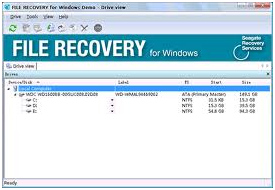
Seagate File Recovery Software Seagate File Recovery is an advanced, easy to use, data recovery and undelete software. It helps you to recover your lost files from local hard disks and other removable media.

Consider using Seagate File Recovery if:

  • You need a fast and affordable data recovery solution.
  • You have accidentally formatted your hard drive.
  • You have experienced data loss due to software malfunctions, viruses or have deleted important files or directories from your Recycle Bin or Trash Bin.

In most cases when files are lost due to crashes, viruses, or other system failures, they can be recovered without having to send your drive to a drive recovery lab. Run Seagate File Recovery as the first step in recovering your lost data.

Seagate File Recovery Main Features:

  • Free trial – try to recover your data before you pay
    You can preview your disc and file content in a simple hexadecimal viewer which tells you if a successful recovery is possible. You’ll know in advance exactly which files can be recovered before you make a purchase.
  • Available for PC and Mac
  • Supports file systems used by Windows and Mac OS (NTFS, FAT16, FAT32, HFS and HFS+)
  • Works on local hard disks and removable media (USB drive, flash memory, etc.)
  • Recovers compressed files
  • File preview (most graphic file types can be previewed to estimate recovery chances)

System Requirements:

Macintosh:

  • An Intel, PowerPC G5, or PowerPC G4 processor
  • Administrator’s rights to run the program
  • At least 512MB of RAM, a mouse, and enough disk space for recovered files, image files, etc.
  • Mac OS X 10.4 or greater

Windows:

  • An Intel or other PC processor
  • Administrator’s rights to run the program
  • At least 512MB of RAM, a mouse, and enough disk space for recovered files, image files, etc.
  • Windows 9x, ME, NT, 2000, XP, Vista, 7

Seagate File Recovery Free Download:

Mac users: Download Seagate File Recovery

Click the “Download Seagate File Recovery” link to download the .dmg file. When the window opens, double-click “Seagate File Recovery.pkg” and follow the installation instructions.

Windows users: Download Seagate File Recovery

Click the “Download Seagate File Recovery” link to download Seagate File Recovery. When the dialogue box pops up, choose “Run” and follow the installation instructions.

Read More

How to terminate A SCSI hard drive?

SCSI Hard Drive With today’s high speed hard drives combined with long cable runs, only use high quality ‘twisted pair’ cable and external active (cable end) terminators. Active termination boosts data integrity and reliability. With active termination, a 110-ohm resistor on each signal line connects to a voltage regulator. The regulator ensures signal quality over the entire length of the SCSI bus. This reduces under and overshoot signals typically found on passive resistor termination schemes.

Passive termination draws its electrical power from the SCSI host adapter. A 220/330-ohm resistor is used to provide the necessary impedance to prevent the data signal from ‘reflecting’ back. Fluctuations in termination power (or failing cables) can show up as error symptoms in the drive, yet do not originate there. In general we recommend you enable SCSI Termination Power if available.

  • Maxtor (and Quantum) SCSI disk drives have either onboard active termination (jumpers). Older drives (circa 1994) enable active termination by two removable (10-pin) termination resistors. Some use passive termination with three removable (8-pin) terminating resistor packs. Seagate does not supply terminating resistor packs for older drives.
  • SCSI Single Ended Hard drives using active onboard termination have a jumper setting labeled ‘TE’ to control the termination setting.
  • All Quantum Single-Ended SCSI drives ship defaulted to provide SCSI Termination Enable.
  • SCSI LVD(low voltage differential) drives do not supply SCSI Termination Enable. Refer to the drive configuration guides for proper setting of this feature.Notes:
    1. Some Quantum SCSI disk drives are available in both Single-Ended and LVD versions. Specifically, the Atlas III and Viking II drives offer both types of termination. Atlas III Narrow (50 pin) drives are Single-Ended, while the Wide (68 pin) and SCA (80 pin) versions are LVD models. Viking II Wide drives are available in both SE and LVD models. The part number for an SE drive will contain “W”, and the LVD will contain a “L” (e.g. PX09L011 would be LVD). All Viking II SCA drives are LVD models. All fifty pin Quantum SCSI drives are all SCSI Single-Ended.
    2. LVD cables and SCSI bus terminators can be purchased from TMC (The Mate Co.) or a local retailer.
    3. Use due diligence when installing or adding SCSI devices. Unlike most electronic devices, SCSI may operate if improperly terminated, but performance and reliability will be seriously at risk.
Read More