

Top 3 Best Free Antivirus Softwares Download

Top 3 Best Free AntiVirus Softwares Download In today’s world having anti-virus software is not optional.  A good anti-virus software will perform real-time and on-demand virus (See my another post: Top 10 worst computer viruses) checks on your system, and warn you if it detects a virus.  The program should also provide a way for you to update its virus definitions, or signatures; so that your virus protection will be current (new viruses are discovered all the time).  It is important that you keep your virus definitions as current as possible.

Antivirus software provides an essential layer of protection from a multitude of virus, trojan, worm, spyware, adware, dialer, keylogger and rootkit infections. Traditionally antivirus softwares just detected virus and spyware removers just detected spyware but nowadays the boundaries between antivirus and spyware removers are unclear. Most current antivirus have at least reasonably good detection rates of all forms of malware.

Pay for antivirus softwares from the biggies Symantec/Norton or Mcafee and it’ll cost roughly £50 per year. Yet you can also take advantage of a variety of decent free softwares, I looked at several free antivirus softwares which are vital in protecting your computer from virus threats and other types of malware.

1. Avira AntiVir Personal – FREE Antivirus
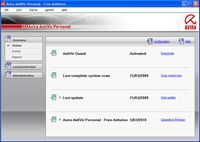
Best Free AntiVirus Softwares: Avira AntiVir Personal Avira AntiVir Personal is a comprehensive, easy to use antivirus software, designed to offer reliable free of charge virus protection to home-users, for personal use only, and is not for business or commercial use. Available for Windows or UNIX.

// The best free antivirus program, outstanding detection of malware, light on resources
// Quite a few false positives, occasional update problems, advertisements with each update, no e-mail scanning

Read more about Avira AntiVir Personal
Free Download Avira Antivir Personal From Download.com

2. Avast! Home Edition
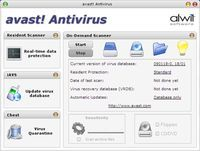
Best Free AntiVirus Softwares: Avast Home Edition Free Antivirus represents the best FREE antivirus protection currently available on the market. This edition is FREE OF CHARGE for non-commercial & home use only.

// Good for silent security, full real-time capabilities, fairly light on resources
// Detection rates lower than AntiVir, many false positives, confusing interface

Read more about Avast! Home Edition
Free Download Avast! Home Edition

3. AVG Anti-Virus Free Edition
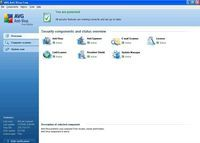
Best Free AntiVirus Softwares: AVG Anti-Virus Free Edition AVG Anti-Virus Free Edition download and installation is only available for single computer use for home and non commercial use.

// Good for silent security, least amount of false positives, e-mail scanning capabilities
// Detection rates lower than AntiVir, limited antirootkit, heavy on resources, installs toolbar by default, advertisements

Read more about AVG Anti-Virus Free Edition
Free Download AVG Anti-Virus Free Edition From Download.com

These three free antivirus softwares are excellent free antivirus programs that provides a real alternative to the major commerical antivirus software.

You can increase your protection if you run on demand scans with another antivirus. On demand scans can be run regularly to check for virus, trojan, worm, spyware, adware, keylogger, rootkit and other malware that may have been missed by your main antivirus scanner. If you have a good preventive security strategy in place, however, the extra protection an on demand antivius scanner offers is minimal.

You can also use one of the free antivirus programs mentioned above as an on-demand antivirus scanner. One advantage is that you can set scheduled scans if you wish.

Read More

Hard Drive Damage Types

Hard Disk Repair

Data loss might also occur in small drives such as the Hitachi MicroDrive. Ontrack was unable to recover any data in the above right example.

Damage to a drive’s circuit board or defects of the drive heads occur fairly often. In both cases, to access hard drive data, a data recovery specialist will substitute the defective component with a working one. In the best case scenario you regain 100% of your data.

A so called head crash – where a write/read head physically hits the magnetic platter – is much more severe. Simply hitting your drive might cause contact, since the distance between the head and surface of drives is minimal nowadays. It is almost always safe to say that a damaged magnetized surface causes the loss of saved bits. The head might even repeatedly get caught at the area of defect, carrying off more material with each additional contact. This material will be distributed inside the drive, causing scratches or other damage. There is nothing a customer can do in case of an intense head crash, because the head is simply unable to move across the defective area any more.

Overvoltage on write/read heads causing the permanent destruction of data areas or magnetization will also result in irreversible data loss. This means the physical destruction of memory sectors, not the simple deletion of saved bits. Depending on the drive, the data recovery specialist might be able to recover some data. Recovering data from defect Hitachi drives is usually impossible, since the manufacturer does not provide any kind of firmware information. Various other products allow at least reading data from other platters.

Strange but true: even internal imbalances can cause trouble. Irregular data platter rotation due to broken bearings will result in unwanted track changes of which the drive is not aware; the result is sometimes total data hodgepodge. Bearing failure is usually the result of improper handling during transportation of the drive. The data recovery specialist will often be able to recover saved data by balancing the drive (slightly shifting and centrally rearranging the platters).

Logical mistakes do not require processing in the clean room. Usually, those mistakes are accidental misuse or deletion of files, where the drive itself has no malfunctions. Even if the problem lies within the drive, it might be a simple defective sector and nothing more severe. Every drive has defective sectors: a primary list will carry a list of bad sectors from the factory; the secondary, so called growing list, will be updated in the course of operation if more sectors become useless. This occurs rather often and is normal, but if your hard drive S.M.A.R.T. feature tells you that you better save some data fast, you’re in trouble. This often means that the growing list is full and an above-average number of sectors are dying.

Now let’s talk about an irreversible defect. Your hard drive will die if fire or another heat source heats it up beyond the Curie temperature of the magnetic material of your drive; this cases the magnetization to be neutralized completely. The Curie temperature depends on the material used in a hard drive; magneto-optical devices use with Curie point principle on purpose (heating via laser), but hard drives do not.

A user who tries to solve issues by himself can make things worse, this is the biggest problem with data recovery. According to statistics, Europeans are worse than Americans in trying to solve problems on their own. Situations also turn bad if, for example, administrators are afraid of their bosses’ reactions. Once, someone even sent a floppy drive instead of the defective hard drive – this is a clear indication of pressure placed on the person involved.

Read More

Sustained Data Transfer Rates For SCSI Hard Drive

Data Transfer Rate Many factors contribute to disk drive performance. One useful measure is data throughput rate or sustained transfer rate. In general, higher data transfer rates from the disk to the computer lead to improved system performance. Data transfer rates are often quoted within the “Specifications” section of the product manuals. Yet it is important to realize that controller overhead, cable quality and termination issues (on older SCSI products) are major factors that affect sustained data transfer rates.

The following specifications are from an older SCSI hard drive. These numbers are used for example, but the same calculations apply to ATA drives. Notice that the internal data transfer rate is listed as sustained, while the external data transfer rate is listed as burst.

INTERNAL DATA TRANSFER RATE (Megabits/sec.)____194 to 340 (sustained)

EXTERNAL DATA TRANSFER RATE – Buffer to SCSI controller (Megabytes/Sec)___Ultra160/m 160 MB/Sec. (burst)

As there are 8 bits to a byte, and 8 Megabits (Mb) to a Megabyte (MB), we divide 194 Mb’s/sec. by 8 to get 24.25 Megabytes/sec. The drive should sustain a transfer rate of 24.25 MB/sec. from the drive platters to the read/write heads, even under the worst possible conditions. The lower number of the range measures data transfer from the inner diameter of the drive platters, where there are the least amount of sectors per track. The higher number of the range measures data transfer from the outer diameter of the drive platters, where the number of sectors is higher per track. Using the higher number of the range (340), the result is 42.5 MB/Sec.

We then have a data rate in Megabytes, of 24.25 to 42.5 MB/sec. Since this is an ‘internal’ data transfer rate, consider it as the raw data rate. Some of this internal rate is lost when translating to the user data rate, because this raw data includes coding overhead that adds length to the user’s data. Add a 25% allowance (more for some drives) for system overhead. In the case of this older SCSI drive, the overhead is approximately 30%. The sustained (user) data rates are actually listed at 17 to 29 MB/Sec. For drives where only the internal data rate is listed, the formula ([Internal rate in Mb/8] x .75 = Approx. data rate in MB ) is used to develop an approximate user data rate.

Most of the time you won’t be getting the lowest sustained transfer performance or the highest, so we should find an average. Using the average of the sustained transfer rates ([17+29]/2=23), you receive an expected average sustained data transfer rate of 23 Mbytes/sec.

It’s very important to realize how these numbers are presented. The internal data rate shown here is expressed in Megabits/sec, the user data rate is written in Megabytes/sec. Certainly, we can tell you, assuming your SCSI (or ATA) subsystem is configured correctly, what your expected sustained transfer rates should be. In this case, a sustained transfer rate of 17 MBytes/sec. to 29MBytes/sec. is acceptable. Your transfer rates may be higher–or lower.

If your sustained user data rates are lower than expected, this indicates a bottleneck in the system. A failing device, improper configuration, and termination issues are leading causes for poor performance. Be aware that transfer rates can be reduced by several issues–poor quality cables, improper cable routing (causes signal reflection), SCSI Single Ended devices on an LVD SCSI bus, host limitations and more.

While you might expect to see 320 MB/sec. transfer from your SCSI Ultra 320 devices, or 300 MB/sec. from a SATA drive, know that these specifications are the burst rate–what the drive’s cache memory buffer can process under the absolute perfect combination of drive, cable, and hard drive controller conditions. Even ambient temperature affects transfer rates. This is not the sustained transfer rate of the drive. It’s what the input/output subsystem is capable of handling. For hard drives, sustained transfer rates are an important benchmark. Only when combining several high-speed drives together (in a performance RAID array), does one approach ‘bus saturation’ speeds.

Read More