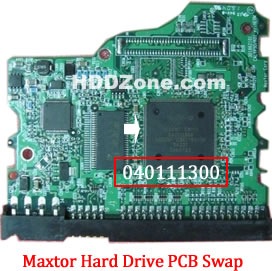
Maxtor Calypso III PCB Replacement

For the following Maxtor hard drive models: Fireball 3, DiamondMax 16, DiamondMax Plus 8, DiamondMax Plus 9, Diamond Max 10 and all MaxLine products there is also a GTLA Number on the model (next to barcode on the bottom of the drive). Format 1Y222J2223322. 1, 2 and 3 stand for numbers, Y and J for letters.

The numbers 1 and 3 as well as the letter Y need to be identical to be able to replace the PCB on these drives.

This number can be found on the large sticker on the top of the drive.

Unfortunately we can not give you any more information than this. Any of your DiamondMax Plus 9 drives could possibly have a matching PCB, however it is most likely to be an older one as the drive in question is almost 3 years old.

This mean that the board and its firmware are disk size indipendent and so if you have a 120 / 160 and so on defective board, you can replace it with a 60 / 80 or what you want board.

1. Maxtor PCB Replacement Guide:

For Maxtor PCB, just need the donor PCB has the same Main Controller IC as yours.

maxtor-hard-drive-pcb-swap

* Maxtor Hard Drive PCB Swap

2. Before Maxtor PCB Replacement you should know:

1. Most PCB’s BIOS chip(ROM Chip) store the unique information. We need change the BIOS form original PCB to replacement PCB, in order to make the replacement PCB compatible with the HDD.  The 8pins (4 pins on each sides) with 25P05VP、25P10VP、25F512、25F1024、25F1024AN、SST25VF512、SST25VF010, etc. are the BIOS Chip.

Tips: Most of the TV/Phone Repair Shop can offer these services for just $5-%20

3. Maxtor replacement PCB online supplier:

  • https://www.hddzone.com/maxtor-diamondmax-21-pcb-c-13.html
  • https://www.hddzone.com/maxtor-diamondmax-16-pcb-c-16.html
  • https://www.hddzone.com/maxtor-diamondmax-10-pcb-c-15.html
  • https://www.hddzone.com/maxtor-diamondmax-plus-9-pcb-c-14.html
  • https://www.hddzone.com/maxtor-pcb-others-c-23.html

Note: These are just the PCB circuit boards, not he whole hard drives.

Read More

Samsung Introduces High-Capacity 250 Gigabyte 1.8" Hard Drives

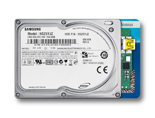
Samsung 250GB 1.8 Hard Drive Samsung announced its 250 Gigabyte (GB) 1.8 inch hard disk drive, the Spinpoint N3U which incorporates a native USB controller on its printed circuit board. This optimized design results in a smaller foot print, less power consumption and optimized performance, which is ideal for portable external storage devices. The Spinpoint N3U stores up to 125 Gigabytes per platter for a total 250GB data storage capacity.

Most external hard drives require the addition of a bridge circuit board to convert the hard drive’s PATA interface into a USB interface. Samsung’s N3U drive, however, uses a native USB interface and as such does not require this bridge board.

“The new high-capacity 1.8″ 250GB drive enhances Samsung’s product offerings and is ideal for consumers who require a small form factor, high capacity data storage, It is easy to carry around and it is designed to withstand a free fall drop of up to 50 centimeters and be resistant to a maximum shock incident of up to 1500G.” said Choel-Hee Lee, vice president of marketing Storage System Division, Samsung Electronics.

As a native USB interface device, the Spinpoint N3U eliminates possible points of failure due to loose cable connections and optimizes performance by eliminating the interrupt service time for the bridge board to convert PATA to USB signals. And the N3U 1.8″ drive also consumes about 40 percent less power than a 2.5″ hard drive of an equivalent capacity.

Samsung now ships industry leading areal density levels for all of its hard disk form factor products with up to 1.5 Terabyte for 3.5″ drives, 500GB for 2.5″ drives and 250GB for 1.8″ drives. The Spinpoint N3U comes in 120-, 160-, 200- and 250-GB capacities, the disk rotation speed is 3600rpm, and it supports a USB 2.0 interface. The drives are equipped with an 8MB cache memory. Initial shipments to OEMs are scheduled from mid-July with a MSRP at $199.00.

Read More