Maxtor & Quantum ATA Hard Disk Drive Jumper Settings

If your drive came with two jumpers and your setting only calls for one,
you can place the extra jumper horizontally accross the top row for storage.

Maxtor CrystalMax 1080
Maxtor Fireball 531DX Ultra ATA 100
Maxtor DiamondMax 16
Maxtor DiamondMax 1750 Ultra ATA 33
Maxtor DiamondMax 1750A Ultra ATA
Maxtor DiamondMax 17 VL Ultra ATA 66
Maxtor DiamondMax 20 VL Ultra ATA 66
Maxtor DiamondMax 2160 Ultra ATA
Maxtor DiamondMax 2880 Ultra ATA
Maxtor DiamondMax 30 VL Ultra ATA 100
Maxtor DiamondMax 30 VL Ultra ATA 66
Maxtor DiamondMax 3400 Ultra ATA
Maxtor DiamondMax 36 ATA 66
Maxtor DiamondMax 40 ATA 66
Maxtor DiamondMax 40 VL Ultra ATA 100
Maxtor DiamondMax 4320 Ultra ATA
Maxtor DiamondMax 536DX
Maxtor DiamondMax 60 ATA 100
Maxtor DiamondMax 60 ATA 66
Maxtor DiamondMax 6800 Ultra ATA
Maxtor DiamondMax 80 ATA 100
Maxtor DiamondMax D540X-4D
Maxtor DiamondMax D540X-4G
Maxtor DiamondMax Plus 2500 Ultra ATA
Maxtor DiamondMax Plus 40 Ultra ATA 100
Maxtor DiamondMax Plus 40 Ultra ATA 66
Maxtor DiamondMax Plus 45 Ultra ATA 100
Maxtor DiamondMax Plus 5120 Ultra ATA 33
Maxtor DiamondMax Plus 5120 Ultra ATA 66
Maxtor DiamondMax Plus 60 Ultra ATA 100
Maxtor DiamondMax Plus 6800 Ultra ATA 66
Maxtor DiamondMax Ultra ATA

Maxtor & Quantum ATA Hard Disk Drive Jumper Settings

Maxtor DiamondMax Plus 8
Maxtor DiamondMax D540X_4K
Maxtor DiamondMax D540X_4L
Maxtor DiamondMax D740X

Maxtor Fireball 541DX
Maxtor Fireball LCT20

Quantum Fireball CR
Quantum Fireball CX
Quantum Fireball EL
Quantum Fireball EX
Quantum Fireball LCT08
Quantum Fireball LCT10
Quantum Fireball LCT15
Quantum Fireball Plus KA
Quantum Fireball Plus KX
Quantum Fireball SE
Quantum Fireball ST
Quantum Fireball LM
Quantum Fireball AS

Maxtor & Quantum ATA Hard Disk Drive Jumper Settings

Maxtor DiamondMax Plus 9
Maxtor DiamondMax 10
Maxtor DiamondMax 11
Maxtor DiamondMax 17

Maxtor & Quantum ATA Hard Disk Drive Jumper Settings

Maxtor DiamondMax 20Maxtor DiamondMax 21

Maxtor & Quantum ATA Hard Disk Drive Jumper Settings

Read More

DELL server data recovery succeeded

Case:A Delle09s server in Binjiang X cannot enter the system, and RAID information is wrong.Customers are according to the RAID1 dual hard disk array.The hard disk model is WDC WD1002FBYS-18W8B1.The capacity is 1TB.Customer financial data storage server.Customers immediately contact data recovery through Dell customers. Solution:The Delle09S server data recovery engineer preliminarily inspected the RAID1 with…

Read More

3 Ways To Determine Seagate Hard Disk Model And Serial Number

To identify your seagate hard disk drive, retrieve the model number, serial number and firmware revision without removing your drive. There are 3 methods:

  1. Seagate DriveDetect.exe method (recommended)Click here to download Drive Detect

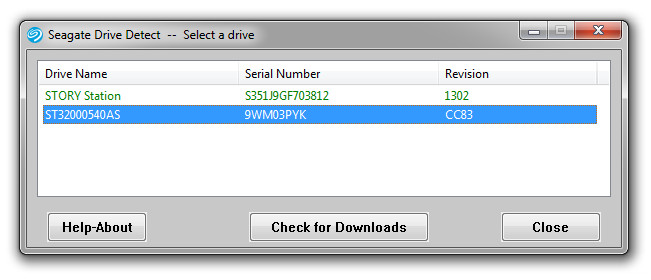
    When running Drive Detect you will see a screen like this.  Look for the drives that are attached:

    Seagate Mode Serial Number

    In the example above the Drive Name is the same as the Model: ST31500341AS, the serial number is 9VS00J20 and the firmware revision is SD1A.

  2. Device Manager Method :

    Use Microsoft Windows Device Manager to see the model numbers of your disk drive.

    • Choose Start | Run | type:  devmgmt.msc
    • Click Ok.
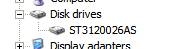
    • Expand the Disk Drive branch to see the model numbers:
      Seagate Model Numbers
  3. Seatools for Windows Method:Download SeaTools for Windows which displays all of the required information.
Read More

Hard Drive Firmware Update/Recover by Yourself

firmware update We know that up to 60% of hard disk drive failures are caused by firmware corruption. Just a little damage is enough to render a hard drive totally unusable. In such cases hard drive becomes inaccessible and sometimes can completely disappear from the system.

“For example, a hard drive can lose its parameters such as device model number and capacity. When it happens, there is no access to partitions and files. In most cases the problem is caused by firmware damage.”

What is firmware?
Firmware is software which is embedded in a piece of hardware. You can think of firmware simply as “software for hardware”.

Where the firmware stores?
Modern disks normally have their firmware codes located on data platters and also the PCB board.

Why firmware is so important?
Without the firmware, no communication will be possible between the PC system and the hard disk. If the firmware area is corrupted, the drive will appear to have failed even all the electrical and mechanical components are still fully functional.

The symptoms of firmware corruption:
1. Drive powers up, but is not recognized /defected by the computer
2. Drive powers up, but is recognized wrongly, sometimes with nonsensical characters, manufacture alias (Such as N40p for Maxtor 6Y and etc ;);
3. Drive freezes during booting up;
4. Drive detect in wrong Capacity, such as 80 GB detected as 1Mb;
5. S.M.A.R.T error;
6. Drive is locked by human error; such as Hitachi hard drive by a drop; it is a self protection method of HDD design;
7. Drive clicking ;( it can be caused by firmware too, the heads try to read the SA on platters and can not positing)

How to update/recover hard drive firmware by yourself?

In fact, in many drives the firmware can be updated under software control, very much the same way that a flash BIOS works. Unlike the system BIOS, this is only very rarely done, when a particular sort of problem exists with the firmware logic that can be fixed without requiring a physical hardware change. You can check the drive manufacturer’s web site for more details. For Example: Seagate Barracuda 7200.11 Command Queuing

If you don’t want to spend a lot of money on the expensive data recovery tools, such as PC3000 or HD Doctor Suite, how do you recover hard drive firmware corruption? Here are some free firmware recover tools , hope them can help you:

A-FF Repair Station

  • Diagnoses the Firmware Area and hard drive mechanics and displays a short summary of hard drive’s health;
  • Reads the Firmware Area;
  • Extracts and analyzes all firmware structures;
  • Rebuilds damaged parts and writes the firmware back to the drive.

All the operation is absolutely safe to the data (partitions and files) and takes no more than 20 minutes.

Maxtor Firmware Repair 2.0
Aiming at solution for typical firmware malfunction of Maxtor 541DX (2B020H1 2B010H1), which may manifest itself as follows:

  • HDD is not identified or identified by its factory alias “Maxtor Athena”;
  • HDD starts the motor and then hangs.

Seagate Firmware Repair 5.0
Aiming at one-key solution towards typical firmware malfunction of Seagate Barracuda VII drives, which may manifest itself as follows:

  • HDD is not identified or identified incorrectly;
  • HDD starts the motor and then hangs.

Please share your ideas here!

Read More