What is termination? How to set it on Maxtor SCSI drive?

Termination is how the signal in the SCSI cable is controlled. Devices at the physical ends of the cable need to have termination installed. All devices between the ends of the cable need to have termination removed. To install or remove termination on the drive, locate the installation sheet or guide that came with the drive.

Search for your drive and select the SCSI family and locate the Installation guide for more information on termination configurations.

Read More

2060-001179-003 WD PCB Circuit Board

HDD Printed circuit board (PCB) with board number 2060-001179-003 is usually used on these Western Digital hard disk drives: WD1600JB-00EVA0, DCM DSCHCTJAH, Western Digital 160GB IDE 3.5 Hard Drive; WD1200JB-00EVA0, DCM HSCACVJCH, Western Digital 120GB IDE 3.5 Hard Drive; WD2000JB-00FUA0, DCM HSBHCTJAH, Western Digital 200GB IDE 3.5 Hard Drive; WD2500JB-32EVA0, DCM HSBACVJAH, Western Digital 250GB…

Read More

Data Recovery Glossary (Letter W)

Winchester Disk
Former code name for an early IBM hard disk model, sometimes still used to refer to the technology and design of most traditional hard drives.

Windows
Microsoft’s series of operating systems for personal computers. Currently popular versions are Windows 95 and Windows 98.

Word
Two bytes that are processed together in a single operation.

Workstation
A personal computer with exceptional capacity and performance capabilities for use mainly in engineering, design and audiovisual applications demanding immediate access to data and the ability to manipulate it in technically sophisticated ways.

Write
The recording of flux reversals onto the magnetic surface of a disk.

Write Cache
High speed RAM used to buffer data transfer from the host to the hard drive.

Write Verify
Immediately after writing data to the disk, a drive with the Write Verify feature will verify that it can read the data it just wrote to the disk to ensure that it will be able to retrieve it later. If the drive is unable to read the data, it writes it to another area of the disk, where it attempts to write verify it again.


Read More

100767980 Seagate PCB Circuit Board

HDD Printed circuit board (PCB) with board number 100767980 is usually used on these Seagate hard disk drives: ST2000LM003, HN-M201RAD/M1, FW 2BE10001, RRNW, Seagate 2TB SATA 2.5″ Hard Drive; ST2000LM003, HN-M201RAD/M1, FW 2BE10001, SSMW, Seagate 2TB SATA 2.5″ Hard Drive; ST2000LM006, HN-M201RAD/SZ2, FW 2BE10001, Seagate 2TB SATA 2.5″ Hard Drive; ST2000LM003, HN-M201RAD/D1, FW 2BE10001, Samsung…

Read More

Seagate Barracuda 7200.12 PCB Buying Guide

As we know:  Seagate Barracuda 7200.12 HDD can’t spin; board/chip be burnt; interface broken; etc. These problems are caused by PCB malfunction. Swap PCB of your Seagate Barracuda 7200.12 hard drives can resolve the problems.

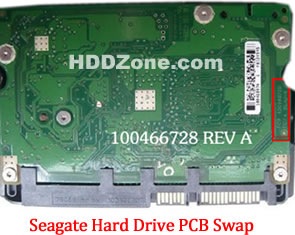
1. Seagate Barracuda 7200.12 Hard Drives PCB Buying Guide:

For Seagate HDD, just need the donor PCB has the same board number as yours.

seagate-hard-drive-pcb-swap

* Seagate Hard Drive PCB Swap

2. Before Seagate Barracuda 7200.12 HDD PCB Swap you should know:

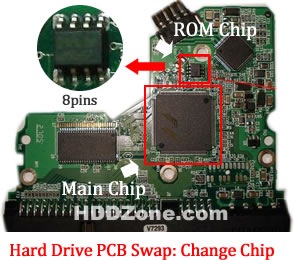
1. Most PCB’s BIOS chip(ROM Chip) store the unique information. We need change the BIOS form original PCB to replacement PCB, in order to make the replacement PCB compatible with the HDD.  The 8pins (4 pins on each sides) with 25P05VP、25P10VP、25F512、25F1024、25F1024AN、SST25VF512、SST25VF010, etc. are the BIOS Chip.

Tips: Most of the TV/Phone Repair Shop can offer these services for just $5-%20

hard-drive-pcb-swap-change-chip

* Hard Drive PCB Swap: Change BIOS Chip, Main Chip

2. Some PCB don’t have separate BIOS. The BIOS be integrated on the Main Controller IC(The biggest chip on the board, also named Main Chip). We should exchange the Main Controller IC to let the HDD be recognized.

3. Where to buy Seagate Barracuda 7200.12 PCB Circuit Boards?

Seagate 100517995 PCB
Seagate 100629241 PCB
Seagate 100611782 PCB
Seagate 100616260 PCB
Seagate 100617476 PCB
Seagate 100546571 PCB
Seagate 100608206 PCB
Seagate 100602819 PCB
Seagate 100656494 PCB
Seagate 100619454 PCB
Seagate 100589569 PCB
Seagate 100595933 PCB
Seagate 100611023 PCB
Seagate 100645422 PCB
Seagate 100653600 PCB
Seagate 100603470 PCB
Seagate 100513586 PCB
Seagate 100573971 PCB
Seagate 100603204 PCB
Seagate 100591286 PCB
Seagate 100583883 PCB
Seagate 100557583 PCB
Seagate 100533173 PCB
Seagate 100579470 PCB
Seagate 100536501 REV A PCB
Seagate 100535537 PCB
Seagate 100574451 PCB
Seagate 100550361 REV A PCB
Seagate 100535704 PCB
Seagate 100536501 REV A PCB
Seagate 100532367 PCB
Seagate 100535537 PCB

Note: Seagate Barracuda 7200.12 PCB sells on HDDZone.com are fully tested before shipment(worldwide free shipping now!); These are just PCB (Printed Circuit Boards), not the whole HDD (Hard Disk Drive).

More other pcb swap guide please refer to this post: hard Drive PCB Swap

Read More