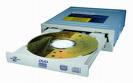
Data Storage: Optical Storage Devices

  • Optical Storage Devices Pinnacle Micro
    Optical storage solutions for general data storage and emerging applications.
    www.pinnaclemicro.com
  • InPhase Technologies
    Developing holographic data storage technology.
    www.inphase-technologies.com
  • QPS, Inc.
    Makers of CD-R, CD-RW and DVD storage products.
    www.qps-inc.com
  • MaxOptix
    Provider of optical drives, media, and jukeboxes.
    www.maxoptix.com
  • Octave Systems, Inc.
    Offers CD and DVD recorders and rewritables, recording software, media, and accessories.
    www.octave.com
  • Summation Technology
    Offers a variey of CD and DVD duplicators, printers, media, and packaging.
    www.summationtechnology.com
  • Verity Systems
    Manufactures CD-R and DVD-R duplicators, printers, packaging equipment, and degaussers (bulk tape erasers).
    www.veritysystems.com
  • Cutting Edge
    Provides high performance RAID solutions, Jukebox, magnetic optical storage, and other network attached storage systems.
    www.cuttedge.com
  • CenDyne, Inc.
    Marketer of computer peripheral products to the computer and consumer electronics market.
    www.cendyne.com
  • PrimeArray Systems, Inc.
    Makers of CD-ROM towers and mastering solutions.
    www.primearray.com
  • U.S. Design Corporation
    Optical Storage for DEC, IBM, SunOS, Solaris, HP, and Windows/NT.
    www.usdesign.com
  • Young Minds Inc.
    Develops mission-critical CD-R and DVD-R storage solutions including hardware and software solutions.
    www.ymi.com
  • 1st-CD Burners-Duplicators and CDR
    Offering firewire devices for Mac and PC, CD burners, duplicators, and printers.
    www.1st-cdburners-duplicators-and-cdr.com
  • Optical Laser
    Distributor of document imaging and mass storage products.
    www.opticallaser.com
  • Sunland International (SLI)
    Offers optical data storage DVD-RAM and UDO libraries, replacement drives, and compliant recordable media.
    www.slidirect.com
  • Optical Jukebox
    Distributes Asaca Fibre Channel DVD-RAM and DVD-R libraries for Optical RAID, NAS, and SAN.
    www.opticaljukebox.com
  • Kubik
    Manufactures CD-ROM and DVD auto-changer storage units.
    www.kubikjukebox.com
  • STEAG HamaTech
    Supplier of manufacturing equipment for the optical disc and photomask industries.
    www.flt.com
  • OpticalJukeboxes.com
    Provides information about optical storage technologies including CD, DVD, and Magneto-Optical jukeboxes. A division of Digital Storage Solutions.
    www.opticaljukeboxes.com
  • e-tronicDepot
    Sells DVD/CD duplicators, writers, recorders, players, printers, and media as well as PC peripherals and parts.
    www.e-tronicdepot.com
  • ProDisk Inc.
    Offers optical disk products and service.
    www.prodiskinc.com
  • T.S. Solutions
    Offers automated or manual CD-R duplication equipment, automated floppy duplicators and CD-R printers.
    ts-solutions.com
  • Gotdrives
    Offers a variety of optical drives from such makers as HP, Sony, Maxoptix, and Panasonic.
    www.gotdrives.com

To add your Optical Storage Devices Link here, please feel free to contact us!

Read More

UNMOUNTABLE_BOOT_VOLUME Error Message

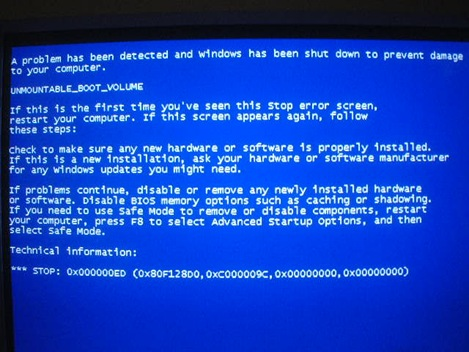
UNMOUNTABLE_BOOT_VOLUME After installing or upgrading Windows XP from Windows 95 or 98 an error message:
STOP 0x000000ED (0x aaaaaaaa ,0x bbbbbbbb ,0x cccccccc ,0x dddddddd ) UNMOUNTABLE_BOOT_VOLUME appears when Windows tries to load.

This error is generated by design through Microsoft to prevent any data loss during operation. By design this error can incur when:

  • A 40-wire cable is used to connect an Ultra ATA hard drive to an Ultra ATA hard disk controller.
  • Improper BIOS settings
  • A file system may be damaged and cannot be mounted.

To resolve this issue:

  1. Replace the 40-wire cable with an 80-wire Ultra ATA Cable
  2. In the BIOS load the “Fail Safe Default Settings”.
  3. Restart the computer. If it doesn’t correct the problem a file system may be damaged.

Repairing a Damaged File System

  1. Restart the computer with the XP install disk.
  2. Press R to select the Repair Option at the “Welcome to Setup” screen.
  3. Enter administrator password if prompted to do so.
  4. At the next prompt press 1 and Enter .
  5. This should bring you to the command prompt “C:\” or “C:\Windows”.
  6. Type chkdsk /r and press enter. This will scan the disk and repair any errors.
  7. Type fixboot X: where “X” is the drive that you are installing the operating system on.
  8. Restart the system. If Windows still errors repeat steps 1 thru 5.
  9. Type fixmbr at the command prompt.

If all the above steps fail you may run a low-level format on the drive using SeaTools. Run the Write Disk Pack. This process may take several hours depending on the size of the drive.

Read More

Scp from remote Linux to local Windows with spaces in local path

To push a file from a Linux terminal to a Windows system, the following two examples work just fine. scp /home/user.name/file.html user.name@local.ip.num:/C:/Users/user.name/test_folder/file.htmlscp /home/user.name/file.html user.name@local.ip.num:”/C:/Users/user.name/test_folder/file.html” I need to do this where the local folder has spaces and I cannot change the name, say /C:/Users/user.name/test folder/ All of the following fail with the message scp: ambiguous target…

Read More