Tips for Buying IBM Storage

Tips for Buying IBM StorageIBM has been in the data storage business since before the advent of computers. Over the decades it has developed a broad storage portfolio that includes tape, disk, SAN and NAS. But more important than just the hardware is the intelligence added to easily and efficiently manage the growing storage capacity.

“Long gone are the days when storage was about ‘how much spinny stuff do you want? Clearly the media plays a role, but it is much more about the software DNA we are bringing than the hardware physicality.” said Doug Balog, IBM’s Vice President and Business Line Executive, Storage Systems.

He said that storage intelligence is increasingly important as IT departments are caught between the demand to provide faster access to larger amounts of data and the demand to keep budgets flat. This necessitates the use of deduplication and compression to reduce the amount of hardware required and automatic tiering so hardware is put to the best use.

With more than 150 storage products, it is impossible to cover IBM’s entire product line in a single article, but here are some of the highlights.

IBM Tape

    Despite regular reports of its imminent demise, tape, like the mainframe, is still here and continues to find new applications.

“Tape is still the greenest tech for long-term repository of data: It consumes no energy, and there is no carbon footprint, what we have done is extended tapes usefulness with a technology called LTFS (Linear Tape File System), which addresses one of the challenges tape has had — how do we find that critical piece of information on a tape cartridge that is now holds 5TB” said Balog.

This development makes tape not just useful for offsite archiving, but also for nearline storage of large amounts of data for media and high performance computing applications. In October 2011, IBM and Fox News Group even received an Emmy “for media workflow transformation and pioneering the development and application of LTFS in a broadcast environment enabling real-time content recording and high-speed recovery of content leading to a broadly supported multi-industry solution.”

LTFS is built on the Linear Tape-Open (LTO) Ultrium5 format standard and allows users to search, read and write to IBM tape libraries with the existing OS file interface without the need for additional tape management software.

“LTFS allows some metadata to be tagged to the file at the time the data is written, the tape starts to act like a disk and looks like just another drive to the server.” said Balog.

IBM has entry, midrange, and enterprise tape libraries and drives ranging from the 1U TS2900 Tape Autoloader Express with a single drive and nine cartridges up to the TS3500 Tape Library, which has up to 192 drives per library and 2,700 drives per complex.

The Crossroads Read Verify Appliance monitors the utilization, performance and health of the tape drives to improve performance, reduce the risk of restore failures and provide an audit trail for regulatory compliance.

IBM Virtual Tape Servers

IBM also offers virtual tape servers for the entry, midrange and entry markets. The IBM Virtualization Engine TS7700 is a family of mainframe virtual-tape solutions designed to optimize tape processing, with a RAID array cache up to 115TB and up to 64 tape drives.

IBM appliances and ProtecTIER deduplication gateways reduce storage needs by up to 25 to 1. The entry-level TS7610 is for weekly full backups of up to 3TB and daily backups up to 1TB. For enterprises, the TS7560G ProtecTIER Deduplication Gateway provides sustained inline deduplication for backups at speeds up to 7.2TB/hr (2000 MBps). For mainframes, the TS7680 ProtecTIER Deduplication Gateway for System z has two-node clustering for high availability and up to 1PB of storage capacity per system.

IBM Disk Systems

XIV is a high-end storage system with a massively parallel grid structure that is optimized for virtual and cloud storage applications. Last year, IBM released XIV Gen3, which includes InfiniBand interconnections, 8 Gb/sec Fibre Channel ports and an increase in memory from 16 GB to 24 GB per module. It comes with 72 TB to 180 2 TB or 3 TB SAS drives. Administrators can monitor and manage the XIV through an iPad.

“XIV has a lot of IBM research assets in it now, which it didn’t have when we acquired it four years ago, It is a great product in terms of the intelligence it has built into it around the way it thin provisions all the LUNS and the way it distributes the data in an intelligent way to maximize the utilization and efficiency of the system.” said Balog.

While the XIV is designed for enterprise applications, IBM adapted some of its technology for the mid-market with the Storwize V7000 Unified, a 2U box that combines block and file storage in the same system. IT can use a mix of SSD, SAS or near-line SAS drives. It automatically migrates files to the appropriate drive based on policy. Maximum capacity is 36TB when using 12 3TB near-line SAS disk drives.

“The V7000 is very software-rich in its capability for virtualizing not only itself, but storage from a lot of other vendors as well, Instead of having to throw out a lot of the legacy storage they have, the V7000 virtualizes the older storage so they can get greater value out of their assets.” said Balog.

NAS and SAN

For large-scale NAS deployments, IBM released Scale Out NAS (SONAS) to deliver petascale cloud storage.

“Unstructured and semi-structured data is the fastest growing part of the storage market, and we found clients were looking at these massive NAS filer systems built up over the years, They would have dozens or hundreds of filer farms, each with little islands of unstructured data.” said Balog.

SONAS allows them to bring up to 21PB of unstructured data into a single namespace, and research is ongoing to raise the capacity to 100PB.

The IBM SAN Volume Controller (SVC) software and the SVC Entry Edition appliance bring SAN efficiency and reliability to enterprises and SMBs. To simplify deployment, the SVC software comes preinstalled on SVC Storage Engines, which are based System x server technology. The Storage Engines are always deployed in redundant pairs to ensure availability. The SVC also uses a new graphical user interface similar to that used by the XIV Storage System.


Read More

Hard Disk Details(11)

Random Notes and Ideas For Data Recovery

    1. Drive goes to sleep, replace the board live
    2. Partitions start on Cylinder Boundaries
    3. Hard Drives have a Safe Mode
    4. You can fix LaCie problems with a Mac mounting them in the system
    5. Drives that you plug in that cause windows to Crash – Use Ubuntu to Read Files
    6. When problems with MFT then retry smaller blocks
    7. If drive parts are good then rewriting the SA area is the part that needs repairing
    8. SA Code can be replaced to do data destruction or encryption
    9. If you are thinking of a hard drive as 0’s 1’s then you are wrong. The equipment interprets signals to make the representation of 0s or 1s. Designers have taken into account the signal distortion and interface problems to make the work
    10. Remove a chip from the PCB and re-solder the chip onto a good board to fix specific problems with chips that are burned, cracked, etc
    11. Soft resets on SATA also need to do a hard reset the controller as it cannot be reset any other way like the bus is reset in a PCI or ATA
    12. ATA-3 Spec – hard drive read without retry was disabled and now is internal on the drive
    13. Seagate Drives use a serial interface of which you can find online. It will show you stats on the drive. If you see FFFF mask FFFF mask it is a head error
    14. If a drive is read with a standard read then it does not need to be read again but it might be good to use ECC to compare in a later pass
    15. Force the drive to use PIO mode instead of DMA/UDMA modes. Some hard drive failures cause the drive to fail reading UDMA but might still work in PIO
    16. Powers on good drive, while board is still in use move it to a new drive. Wrong defect tables and can be cleared
    17. If the platters are misaligned you can write data over the servo wedge and thereby destroying any chance that you can ever read the data
    18. As the thermal heat increases stability of the bits drop rapidly and with the addition of Areal density – degradation is much higher. There are fewer atoms in each bit to retain the bit orientation. Currently the drive will test for decay and if detected will automatically rewrite the data it detects
    19. Hard drives stored in heat for long term storage is extremely bad
    20. Adaptec ATA Raid 1200A Controller in combination with MHDD is great for recovery software.
    21. To determine if there is an HPA – Look at the LBA Maximum and if it is equal to Maximum Native LBA then there is no HPA
    22. Partitions created using standard disk partitioning tools, fdisk, Windows Disk Management, Partition Magic, will all be cylinder aligned. You only have to scan cylinder boundaries for partitions. Dynamic disks do not use partition tables, they use LDM which is at the end of the disk and needs to be done backwards. It uses one single partition occupying the entire disk minus one cylinder. When volumes are added or deleted the partition table is not updated. There are only 4 partitions possible with the standard Windows tools
    23. All partition table signatures end in 55 AA – if this is gone the OS will regard this as not existing. 80 is active 0B fat32 0F extended
    24. Everything in NTFS is a file – $boot
    25. Sector is the smallest addressable unit on the disk. You can read more than one sector but you cannot read less
    26. If doing a head replacement try straws for head stack replacements around the heads to keep them protected. Cut off a small piece of a drinking straw and place it over the head area of each and every head
    27. Even when the lower part of a head stack does not have heads they are still numbered.
    28. Increasing numbers of drive have no chance for parts replacement due to changes in the hardware
    29. Some drives store the lists in the NV Ram on the PCB. The table on one drive will not match the table on another drive and are unique. That might cause the same logical blocks to be mapped to different physical blocks on different hard drives. It is possible to have a swapped board cause a space on the hard drive to be overwritten due to the mapping problem.
Read More

Seagate Board 100535537

I am looking for Segate board # 100535537 and the main chip is b5502c30. I see you have the board but the description says it contains a different chip b5502c20. Do you have the c30?

We also have this PCB with Main Controller IC of b5502c30. When you order, please note you need the b5502c30 one.

In fact, for this PCB swap, just need the donor PCB has the same board number 100535537 as yours. Then you need move your original PCB’s BIOS to the replacement PCB. The 8pins (4 pins on each sides) with 25P05VP、25P10VP、25F512、25F1024、25F1024AN、SST25VF512、SST25VF010, etc. are the BIOS.

Different Main Controller IC PCB can be used as same.

I received my board today, transfered the bios, but the drive is not powering up, is there anything else that needs to be transfered? The board I received does not have all components matching up, only 2 of the 3 main ic’s

In fact, for this PCB swap, just need the donor PCB has the same board number as yours. Also just need swap BIOS.

Please add more tin to solder the BIOS firmer and confirm you soldered the BIOS in right direction.

Thanks! I did have it in the right direction, just not enough solder.

Read More

What a hard drive looks like?

 To many people, a hard disk is a “black box” of sorts—-it is thought of as just a small device that “somehow” stores data. There is nothing wrong with this approach of course as long as all you care about is that it stores data. It is hard to really to understand the factors that affect performance, reliability and interfacing without knowing how the drive works internally.

If you use your hard disk as more than just a place to “keep stuff”, then you want to know more about your hard disk. For those people who earn their butter and bread by retrieving data from a defect hard drive, it is necessary to know how the hard drives works know more the ticks of store data.

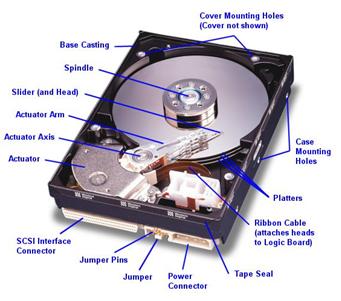
Fortunately, most hard disks are basically the same on the inside. While the technology evolves, many of the basics are unchanged from the first PC hard disks in the early 1980s. Lets have a look at the following pictures of a modern SCSI hard disk, with major components annotated from Western Digital Corporation):

(Original image � Western Digital Corporation)

We look at the various key components, discuss how the hard disk is put together, and explore the various important technologies and how they work together to let you read and write data to the hard disk. My goal is to help you really understand the design decisions and tradeoffs made by hard disk engineers, and the ways that new technologies are being employed to increase capacity and improve performance.

When the first HDD looked like? What was the capacity of it?
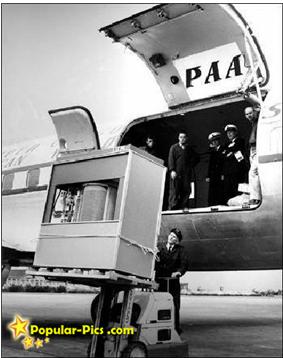
5MB Hard Disk in 1956
It’s a hard disk in 1956…. the Volume and Size of 5MB memory storage in 1956. In September 1956 IBM launched the 305 RAMAC, the first computer with a hard disk drive (HDD). The HDD weighed over a ton and stored 5MB of data. Let us start appreciating your 4 GB jump drive!

5MB Hard Disk in 1956 – Its a hard disk in 1956…. The Volume and Size of 5MB memory storage in 1956. In September 1956 IBM launched the 305 RAMAC, the first computer with a hard disk drive (HDD). The HDD weighed over a ton and stored 5MB of data.

Read More