

What You Can Learn From An All-Around Data Recovery Training Courses?

Data Recovery Training Class Data Recovery Training course is to train you on advanced data recovery techniques as well as advanced data analysis strategies.

You will do during the data recovery training class:

1. Logical Recovery of disabled hard drives
2. Using file format recognition tools
3. Logical recovery via avoiding BIOS interrupts
4. Motions that unlock the actuator of a drive
5. Diagnosing the physical recovery of drives
6. Comparing pre-recorded sound samples to live drives
7. Logic board replacements
8. Single and Multi-Platter Swaps
9. Head Assembly replacement
10. P-List and G-List recovery
11. Addressing SMART values
12. Dealing with damaged sectors
13. Reverse scanning
14. Capturing SID protected folders
15. Resolving kernel or driver issues with a Linux bootable disk
16. Head Stack replacement
17. Working with the Service Area (SA) of a drive
18. Reviewing data structures with a Hex Editor
19. Diagnosing “clicking noises”
20. Mac OS X Data Recovery
21. Linux Data Recovery
22. RAID 0 Recovery & RAID 5 Recovery
23. Vista and Recovery of Shadow Copies
24. Clearing passwords on a password protected drive
25. Solid state drive recovery
26. Firmware issues
Read More

A single user does not respond after plugging the Kingston U disk into the computer.

Case:Kingston U disk is not displayed after inserting into the computer Solution:The detection circuit found that the DATA+responsible for data transmission and exchange was damaged with a component connected to the main control. After the replacement was replaced, the capsule was successfully identified, but the capacity displayed 0 bytes. Use a special device to successfully…

Read More

Windows – How can I stop percentage expansion in a batch file?

(This is on NT based Windows like 2000, XP, Vista, 7) On the command-line, the percentage characters are ignored: wget “http://www.justitie.nl/images/Handleiding%20voor%20verwerkers%20persoonsgegevens_tcm34-3940.pdf” So it correctly downloads this file (each %20 becomes a space): “http://www.justitie.nl/images/Handleiding voor verwerkers persoonsgegevens_tcm34-3940.pdf” But inside a batchfile, all the %20 are being interpreted as expanding parameter 2 (which is empty) resulting in…

Read More

Two mechanisms of defect relocation

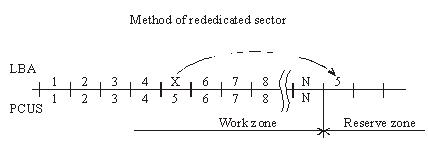
When the substitution (Assign) mechanism is used in a drive the latter records to the ID field of a BAD sector the flag of the relocated sector and writes to the data field the number of the reserved sector, i.e. the one, which should be accessed for data recording or reading. As a rule, it is the first available sector after user data area. (figure 2.).

Figure 2. Method of rededicated sector.
During data read/write operations accessing the defective sector drive controller will read the flag and assigned address and reposition the heads to the reserved zone in order to perform reading/writing from/to a good sector. Defective sectors in that case will disappear, but the drive will perform positioning to the reserved area each time it has to address a defective sector. The procedure is accompanied with clicking sounds and slight slow-down. The “Assign” procedure allows relocation only for defects in data fields. Errors pertaining to corruption of ID fields or servo fields cannot be relocated using the “Assign” method.

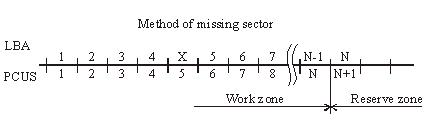
Another mechanism used for hiding defective sectors at manufacturing factories is skipping of defective sectors. When that method is used, the defective sector is skipped, its number is assigned to the following sector (and so on), and the last sector is shifted to the reserved zone. (figure 3.).

Figure 3. Method of missing sector.
Such method of sector hiding disrupts the continuous integrity of low-level format; the system of LBA conversion to PCHS should also take into account BAD sectors while skipping them. Therefore the method requires obligatory recalculation of translator tables and low-level formatting making it impossible to preserve user data if the method is employed. Exactly for that reason the said method of relocation is applied only in special factory mode of drive operation. It is used in the FUJFMT.EXE utility designed for relocation of defects in FUJITSU drives.

Read More