

My Book World Edition II 4 TB
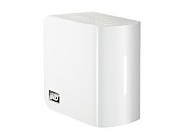 Brand: Western Digital
Elements Model: WDH2NC40000N
Port RJ-45: 1 x 10/100/1000M
HDD Interface: 2 x SATA
Operating System: Windows XP/Vista/Mac OS X Tiger or Leopard
Form Factor: Desktop
Capacity: 4 TB
RAID: Raid 1
Dimensions: 6.5″ x 6.3″ x 3.9″
Weight: 5.51 lbs.
Temperature: 5°C – 35 °C
Manufacturer Warranty:
Parts: 5 year limited
Labor: 5 year limited
Simplified set up and best-in-class performance make the My Book World Edition network drive the perfect choice for centralizing and backing up data on all the computers in your home.
Features:
· Automatic and continuous backup for all the computers on your network – Now you can easily back up data from all your networked computers with the included continuous backup software. Set it and forget it; every time you save something it’s instantly and automatically backed up.
· The double-safe place for your data – Using RAID mirroring technology, this system automatically and continuously maintains a second copy of your data for extra safe data protection. If one drive in this two-drive system ever fails, the system continues to run and your data is safe. How’s that for peace of mind?
· Centralized storage to share and stream all your family’s digital content – Built-in media server for streaming music, photos and movies to any PC, Mac or DLNA certified multimedia device such as Playstation 3, Xbox 360, wireless digital picture frames, and connected audio receivers. DLNA 1.5 & UPnP certified. Centralize your music collection and play from Macs or Windows PCs using iTunes software.
· Remote access – Access your files anywhere, anytime using MioNet remote access technology from WD.
· iTunes server support – Centralize your music collection and stream to a Mac or Windows PC using iTunes software.
· Simple file recovery – Restore lost, damaged or older files back to their original location with a couple of clicks. Backup files are stored in the same file structure that you originally saved them, so it’s easy and intuitive to find files.
· Share your personal content – MioNet remote access technology makes it easy for you to securely share photos and documents with friends and family.
· USB 2.0 utility port – Turn any USB drive into an instant network drive or extra capacity for your World Edition II.
· Cooler, quieter, eco-friendlier – Equipped with WD drives using WD GreenPower Technology, this system consumes significantly less power and delivers performance on par with power hungry externals using 7200 RPM hard drives.
Price: $599.99
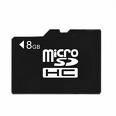 The SD memory cards known as the “Secure Digital” first began as miniature cards. Afterwards the new and advanced form of the SD memory card SDIO “Secure Digital Input/output” was introduced into the market. The SDA “Secure Digital Association” included new features and technology to the SD memory cards. The SDA included new varieties of card functions. These new card functions included wireless “Local Area Network LAN” devices, cell phones, GPS receiver, digital video camera etc. The memory card readers that were used in the Secure Digital devices connected to the Universal Serial Bus (USB). The Windows Operating System detects and manages the SD (Secure Digital) memory cards through the driver called the (USB) Universal Serial Bus mass storage. The (SD) Secure Digital host controllers are supported by the Operating System. The Operating System connects the host controller SD to the Peripheral Component Interconnect (PCI) bus. When the SD-host controller is detected by the operating system, the “SD Secure Digital bus driver” is loaded by the operating system OS. When the SD card is inserted by the user, the windows Operating system loads two drivers the “Storage mini-port” and the “SD Secure Digital Storage Class”. These two drivers are loaded on top of “Bus driver” by the Windows Operating System. On the other hand if the SD memory card of a different function like the wireless Local Area Network (LAN) or the Global Positioning System is inserted by the user, then the Windows Operating System loads the driver that is supplied by the vendor. It is necessary that both the vendor supplied and the native drivers in the (SD) Secure Digital stack communicate with “Secure Digital Bus”. The device drivers call the routines to communication with the “Secure Digital Bus”. These routines are called in the static “Secure Digital Bus library”. When the SD Secure Digital drivers compile, it is necessary that they link to the “Secure Digital SD Bus library”. There are some limitations for the SD device drivers. The “Host Controller Register” is not directly accessible by the Secure Digital device drivers.