Computer Forensics For Dummies

Computer Forensics For Dummies Uncover a digital trail of e-evidence by using the helpful, easy-to-understand information in Computer Forensics For Dummies! Professional and armchair investigators alike can learn the basics of computer forensics, from digging out electronic evidence to solving the case. You won’t need a computer science degree to master e-discovery. Find and filter data in mobile devices, e-mail, and other Web-based technologies.

You’ll learn all about e-mail and Web-based forensics, mobile forensics, passwords and encryption, and other e-evidence found through VoIP, voicemail, legacy mainframes, and databases. You’ll discover how to use the latest forensic software, tools, and equipment to find the answers that you’re looking for in record time. When you understand how data is stored, encrypted, and recovered, you’ll be able to protect your personal privacy as well. By the time you finish reading this book, you’ll know how to:

  • Prepare for and conduct computer forensics investigations
  • Find and filter data
  • Protect personal privacy
  • Transfer evidence without contaminating it
  • Anticipate legal loopholes and opponents’ methods
  • Handle passwords and encrypted data
  • Work with the courts and win the case

Plus, Computer Forensics for Dummies includes lists of things that everyone interested in computer forensics should know, do, and build. Discover how to get qualified for a career in computer forensics, what to do to be a great investigator and expert witness, and how to build a forensics lab or toolkit.

Read More

Glossary of Western Digital Hard Disk Drive (Letter F)

FAT
Western Digital Hard Disk Drive File allocation table. A data table stored at the beginning of each partition on a disk and used by the operating system to determine which sectors are allocated to each file and in which sequence.

FAT32
A file allocation table system with a maximum file transfer of 4 GB and a maximum partition size of 32 GB.

FC
Fibre channel. The general name given to an integrated set of standards being developed by an ANSI-approved X3 group. This set of standards defines new protocols for flexible information transfer. Fibre channel supports three topologies: point-to-point, arbitrated loop, and fabric.

FC-AL
Fibre channel-arbitrated loop. A serial storage interface designed for high-end applications. A subset of FC network systems interconnection.

FDB
Fluid dynamic bearings. A design that incorporates a layer of lubricant instead of ball bearings in a hard drive spindle motor, thus providing increased storage capacity, non-operational shock resistance, speed control, robust shipping and handling, and improved acoustics.

FDISK
A software utility that partitions a hard drive.

Femto slider
Form factor in which the read/write head is mounted on the small, lightweight femto slider which allows the head to move more quickly from track to track on the disk.

fetch
The process of retrieving data.

FFS
Free-fall sensor. As an added layer of protection, if the drive (or the system it’s in) is dropped while in use, WD’s free-fall sensor detects that the drive is falling and, in less than 200 milliseconds, parks the head off the disks to help prevent damage and data loss.

FireWire 400
FireWire400 supports data transfer rates up to 400 Mb/s.

FireWire 800
FireWire 800 has a maximum data transfer rate of 800Mb/s. It is backward-compatible with FireWire 400 using an optional adapter.

FireWire®
This high-speed serial bus, also known as IEEE 1394, provides a non-proprietary, high-performance method of interconnecting digital devices.

firmware
Permanent instructions and data programmed directly into the circuitry of read-only memory for controlling computer operations.

FIT
Functional integrity testing. A suite of tests WD performs on all its drive products to ensure compatibility with different hosts, operating systems, adapters, application programs, and peripherals. This testing is performed before a product is released to manufacturing.

flash drive
Compact, portable device that works in a similar way to a hard drive.

flash memory
A special type of portable electronic storage device used for easy and fast information storage in such devices as external hard drives and digital cameras. Examples of flash memory include PCMCIA cards and memory cards for video game consoles.

FlexPower™
Connector technology that accepts power from both industry-standard and new SATA power supplies.

flow control
is the process of managing the rate of data transmission between two nodes to prevent a fast sender from outrunning a slow receiver.

form factor
An industry standard term for the physical and external dimensions of a device.

format
A process that prepares a hard drive to store data.

formatted capacity
The actual capacity available to store data in a mass storage device. The formatted capacity is the gross capacity minus the capacity used by overhead (formatting).

FTP
File Transfer Protocol. A network protocol used to transfer data from one computer to another through a network. FTP is a popular choice for exchanging files independent of the operating systems involved.

full-duplex
A communication protocol that permits simultaneous transmission in both directions.

Read More

Linux File Structure

linux file structureLinux file structure files are grouped according to purpose. Ex: commands, data files, documentation. Parts of a Unix directory tree are listed below. All directories are grouped under the root entry “/”.
root – The home directory for the root user
home – Contains the user’s home directories along with directories for services

  • ftp
  • HTTP
  • samba
  • george

bin – Commands needed during bootup that might be needed by normal users
sbin – Like bin but commands are not intended for normal users. Commands run by LINUX.
proc – This filesystem is not on a disk. It is a virtual filesystem that exists in the kernels imagination which is memory.

  • 1 – A directory with info about process number 1. Each process has a directory below proc.

usr – Contains all commands, libraries, man pages, games and static files for normal operation.

  • bin – Almost all user commands. some commands are in /bin or /usr/local/bin.
  • sbin – System admin commands not needed on the root filesystem. e.g., most server programs.
  • include – Header files for the C programming language. Should be below /user/lib for consistency.
  • lib – Unchanging data files for programs and subsystems
  • local – The place for locally installed software and other files.
  • man – Manual pages
  • info – Info documents
  • doc – Documentation
  • tmp
  • X11R6 – The X windows system files. There is a directory similar to usr below this directory.
  • X386 – Like X11R6 but for X11 release 5

boot – Files used by the bootstrap loader, LILO. Kernel images are often kept here.
lib – Shared libraries needed by the programs on the root filesystem

  • modules – Loadable kernel modules, especially those needed to boot the system after disasters.

dev – Device files
etc – Configuration files specific to the machine.

  • skel – When a home directory is created it is initialized with files from this directory
  • sysconfig – Files that configure the linux system for devices.

var – Contains files that change for mail, news, printers log files, man pages, temp files
file

  • lib – Files that change while the system is running normally
  • local – Variable data for programs installed in /usr/local.
  • lock – Lock files. Used by a program to indicate it is using a particular device or file
  • log – Log files from programs such as login and syslog which logs all logins and logouts.
  • run – Files that contain information about the system that is valid until the system is next booted
  • spool – Directories for mail, printer spools, news and other spooled work.
  • tmp – Temporary files that are large or need to exist for longer than they should in /tmp.
  • catman – A cache for man pages that are formatted on demand

mnt – Mount points for temporary mounts by the system administrator.
tmp – Temporary files. Programs running after bootup should use /var/tmp.

Read More

Swap Hard Drive PCB Board

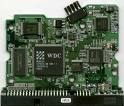
Hard Drive PCB Board If you’ve ever installed a hard drive, you have noticed the green board on the bottom of the drive. The green board is known as the hard disk drive’s PCB (Printed Circuit Board).

What A Hard Drive PCB Does?

The PCB is more than a simple way for a hard drive to contain power; it often contains part of the firmware of a drive, which lets the hard drive know how to operate properly and how to read data from the platters. For instance, part of its function is to store information about how many heads are contained within the drive, unique adaptive, and how to access continued microcode for successful drive start-up.

This information is put onto each PCB at the factory, and is programmed to be very specific to the particular hard drive for which it’s designed. While this may sound inefficient, it’s actually the culmination of dozens of years of hard drive technology; it allows larger and larger drives to be built that are both accurate and dependable.

PCB is one of the most complex and intriguing parts of a hard drive. When hard drives fail, occasionally it’s due to a malfunction of the PCB board. Power surges can cause this type of a failure, as well as dust contamination and many other common computer problems.

Hard Drive PCB Failure Symptoms

Hard drive PCB failures usually render a drive unable to boot up. Depending on the brand and model of the drive, some PCB problems cause a hard drive’s information to display inaccurately in the BIOS.

Swapping Out a Hard Drive’s PCB

Because of this customized firmware, however, it’s not possible to switch out a PCB board in many cases; of course, this varies depending on the manufacturer of a drive. For instance, some older drives have the same basic information on two PCB boards of the same model, provided that both drives were made at about the same time, before more unique adaptive were programmed into the next line of drives. If one of the PCBs fails, there is some chance of making a recovery by simply swapping the boards of the two drives. However, hard drives have contained “customized” firmware on at least an occasional basis since they’ve become a consumer product, so the chances of a straight “board swap” working are very low. In most cases, when you swap the PCB, you should also exchange the BIOS which includes the unique information.

Recommended PCB Boards Provider:

HDDzone.com can offer all kinds of HDD PCB boards which you want. You just need to contact them and issue your detailed requirements. They will send your requires with best price in short time.

Read More