Which RAID Mode Should You Choose?

1. Speed (RAID 0)

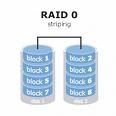
Set in high-performance mode (also called striped mode or RAID 0) the storage system gives you the power you need when you’re:raid 0

  • Designing huge graphics and need a lightning-fast Photoshop scratch space.
  • Recording large DV files while maintaining clean audio performance.
  • Editing DV or HD video and want a smooth work flow with no dropped frames.
  • Rendering complex 3D objects or special effects.
  • Performing disk-intensive database operations.
  • Driven to be the first geek on your block with a computer so fast it blows your
    socks off.
      Why is RAID 0 so fast? It’s a bit complicated, but suffice it to say that two or more heads, or in this case, drives, are better than one. Picture multiple hoses filling a bucket at the same time or several men bailing a boat and you can understand why two drives striped are

faster

      than one. Data is saved (striped) across both drives and accessed in parallel by all the drives so you get

higher data transfer rates

      on large data accesses and

higher input/output rates

      on small data accesses.

Raid Mode

2. Data protection (RAID 1)

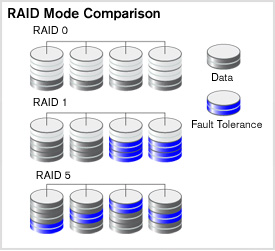
Set the system to data protection mode (also known as mirrored mode or RAID 1) and the capacity is divided in half. Half of the capacity is used to store your data and half is used for a duplicate copy.

Why do I want that kind of redundancy? It’s your data, your family pictures, your movie of baby’s first steps, your first novel. Is it important? You decide. If it is, then RAID mirroring is for you.

3. Data protection and speed (RAID 5)

In systems with three or more drives. we recommend that you set the system to RAID 5. This gives you the best of both worlds: fast performance by striping data across all drives; data protection by dedicating a quarter of each drive to fault tolerance leaving three quarters of the system capacity available for data storage.


Read More

Security – How do I list the SSL/TLS cipher suites a particular website offers?

How can I retrieve a list of the SSL/TLS cipher suites a particular website offers? I’ve tried openssl, but if you examine the output: $ echo -n | openssl s_client -connect www.google.com:443 CONNECTED(00000003)depth=1 /C=ZA/O=Thawte Consulting (Pty) Ltd./CN=Thawte SGC CAverify error:num=20:unable to get local issuer certificateverify return:0—Certificate chain 0 s:/C=US/ST=California/L=Mountain View/O=Google Inc/CN=www.google.com   i:/C=ZA/O=Thawte Consulting (Pty) Ltd./CN=Thawte…

Read More

Reinstall system data lost file repair

Case:My computer was sent to the computer repair department.It was unintentional Chinese format during repair.Can you recover?My computer has four plates of C.D.E.F.The repairman accidentally formatted the three disks of the DEF.Now the computer is repaired.Customers find data recovery through the Internet. Solution:Data recovery engineer testing, the hard disk has covered the space of four…

Read More

Notebook reinstallation system automatic partition recovery is successful

Case:Samsung laptop, Windows operating system, customers used the CD -ROM reinstallation system, and found that all the original data was lost.The reason is that the one -click automatic partition function comes with the CD -ROM has transformed the hard disk to 4 partitions and formatted. It was originally 5 partitions. Solution:The engineer connected the mobile…

Read More

2060-800018-001 WD PCB Circuit Board

HDD Printed circuit board (PCB) with board number 2060-800018-001 is usually used on these Western Digital hard disk drives: WD5000LPLX-75ZNTT0, DCM HHNTJHK, Western Digital 500GB SATA 2.5″ Hard Drive; WD3200LPLX-75ZNTT0, DCM HAOTJHB, Western Digital 320GB SATA 2.5″ Hard Drive; WD3200LPLX-75ZNTT0, DCM EAOTJAK, Western Digital 320GB SATA 2.5″ Hard Drive; WD5000LPLX-75ZNTT0, DCM HANTJAK, Western Digital 500GB…

Read More