SCSI – Small Computer System Interface
An intelligent peripheral interface characterized by its use of high level communication between devices. Communications are defined as being between an “Initiator” and a “Target”. The Initiator is normally a computer, and the Target is normally a peripheral. Data may be transferred in asynchronous (not clocked) or synchronous (clocked) mode. All messages and commands are always transferred in asynchronous mode.
This term is often used to describe the published ANSI standard now called SCSI-1 (X3.131-1986).
SCSI-2
This is a term describing the published ANSI standard (X3.131-1994). SCSI-2 was an upgrade from the original SCSI interface. Changes included faster data rates and mandated message and command structure to improve compatibility. Synchronous data transfer rate for SCSI-2 is 2.5 to 10 Mbytes/sec for an 8-bit data bus (N/ND models), and 5.0 to 20 Mbytes/sec for a 16-bit data bus (W/WC/WD/DC models).
SCSI-3
This term describes a set of related ANSI standards that are currently being developed for the SCSI bus. The SCSI-2 document is very large (400+ pages) and covers the full range of topics. SCSI-3 split this large document into a series of smaller documents, each covering a “layer” of the interface definition.
The basic layers are:
physical (connectors, pin assignments, electrical specifications)
protocol (physical layer activity is organized into bus phases, packets, etc.)
architecture (a description of how command requests are organized, queued, and responded to by any protocol)
primary commands (description of commands that must be supported by all SCSI devices)
device specific commands (commands that are specific to a particular class of devices; CD-ROMs or -WORM drives, for example)
The set of standards needed to do a SCSI-3 parallel interface disc drive implementation are:
SPI (SCSI Parallel Interface) for the physical layer
SIP (SCSI Interlocked Protocol) for the protocol layer
SAM (SCSI Architecture Model) for the architecture
SPC (SCSI Primary Commands) for the primary command set
SBC (SCSI Block Commands) for the disc drive specific command set
The SCSI-3 standards are layered in this manner to allow substitution of parts of the structure as new technology emerges. For example, a comparable set of standards for a SCSI Fiber Channel interface disc drive replaces the physical and protocol layers with new documents but uses the same documents for the other 3 layers. The main point to remember here is that the terms SCSI-2 or SCSI-3 do not imply any particular performance per se, rather they refer to the generation of documents to which a product conforms. Since the newest features are only in SCSI-3 and tend to be higher performing, SCSI-3 devices should demonstrate better performance than SCSI-2 in most cases.
SCSI FAST
This refers to timings defined in SCSI-2 for a 10 MegaTransfer/sec transfer rate. A “MegaTransfer” (MT) is a unit of measure referring to the rate of signals on the interface regardless of the width of the bus. For example, a 10 MT/sec rate on a 1 byte wide (narrow) bus results in a 10 Mbytes/sec transfer rate, but on a 2 byte (wide) bus, it results in a 20 Mbytes/sec transfer rate.
SCSI FAST-20
This refers to timings defined in SCSI-3 SPI for a 20 MT/sec transfer rate, which achieves data rates twice as fast as SCSI FAST rates. For example, a 20 MT/sec rate on a 1 byte wide (narrow) bus results in a 20 Mbytes/sec transfer rate, but on a 2 byte (wide) bus, it results in a 40 Mbytes/sec transfer rate.
SCSI FAST-40
This refers to timings being defined for a future revision of the SCSI-3 SPI that achieve 40 MT/sec, which is twice as fast as SCSI FAST-20 rates. For example, a 40 MT/sec rate on a 1 byte wide (narrow) bus results in a 40 Mbytes/sec transfer rate, but on a 2 byte (wide) bus, it results in an 80 Mbytes/sec transfer rate. For more information, see Ultra2 SCSI.
SCSI FAST-80
This refers to timings being defined for a future revision of the SCSI-3 SPI that achieve 80 MT/sec, which is twice as fast as SCSI FAST-40 rates. For example, an 80 MT/sec rate on a 1 byte wide (narrow) bus results in an 80 Mbytes/sec transfer rate, but on a 2 byte (wide) bus, it results in a 160 Mbytes/sec transfer rate.
Ultra SCSI
This is a term describing the latest published ANSI standard (X3T10/1071D rev. 6), commonly known as Fast-20. Ultra SCSI, like all synchronous transfers, is a negotiated clock rate. For more information, see The UltraSCSI Buzz.
Ultra2 SCSI
This is a term describing the latest published ANSI standard (X3T10/1071D rev. 6), commonly known as Fast-40. Ultra2 SCSI, like all synchronous transfers, is a negotiated clock rate.
SCSI Narrow
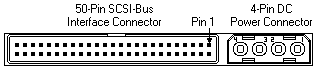
This term refers to the 1 byte wide data bus on a 50-pin parallel interface that is defined in the ANSI standard SCSI-1 (X3.131-1986). The narrow bus consists of 8 data lines with parity, a series of control lines and the matching ground lines. Seagate designates a narrow SCSI interface with an “n” in the model number.

SCSI WIDE
This term usually refers to the 2 byte wide data bus on a 68 pin parallel interface that is defined in the SCSI-3 SPI document. The term can be generically applied to any implementation wider than 1 byte, but at the time of this writing, there are no implementations wider than 2 bytes. Future implementations may include more data bytes because FAST transfer rates are giving plenty of life to 2 byte transfers until serial interfaces (like Fibre Channel or FireWire) become more popular. Seagate designates a wide SCSI interface with a “w” in the model number.

SCSI FAST-WIDE
This refers to a combination of a FAST transfer rate with a 2 byte wide connector, resulting in an increased data transfer rate. Wide FAST-20 (40 Mbytes/sec) products will be available in the year of this writing. Wide FAST-40 (80 Mbytes/sec) and FAST-80 (160 Mbytes/sec) products will be available in the near future.
Differential or High Voltage Differential (HVD)
Differential (D, ND, WD, WDC) is a logic signal system used in some SCSI drives. It uses a paired plus and minus signal level to reduce the effects of noise on the SCSI bus. Any noise injected into the signal would be present in both a plus and minus state, thereby being canceled. Seagate designates a differential (high voltage) SCSI interface with a “d” in the model number.
Due to changing definitions, Differential is now often referred to as High Voltage Differential (HVD).
Low Voltage Differential (LVD)
Low Voltage Differential is a differential logic scheme using lower voltage levels than HVD. For more information, see Ultra2 SCSI. Seagate designates low voltage differential SCSI interface with an “l” in the model number.
Fibre Channel Arbitrated Loop (FCAL)
This is the formal name for the Fibre Channel system used by SCSI. It is more commonly known as Fibre Channel SCSI. The loop part of the name refers to the way the system is connected as one large ring. Because of the loop characteristics, this interface has more in common with local area networks than with parallel SCSI.
Fibre Channel SCSI
This refers to products with fibre channel physical and protocol layers using the SCSI command set. The Fibre Channel interface is completely different from parallel SCSI in that it is a serial interface, meaning command and data information is transmitted on one signal stream organized into packets. The fibre may be either a copper coaxial cable or a fiber optic cable. The signal on the first implementation of fibre channel uses a 1 GHz rate, thereby achieving 100 Mbytes/sec over the cable. Fibre channel also implements increased software control of configuration and pushes the total device count on the bus to 126 IDs, as opposed to only 8 or 16 on a parallel bus. For more information, see our Technology Paper on Fibre Channel. Seagate designates a fiber channel SCSI interface with an “fc” in the model number.
ASA-2 SCSI
This is a Seagate specific term describing the basic structure of the SCSI firmware included with a Seagate disc drive and standing for Advanced SCSI Architecture, generation 2. It provides better performance than ASA-1 code in certain user environments (such as sequential 1 block data transfers). The labels ASA-1 and ASA-2 can apply to code shipped on a wide range of products, meaning different products have firmware originating from the same base firmware, but such firmware is individually adapted to the particular servo and read/write channel hardware on that product. The performance of a disc drive is still primarily determined by the seek times and data transfer rates, but the code base label provides a level of commonality and lack of bugs assurance in SCSI features for all drives with that label.
The most attractive feature of a common code architecture is that most enhancements made on one drive (such as a Barracuda 4) can be quickly migrated to other drives (such as the Barracuda 2 or Hawk 4) developed from the same code base. All new products since January 1995 use the ASA-2 code base, and many older products developed with ASA-1 code have been updated to the new structure.
SCA-2
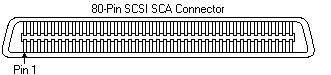
This is a miniature D style, 80 pin connector used on SCSI drives to plug to backplane connections. The SCA-2 connector provides grounds, voltage, and control lines needed to allow hot-plugging of parallel interface SCSI drives. Seagate designates an SCA-2 SCSI interface with a “c” in the model number.