

Hard Drive Data Recovery after Physical Damage
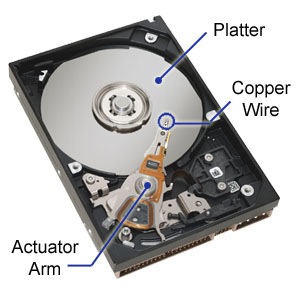 A wide variety of failures can cause physical damage to hard drives. HDD can suffer any of several mechanical failures, such as head crashes and failed motors. Most physical damage cannot be repaired by end users. For example, opening a hard disk drive in a normal environment can allow airborne dust to settle on the platter and become caught between the platter and the read/write head, causing new head crashes that further damage the platter and thus compromise the recovery process. Furthermore, end users generally do not have the hardware or technical expertise required to make these repairs. Consequently, costly data recovery companies are often employed to salvage important data.
A hard drive can fail in many ways, caused by various reasons.
- Logic board (controller) failures.
- Moving parts failures.
- Firmware corruption
How to determine a physical hard drive failed?
The hard drive is most likely physically damaged, and may be beyond the software repair capabilities, if any of the following symptoms is evident
- There is a problem apparent on the exterior of the drive, like visible damage to the chips and/or connectors.
- The drive is not listed in Widows Disk Management, Windows Device Manager, and in the system BIOS.
- The drive remains silent (no spin-up sound, no movement/vibration felt) when powered up.
- The drive emits loud clicking noise when accessed. Typical pattern would be repetition of click-pause-click-pause-click, followed by the sound of the drive stopping and then spinning up again. Windows typically locks up or feels “sluggish” for the entire duration of the sequence.
Physical Damage Recovery techniques
Recovering data from physically damaged hardware can involve multiple techniques. Some damage can be repaired by replacing parts in the hard disk. This alone may make the disk usable, but there may still be logical damage. A specialized disk-imaging procedure is used to recover every readable bit from the surface. Once this image is acquired and saved on a reliable medium, the image can be safely analysed for logical damage and will possibly allow for much of the original file system to be reconstructed.
Hardware repair
Media that has suffered a catastrophic electronic failure requires data recovery in order to salvage its contents. Examples of physical recovery procedures are: removing a damaged PCB (printed circuit board) and replacing it with a matching PCB from a healthy drive, performing a live PCB swap (in which the System Area of the HDD is damaged on the target drive which is then instead read from the donor drive, the PCB then disconnected while still under power and transferred to the target drive), read/write head assembly with matching parts from a healthy drive, removing the hard disk platters from the original damaged drive and installing them into a healthy drive, and often a combination of all of these procedures. Some data recovery companies have procedures that are highly technical in nature and are not recommended for an untrained individual. Many of these procedures will void the manufacturer’s warranty.