Seagate Internet Drive – Using Java-Based Drag and Drop for File Uploads

The following shows how to use the Drag N’ Drop feature for file uploads on your Seagate Internet Drive. This assumes that you have already logged into your Seagate Internet Drive account:

  • From a folder on your Internet Drive, click UPLOAD.
  • The UPLOAD FILES page opens. Click on Click here for Drag N’ Drop.
  • The Drag N’ Drop Applet opens. Open a window local on your PC containing files you wish to upload to your Seagate Internet Drive. Select these files and Drag them to the Internet Drive’s Drag N’ Drop applet. Click Add Files. At this point the selected files are copied to your Seagate Internet Drive.

Note: For more information on Internet Drive features, visit www.memeo.com.

Flash Video: Seagate Internet Drive – Using Java-Based Drag N’ Drop for File Uploads

Read More

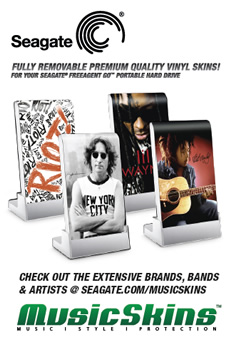
Seagate And MusicSkins Join Forces To Add Custom Options To External Storage

Seagate And MusicSkins Seagate, the world’s leading provider of hard drives and storage solutions, and MusicSkins LLC, the leader in music and music-related, high-quality, vinyl skin products, today announced a marketing partnership to add personal flair to the FreeAgent Go™ and FreeAgent Go™ for Mac external hard drives. With a wide range of skins from a vast catalog of licensed creative or customized designs, this partnership expands on the already extensive range of FreeAgent® drive color, size and capacity options that let people to put their personal stamp on their Seagate external storage devices.

MusicSkins’ utilizes a patented 3M® adhesive technology that prevents air bubbles and allows for both easy application and clean removal. These hassle-free, premium vinyl skins offer a distinctive look, and personal style to Seagate external drives, while also safeguarding the device with a durable anti-scratch, anti-UV coating to protect the exterior of the hard drive. From Bob Marley to John Lennon, Madonna to Lil Wayne, EXPLODINGDOG to Adult Swim, and even personal photos and images, there’s a MusicSkin to suit every personality.

“Our FreeAgent Go™ portable hard drives allow people to store their personal digital treasures in a slim, fashionable, easy-to-carry package. It makes sense that they would want to add their personal stamp to the drives, Your photos, music and movies are a reflection of who you are and through our partnership with MusicSkins, you can now have their drives reflect your personality, too.” said Terry Cunningham, senior vice president, Seagate Branded Solutions.

Tricking out your FreeAgent external portable drive is easy. Consumers can either purchase a skin directly from Seagate.com when purchasing a FreeAgent Go drive, or outfit a previously purchased drive by visiting www.seagate.com/musicskins and selecting a skin from the library of designs, or creating a uniquely designed personal piece with the online customization tool. The skins traditionally range in price from $15.00 to $30.00, depending on the selection and type of device, and arrive via mail in seven to ten business days(1). However, for a limited time(2), those who purchase a FreeAgent Go or FreeAgent Go for Mac drive at any Seagate retailer, can take advantage of a special email offer to receive 20 percent off any MusicSkin and 35 free songs from eMusic when they register their FreeAgent Go on Seagate.com. With even more options for tricking out a Seagate hard drive with fresh looks and favorite tunes, the FreeAgent Go drive makes the perfect addition to any back-to-school, gift or personal shopping list.

“As the leading manufacturer of premium quality vinyl skin products for an array of leading personal digital devices, we’re proud to be working with Seagate to tailor their award-winning FreeAgent Go™ drives to fit the personal style of their customers, People today are inseparable from the tools that give them access to content. They want it with them wherever they go, whether it’s on their phone, iPod, laptop or an external hard drive. They also like to put a personal mark on the device to make it their own.”  said Vince Bartozzi, president, MusicSkins LLC.

Read More

Seagate Has Shipped More Than 1 Million Self-Encrypting Hard Drives(SEDs)

Seagate announced that it has shipped more than 1 million self-encrypting laptop and enterprise hard drives. Sales of the Seagate hard drives with built-in encryption continue to surge as more computer makers offer the drives to protect against unauthorized access to sensitive data, more independent software vendors team up with Seagate to provide the management capabilities required for company-wide installations of self-encrypting laptop PCs, and more of the drives win U.S. government certifications:

Seagate’s Cheetah Self-Encrypting Hard Drive

  • Six original equipment manufacturers – Dell, Fujitsu, Hitachi, IBM, LSI and Network Appliance – now offer products powered by Seagate enterprise self-encrypting drives (SEDs). All told, Seagate now ships 24 products in a family of enterprise drives that includes Savvio®, Cheetah®, Constellation® ES and Constellation® SEDs.
  • Dell, Lenovo and Panasonic are shipping or qualifying standard-sized or thin laptops with Seagate Momentus® and Momentus® Thin SEDs as optional features.
  • Seagate’s family of Savvio, Cheetah, Constellation and Momentus SEDs have secured FIPS 140-2 certification from the U.S. National Institute of Standards and Technology (NIST). This key government certification clears the way for deployments of Seagate self-encrypting drives by all U.S. and Canadian federal agencies, many state and local governments, and regulated industries such as healthcare, finance and defense required to use FIPS-certified gear to help protect sensitive data on PCs and computer networks and in data centers. The Seagate laptop and enterprise hard drives are the first with native encryption to earn the FIPS certification.
  • Seagate’s independent software vendor (ISV) partnerships have grown to include security leaders Credant, McAfee, Mobile Armor, Secude, Softex, Symantec, Wave Systems and WinMagic. With management software from these providers, organizations can easily and affordably manage and protect encryption keys and passwords to simplify deployments of Momentus and Momentus Thin SEDs.
  • Dell and Panasonic now offer laptops featuring FIPS-certified Momentus SEDs.
  • Several major original equipment manufacturers (OEMs) are now qualifying Momentus SEDs that are compliant with the Trusted Computing Group’s Opal specification. The Trusted Computing Group, an international body that promotes open standards for computer security, issued the Opal specification in 2009. The specification is focused on enabling the ecosystem for self-encrypting drives and increasing their adoption.
  • Seagate enterprise SED shipments have tripled over the past two quarters, while the company’s laptop SED shipments have doubled in each of the past three years.

“Companies and government organizations worldwide increasingly are securing confidential information on self-encrypting hard drives, recognizing that this commonsense yet powerful approach simplifies the deployment of security for data at rest, as storage and security continue to converge, solutions like Seagate’s self-encrypting hard drives are leading the way by providing organizations with the strong, easy-to-use security they need to protect their data assets.” – said Charles Kolodgy, research director of security products for analyst group IDC.

Seagate® Enterprise Self-Encrypting Hard Drives Deliver Government-Grade Security

Seagate offers a full lineup of enterprise SED options within its Savvio, Cheetah, and Constellation families. Strong enough for national security, yet easy enough for the one-person IT department, Seagate enterprise SEDs simplify decommissioning and preserve hardware value for returns and repurposing by eliminating the need to overwrite or physically destroy the drive, securing warranty and expired lease returns, and enabling drives to be repurposed securely.

Laptop Lockdown with Momentus® Self-Encrypting Hard Drives

Momentus® SEDs give organizations of all sizes a simple, cost-effective way to protect against unauthorized access to data on notebook PCs and a powerful tool for complying with the growing number of data privacy laws calling for the protection of consumer information using government-grade encryption. The AES encryption chip in the Momentus SEDs automatically and transparently encrypts all drive data, not just selected files or partitions. The 2.5-inch drive also eliminates disk initialization and configuration required by encryption software, allows IT administrators to instantly erase all data cryptographically so the drive can be quickly and easily redeployed, and delivers full inline-speed encryption with no impact to system performance.

Momentus SEDs keep all security keys and cryptographic operations within the drive, separating them from the operating system to provide greater protection against hacking and tampering than traditional software alternatives, which can give thieves backdoor access to encryption keys and are otherwise more vulnerable to key theft. Momentus SEDs are offered in capacities up to 500GB.

Read More

Top 20 Most Popular USB Hard Drives on Amazon.com

Definition: USB flash drives are compact file storage devices to save your information externally. Flash drives are about the size of a disposable lighter and can be conveniently worn around your neck or attached to your keychain.

The end of the flash drive is inserted into the USB port on the computer. Once attached to the computer, they operate in much the same way as floppy drives, but have capacities currently in the range of up to 2 gigabytes.

Also Known As: USB memory stick, jump drive

From: http://presentationsoft.about.com/od/uvw/g/usb_flash.htm

A small, portable flash memory card that plugs into a computer’ USB port and functions as a portable hard drive. USB flash drives are touted as being easy-to-use as they are small enough to be carried in a pocket and can plug into any computer with a USB drive. USB flash drives have less storage capacity than an external hard drive, but they are smaller and more durable because they do not contain any internal moving parts.

USB flash drives also are called thumb drives, jump drives, pen drives, key drives, tokens, or simply USB drives.

From: http://www.webopedia.com/TERM/U/USB_flash_drive.html

A USB flash drive consists of flash memory data storage device integrated with a USB (Universal Serial Bus) 1.1 or 2.0 interface. USB flash drives are typically removable and rewritable, much smaller than a floppy disk, and most weigh less than 30 g (1 oz). Storage capacities in 2010 can be as large as 256 GB with steady improvements in size and price per capacity. Some allow 1 million write or erase cycles and have a 10-year data retention cycle.

From: http://en.wikipedia.org/wiki/USB_flash_drive

Read More

Top Using For USB Flash Drives

usb flash drive USB flash drives are convenient little gadgets. I remember the days when we were using 1.44 MB floppy drives to move things around. What a pain those were! The capacity was pitiful, giving rise to utilities designed to split up a single file among multiple floppies. Then CDs became the norm. CDs offer much higher capacity, but they do not operate like a hard drive. They are also pretty slow. DVDs offer even higher capacity, but you are still dealing with all the restrictions (and annoyances) of optical media.

USB flash drives are so much better (The advantages of USB Flash Drive). Today, they offer respectable capacities. USB 2.0 makes them pretty fast. The BIOS of many motherboards even has the capability of booting from a USB drive. They are more dependable then optical media because they cannot be scratched. They are more dependable than even hard drives because they have no moving parts. So, there are a lot of possibilities for these little sticks.

Below, I will go over the most useful uses for your USB flash drive.

  • Personal data transport
  • Secure storage of data, application and software files
  • System administration
  • Application carriers
  • Computer forensics and law enforcement
  • Booting operating systems
  • Windows Vista and Windows 7 ReadyBoost
  • Audio players
  • Music storage and marketing
  • In arcades
  • Brand and product promotion
  • Backup
Read More