Partition Offset Information (Part II)

How to check if a partition is aligned?
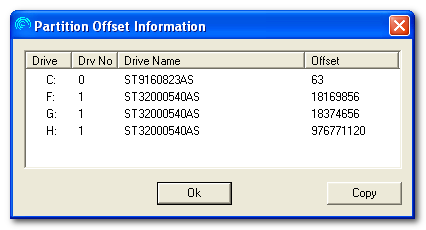
Seagate has created a simple Windows utility, Partition Offset Information, to read and display the starting LBA for every partition. This tool can analyze the starting sector of a partition if it is misaligned or not.

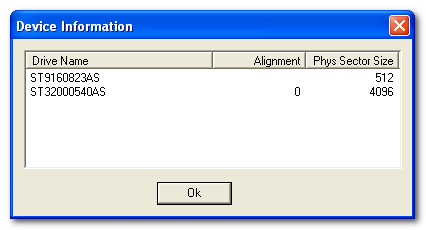
In the example below, drive C: is a generic drive (ST9160823AS) with 512 bytes per sector. Drives F:, G: and H: are logical drives, all on the ST32000540AS which has a 4096 byte (4KiB) sector size and an Alignment of 0.

Partition Offset Information

Partition Offset Information

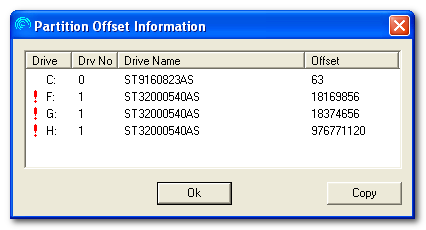
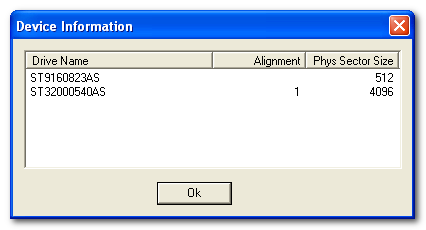
If the alignment on the ST32000540AS was 1, instead of 0, the display would look like this:

Partition Offset Information

Partition Offset Information

Notice: the the RED exclamation marks. These marks indicate that the Logical Volumes (drive letters) in this partitioning arrangement are not aligned with the physical sectors on the disk drive. Normal 4K disk drives will ship with Alignment 0. Drives with Alignment 1 and not typical and the example above is shown only for comparison purposes.

It is important to understand that the drive operates with the same reliability, but just a little bit slower when WRITING to the drive. It runs the same when READING which accounts for the majority of activity on a disk drive.

Useful link: Download Partition Offset Information

Read More

Few bad troubles on Seagate Barracuda 7.7200

For example: Seagate Barracuda 7.7200 40Gb. When scan it by MHDD almost all surface looks perfect, but drive have 1 bad block (or little bit more) in first sectors. How to fix the problem?

First rule: if data is important you must save it first, before do any “repair” or you can lose you data in this drive at any moment.

Now, then data saved we can start drive diagnostic. If drive have few bad blocks we can divide situation to the following case:

Universal:

1) software damaged – this is actually not damage, but sectors with incorrect ECC info, simply rewrite sectors to remove trouble.(MHDD erase waits will help)

2) actual damaged – well sometimes surface can be worn and we have actual damage. If we have not very much damage that we can try remap them. Try simple rewrite bad sector (most drives perform remap on write) or use MHDD remap on etc. (then bad sector remapped SMART Reallocated sector count attribute increased )

Seagate 7.7200:

3) head problem – drive firmware detect head problem and switch to “read only” mode. This can be diagnosed by following symptoms:

①. after drive power on, it take long time to become ready (BSY status cleared)

②. drive don’t write if you run MHDD “erase” (not fast erase, but normal erase) everything stopped after MHDD write 765 sectors. (Really nothing wrote at all, if you try writing disk sectors with disk editor, you see what nothing changed)

Such troubles most likely can’t be fixed by MHDD, because they caused by bad head. You should use the head replace tools to fix this problem.


Read More

Sync – How can I synchronise my Outlook Calendar with Google Calendar (preferably using a free/open source tool)?

How can I synchronise my desktop Outlook calendar with my Google Calendar (Outlook -> Google)? I saw the question Free tool for Synchronizing Google Contacts and Calendar with Outlook, but the solution that was suggested there is no longer available – Google Sync End of Life. There are tools that required a payment, like SyncMyCal,…

Read More

G3626A Toshiba PCB Circuit Board

HDD Printed circuit board (PCB) with board number G3626A is usually used on these Toshiba hard disk drives: MD04ACA400, FP1A, HDETR11GEA51, Toshiba 4TB SATA 3.5″ Hard Drive; MD04ACA500, FP2A, HDETR10GEA51, Toshiba 5TB SATA 3.5″ Hard Drive; MD04ACA400, FP2A, HDETR11GEA51, Toshiba 4TB SATA 3.5″ Hard Drive; HDWE150UZSVA, FP2A, HDETR10GCA51, Toshiba 5TB SATA 3.5″ Hard Drive; HDWE140UZSVA,…

Read More