Hard disk storage manufacturers have been always working to improve the technology. Storage space, data transfer rates, and internal error checking have been the guiding principles of hard drive technology. Data Recovery companies work hard to maintain their capabilities to be compatible with these emerging technologies so that they can provide the best hard drive recovery for their client’s data. What are some of the advancements in hard disk storage devices? What are some common data loss scenarios with hard disk storage? This document will help answer these questions and more. Let’s begin with looking at the inner workings of the hard disk itself.
Hard Drives — Technology in Action
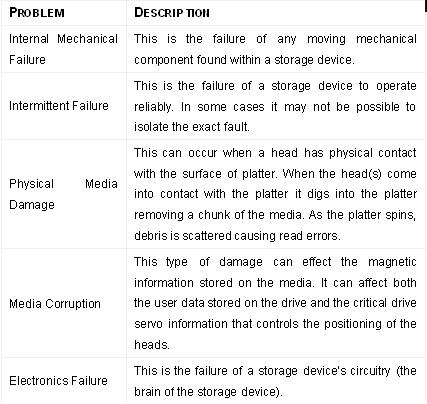
Types of common failures include:

As we know, hard drives are a combination of sophisticated electronic and mechanical systems that incorporate a number of specialized motors and electro-mechanical components to read and write data.
Hard drive technology has substantially advanced in the past 10 years. In fact, hard drives are designed to manage themselves in addition to reading and writing data. Hard drives today use a number of algorithms to verify data on the drive and also maintains a ‘Defect Management’ list internally that constantly monitors their own health and performance. If a sector is beginning to fail, the hard drive’s electronics will remove that sector from use. In addition to this, S.M.A.R.T. (Self-Monitoring, Analysis and Reporting Technology) circuitry has been incorporated on many hard drives and is used to monitor all of the internal systems.
Despite these safeguards, hard drives can fail. There can be a number of reasons for hard drive failure, for instance physical damage can result when the hard drive or case is jarred while operating or even when powered off. Power spikes or fluctuations can damage the electronics or corrupt the data on the drive. Internal mechanical parts can seize up due to high temperatures if the drive does not have enough airflow to keep the unit cool.