Seagate Barracuda 7200.11 hard drive PCB

Buy Seagate Barracuda 7200.11 hard drive PCB(Printed Circuit Board) on HDDZone.com with low price, fast shipping and top-rated customer service! All kinds of Seagate Barracuda 7200.11 HDD PCB for your Data Recovery Needs!

Seagate Barracuda 11 PCB ST31500341AS 100530756 RVE A
Name: ST31500341AS
Board Number: 100530756 RVE A
Main Controller IC: V723A
HDD Motor Combo IC: 100369972

Seagate Barracuda 11 PCB ST3320613AS 100496208 V723A
Name: ST3320613AS
Board Number: 100496208
Main Controller IC: V723A
HDD Motor Combo IC: SH6964BD

Seagate Barracuda 11 PCB 100466824
Board Number: 100466824
Main Controller IC: TTB5501D
HDD Motor Combo IC: 100439116

Seagate Barracuda 11 PCB 100475720
Board Number: 100475720
Main Controller IC: V523C/TTB5501D
HDD Motor Combo IC: 100369972

Seagate Barracuda 11 PCB 100498535
Board Number: 100498535
Main Controller IC: LSI-B5504A/V723A
HDD Motor Combo IC: 100369972

Seagate Barracuda 11 PCB 100512588 REV A
Board Number: 100512588 REV A
Main Controller IC: 100369972
HDD Motor Combo IC: LSI 5504A

Seagate Barracuda 11 PCB ST3320613AS 100496208 lsi-B5504A
Name: ST3320613AS
Board Number: 100496208
Main Controller IC: lsi-B5504A
HDD Motor Combo IC: SH6964BD

Seagate Barracuda 11 PCB ST3500320AS 100466725
Name: ST3500320AS
Board Number: 100466725
Main Controller IC: TTB5501C
HDD Motor Combo IC: 100369972

Seagate Barracuda11 PCB 100442000 REV A
Board Number: 100442000 REV A
Main Controller IC: TTB54081AD
HDD Motor Combo IC: SH6960B

Note:

  • These are just PCB(Printed Circuit Boards), not the whole HDD(Hard Disk Drive).
  • All boards have been fully tested before shipment, no refund and exchange policy.
  • It is a buyer responsibility to know if the board is adequate for his hard drive model.
  • Hard drive failures are NOT always caused by circuit board failure. We cannot guarantee your drive to be repaired by replacing the board.

HDDZone.com: Seagate Hard Drive PCB

Read More

Seagate Has Shipped More Than 1 Million Self-Encrypting Hard Drives(SEDs)

Seagate announced that it has shipped more than 1 million self-encrypting laptop and enterprise hard drives. Sales of the Seagate hard drives with built-in encryption continue to surge as more computer makers offer the drives to protect against unauthorized access to sensitive data, more independent software vendors team up with Seagate to provide the management capabilities required for company-wide installations of self-encrypting laptop PCs, and more of the drives win U.S. government certifications:

Seagate’s Cheetah Self-Encrypting Hard Drive

  • Six original equipment manufacturers – Dell, Fujitsu, Hitachi, IBM, LSI and Network Appliance – now offer products powered by Seagate enterprise self-encrypting drives (SEDs). All told, Seagate now ships 24 products in a family of enterprise drives that includes Savvio®, Cheetah®, Constellation® ES and Constellation® SEDs.
  • Dell, Lenovo and Panasonic are shipping or qualifying standard-sized or thin laptops with Seagate Momentus® and Momentus® Thin SEDs as optional features.
  • Seagate’s family of Savvio, Cheetah, Constellation and Momentus SEDs have secured FIPS 140-2 certification from the U.S. National Institute of Standards and Technology (NIST). This key government certification clears the way for deployments of Seagate self-encrypting drives by all U.S. and Canadian federal agencies, many state and local governments, and regulated industries such as healthcare, finance and defense required to use FIPS-certified gear to help protect sensitive data on PCs and computer networks and in data centers. The Seagate laptop and enterprise hard drives are the first with native encryption to earn the FIPS certification.
  • Seagate’s independent software vendor (ISV) partnerships have grown to include security leaders Credant, McAfee, Mobile Armor, Secude, Softex, Symantec, Wave Systems and WinMagic. With management software from these providers, organizations can easily and affordably manage and protect encryption keys and passwords to simplify deployments of Momentus and Momentus Thin SEDs.
  • Dell and Panasonic now offer laptops featuring FIPS-certified Momentus SEDs.
  • Several major original equipment manufacturers (OEMs) are now qualifying Momentus SEDs that are compliant with the Trusted Computing Group’s Opal specification. The Trusted Computing Group, an international body that promotes open standards for computer security, issued the Opal specification in 2009. The specification is focused on enabling the ecosystem for self-encrypting drives and increasing their adoption.
  • Seagate enterprise SED shipments have tripled over the past two quarters, while the company’s laptop SED shipments have doubled in each of the past three years.

“Companies and government organizations worldwide increasingly are securing confidential information on self-encrypting hard drives, recognizing that this commonsense yet powerful approach simplifies the deployment of security for data at rest, as storage and security continue to converge, solutions like Seagate’s self-encrypting hard drives are leading the way by providing organizations with the strong, easy-to-use security they need to protect their data assets.” – said Charles Kolodgy, research director of security products for analyst group IDC.

Seagate® Enterprise Self-Encrypting Hard Drives Deliver Government-Grade Security

Seagate offers a full lineup of enterprise SED options within its Savvio, Cheetah, and Constellation families. Strong enough for national security, yet easy enough for the one-person IT department, Seagate enterprise SEDs simplify decommissioning and preserve hardware value for returns and repurposing by eliminating the need to overwrite or physically destroy the drive, securing warranty and expired lease returns, and enabling drives to be repurposed securely.

Laptop Lockdown with Momentus® Self-Encrypting Hard Drives

Momentus® SEDs give organizations of all sizes a simple, cost-effective way to protect against unauthorized access to data on notebook PCs and a powerful tool for complying with the growing number of data privacy laws calling for the protection of consumer information using government-grade encryption. The AES encryption chip in the Momentus SEDs automatically and transparently encrypts all drive data, not just selected files or partitions. The 2.5-inch drive also eliminates disk initialization and configuration required by encryption software, allows IT administrators to instantly erase all data cryptographically so the drive can be quickly and easily redeployed, and delivers full inline-speed encryption with no impact to system performance.

Momentus SEDs keep all security keys and cryptographic operations within the drive, separating them from the operating system to provide greater protection against hacking and tampering than traditional software alternatives, which can give thieves backdoor access to encryption keys and are otherwise more vulnerable to key theft. Momentus SEDs are offered in capacities up to 500GB.

Read More

Hard Disk Details (3)

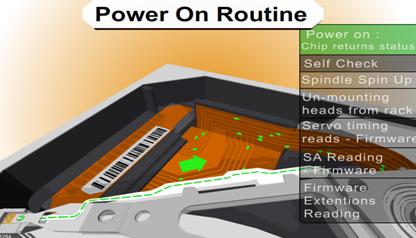
Slide 1289: The first thing a hard drive will do after it receives power is check for a return status from it’s chips to make sure the electronics are functioning. Then the drive will begin the self-check of its parts and wait for a return status. If both status checks are returned then the drive continues on to the next step and spin up the spindle.

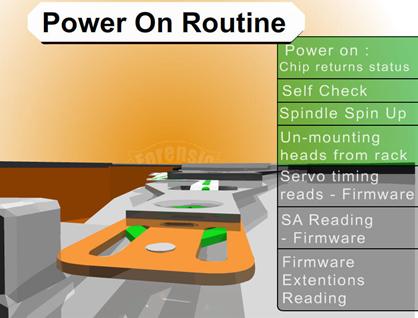
Slide1389: The drive begins to spin the spindle or as you would see, the platters begin to revolve.  When the platters begin to revolve the air flow around the platter creates a force that is called an air bearing.  This air bearing will fling off debris on the platters such as any dust particles or metal fragments from the standard operation of the drive. This air bearing also causes the plastic locking arm mechanism to move out of the way as soon as there is enough air flow for the head to float. Without that airflow the arm is locked in place and will not move over the platter. This is a way to protect the platter from the head touching the platter and causing physical damage. The opposite is true during a power down. When power is cut to the drive, during the last revolutions of the motor, it generates enough power to move the head back to it park position.  Because of this, as you can imagine,  if you get enough power on and power off cycles in a row it is possible for the head to be stuck in the center of the platter and never to be parked correctly causing several types of damage. In certain 80 gig laptop 2.5″ inch drives it is common for the head to be stuck to the center of the platter, never having parked and keeping the platters from spinning. In most cases there is very little damage if the drive is opened and manually turned slow enough not to damage the head, and the data can be recovered, obviously never using this drive again.

Slide 1483: At this point, if the all has proceeded correctly the air bearing will allow the head to float over the platter allowing it to move freely without scratching the surface of the platter.

Slide 1545: At this point, if the head is reading the Servo Timing info from the platter and relaying it to the circuitry so the controller knows the geographic information for the placement of data.  (See previous speech at Defcon 14 for discussion about Voice Coil and stepping motors to understand the servo info).

Slide 1679: At this point the head moves to the System Area (SA) of the platters and reads the content that it requires as well as any additional firmware and overlays.
Most of the time, the system area is on the outer tracks – the extreme outer edge. This is chosen by the manufacturer but is most common on the outside on 3.5 and is sometimes written to the inside tracks on a 2.5″ inch drive.

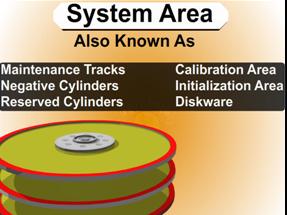
System Area Information Common Names

 1.      System Area
 2.      Maintenance Tracks
 3.      Negative Cylinders
 4.      Reserved Cylinders
 5.      Calibration Area
 6.      Initialization Area
 7.      Diskware

Read More

2060-771640-003 WD PCB Circuit Board

HDD Printed circuit board (PCB) with board number 2060-771640-003 is usually used on these Western Digital hard disk drives: WD5000AAKX-08ERMA0, DCM HGNCHT2MHB, Western Digital 500GB SATA 3.5 Hard Drive; WD5000AAKX-75U6AA0, DCM DHRNHT2CHB, Western Digital 500GB SATA 3.5 Hard Drive; WD5000AVDS-63U7B1, DCM HHNNHT2CH, Western Digital 500GB SATA 3.5 Hard Drive; WD5000AAKX-001CA0, DCM EARNHT2MEB, Western Digital 500GB…

Read More

Data Backup Glossary (Letter H)

Heterogeneous environment
An IT environment that includes computers, operating systems, platforms, databases, applications, and other components from different vendors.

Hierarchical storage management
Hierarchical storage management (HSM) is a data storage system that automatically moves data between high-cost and low-cost storage media. HSM systems exist because high-speed storage devices, such as hard disk drives, are more expensive (per byte stored) than slower devices, such as optical discs and magnetic tape drives. While it would be ideal to have all data available on high-speed devices all the time, this is prohibitively expensive for many organizations. Instead, HSM systems store the bulk of the enterprise’s data on slower devices, and then copy data to faster disk drives when needed. In effect, HSM turns the fast disk drives into caches for the slower mass storage devices. The HSM system monitors the way data is used and makes best guesses as to which data can safely be moved to slower devices and which data should stay on the hard disks.

High availability
The availability of resources in a computer system in the wake of component failures in the system. High availability can be achieved in a variety of ways—from solutions that use custom and redundant hardware to ensure availability to solutions that provide software solutions using off-the-shelf hardware components. The former class of solutions provides a higher degree of availability, but is significantly more expensive than the latter class. This high cost has led to the popularity of the latter class, with almost all vendors of computer systems offering various high availability products. Typically, these products survive single points of failure in the system.

High-level format
(n.) A formatting method that initializes portions of the hard disk and creates the file system structures on the disk, such as the master boot record and the file allocation tables. High-level formatting is typically done to erase the hard disk and reinstall the operating system back onto the disk drive.

(v.) The process of performing high-level formatting.

Holographic data storage
A mass storage technology that uses three-dimensional holographic images to enable more information to be stored in a much smaller space. In holographic storage, at the point where the reference beam and the data carrying signal beam intersect, the hologram is recorded in the light sensitive storage medium.

Hosted service
A service in which day-to-day related management responsibilities are transferred to the service provider. The person or organization that owns or has direct oversight of the organization or system being managed is referred to as the offerer, client, or customer. The person or organization that accepts and provides the hosted service is regarded as the service provider. Typically, the offerer remains accountable for the functionality and performance of a hosted service and does not relinquish the overall management responsibility of the organization or system.

Hot backup
A technique used in data storage and backup that enables a system to perform a routine backup of data, even if the data is being accessed by a user. Hot backups are a popular backup solution for multi-user systems as no downtime to perform the backup is required. If a user alters the data during the backup process (for example, makes changes at the exact moment the backup system is processing that data) the final version of the backup may not reflect those changes. Hot backup may also be called a dynamic backup or active backup.

Hot potato routing
A form of routing in which the nodes of a network have no buffer to store packets in before they are moved on to their final predetermined destination. In normal routing situations, when multiple packets contend for a single outgoing channel, packets that are not buffered are dropped to avoid congestion. But in hot potato routing, each packet that is routed is constantly transferred until it reaches its final destination because the individual communication links cannot support more than one packet at a time. The packet is bounced around like a “hot potato,” sometimes moving further away from its destination because it has to keep moving through the network. This technique allows multiple packets to reach their destinations without being dropped.

Hot standby
A method of redundancy in which the primary and secondary (backup) systems run simultaneously. The data is mirrored to the secondary server in real time so that both systems contain identical information.

Read More

Online Backup for Small Business

You’ve heard it thousands of times — backup your data. A good data backup strategy is to have two copies of your data – one local (it resides in your office or place of business) and one offsite (you pay an online data company to store it remotely on their secure servers).

Online backup is now a must have for all computer users, as we now live in a digital age where our whole digital life is store online.  Our files, photos, music, video, financials and more are all stored on our computer hard drives. But what happens if your hard drives crash? All hard drives will fail eventually and they usually happen at random when you least expect them. We no longer have CD collections, or DVD racks with our films, or photo albums of our photos, they are all stored on our hard drives. Theft, Fire, Accidental deletion, hardware failure, all these can contribute to lost files. Files which are no longer just binary text, these files are irreplaceable memories which money cannot buy back.

OnlineBackupforSmallBusiness

Online Backup for Small Business

Tips For Buying Online Backup Services:
Below are some of the main factors to consider when selecting an online data backup providers:

1. The Kind of Backup User You Are:

A service designed for home users or small businesses is quite different than one designed for the enterprise. The latter requires complex features such as ability to backup operating system files, live database, historical backup, and extremely tight encryption, while the former would be happy with a relatively low priced service that provides common features such as scheduled backup, web access, ability to send files by CD/DVD, and share files with others.

2. In general, online backup users should ask the following questions:

  • Does the service offer historical backup?
  • Can the software recover from an interrupted backup process?
  • Is there an option for a live and continuous backup? (As opposed to a scheduled backup)
  • Does the software allow network backups?
  • How about database and operating system backup? (Including registry files)
  • Can I get copies of my data on a CD-ROM for an emergency data restoration?
  • Can I edit or delete stored files?
  • Can I select a whole folder without having to select each individual file to backup?
  • Does the software allow multiple file sets to be scheduled on different times?
  • Can I include / exclude filters to include / exclude certain file types?
  • How long will my data be kept in the provider’s servers?
  • Will my data be duplicated to at least two geographically different locations?
  • Where is the data center of this company?
  • How many different versions of my data will be kept?
  • Will this company be around, say, 3 years from now?
  • Is this company an original provider or is it a re-seller?
  • What is the speed of uploading and restoring files? If this is important to me, shall I consider paying more for a fast service?
  • Does this provider support my computer systems (E.g. Mac, Linux, etc.)?

3. Security

To ensure that your data is secure while it is being transferred from your computer to the provider’s data center, most providers offer the option of encryption and password protection. In this way, only someone with your password can access your data.

In most cases a 128-bit encryption is sufficient. For some businesses that want absolute privacy, security might require a much stronger encryption. Although not very common, some providers offer a 448-bit encryption. In addition, data has to remain secure once it reaches the destination server, which means providers have to have proper policies to ensure employees do not access client data for non-authorized reasons. Most providers take the issue of security very seriously, as it is one of the reasons why computer users are hesitant to backup online.

4. Speed, Reliability and Uptime

As backups are usually a last resort way of recovering data after a disaster or system failure, backup providers don’t have much of a margin of error. The data has to be there when needed. No amount of explanation on why the data is not available will calm a user that just lost an entire computer hard drive and is trying to restore from a backup.

To ensure the provider has taken sufficient steps to keep service reliable, you should ask the following questions:

Does the backup provider have a “backup” copy of all clients’ data somewhere on a secondary data center, away from the primary?
Is the backup center equipped with uninterruptible power supply, backup generator and is it located in a safe and secure location?
What is the uptime for the data center?
How many clicks does it take before the actual backup is started?
How fast is the data center?
How much CPU or disk resources does it chew up when the backup is running?
Where is the geographic location of the data center?
Is the backup continues?
How many years has this Online Backup Service Provider been in business or does the company have solid financial resources?
How fast can files be restored?
Who are the clients of this company?
How many paying customers does the company have?

5. Quality and Accessibility of Technical Support

Does the company have a toll free number?
Is technical support available 24/7?
Does this company reveal its email address in their site or does it force me to fill in a time consuming form?
Is there an emergency user support?
Does the company have a physical address listed in their site?
What is the turn around time for email queries?
Does the company have an international presence?
Does the company publish a customer support satisfaction survey stats?
What is the wait time for phone support?

6. Cost

How much does this Online Backup Service Provider charge per GB per month?
Is there a set-up fee?
Is the cost per account or per PC?
How often and how much data are allowed for backup per day or per month?
Is there a no obligation free trial period before I sign up?
Can I cancel at any time or am I tied in for a minimum period?
What is the cost for exceeding the allowable traffic and storage quota?
Is there extra cost for telephone technical support?

7. Some these Online Backup Service Providers:

mypcbackup.com
justcloud.com
backupgenie.com
sosonlinebackup.com
zipcloud.com
sugarsync.com
mozy.com
box.com
crashplan.com
carbonite.com

Online Backup is like insurance, for a small monthly fee (Less than the cost of a Cinema Ticket) you will never have to worry about your files again. If you get a new computer and you need to restore your files and documents its literally a click of a button.


Read More

Head-Actuator Assembly

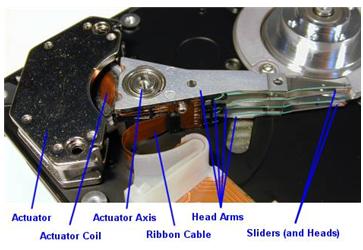
We often call the Head-Actuator Assembly as head stacks or only heads for short. In fact, we make a mistake in some way. Let’s take a look at a head-actuator Assemble on the flowing photo:

Mostly, each platter is accessed for read /write operations using two read/write heads, one mounted on the top of the platter and another on the bottom. These heads are mounted onto arms that allow them to be moved from the outer tracks of the hard drive to the inner tracks and back again. The arms are controlled using a device called an actuator that positions the arms to the appropriate track on the disk. The read/write heads don’t touch the platter when the platter is spinning at full speed; instead, they float on an extremely thin cushion of air (10 millionths of an inch, Winchester disk drive). That’s why power surge may cause Head crash and platter scratch due to the fast rotating rolling of platters.

Notice: In 1973, IBM introduced the IBM 3340 “Winchester” disk drive, the first significant commercial use of low mass and low load heads with lubricated media. All modern disk drives now use this technology and/or derivatives thereof. Project head designer/lead designer Kenneth Haughton named it after the Winchester 30-30 rifle after the developers called it the “30-30” because of it was planned to have two 30 MB spindles; however, the actual product shipped with two spindles for data modules of either 35 MB or 70 MB.

How they work?
The hard disk platters are accessed for read and write operations using the read/write heads mounted on the top and bottom surfaces of each platter. Obviously, the read/write heads don’t just float in space; they must be held in an exact position relative to the surfaces they are reading, and furthermore, they must be moved from track to track to allow access to the entire surface of the disk. The heads are mounted onto a structure that facilitates this process. Often called the head assembly or actuator assembly (or even the head-actuator assembly), it is comprised of several different parts.

The heads themselves are mounted on head sliders. The sliders are suspended over the surface of the disk at the ends of the head arms. The head arms are all mechanically fused into a single structure that is moved around the surface of the disk by the actuator. (Sort of like “the wrist connected to the hand”, why I say it is a hand because it is very skillful and ingenious and the upper site is Arm: D).They play an important role in the function and performance of the drive. In particular, advances in slider, arm and actuator design are critical to improving the seek time of a hard disk.

Read More