half-duplex
 A communication protocol that permits transmission in both directions but in only one direction at a time.
hard drive
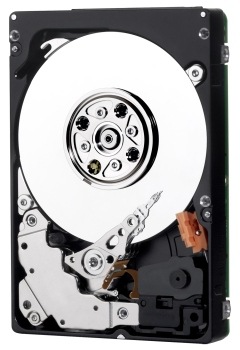
An electromechanical device for information storage and retrieval, incorporating one or more rotating disks on which data is magnetically recorded, stored, and read. The principal products of WD.
hard error
An error that is repeated every time the same area on a disk is accessed.
hard sectored
A technique that uses a digital signal to indicate the beginning of a sector on a track.
HDA
Head disk assembly. The mechanical components of a hard drive, including disks, heads, spindle motor, and actuator.
head
Also known as a read/write head. An electromagnetic coil and metal pole that read/write magnetic patterns on a disk. A drive with several disk surfaces or platters has a separate head for each data surface. See also MR head.
head actuator
A motor that moves the head stack assembly in a hard drive to align read/write heads with magnetic tracks on the disks.
head crash
The damage incurred to a read/write head when the head comes into contact with a disk surface. A head crash may be caused by severe shock, dust, fingerprints, or smoke, and may damage the disk surface and/or head.
head loading zone
The area on a disk reserved for heads to take off or land when power to the drive is turned on or off. No data is stored in the head loading zone.
head stack assembly
An electromechanical component containing read/write heads and their supporting devices.
headerless format
The lack of headers or ID fields (track format). This format enables greater efficiency and increased user capacity.
HFS
Hierarchical File System. File system developed by Apple Computer for use on computers running Mac OS.
high-level formatting
Formatting that erases all information on a hard drive and sets up the system for storing and retrieving files.
host
The computer to which other computers and peripherals connect. See also initiator.
host adapter
A plug-in board that acts as an interface between a computer system bus and a hard drive.
host interface
The point at which a host and a drive are connected to each other.
host transfer rate
The speed at which a host computer can transfer data across an interface.
hot plug
Act of swapping out a hard drive without having to power down the system or reboot. Hot plugging capability promotes system design flexibility, data availability, and serviceability.
hot swap
See hot plug.
HTTP
Hypertext Transfer Protocol. Protocol used by the World Wide Web to transfer information between servers and browsers.
HTTPS
HTTPS (HTTP over SSL) is the use of Secure Socket Layer (SSL) or Transport Layer Security (TLS) as a sub-layer under regular HTTP application layering. HTTPS encrypts and decrypts user page requests as well as the pages that are returned by the Web server.
hub
A multiple port connection point for network devices, often used to connect segments of a LAN.


 A communication protocol that permits transmission in both directions but in only one direction at a time.