Flash cards are the main storage devices used in digital cameras. In some situations, you may find that the photos that were stored on your memory cards have been lost. During these situations, you need photo recovery software to get your lost photos back. Now we introduce some free Flash Data Recovery Software for you:
Fast Flash Recovery 3.2
Risk free file restore tool for flash cards and other media. Fast Flash Recovery is an user friendly image recovery software developed to recover files deleted by mistake from hard disks and memory cards. Deleted files, documents, archives, images, video, music and other erased important information can be easily recovered and saved without any special skills. Now you can recover your lost or deleted data with fast, accurate and easy to use.
MjM Free Photo Recovery Software
MjM Free Photo Recovery Software will recover images that have been deleted from a memory card, or from memory cards that have been formatted. The easy-to-use interface will automatically detect the media card in the card reader and scan it, while displaying thumbnail images of the photos that are found during the scan. You can view each photos in full-size and recover them all or only save selected images. During our review, we first deleted all images from the card the via Windows – the program found and recovered all of them. We then formatted the card in the camera and restarted the search – and again it found them all (recovery results after formatting may vary depending on the formatting method used by the camera). Works with Compact Flash, SmartMedia, Memory Sticks and other media storage cards, does not work with local hard drives. Deep scanning is very slow and can take hours depending on the size of your media card.
Smart Flash Recovery 3.6
Smart Flash Recovery is a data recovery tool for the Windows operating system that supports the FAT 16/32 file system. The software easily recovers data from any type of storage media: flash drives, USB drives, digital cameras, memory sticks, PC cards, multimedia cards, secure digital cards and more. Smart Flash Recovery can recover any deleted files, including MS Office files, photos, mp3 and zip files, even if the partition table is lost! Requirements: Windows NT/2000/XP/2003 What’s New: Recovery possibility option.
Smart Flash Recovery is a completely free software. You can free download and use it as long as you like.
My Flash Recovery 2.0
Data recovery tool for flash drives and other type of USB devices from all major manufacturers under FAT 16/32 file system – find, preview and restore accidenatlly deleted data even flash drive was formatted. Deleted files, documents, archives, images, video, music and other erased important information can be effectively recovered and saved without any special skills. My Flash Recovery use two mode: quick (less then one min.) and deep scan, designed to recover data from formated flash drives. Preview of any file is possible even with the free trial version. After the program is purchased, you can restore single file as far as entire folder. My Flash Recovery will work under Windows NT,2000,XP,2003,Vista operating systems.
My Flash Recovery is a free to try software. You can free download and try it for an evaluation period.
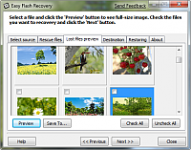
Easy Flash Recovery 3.4
Risk free file recovery tool for flash cards and other media.
Easy Flash Recovery is an easy-to-use data recovery software designed to restore files accidentally deleted from hard disks and memory cards. Deleted files, documents, archives, images, video, music and other erased important information can be effectively recovered and saved without any special skills. Now you can recover your lost or deleted data with fast, accurate and easy to use technique. With Easy Flash Recovery you can restore digital photo files (jpg, png, psd, gif, etc), professional photo raw files (crw, nef, raf, orf, etc), audio and video files (like avi, mov, wmv, mp3, mpg, etc) and other document files (zip, xls, doc, rar, etc).