

Hard Disk Details (3)

Slide 1289: The first thing a hard drive will do after it receives power is check for a return status from it’s chips to make sure the electronics are functioning. Then the drive will begin the self-check of its parts and wait for a return status. If both status checks are returned then the drive continues on to the next step and spin up the spindle.
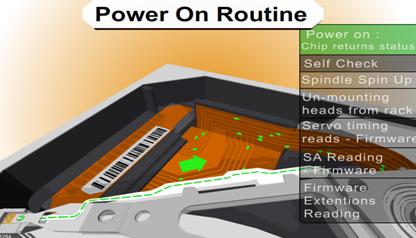
Slide1389: The drive begins to spin the spindle or as you would see, the platters begin to revolve.  When the platters begin to revolve the air flow around the platter creates a force that is called an air bearing.  This air bearing will fling off debris on the platters such as any dust particles or metal fragments from the standard operation of the drive. This air bearing also causes the plastic locking arm mechanism to move out of the way as soon as there is enough air flow for the head to float. Without that airflow the arm is locked in place and will not move over the platter. This is a way to protect the platter from the head touching the platter and causing physical damage. The opposite is true during a power down. When power is cut to the drive, during the last revolutions of the motor, it generates enough power to move the head back to it park position.  Because of this, as you can imagine,  if you get enough power on and power off cycles in a row it is possible for the head to be stuck in the center of the platter and never to be parked correctly causing several types of damage. In certain 80 gig laptop 2.5″ inch drives it is common for the head to be stuck to the center of the platter, never having parked and keeping the platters from spinning. In most cases there is very little damage if the drive is opened and manually turned slow enough not to damage the head, and the data can be recovered, obviously never using this drive again.

Slide 1483: At this point, if the all has proceeded correctly the air bearing will allow the head to float over the platter allowing it to move freely without scratching the surface of the platter.
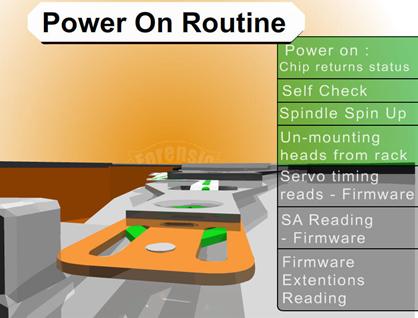
Slide 1545: At this point, if the head is reading the Servo Timing info from the platter and relaying it to the circuitry so the controller knows the geographic information for the placement of data.  (See previous speech at Defcon 14 for discussion about Voice Coil and stepping motors to understand the servo info).

Slide 1679: At this point the head moves to the System Area (SA) of the platters and reads the content that it requires as well as any additional firmware and overlays.
Most of the time, the system area is on the outer tracks – the extreme outer edge. This is chosen by the manufacturer but is most common on the outside on 3.5 and is sometimes written to the inside tracks on a 2.5″ inch drive.

System Area Information Common Names
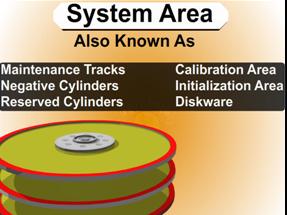
 1.      System Area
 2.      Maintenance Tracks
 3.      Negative Cylinders
 4.      Reserved Cylinders
 5.      Calibration Area
 6.      Initialization Area
 7.      Diskware
Read More

Windows – Why is there a difference between ping “localhost” and ping “local IP address”?

Using cmd and ping on Windows gave me the following results: Pinging “localhost”: Pinging “192.168.0.10” (local IP address): Aren’t both situations exactly the same? I mean, I’m pinging the same interface, the same machine and the same address. Why do I get such different results? EDIT: Here is my ipconfig /all screen: Solution: You are…

Read More

Cheap Hard Drive Recovery

Cheap Hard Drive Recovery Are you looking for a cheap hard drive recovery service? Data loss can occur on any device that stores data. Although any loss of data, even a simple misplacement, is by definition technically a loss, what we are primarily concerned with is the permanent loss of data that is important to your business’ ongoing success.

Let’s first take a look at people’s questions:

1. Cheap Logical Hard Drive Recovery

I have two USB externals drives. One is my backup drive. The other I just bought and was formating it to NTFS. The full format was taking a long time so I aborted the format and used the quick format. Everything went fine.

I then went to copy some stuff to the backup drive but it said it was not formated. My heart stopped then I said a few choice words. All my pictures for the last 1.5 years is on there. I could not do anything to the drive until I format, so I went ahead and did a quick formate. I am using Vista and the FAT32 option was not there so I formated to NTFS. I think the drive came formated to FAT32. I have no idea how the backup drive got formated. I guess I must of done something. Since the format I have not written anything to the hard drive.

I got a program form Diskinternals. It took about 4 hours to scan. It found around 350gig. It then took another 4 or so hours to copy to my new drive. All the files were corrupted.

Now for my questions:
1. Can the data still be recovered if the drive was FAT32 and then formated to NTFS?
2. Would it help if I formated it back to FAT32?
3. What would be the best software to try to recover my data?
4. Any other thoughts or ideas?

To solve this problem, the cheapest method is to purchase a advanced recovery software and recover it yourself. Connect your computer to a working PC and scan your HDD. In fact, if you know how to send an e-mail you can find all of the data from a crashed disk drive. With this powerful hard drive recovery software you can easily:

  • Recover files even if emptied from the Recycle Bin
  • File recovery after accidental format, even if you have reinstalled Windows.
  • Disk recovery after a hard disk cras
  • Get back files after a partitioning error
  • Get data back from RAW hard drives
  • Recover documents, photos, video music and email
  • Recover from hard drive, camera card, USB, Zip, floppy disk or other media

Recommend Hard Drive Recovery Software: RecoveMyFiles

2. Cheap Physical Hard Drive Recovery

After moving, my backup drive no longer works. I’ve tried two enclosures and the drive isn’t making a sound so I assume it is an electronics problem not a mechanical problem. I also have a drive that fell off my desk, it does click so I assume it is a mechanical problem. Both drives contain my backups and photos. I would like to recover the data from both these drives. Both are Seagate 7200, one is .11 and the other is a .10. I think I have about 1TB of data between the two.

What is the cheapest method of recovering the data? Send it to a data recovery company (recommendations?) or try switching the platters myself in a makeshift clean room?

Logic board (controller) failures.

  • Broken power/data connectors (requires fine soldering).
  • Spindle/arm driver chip failure (requires replacement of either a logic board, or a chip; additional repairs may be needed depending on the true cause of the problem).
  • Head block pre-amplification failure (platter box must be opened).

Moving parts failures.

  • Head crash.
  • Spindle bearing seizure or spindle motor failure.

Firmware corruption (requires special software and sometimes special connection arrangement).

In case of the massive damage, there is no point in attempting the do-it-yourself type data recovery at home. There is little you can do to repair a physically damaged device without the special equipment. In this case, you need a data recovery lab.

Recommend Physical Hard Drive Recovery Service(USA):

  • ESS Data Recovery
  • 24 Hour Data
Read More