Top 10 Data Recovery Softwares (2): Recover My Files

Recovery My Files Recover deleted files, perform unformat recovery and corrupt drive recovery.

Price: Free to try (Save-disabled); $69.95 to buy
Operating system: Windows 95/98/ME/2000/XP/2003/Server 2008/
Version: 3.9.8.6472

Recover My Files is advanced data recovery software to recover deleted files and formatted or corrupt drives. Works with hard drives, digital cameras, USB drives, ZIP disks, CompactFlash cards, SmartMedia, and Memory Sticks. Specific data recovery support for 350+ file types, including: Word, Excel, PowerPoint, Outlook, email, AutoCAD, Money, QuickBooks, SQL, MYOB, photos, MPEG, AVI, MP3 files. See and read data recovery results in evaluation mode. Data recovery is simple; no technical skill is required. Recover files that most undelete programs cannot find. The application has exclusive built-in CD and DVD burning support to save your data recovery results.

User Reviews:

I had a MS that was unreadable by either camera or computer both kept asking me to format it. My son’s performance was on there untransfered yet (stored in MP4). Not only did this recover it on the demo it previewed it so I was sure I was gettintg what I needed. I ordered quickly. Company was also great when I called with questions about other applications for product. Easy to use and worked thats a no brainer. Worth every cent plus.

As I understood the write-up I could recover files that had take a hit, but the disk sector not actually damaged or deleted. After a four hour run down my hard drive it found some deleted filses and would no let me access the file that the application would not now allow me access to so I could recover the data or fix the records so app would read. Ater hour with knowledge base and no help, and e-mail asking about advertised ablility to read such files was not responded to. Been too many years since I had such issues, where are the simple hex/ascii read sectors, edit and write back to recover?

Useful Links:

  • Web site: http://www.getdata.com/
  • Support web site: http://support.getdata.com
  • Free Download Recovery My Files Now!
  • Buy Recovery My Files Online.

Publisher profile:

GetData is a provider of data recovery, computer security, and Windows system tools. Company’s leading product is Recover My Files.

Read More

2060-771960-000 WD PCB Circuit Board

HDD Printed circuit board (PCB) with board number 2060-771960-000 is usually used on these Western Digital hard disk drives: WD10JPVX-22JC3T0, DCM HBMTJHKB, Western Digital 1TB SATA 2.5 Hard Drive; WD10JPVX-75JC3T0, DCM SBKT2BN, Western Digital 1TB SATA 2.5 Hard Drive; WD7500BPVX-60JC3T0, DCM HBOT2HB, Western Digital 750GB SATA 2.5 Hard Drive; WD10JPVX-22JC3T0, DCM SBOTJHN, Western Digital 1TB…

Read More

What Makes a Good Hard Disk Drive?

When looking to buy a hard drive there is a quick checklist of things to look for:

  1. Interface (PATA, SATA, SCSI or other more exotic setups)
  2. Capacity (how much space do you need/want)
  3. Spindle speed (i.e., 5400rpm, 10,000rpm, 15,000rpm etc)
  4. Cache (2MB, 8MB, 16MB)
  5. Brand (Western Digital, Seagate, Maxtor etc)

HDD Interface:

  • PATA drives are arguably the most universally compatible, are the cheapest and offer a respectable degree of performance however there is a potential inconvenience of having to set/adjust jumpers on the drive.
  • SATA (and SATA-II) drives are the next-generation drives and outperform similarly priced PATA drives (the price delta is usually no more than $10). Since there is only one drive per cable, no jumpers need to be set however the potential downside is that the destination motherboard/controller may not offer native boot-time support of the SATA drive (thus requiring a floppy/CD with the drivers in order to install an OS). Another consideration is if the drive only accepts SATA-power connectors than either the PSU needs these special connectors in order to power the drive (or adaptors must be purchased)
  • SCSI drives have the inconvenience of lack-of-boot-time support as well as the potential hassle of assigning SCSI id’s and performing termination. The upside is that many RAID options are available (much more so than with IDE drives) as well as significantly improved performance. Of the three common interfaces, SCSI is the most expensive.

HDD Capacity:
The old rule for determining how much drive space is requires is to “estimate how much you think you will need, double it and round-up to the nearest drive size”. With dropping drive prices as well as decreasing price deltas (i.e., going from a 120GB to 160GB drive is usually $10 — why? Because a 120GB drive is just a 160GB drive with a half-a-platter disabled).

HDD Spindle Speed & Cache:
Naturally, the faster the platters spin the better the overall performance however it is not always as simple as that. With SCSI drives, it’s fairly clean-cut as they tend to fall into distinct categories (10k and 15k rpm drives) with very distinct performance and price brackets. For IDE drives the three most common speeds are 5400, 7200 and 10000 rpm however the element of cache makes things interesting.

The argument for 5400rpm drives used to be “get a massive 5400rpm drive for archive — you’re not gonna be accessing it all the time so access-time performance isn’t critical” however with the advent of affordable (and massive) 7200rpm drives there isn’t much of a case for 5400rpm drives from a performance/functionality perspective (i.e., you won’t be able to get a 500GB DeskStar drive in a 5400rpm flavour). The only case really for 5400rpm (or slower) drives is for people looking to build uber-quiet systems. All 5400rpm IDE drives come with 2MB of cache.

Mainstream 7200rpm drives come in several flavours, 2MB, 8MB and 16MB of cache and with the wide variety of capacities. Buying a 2MB cache drive isn’t really a smart move anymore as the price delta to go from a 2MB to 8MB cached drive is usually ~$10. In the case of 16MB drives (currently only the Maxtor DiamondMax 10) which also offer NCQ support as well as being one of the few native SATA drives (Seagate’s barracuda 7200. 7 is another), it is obvious that the 16MB cache allow the DiamondMax10 to be the best performer for a 7200rpm drive and the NCQ and drive capacity allows for the drive to be immediately implemented in a server environment. Realistically the only competition in terms of performance for these drives are the 10k rpm drives.

Currently, two IDE drives support 10k rpm spindle speed (with 8MB of cache) and the advantages are obvious: significantly reduced access times. The downside is that (a) the drives are exceptionally expensive, (b) the highly competitive Maxtor 16MB cache drives represent a significantly improved value hands-down.

So will it be 10k@8MB ot 7.2k@16MB?
Ok let’s have a look at some numbers,

AVG Transfer rate
Maxtor DiamondMax 10 (NCQ on) — 54.5MB/s
Maxtor DiamondMax 10 (NCQ off) — 54.6MB/s
WD Raptor II — 64.9MB/s
with HDTach 3.0, it’s fairly evident that the Raptor is superior by a significant margin.

Burst Transfer
Maxtor DiamondMax 10 (NCQ on) — 131.7MB/s
Maxtor DiamondMax 10 (NCQ off) — 136.3MB/s
WD Raptor II — 118.7MB/s
here the tables are reversed however burst transfers are not as significant as average throughput.

Random Access Time
Maxtor DiamondMax 10 (NCQ on) — 13.9ms
Maxtor DiamondMax 10 (NCQ off) — 13.8ms
WD Raptor II — 7.9ms
The Raptor has a significantly reduced access time (42% advantage) however we don’t see anywhere near a 42% advantage in terms of benchmarked throughput performance … This is due to the larger cache count on the DiamondMax10: with the larger cache, the performance of the drive depends less and less on the mechanics of the drive (i.e., it reduces the effect of the rpm advantage the Raptors have)

Diskbench 2.3 – 250mb file
Maxtor DiamondMax 10 (NCQ on) — 16.2MB/s (30.7sec)
Maxtor DiamondMax 10 (NCQ off) — 15.3MB/s (33.6sec)
WD Raptor II — 13. 0MB/s (38. 2sec)
Here we can see the cache-advantage flex it’s muscles: a 17%-25% advantage in real-world performance (impressive if we consider the access-time disadvantage the Maxtors are operating with).

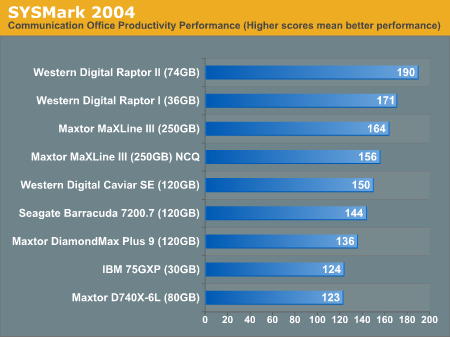
anandtech offers similar results with the Maxtor and wd trading spots back and forth with the 16MB Maxtor generally keeping up with or beating the 8MB Raptors (albeit by non-massive margins). Here is the 8MB Raptor pulling ahead by a non-insignificant margin

001

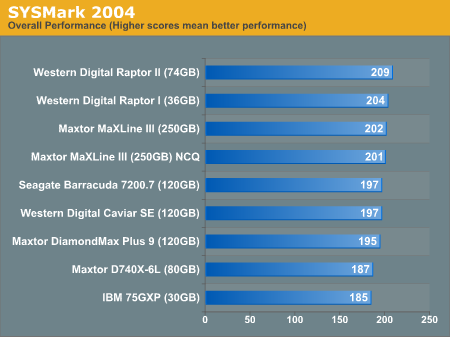
Summarizing the SYSmark scores, the Raptor comes out on top but with a very small lead

002

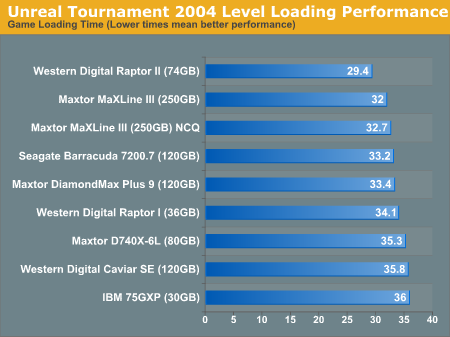
the Raptor pulls ahead with a small lead in UT2004 load times,

003

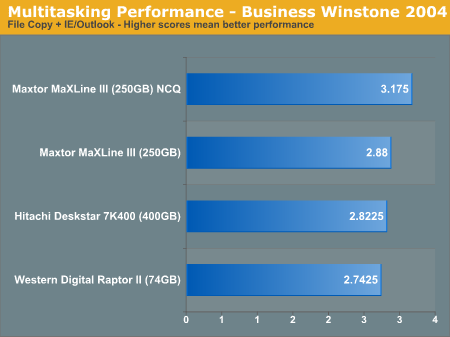
however the Raptor comes in last when multitasked heavy-disk access is thrown at it:

004

From a value perspective, there is almost no reason to recommend the WD 10k drives: one can get a 300GB Maxtor 16MB cache drive for the same price as a 74gb Raptor II. Now if the Raptor swept the floor it would probably be justifiable to purchase it however that was not the case. Perhaps if/when a 10k 16MB cache drive is released, the high-end drive market can be a bit more clear-cut.

HDD Brand:
Brand doesn’t matter all that much: people can tell you nightmare stores about Company X and recommend Company Y, however it’s probably equally possible to find nightmare stories about Company Y. While there may be bad drives (for instance the IBM/Hitatchi GXP75), it doesn’t mean that the entire product line will be bad.


Read More

WD Drives Caviar Blue vs Green vs Black

A coworker asked me, and other than the cache size and power consumption, i wasn’t sure what else to answer… What is the difference between the colors of Caviar drives? I’ve been under the impression it is primarily the power consumption but I have to assume there are other things as well.

Performance. The Black is optimized for performance at the expense of noise and power consumption, the blue is a general use drive, designed to be a good balance of performance, power consumption, and noise, and the green is designed to use as little power and make as little noise as possible at the expense of performance.

I’m having a dilemma of choosing which version of Caviar for storage/backup purposes.

I need a HDD which is stable, durable and can last for a longer time.
I’ll only use this HDD for backing up my important data once a week, which means I’ll just leave it unplug at the rest of the time.

I plan to go for an internal HDD with an external dock, which I think it will be more flexible switching between IN/EXternal usage and getting emergency backup when the HDD encounters any bad sector issues.

For my understanding, a LOW RPM HDD will definitely be more stable than a HIGH RPM HDD. Is it true?

Through my experience, I’ve a 2009 Caviar Blue, which doesn’t has any issue until today, while I have a couple units of Caviar Black 2009 FALS & 2010 FAEX which encountered with some issues (through checking via HD Tune). Beside that, I’ve also used Caviar Green before, but I felt it is slow when the drive turns from idle to active due to the energy saving technology in it? Correct me if I’m wrong.

So, based on my requirement, which version of Caviar suit me most and which should I go for? Green, Blue, or Black ?

Any of those HDD’s will be stable, each are as likely to break as each other. Only difference is price and performance.

Greens – slow, minimal energy savings (nowhere near worth the loss of performance), generally same price.
Blue – Mid-range, average performance.
Blacks – Faster and more expensive.

There are also Red drives, which are a mix of Green and Blue and optimized for mass storage (talking large scale business server stuff). They have no real use in desktops though.

Read More

Kingston sms200s360gmsata solid state drive cannot be recognized and the recovery is successful

Case:Before the Spring Festival, the Data Recovery Center continued to receive customers’ solid -state hard drives. The model: SMS200S360GMSATA, the failure cannot be recognized.These solid -state hard disks are used by customers of some business elites. There are important company data in it, and hard disks have hardware encryption functions. Solution:After the underlying analysis and…

Read More

Seagate Has Shipped More Than 1 Million Self-Encrypting Hard Drives(SEDs)

Seagate announced that it has shipped more than 1 million self-encrypting laptop and enterprise hard drives. Sales of the Seagate hard drives with built-in encryption continue to surge as more computer makers offer the drives to protect against unauthorized access to sensitive data, more independent software vendors team up with Seagate to provide the management capabilities required for company-wide installations of self-encrypting laptop PCs, and more of the drives win U.S. government certifications:

Seagate’s Cheetah Self-Encrypting Hard Drive

  • Six original equipment manufacturers – Dell, Fujitsu, Hitachi, IBM, LSI and Network Appliance – now offer products powered by Seagate enterprise self-encrypting drives (SEDs). All told, Seagate now ships 24 products in a family of enterprise drives that includes Savvio®, Cheetah®, Constellation® ES and Constellation® SEDs.
  • Dell, Lenovo and Panasonic are shipping or qualifying standard-sized or thin laptops with Seagate Momentus® and Momentus® Thin SEDs as optional features.
  • Seagate’s family of Savvio, Cheetah, Constellation and Momentus SEDs have secured FIPS 140-2 certification from the U.S. National Institute of Standards and Technology (NIST). This key government certification clears the way for deployments of Seagate self-encrypting drives by all U.S. and Canadian federal agencies, many state and local governments, and regulated industries such as healthcare, finance and defense required to use FIPS-certified gear to help protect sensitive data on PCs and computer networks and in data centers. The Seagate laptop and enterprise hard drives are the first with native encryption to earn the FIPS certification.
  • Seagate’s independent software vendor (ISV) partnerships have grown to include security leaders Credant, McAfee, Mobile Armor, Secude, Softex, Symantec, Wave Systems and WinMagic. With management software from these providers, organizations can easily and affordably manage and protect encryption keys and passwords to simplify deployments of Momentus and Momentus Thin SEDs.
  • Dell and Panasonic now offer laptops featuring FIPS-certified Momentus SEDs.
  • Several major original equipment manufacturers (OEMs) are now qualifying Momentus SEDs that are compliant with the Trusted Computing Group’s Opal specification. The Trusted Computing Group, an international body that promotes open standards for computer security, issued the Opal specification in 2009. The specification is focused on enabling the ecosystem for self-encrypting drives and increasing their adoption.
  • Seagate enterprise SED shipments have tripled over the past two quarters, while the company’s laptop SED shipments have doubled in each of the past three years.

“Companies and government organizations worldwide increasingly are securing confidential information on self-encrypting hard drives, recognizing that this commonsense yet powerful approach simplifies the deployment of security for data at rest, as storage and security continue to converge, solutions like Seagate’s self-encrypting hard drives are leading the way by providing organizations with the strong, easy-to-use security they need to protect their data assets.” – said Charles Kolodgy, research director of security products for analyst group IDC.

Seagate® Enterprise Self-Encrypting Hard Drives Deliver Government-Grade Security

Seagate offers a full lineup of enterprise SED options within its Savvio, Cheetah, and Constellation families. Strong enough for national security, yet easy enough for the one-person IT department, Seagate enterprise SEDs simplify decommissioning and preserve hardware value for returns and repurposing by eliminating the need to overwrite or physically destroy the drive, securing warranty and expired lease returns, and enabling drives to be repurposed securely.

Laptop Lockdown with Momentus® Self-Encrypting Hard Drives

Momentus® SEDs give organizations of all sizes a simple, cost-effective way to protect against unauthorized access to data on notebook PCs and a powerful tool for complying with the growing number of data privacy laws calling for the protection of consumer information using government-grade encryption. The AES encryption chip in the Momentus SEDs automatically and transparently encrypts all drive data, not just selected files or partitions. The 2.5-inch drive also eliminates disk initialization and configuration required by encryption software, allows IT administrators to instantly erase all data cryptographically so the drive can be quickly and easily redeployed, and delivers full inline-speed encryption with no impact to system performance.

Momentus SEDs keep all security keys and cryptographic operations within the drive, separating them from the operating system to provide greater protection against hacking and tampering than traditional software alternatives, which can give thieves backdoor access to encryption keys and are otherwise more vulnerable to key theft. Momentus SEDs are offered in capacities up to 500GB.

Read More