Samsung Develops SSD with SATA Mini-card Design for Netbooks
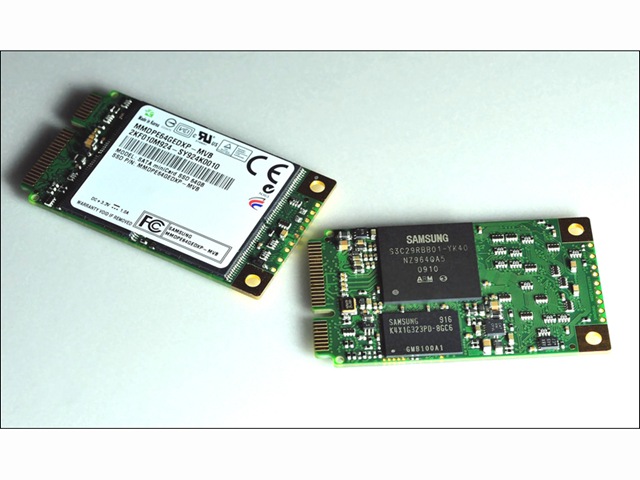
Samsung SATA SSD Samsung Announced that it is now sampling a SATA-interface mini-card solid state drive (SSD) with some of its customers, for use in the expanding netbook marketplace. The Samsung SATA mini-card SSD expands the use of SSDs from not only being a primary storage medium, but also as a complementary drive to boost the performance of PCs with dual drive capabilities.

Samsung’s new mini-card form factor, with a highly robust interface, makes an already rugged SSD even less susceptible to damage from jarring, jostling and dropping.

Featuring a mini-PCI Express (PCIe) form factor with a SATA 3.0Gb/s interface, the highly cost-efficient mini-card SSD is nearly 80 percent smaller than the conventional 2.5-inch hard disk drive, making it ideal for the tighter constraints of most netbooks. In addition, it can be used in printers and various handheld terminals including ruggedized mobile devices.

Moreover, the SATA mini-card SSD form factor can be used in a combination comprised of the SSD as main memory and HDD as supporting storage space. This new approach is expected to increase the adoption of SSDs in a broader range of applications.

Samsung is working to standardize the new mechanical form factor and its pin layout specifications at JEDEC (Joint Electron Device Engineering Council). With possible revisions by OEM manufacturers, standardization could be expected as early as the third quarter of this year.

Available in 16GB, 32GB and 64GB densities, the new SSD drive will be produced using 40-nanometer-class process technology. The SATA mini-card SSD provides strong performance levels with a sequential read rate of 200MB/s (megabytes per second) and writes data sequentially at 100MB/s.

Samsung’s mini-card SSD is only 30 millimeters (mm) wide and 51mm high. The drive weighs up to 8.5g and measures up to 3.75 millimeters thick. Also offering a high degree of energy efficiency, the new drive consumes 0.3 watts of power.

Samsung’s new netbook-targeted SSD is available with optional full disk encryption to thwart theft or any unwanted access to a netbook or other device.

“The market is beginning to embrace a smaller SSD for the nascent netbook sector, The cost-efficiency and reliability of lower-density, highly compact Samsung SSDs are perfectly suited as the storage medium for the rapidly growing netbook marketplace,” said Jim Elliott, vice president, memory marketing, Samsung Semiconductor, Inc.
Read More

Data Recovery Equipment: CleanRoom Environment Control

Cleanroom

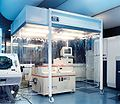
What is a Cleanroom?

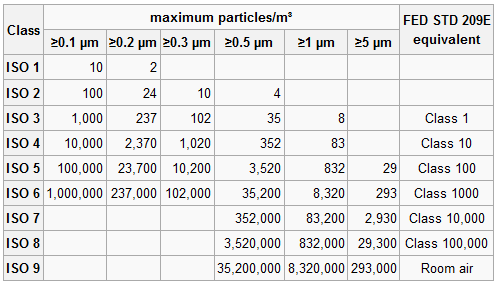
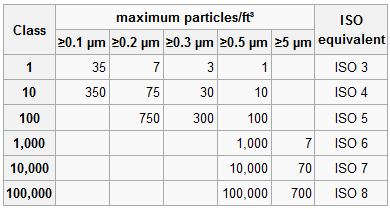
A cleanroom is an environment, typically used in manufacturing or scientific research, that has a low level of environmental pollutants such as dust, airborne microbes, aerosol particles and chemical vapors. More accurately, a cleanroom has a controlled level of contamination that is specified by the number of particles per cubic meter at a specified particle size. To give perspective, the ambient air outside in a typical urban environment might contain as many as 35,000,000 particles per cubic meter, 0.5 μm and larger in diameter, corresponding to an ISO 9 cleanroom.

If the hard disk needs to be opened up, one has to do it within a cleanroom. The gap between the Read-Write head and the data platter is just a few microns. Any dust particles that get into the gap will induce “crashing” of the Read-Write head onto the data platter (where your magnetic data bits are stored) resulting in total and permanent loss of data.

Cleanroom Standards

1. US FED STD 209E was officially cancelled by the General Services Administration of the US Department of Commerce November 29, 2001, but is still widely used.

Cleanroom Standard

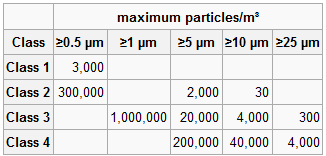
2. ISO 14644-1 cleanroom standards

Cleanroom Standard

3. BS 5295 Class 1 also requires that the greatest particle present in any sample does not exceed 5 μm.

Cleanroom Standard

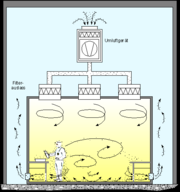
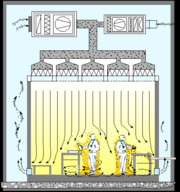
Cleanroom air flow principles

Cleanroom air flow principles Cleanroom air flow principles

picture 1: Air flow pattern for “Turbulent Cleanroom”
Picture 2: Air flow pattern for “Laminar Flow Cleanroom”

What makes cleanroom environment fail?

* Facilities

Walls, floors and ceilings

Paint and coatings

Construction material (sheet rock, saw dust etc.)

Air conditioning debris

Room air and vapors

Spills and leaks

* People

Skin flakes and oil

Cosmetics and perfume

Spittle

Clothing debris (lint, fibers etc.)

Hair

* Tool Generated

Friction and wear particles

Lubricants and emissions

Vibrations

Brooms, mops and dusters

* Fluids

Particulates floating in air

Bacteria, organics and moisture

Floor finishes or coatings

Cleaning chemicals

Plasticizers (outgasses)

Deionized water

* Product generated

Silicon chips

Quartz flakes

Cleanroom debris

Aluminum particles

Cleanroom Control Regulations for reference

1.  All personal items such as keys, watches, rings, matches, lighters and cigarettes should be stored in the personal locker outside the gowning room.

2.  Valuable personal Items such as wallets may be permitted in the cleanroom provided they are NEVER removed from beneath the cleanroom garments.

3.  NO eating, smoking or gum chewing allowed inside the cleanroom.

4.  Only garments approved for the cleanroom should be worn when entering.

5.  NO cosmetics shall be worn in the cleanrooms. This includes: rouge, lipstick, eye shadow, eyebrow pencil, mascara, eye liner, false eye lashes, fingernail polish, hair spray, mousse, or the heavy use of aerosols, after shaves and perfumes.

6.  Only approved cleanroom paper shall be allowed in the cleanroom.

7.  Approved ball point pens shall be the only writing tool used.

8.  Use of paper or fabric towels are prohibited. Use of hand dryers equipped with HEPA filters are suggested.

9.  Gloves or finger cots should not be allowed to touch any item or surface that has not been thoroughly cleaned.

10. Only approved gloves, finger cots (powder-free), pliers, tweezers should be used to handle product. Finger prints can be a major source of contamination on some products.

11. Solvent contact with the bare skin should be avoided. They can remove skin oils and increase skin flaking.

12. Approved skin lotions or lanolin based soaps are sometimes allowed. These can reduce skin flaking.

13. All tools, containers and fixtures used in the cleaning process should be cleaned to the same degree as the cleanroom surfaces. All of these items are a source of contamination.

14. NO tool should be allowed to rest on the surface of a bench or table. It should be place on a cleanroom wiper.

15. Only cleanroom approved wipers are allowed to be used. The wipers must be approved for the Class of cleanroom being cleaned.

16. ALL equipment, materials and containers introduced into a sterile facility must be subjected to stringent sterilization prior to entrance.

17.NO ONE who is physically ill, especially with respiratory or stomach disorders, may enter a sterile room. This is a good practice in any cleanroom environment.

Personal Actions Typically Prohibited in Cleanrooms

1. Fast motions such as running, walking fast or horseplay.

2. Sitting or leaning on equipment or work surfaces.

3. Writing on equipment or garments.

4. Removal of items from beneath the cleanroom garments.

5. Wearing the cleanroom garment outside the cleanroom.

6. Wearing torn or soiled garments.

Read More

Seagate Has Shipped More Than 1 Million Self-Encrypting Hard Drives(SEDs)

Seagate announced that it has shipped more than 1 million self-encrypting laptop and enterprise hard drives. Sales of the Seagate hard drives with built-in encryption continue to surge as more computer makers offer the drives to protect against unauthorized access to sensitive data, more independent software vendors team up with Seagate to provide the management capabilities required for company-wide installations of self-encrypting laptop PCs, and more of the drives win U.S. government certifications:

Seagate’s Cheetah Self-Encrypting Hard Drive

  • Six original equipment manufacturers – Dell, Fujitsu, Hitachi, IBM, LSI and Network Appliance – now offer products powered by Seagate enterprise self-encrypting drives (SEDs). All told, Seagate now ships 24 products in a family of enterprise drives that includes Savvio®, Cheetah®, Constellation® ES and Constellation® SEDs.
  • Dell, Lenovo and Panasonic are shipping or qualifying standard-sized or thin laptops with Seagate Momentus® and Momentus® Thin SEDs as optional features.
  • Seagate’s family of Savvio, Cheetah, Constellation and Momentus SEDs have secured FIPS 140-2 certification from the U.S. National Institute of Standards and Technology (NIST). This key government certification clears the way for deployments of Seagate self-encrypting drives by all U.S. and Canadian federal agencies, many state and local governments, and regulated industries such as healthcare, finance and defense required to use FIPS-certified gear to help protect sensitive data on PCs and computer networks and in data centers. The Seagate laptop and enterprise hard drives are the first with native encryption to earn the FIPS certification.
  • Seagate’s independent software vendor (ISV) partnerships have grown to include security leaders Credant, McAfee, Mobile Armor, Secude, Softex, Symantec, Wave Systems and WinMagic. With management software from these providers, organizations can easily and affordably manage and protect encryption keys and passwords to simplify deployments of Momentus and Momentus Thin SEDs.
  • Dell and Panasonic now offer laptops featuring FIPS-certified Momentus SEDs.
  • Several major original equipment manufacturers (OEMs) are now qualifying Momentus SEDs that are compliant with the Trusted Computing Group’s Opal specification. The Trusted Computing Group, an international body that promotes open standards for computer security, issued the Opal specification in 2009. The specification is focused on enabling the ecosystem for self-encrypting drives and increasing their adoption.
  • Seagate enterprise SED shipments have tripled over the past two quarters, while the company’s laptop SED shipments have doubled in each of the past three years.

“Companies and government organizations worldwide increasingly are securing confidential information on self-encrypting hard drives, recognizing that this commonsense yet powerful approach simplifies the deployment of security for data at rest, as storage and security continue to converge, solutions like Seagate’s self-encrypting hard drives are leading the way by providing organizations with the strong, easy-to-use security they need to protect their data assets.” – said Charles Kolodgy, research director of security products for analyst group IDC.

Seagate® Enterprise Self-Encrypting Hard Drives Deliver Government-Grade Security

Seagate offers a full lineup of enterprise SED options within its Savvio, Cheetah, and Constellation families. Strong enough for national security, yet easy enough for the one-person IT department, Seagate enterprise SEDs simplify decommissioning and preserve hardware value for returns and repurposing by eliminating the need to overwrite or physically destroy the drive, securing warranty and expired lease returns, and enabling drives to be repurposed securely.

Laptop Lockdown with Momentus® Self-Encrypting Hard Drives

Momentus® SEDs give organizations of all sizes a simple, cost-effective way to protect against unauthorized access to data on notebook PCs and a powerful tool for complying with the growing number of data privacy laws calling for the protection of consumer information using government-grade encryption. The AES encryption chip in the Momentus SEDs automatically and transparently encrypts all drive data, not just selected files or partitions. The 2.5-inch drive also eliminates disk initialization and configuration required by encryption software, allows IT administrators to instantly erase all data cryptographically so the drive can be quickly and easily redeployed, and delivers full inline-speed encryption with no impact to system performance.

Momentus SEDs keep all security keys and cryptographic operations within the drive, separating them from the operating system to provide greater protection against hacking and tampering than traditional software alternatives, which can give thieves backdoor access to encryption keys and are otherwise more vulnerable to key theft. Momentus SEDs are offered in capacities up to 500GB.

Read More

Weekly Hard Disk Drive Prices for Nov 02, 2009

Hard Disk Drive Price This post will provide some prices information about hard disk drives. These informations are mainly from NEWEGG.COM and EWIZ.COM, Both of them are engaged in computer parts, notebook computers, system software and other computer products sales. They have good reputation and also they provide “the best prices”.

Seagate Barracuda 7200.12 1TB 3.5″ SATA 3.0Gb/s Internal Hard Drive -Bare Drive
$89.99
From: NEWEGG.COM

Seagate 1TB 3.5″ External Hard Drive – Retail
$99.99
From: NEWEGG.COM

Seagate ST31000528AS 1TB SATA2 7200rpm 32MB Hard Drive
$89.50
From: EWIZ.COM

Seagate Barracuda 7200.12 320GB 3.5″ SATA 3.0Gb/s Internal Hard Drive -Bare Drive
$49.99
From: NEWEGG.COM

Western Digital Caviar Green 1TB 3.5″ SATA 3.0Gb/s Internal Hard Drive -Bare Drive
$84.99
From: NEWEGG.COM

Western Digital Elements 640GB 2.5″ Midnight Black Portable Hard Drive – Retail
$119.99
From: NEWEGG.COM

HITACHI Deskstar 2TB 3.5″ SATA 3.0Gb/s Internal Hard Drive –Retail
$179.99
From: NEWEGG.COM

HITACHI SimpleDrive 1TB External Hard Drive – Retail
$89.99
From: NEWEGG.COM

Samsung 320GB (HM320JI) 5400rpm SATA 8MB Notebook Hard Drive (2.5 inch)
$58.99
From: EWIZ.COM

Fujitsu 320GB 2.5″ SATA 3.0Gb/s Internal Notebook Hard Drive -Bare Drive
$59.99
From: NEWEGG.COM

iomega Select 1TB 3.5″ External Hard Drive – Retail
$89.99
From: NEWEGG.COM

iomega Select 320GB 2.5″ Portable Hard Drive – Retail
$59.99
From: NEWEGG.COM

Fantom Drives G-Force 2TB 3.5″ External Hard Drive – Retail
$179.99
From: NEWEGG.COM

Cavalry CAXB 2TB 3.5″ Black External Hard Drive – Retail
$189.99
From: NEWEGG.COM

Note: All the informations below are only for reference, if you want to get the latest prices, please refer to their websites.

Read More

2060-800055-001 WD PCB Circuit Board

HDD Printed circuit board (PCB) with board number 2060-800055-001 is usually used on these Western Digital hard disk drives: WD40EZRZ-00GXCB0, DCM HANNNT2CAB, Western Digital 4TB SATA 3.5 Hard Drive; WD40EFRX-68N32N0, DCM HHNNNTJMHB, Western Digital 4TB SATA 3.5 Hard Drive; WD40EFRX-68N32N0, DCM HANNNTJMAB, Western Digital 4TB SATA 3.5 Hard Drive; WD40EFRX-68N32N0, DCM HHNNNT2CHB, Western Digital 4TB…

Read More

Seagate Malfunctions (Barracuda IV, V and 7200.7)

A very common flaw is disruption of protective diode along the +12V circuit and resulting outage of the computer power supply unit. In that case the external look of that component does not allow identification of the damage, because its case remains unaffected. An attempt to connect a drive so damaged to an operable power supply for diagnostics will most likely result in breakdown of the latter. Therefore if such a drive is brought for repair then first of all you should probe the 0 and +12 V circuit with a regular tester to check for a short circuit.

The protective diode originally designed using the “transil” technology at SGS Thomson is intended for protection of electronic circuitry from short power supply peaks not greater than 10 – 20 microseconds. But in that case their common failures demonstrate that HDD designers did not expect to encounter so poor quality of power supply units. Thus drive operation can be resumed after simple removal of that damaged element from its circuits but we cannot guarantee flawless HDD operation without that component.

Read More