

Seagate 160G mobile hard disk knocking data recovery successfully
Case:After the client’s Seagate hard disk collided fiercely, the computer could not be recognized, and the sound of “click”” was powered on. Because the data was important
Case:After the client’s Seagate hard disk collided fiercely, the computer could not be recognized, and the sound of “click”” was powered on. Because the data was important
HDD Printed circuit board (PCB) with board number 100611023 is usually used on these Seagate hard disk drives: ST32000646NS, Z1K, KRATSG, PN 9XK167-268, FW G006, Seagate 2TB SATA 3.5″ Hard Drive; ST33000650NS, Z29, KRATSG, PN 9SM160-136, FW RA61, Dell 3TB SATA 3.5″ Hard Drive; ST33000651AS, 9XK, TK, PN 9KC16V-578, FW CC43, Seagate 3TB SATA 3.5″…
Sept. 10, 2012 – Western Digital Corp. today announced it is sampling a 5mm-thin hard disk drive(New 5 mm Standard Slashes Storage Footprint by Almost 50% Compared to Traditional 2.5-inch Hard Drives) featuring hybrid technology. Western Digital has developed hard drives slim enough for integration into today’s thinnest notebook PCs, which provide high-capacity storage and robustness while featuring instant-on and application performance similar to today’s client solid state drives (SSDs). The new technologies will be showcased during WD’s Investor Day, Sept. 13, 2012.
“Mobile devices are becoming smaller, thinner, lighter and more responsive, working with our technology partners, WD has developed new 5 mm hard drives that enable high capacity storage along with excellent performance and superior economics to allow our customers to expand their thin offerings.”- said Matt Rutledge, vice president of client storage solutions at WD.
With device volumetric efficiency a key concern for system makers, WD began shipping 7 mm height hard drives for thin-profile notebooks earlier this year (historically, standard notebook hard drives have been 9.5 mm). WD 5 mm hybrid hard drives will enable the market’s thinnest computers to offer 500 GB of capacity, utilizing almost 50% less volume compared to current 9.5 mm hard drives and at one tenth the cost of similar capacity SSDs.
“Acer is partnering with WD to bring advanced notebook performance and capacity in the smallest form factor, It’s a part of our ongoing commitment to present leading technology that ultimately improves the total user experience of our customers.”- said David Lee, associate vice president of Mobile Computing Product business unit at Acer.
“We are seeing a shift in the computing world to more powerful mobile computing solutions, notebook business unit. with this in mind, ASUS and WD are collaborating to create slimmer and more mobile notebook solutions — without sacrificing capacity or performance — to deliver smaller form-factor to consumers.” – said SY Shain, senior vice president of ASUS’
Hybrid Technology and Client Tiered Storage
WD’s innovative hybrid technology pairs MLC NAND flash storage for fast SSD-like data throughput and instant-on responsiveness with magnetic disks for efficient, high-capacity storage. Similar to the practice of multi-million dollar enterprise systems, WD’s hybrid technology utilizes the concept of tiered storage. Data accessed most frequently (often referred to as ‘hot’ data) is managed using speedy NAND flash to ensure fast response times, while data accessed less often (‘cold’ data) resides on the robust magnetic disks. The tiered design of hybrid hard drives, compared to current dual-drive solutions, also provides a redundancy benefit for users. The magnetic disk backs up all files residing in the NAND, protecting the user from inevitable NAND wear and preserving it for the more hot data handling. WD’s hybrid technology works in conjunction with the PC operating system to deliver higher performance than current hybrid offerings while minimizing NAND wear to allow the use of less expensive MLC NAND.
Hybrid hard drives combine NAND flash and magnetic disks, simplifying storage-element integration for OEM customers and providing a host of end user benefits: superior performance, responsiveness, lower power consumption, greater operating shock tolerance, and data protection. And unlike dual-drive designs, WD’s hybrid technology provides single-unit design homogeneity that OEM system manufacturers have long sought from the storage industry.
Case:Customers are Windows operating systems. The database is Oracle 11G, which is HIS database, and stores on a disk array. Due to the frequent use of the database, there are many fragments, and the emergency file system is damaged. After CHKDSK, a large number of table files become 0. Solution:Engineers comprehensively retrieve the database pages…
Case:HP 3650 server, Windows operating system, using RAID1 made of 2*500G SCSI hard disk, at a certain time, it is found that the server cannot start and needs to restore the database data.After testing by engineers, one of the plates dropped very early, and the server collapsed when the other had a problem. Solution:The engineer…
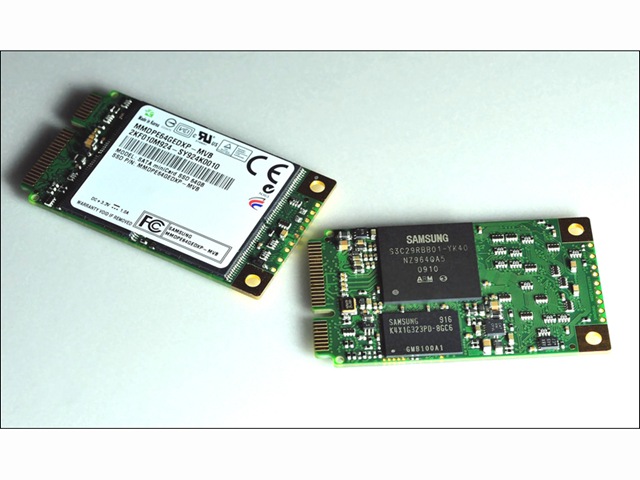 Samsung Announced that it is now sampling a SATA-interface mini-card solid state drive (SSD) with some of its customers, for use in the expanding netbook marketplace. The Samsung SATA mini-card SSD expands the use of SSDs from not only being a primary storage medium, but also as a complementary drive to boost the performance of PCs with dual drive capabilities.
Samsung’s new mini-card form factor, with a highly robust interface, makes an already rugged SSD even less susceptible to damage from jarring, jostling and dropping.
Featuring a mini-PCI Express (PCIe) form factor with a SATA 3.0Gb/s interface, the highly cost-efficient mini-card SSD is nearly 80 percent smaller than the conventional 2.5-inch hard disk drive, making it ideal for the tighter constraints of most netbooks. In addition, it can be used in printers and various handheld terminals including ruggedized mobile devices.
Moreover, the SATA mini-card SSD form factor can be used in a combination comprised of the SSD as main memory and HDD as supporting storage space. This new approach is expected to increase the adoption of SSDs in a broader range of applications.
Samsung is working to standardize the new mechanical form factor and its pin layout specifications at JEDEC (Joint Electron Device Engineering Council). With possible revisions by OEM manufacturers, standardization could be expected as early as the third quarter of this year.
Available in 16GB, 32GB and 64GB densities, the new SSD drive will be produced using 40-nanometer-class process technology. The SATA mini-card SSD provides strong performance levels with a sequential read rate of 200MB/s (megabytes per second) and writes data sequentially at 100MB/s.
Samsung’s mini-card SSD is only 30 millimeters (mm) wide and 51mm high. The drive weighs up to 8.5g and measures up to 3.75 millimeters thick. Also offering a high degree of energy efficiency, the new drive consumes 0.3 watts of power.
Samsung’s new netbook-targeted SSD is available with optional full disk encryption to thwart theft or any unwanted access to a netbook or other device.
“The market is beginning to embrace a smaller SSD for the nascent netbook sector, The cost-efficiency and reliability of lower-density, highly compact Samsung SSDs are perfectly suited as the storage medium for the rapidly growing netbook marketplace,” said Jim Elliott, vice president, memory marketing, Samsung Semiconductor, Inc.
Windows is generally perceived as being easier to use and administer and mostly with good reason. Most companies choose Windows as their desktop environment and often for their intranet servers too. And yet some companies selected Linux as the desktop and server platform for their massive infrastructure upgrade. In the following paragraphs I will explain the rationale for the decision.
As Sever Machines: Linux VS Windows
For Example: we have embarked on a massive upgrade of our infrastructure with the addition of several 24/7 servers with RAID 1, QA automation machines, order processing machine and redundant internet connections. Each server machine will have RAID 1 and also have hot backup. The choice was between Windows server and Linux. Choose Linux for our server machines for the following reasons:
1. Web server runs on Linux for strategic and security reasons. It only makes sense to have the same server operating system and environment here to simplify maintenance.
2. There should have two machine (one for hot backup) to provide internet connection. The same machine will also host DNS server, Web server and database (for the applications). In short we should make it a near duplicate of our web server machine. The idea is to be able to use this machine to act as a emergency backup of our live server(s). Both the machines (files and database) will be synched several times a day. This machine can also act as backup DNS provider. However this cannot be used to distribute load under normal situations because the upload bandwidth is low as is normal in ADSL and Cable connections. Even then this should provide me with some peace of mind. It only makes sense to have similar configurations in this machine as our current web server machine(s).
3. High cost of Windows server machines for multiple licenses and complicated licensing schemes. The cost of procuring and ensuring that we are compliant is very high for small organizations, not simply in dollar value but also in terms of resource allocation. They will use commodity hardware and they will have to replace them from time to time. However, with Linux they can keep several hot backups and not worry about breaking their licenses. In intend to use Fedora Core as our experience with them has been very positive.
4. RAID 1 support: Both Windows 2003 server and Linux provide software RAID 1 support and also other RAID levels. Unfortunately Windows XP Pro or Windows 2000 do not provide RAID 1 support (mirrored). You must purchase the server version. Both operating systems work with hardware RAID 1. However at this time we choose the software route as it fits well with our strategy of using commodity hardware and having spare backup machines; also it is cheaper without compromising data integrity and availability. Generally in software RAID the performance is expected to be lower. Also in Windows RAID support you will first have to install the operating system on a non-RAID device before RAID can be enabled. Linux provide all the RAID support through software and for free. Their RAID support appears more configurable and all encompassing.
5. The server applications like Apache HTTP server, Subversion, MySQL, DNS Server runs equally well on both platforms.
As Workstations: Linux VS Window
Development & QA Automation Machines
These need to be high end machine. For Example: we use a code editor for php and Eclipse IDE for Java. Both of them are available in Linux as well as Windows XP. Linux comes with Bash shell which is significantly superior to cmd prompt in terms of scripting and task automation. Java and PHP work in Linux as well as on Windows platform.
Blogging Machine
As a blogger we simply need a web browser and a convenient feed reader. There are several PHP-MySQL based feed readers which will suitably serve our requirements. Firefox works fine with Linux as well as Windows. So you see Windows do not have any advantage here.
Any machines require email access. In my experiments Thunderbird came slightly ahead of Microsoft Outlook for pure email purposes especially due to built in Naive Bayesian filter and close integration with Firefox, our web browser. For additional requirements like Calendar, Sunbird is a good choice.
Security
Linux is traditionally ahead of Windows in terms of security. We can get a reasonable protection with iptables alone. ClamAV serves as a decent anti-virus solution for Linux among others. Frankly Internet Explorer will not be missed.
Office Productivity Suite
Star Office competes well against Microsoft Office in this department.
Linux lacks behind in ease of use and requires more upfront training. However the increased security, availability of software RAID 1 (mirroring) and lack of licensing hassles give it a strong advantage over Microsoft Windows. This is just my opinion.
Case:After the customer’s Samsung notebook fell, there was a “Kaka”” knock on the hard disk. Solution:This kind of problem is generally caused by the failure of the foundation plate after the magnetic head is damaged. Of course
Case:The operating system is Windows, the file system is NTFS/FAT, and the 320GB model is the Seagate hard disk with ST9320423asg.The hard disk cannot be recognized in BIOS. After testing, it is not only damaged by the firmware area, but also a physical bad sector. Solution:The engineer evaluates the degree of damage to the hard…
Case:The U disk partition accidentally formats it. After the formatting, it does not store data to the U disk Solution:Data recovery engineers use professional devices to perform mirror operations on the U disk (the bottom layer code of the mirror U disk prevents the U disk operation during the recovery process and destroys the difficulty…