Serial ATA (SATA) data cable lengths

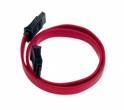
SATA Data Cable Lengths Serial ATA cables are available in many lengths up to 1 meter. Minimum cable length is 12 inches, using shorter cables can cause timing, or noise interference on the cable. The same conditions apply to cables that are too long. Though the Serial ATA specification calls out supporting cable lengths up to 1 meter or 39.37 inches, PCB traces from the cable connection to the host and drive controllers ASIC, adds length to the bus.

Example: SATA drive installed with a 40 inch cable. PCB trace from Serial host connector to the serial hosts ASIC = 3 inches. The same 3 inch PCB trace applies to the hard disk. This configuration gives you a bus length of about 46 inches. If you are having performance or data corruption issues, try using a shorter cable or different manufacturer of cable. Cable quality can vary between vendors.

Read More

Windows file systems and Mac File Systems

Windows file Systems And Mac File Systems This article provides a brief history and description of Windows file systems and Mac file systems.

File Systems
A file system organizes large numbers of files on some sort of recording medium (most commonly a disk drive or cd-rom). Mac and PC computers use different primary file systems which is why a program like TransMac is necessary.

The two common versions of Mac file systems (or volume formats) are standard HFS and Mac OS Extended (or HFS+). HFS came about early on in the life of the Macintosh line when disks had relatively small capacities. Limitations appeared in this format when disk drives grew very large in size. Mac OS Extended (or HFS+ as it was originally called) is similar to HFS but some of its internal structures were changed to accommodate the changing needs of modern personal computing. The major differences between the two are outlined below. HFS is best for small volumes or those that may be used on older systems (before OS 8.1). Mac OS Extended is best for larger volumes as long as they will not be used on older systems.

Standard HFS:

  • Compatible with all Mac OS versions
  • File names limited to 31 characters
  • File sizes limited to 2GB
  • Large volumes with small files waste a lot of space.

Mac OS Extended (HFS+):

  • Compatible with Mac OS 8.1 and later
  • 255 character Unicode file names
  • No file size limit
  • Less wasted space

Windows uses two primary types of file systems FAT (File Allocation Table) and NTFS (New Technology File System).

FAT:
There are three variations of the FAT file system: FAT12, FAT16 and FAT32. FAT12 and FAT16 originated in the DOS days. They had the same sort of problems HFS had due to growing  disk sizes. FAT32 was created to alleviate some of these problems, but it still has limitations like a maximum file size of 4GB.

NTFS:
NTFS was created for Windows NT. It does not have as many limitations as the FAT systems and also includes much needed security and reliability features. Recent versions of Windows (NT, 2000, XP, etc.) support both file system types, but older versions of Windows (95, 98, Me) do not natively support NTFS.

Read More

2060-701640-001 WD PCB Circuit Board

HDD Printed circuit board (PCB) with board number 2060-701640-001 is usually used on these Western Digital hard disk drives: WD10EAVS-98M4B0, DCM DHNNNV2MHB, Western Digital 1TB SATA 3.5 Hard Drive; WD10EADS-65M2B0, DCM HGNCNT2MHB, Western Digital 1TB SATA 3.5 Hard Drive; WD6400AACS-00M3B0, DCM HHRCNV2MGB, Western Digital 640GB SATA 3.5 Hard Drive; WD10EVDS-63U8B0, DCM HANNHV2MBB, Western Digital 1TB…

Read More

Seagate HDD Firmware Download

Here you can download Seagate firmware collections, you can make use of them as donor for your damaged hard drives or your seagate harddisk firmware update!

Seagate Harddisk Firmware:k2,k3,k4,k5,k7,k9,Momentus,Neptune,u5,u6,u8,u10,ux series Firmware Free download!

Seagate Disk Firmware Download

Seagate Momentus hard drive firmware update SP35474 SP33937
Firmware update for ST94813A, ST96812A, ST98823A, ST9100824A, ST9120821A, ST9402112A, ST980829A, ST9100825A,

ST9210824A, ST960812A, ST94813AS, ST96812AS, ST98823AS, 9100824AS, ST9120821AS

Seagate Barracuda 7.200 11 ST3500320AS ; ST31000340AS ; ST3750330AS
Seagate Firmware Update

Latest firmware update for Seagate ST3320620AS 3.AAE Tested!
Seagate Firmware Update

UX-UXX307B
Seagate Disk Firmware

UX-UXX307A
Seagate Disk Firmware

UX-UX20307
Seagate Disk Firmware

u8-U88303B
Seagate Disk Firmware

u8-U88303
Seagate Disk Firmware

u8-U84303
Seagate Disk Firmware

u8-U817303B
Seagate Disk Firmware

U8-U817303
Seagate Disk Firmware

u6-U640G339
Seagate Disk Firmware

u6-U640533
Seagate Disk Firmware

u6-U640399D
Seagate Disk Firmware

u6-U640399
Seagate Disk Firmware

u6-U640334D
Seagate Disk Firmware

u6-U640334C
Seagate Disk Firmware

U6-U620G399
Seagate Disk Firmware

U6-U620334A
Seagate Disk Firmware

U6-U620334!
Seagate Disk Firmware

U5-6.55
Seagate Disk Firmware

U5-3.58
Seagate Disk Firmware

U5-3.57
Seagate Disk Firmware

U5-3.54
Seagate Disk Firmware

U5-3.53
Seagate Disk Firmware

U5-3.39
Seagate Disk Firmware

U5-3.35
Seagate Disk Firmware

U5-3.11
Seagate Disk Firmware

U5-3.07
Seagate Disk Firmware

U10-U105302
Seagate Disk Firmware

U10-U1015302
Seagate Disk Firmware

U10-U1010302
Seagate Disk Firmware

ST380817AS-3.42-4MR1MNEN
PCI PC3000 v2.27 Firmware

ST3802110A-3.AAH-5LR57566
PCI PC3000 v2.27 Firmware (LDR included)

ST380011A-8.01-M14-248-5JVF40LF
PCI PC3000 Firmware

Read More

Can I boot my computer from SCSI drive?

SCSI Drive Will my new SCSI drive boot my computer? or error message:

no ROM BIOS?

The drive will need to be partitioned and formatted for your computer’s operating system before it can be used as the boot drive. Follow the instructions in the operating system or computer manual for installing a new hard drive and loading the operating system.

SCSI boots from BIOS. Most SCSI controllers feature on-board ROM BIOS to controll the disk drive. Older SCSI controllers may use jumpers or a start up disk to access BIOS. Enable SCSI BIOS for the active partition, C:\, to be recognized. Using more than one SCSI controller? Choose only one to start up. Typically only one active partition is allowed each drive. If BIOS has support for removable disks as hard drives, choose:All Disks. Consult your SCSI controller or system guides.

Read More