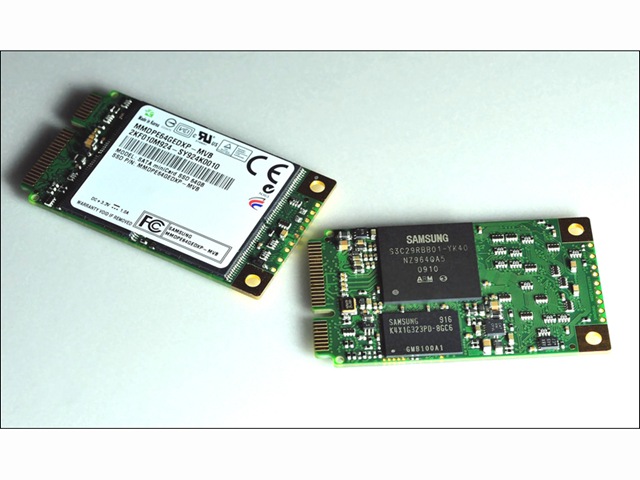
Samsung Announced that it is now sampling a SATA-interface mini-card solid state drive (SSD) with some of its customers, for use in the expanding netbook marketplace. The Samsung SATA mini-card SSD expands the use of SSDs from not only being a primary storage medium, but also as a complementary drive to boost the performance of PCs with dual drive capabilities.
Samsung’s new mini-card form factor, with a highly robust interface, makes an already rugged SSD even less susceptible to damage from jarring, jostling and dropping.
Featuring a mini-PCI Express (PCIe) form factor with a SATA 3.0Gb/s interface, the highly cost-efficient mini-card SSD is nearly 80 percent smaller than the conventional 2.5-inch hard disk drive, making it ideal for the tighter constraints of most netbooks. In addition, it can be used in printers and various handheld terminals including ruggedized mobile devices.
Moreover, the SATA mini-card SSD form factor can be used in a combination comprised of the SSD as main memory and HDD as supporting storage space. This new approach is expected to increase the adoption of SSDs in a broader range of applications.
Samsung is working to standardize the new mechanical form factor and its pin layout specifications at JEDEC (Joint Electron Device Engineering Council). With possible revisions by OEM manufacturers, standardization could be expected as early as the third quarter of this year.
Available in 16GB, 32GB and 64GB densities, the new SSD drive will be produced using 40-nanometer-class process technology. The SATA mini-card SSD provides strong performance levels with a sequential read rate of 200MB/s (megabytes per second) and writes data sequentially at 100MB/s.
Samsung’s mini-card SSD is only 30 millimeters (mm) wide and 51mm high. The drive weighs up to 8.5g and measures up to 3.75 millimeters thick. Also offering a high degree of energy efficiency, the new drive consumes 0.3 watts of power.
Samsung’s new netbook-targeted SSD is available with optional full disk encryption to thwart theft or any unwanted access to a netbook or other device.
“The market is beginning to embrace a smaller SSD for the nascent netbook sector, The cost-efficiency and reliability of lower-density, highly compact Samsung SSDs are perfectly suited as the storage medium for the rapidly growing netbook marketplace,” said Jim Elliott, vice president, memory marketing, Samsung Semiconductor, Inc.