Maxtor DiamondMax Plus 10 PCB

maxtor-diamondmax-plus-10-pcbBuy Maxtor DiamondMax Plus 10 PCB on HDDZone.com with low price, fast shipping and top-rated customer service! All kinds of Maxtor hard drive PCB board for Data Recovery and HDD Repair Needs!

Maxtor DiamondMax Plus 10 PCB Swap Guide:

For swapping Maxtor PCB, there are only two steps to find the matching pcb.

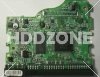
Step 1: Find the Main Controller IC. The biggest chip (show above). Make sure the information says ARDENT C8-C1, 040111300 which is the Main Controller IC.

Step 2: Verify the Motor Combo IC. L7250E 1.2

Step 3: Send these info to your PCB seller. Such as HDDZone.com

Note: In most cases, you should exchange the BIOS chip before you swap the PCB. You should have certain technique. Hard drive failures are NOT always caused by circuit board failure. We cannot guarantee your drive to be repaired by replacing the board.

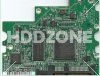
maxtor-diamondmax-plus-10-pcbMaxtor DiamondMax Plus 10 PCB 040103500

Main Controller IC:SEAGLET 040103500
HDD Motor Combo IC: SH6770C

maxtor-diamondmax-plus-10-pcb-2Maxtor DiamondMax Plus 10 PCB 040103700

Main Controller IC:SEAGLET 040103700
HDD Motor Combo IC: SH6770C

maxtor-diamondmax-plus-10-pcb-3Maxtor DiamondMax Plus 10 PCB agereBEAGLE D4-D4 040116600

Main Controller IC: agereBEAGLE D4-D4 040116600
HDD Motor Combo IC: L7250E 1.2

maxtor-diamondmax-plus-10-pcb-4Maxtor DiamondMax Plus 10 PCB agereBEAGLE D4-D4 040121400

Main Controller IC: agereBEAGLE D4-D4 040121400
HDD Motor Combo IC: L7250E 1.2

maxtor-diamondmax-plus-10-pcb-5Maxtor DiamondMax Plus 10 PCB agereBEAGLE E5-D4 040125100

Main Controller IC: agereBEAGLE E5-D4 040125100
HDD Motor Combo IC: L7250E 1.2

maxtor-diamondmax-plus-10-pcb-6Maxtor DiamondMax Plus 10 SATA PCB 040115400

Main Controller IC: 040115400
HDD Motor Combo IC: L7250E 1.2

maxtor-diamondmax-plus-10-pcb-7Maxtor DiamondMax Plus 10 SATA PCB OSCAR E5-D4 040121300

Main Controller IC: OSCAR E5-D4 040121300
HDD Motor Combo IC: L7250E 1.2

maxtor-diamondmax-plus-10-pcb-8Maxtor DiamondMax Plus 10 SATA PCB OSCAR F7-D4 040125400

Main Controller IC: OSCAR F7-D4 040125400
HDD Motor Combo IC: L7250E 1.2

maxtor-diamondmax-plus-10-pcb-9Maxtor DiamondMax Plus 10 SATA PCB SEAGLET C3-D4 040123900

Main Controller IC: SEAGLET C3-D4 040123900
HDD Motor Combo IC: SH6790

maxtor-diamondmax-plus-10-pcb-10Maxtor DiamondMax Plus 10 SATA PCB SEAGLET D4-D4 040128000

Main Controller IC:SEAGLET D4-D4 040128000
HDD Motor Combo IC: SH6790A

Hard Drive PCB Swap Guide: For Seagate, Maxtor, WD, IBM/Hitachi Hard Drives.

More Maxtor DiamondMax 10 PCB Circuit Board on HDDZone.com

Read More

Hard Disk Prices to Remain High Through 2014

While hard drive (Hard disk drive) supplies are beginning to resurge, inventories won’t be back to normal before the third quarter of the year and costs will stay abnormally high through 2014, according to researching the market firms IHS iSuppli and Coughlin Affiliates.

Consequently of flooding in Thailand this past year, Hard disk drive prices will probably increase 20% to 30% over their average pre-ton prices and turn into there through the majority of 2012, Coughlin Affiliates stated in the report today (download PDF).

Hard Disk Prices to Remain High Through 2014

Furthermore, the hard disk manufacturing industry may have to spend about $1 billion to replace and repair manufacturing plants broken through the monsoonal flooding.

Hard disk drive supplies within the 4th quarter of 2011 fell by 26% in comparison to exactly the same period this year, according to IHS iSuppli. Deliveries are positioned to decline by another 13% within the first quarter of 2012 by 5% within the second quarter with an annual basis.

The typical global value for HDDs jumped by 28% within the 4th quarter of 2011, according to IHS iSuppli. While prices will decline by 3% within the first quarter by 9% within the second quarter, they’ll remain inflated for the entire year.

“Prices will stay high for several reasons, such as the greater costs connected using the moving of production, in addition to greater component costs due to flooding impacts among component makers,” stated Fang Zhang, a storage analyst for IHS iSuppli.

PC prices may also be affected because system makers have signed annual contacts with Hard disk drive makers which have locked them into elevated prices deals for that relaxation of the season, Zhang noted.

Furthermore, industry Hard disk drive consolidation could hold prices greater than pre-ton levels for any couple of more quarters because you will find less rivals on the market, IHS iSuppli stated. It had been mentioning to mergers between Seagate and Samsung and between Western Digital and Hitachi GST.

Inside a report launched Friday, iSuppli predicted the Thailand flooding continues to have an affect on inventory and costs until deliveries rise first by 2% within the third quarter, then a 42% surge within the 4th quarter of 2012.

“The recovery of worldwide Hard disk drive manufacturing has started and can continue throughout each quarter of 2012, hard disk drive prices will stay inflated and inventories continues to be depleted, showing that demand is exceeding supply. Demand and supply should return to balance through the finish from the third quarter.” Zhang stated.

Coughlin Affiliates stated the mixture of industry consolidation and Thailand-related shortages, can lead to greater Hard disk drive prices a minimum of until 2014. The greater prices, however, can help fund costly new technology transitions by 2015 or 2016 and increase areal density growth rates by 40%.

The annual rate where hard drive areal densities increase has slowed down recently, Coughlin Affiliates stated.

However, drive capabilities continue to grow due to technology developments for example Warmth-Aided Magnetic Recording (HAMR). While hard disk areal density growth has slowed down, storage capabilities continue to rise: 3.5-in. HDDs with storage capabilities of 12TB and a pair of.5-in. HDDs with 6 B are required by 2016.

Due to reduced areal density growth, user companies may have to save money per gigabyte of drive capacity within the next 2 yrs. The typical hard disk capital equipment investing each year between 2008 and 2016 is believed at about 7.2% of hard disk industry revenue.


Read More

Hard Disk Details(5)

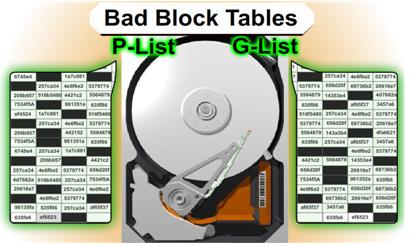
Slide 2221: When the drive is manufactured it is known that there is going to be errors in every drive.  Drives use ECC to correct most errors and if ECC can correct the error then the sector is never marked as bad.  If it is marked as bad, the drive puts the data in a bad block list. Most people know that their hard drive has a bad block table. What most people do not know is that their drive has TWO bad block tables.
1.    P-List (Primary Defects List – manufacture defect info that does not change)
2.    G-List (Grown Defects Lists – sector relocation table)

The G-List is where the bad blocks that your drive has on a daily basis are stored. Since the P-List is done at manufacturing time that list is never suppose to change. There is a very important reason to know about both lists in a low level recovery which I will explain when we get to the repair section. There are certain utilities that can read, delete, merge and change this data.

ECC Notes and Issues

ECC structured redundancy up to 200 bits of 256/512 in a sector-CRC–Scrambled Bits- RLL adds bits to cause pulses and Parity When data is written to the drive it is encoded. The actual data itself is never written, only the interpretation of the data. If you are thinking that a drive contains 0’s and 1’s then you are thinking about it incorrectly. The data is more like a wave form being written to the drive. It has to be interpreted back on its way out before it becomes a 0 or a 1. Before the data is written the data is randomized. This eliminates patterns that might be the same so that ECC is not confused. It is difficult to do pattern detection on a pattern that appears over and over. EMI can be reduced and have less effect on the bit storage and the timing controls.

The drive tries several different ways to re-read the data before giving up, most of them using ECC. It is possible for ECC to improperly correct data under certain circumstances if the data occurs in a certain order. ECC read commands use ODD numbering of at least 3 so as not to cause a 50/50 chance in the selection of 2.

Read ignoring ECC is an LBA 28 command “Read Long” and it was disabled in 48 bits as it was determined to be obsolete in drives over 137 gigs. No Read Ignore ECC is available after 137 gigs. Standard attempts are tried and usually are 10 tries in most hard drives. Reading a drive ignoring ECC can cause possible corruption in the data, but sometimes it is the only way to get the data in those sectors if there is a problem with the PCB or the ECC cannot read the data correctly.

If the Sector is determined to be unreadable by the ECC encoder then the sector is retried again. Reed Solomon in conjunction with sector rereads is expecting to fix data errors for the ECC. Parity bits are stripped off.

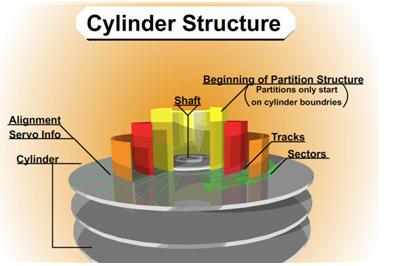
Slide 2422: The cylinder structure is extremely important because there are people believe they can just take the platters out and move them to a new drive. This is true you can do this, but you have to move all platters simultaneously. The reason is because data is written in a cylinder.  Most people have heard the term cylinder in reference to their hard drive, but they have no idea what that means. Writing in a cylinder means that data is written in parallel due to the fact the heads are always moving together in the same stack.  To make it more efficient data is written on the top of a platter and the bottom of the platter and the next platters and so on, at the same time.  Your data is NOT written on the top of one platter and when that gets full then written to the next platter. It is written across all the platters at the same time, making a cylinder of your data.

Most data recovery software will scan an entire hard drive and then display a list of files and directory trees you can recover from. However, if there is a lot of damage to the drive, the scanning may never finish or it might die/kill it in the process. If you have smart software and you can figure out where your partitions start and where the MFT or FAT tables might be, you stand a better chance of getting the data you are looking for.  If a standard utility was used to create the partition then the partition structure will begin on a cylinder boundary. Again, your partition will begin on a Cylinder Boundary. Software like Byteback (www.byteback.org) RecoverSoft Media Tools Pro (www.recoversoft.com), and Runtimes Disk Explorer (www.runtime.org) are smart enough to know the data exists on the cylinder boundary and will quickly check without you have to scan the whole hard drive and possibly saving your drive from disaster during the scan. There certainly are times that scanning will be required but it is best if you can avoid it except in an imaging process.

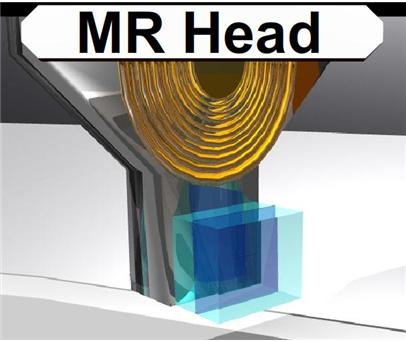
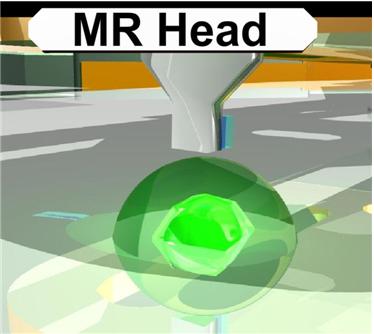
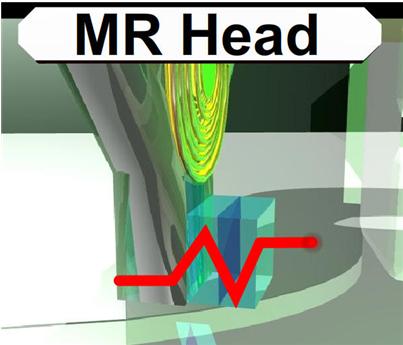
Slide 2585: The MR (magnetoresistive) head of the hard drive you can think of as the head of the 90’s. If you remember how reliable the drives were before 2000 it is mostly because of this head and the density of the platters.  This head was used on drives mostly before we crossed the 10-20 gig barriers. The MR head could determine if a bit passed under it.  When data passed parallel to the head, the head could detect the “MR Effect” due to movement of electrons causing the magnetic field to rotate positive and negative values.

Read More

EnCase Computer Forensics Training for Beginners

EnCase,Computer Forensics TrainingGuidance Software is recognized globally as a world leader in Digital Forensics, Cyber Security, and E-Discovery solutions. Their services include incident response, computer forensics, litigation support, and experts with hands-on experience in digital investigation. Each year they train over 6,000 corporate, law enforcement, and government professionals in digital forensics, e-discovery, security, and incident response.

This hands-on forensics training course involves practical exercises and real-life simulations in the use of EnCase® Forensic version 7 (EnCase v7). The class provides participants with an understanding of the proper handling of digital evidence from the initial seizure of the computer/media to acquisition, including the use of FastBloc® SE and LinEn. Instruction then progresses to the analysis of the data. It concludes with archiving and validating the data. Delivery method: Group-Live. NASBA defined level: basic.

Students attending this forensics training course will learn:

  • The EnCase v7 computer forensic methodology
  • What constitutes digital evidence and how computers work
  • Basic structures of the FAT and NT file systems
  • How to create a case and how to preview and acquire media
  • How to conduct raw and index searches
  • How to analyze file signatures and view files
  • How to conduct hash analysis and import hash sets
  • How to prepare reports, using templates provided with EnCase v7
  • How to restore evidence
  • How to archive files and data created through the analysis process
  • The proper techniques for handling and preserving evidence

Level: Introductory
Prerequlslte: Basic computer skills. Advance preparation for this course is not required.
Tuition: $2,495.00 USD per student.

Note: This training course is intended for IT security professionals, litigation support and forensic investigators Participants may have minimal computer skills and may be new to the field of computer forensics.

Details: http://www.guidancesoftware.com/computer-forensics-training-encase1.htm

Read More