How to use FDISK to partition a Hard Drive?

FDISK Using FDISK to create a Primary Partition

1. Go to an MS-DOS prompt or use a Boot Floppy.
2. Enter -> fdisk
3. Answer the question for large disk support (Y=FAT32 N=FAT)
4. If option 5 exist then you have more than 1 drive attached to your system.
• You need to determine, which drive you are going to partition.
• Enter option 5 and look at your options. It will show you the Drive number and the drive letter associated with it.
• Enter the drive number you wish to select.
• Just a note if you have a Primary Master and a Primary Slave, then the Primary Master will be Drive 1 and the Primary Slave will be Drive 2.
5. Enter Option 4 to “Display Partition Information” to confirm the drive your working with and that there are currently no partitions. If you already have a Primary Master, then you will need to delete it first. (Make sure you save your data first with a proper backup.)
6. Enter option 1 to “Create DOS partition or Logical DOS Drive”.
7. Enter option 1 to “Create Primary DOS Partition”.
8. you will be asked to “Enter Partition size in MBytes or percent of disk space

At this point the drive is ready to be formatted.
If you set this drive up as an additional drive to your existing OS, then you can boot into that OS and begin using the drive.
If this will become a Windows boot disk, you can now start your Windows installation.

Considerations

      •Most functions in

FDISK

      are catastrophic. Make sure to backup your data first.
      •There are two types of Partitions.
      1. Primary.
      2. Extended.

Primary Partition.

      1. Is a boot partition where the Operating System will reside or can also be used for user data.
      2. Each Primary Partition is given a unique Drive Letter assignment. (C:)

Extended Partition.

      1. Each Extended Partition can have one or more Logical Drive(s) within the Extended Partition.
      2. Each Logical Drive is is given a unique Drive Letter assignment. (D:)
      • Hard Drive number.
      1. Windows classifies Hard Drives as Disk Drive 1 through Disk drive n.
      •IDE Drives are scanned in the following order and given a number of 1 through n.
      1. Primary Master.
      2. Primary Slave.
      3. Secondary Master.
      4. Secondary Slave.
      5. Tertiary Master.
      6. Tertiary Slave.
      7. Quantanary Master.
      8. Quantanary Slave.
      • SCSI Drives are scanned from SCSI ID 0 through 16 and given a number of 1 through nn.
      • After entering the FDISK command, you will get a prompt, asking if you want large disk support.
      1. If you reply Y (YES), then you will setup FAT32 partitions.
      2. If you reply N (NO), then you will setup FAT (FAT16) partitions, that have a maximum of 2g.
    3. If you did not receive this prompt then your fdisk command may be from Windows 95 (950A) and you should obtain a newer copy.
Read More

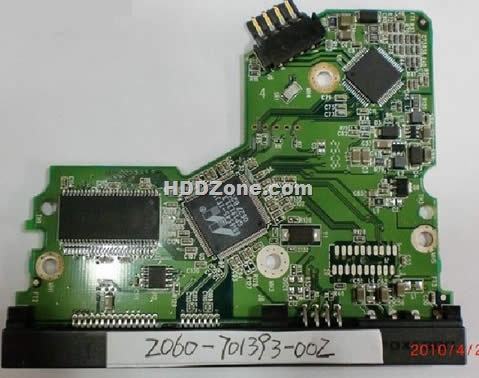
Western Digital PCB 2060-701393-002

Swap Western Digital  PCB 2060-701393-002(Printed Circuit Boards) to recover your data from damaged HDD due to PCB failure. 2060-701393-002 is the board number on this PCB. If your HDD’s PCB has problems, the drive usually cannot boot up or there may be an inaccurate display in the BIOS of the hard drive’s information. Also power may not get to the hard drive and as a result it will not spin up.

Western Digital 2060-701393-002 PCB Board Details:

Board Number: 2060-701393-002
Main Controller IC: 88i6545-TFJ1
HDD Motor Combo IC: L6283 1.3
Manufacturer: Western Digital

Note: Hard drive failures are NOT always caused by circuit board failure.

Swap PCB 2060-701393-002 will not solve the problem below:

1. The hard drive will power up normally (no ticking noises, errors etc) but will not be recognized by the computer;
2. The hard drive will power up normally and be recognized correctly but will report a size of 0 bytes;
3. The hard drive will power up but report SMART errors on boot;

Western Digital 2060-701393-002 PCB Photos:

Western Digital  PCB 2060-701393-002

Buy this pcb board online: Western Digital PCB 2060-701393-002

More Western Digital SATA PCB

Read More

Two Data Recovery Forums

If you are not good at data recovery fileds maybe you need some tips for looking for info on forums. Here i pick up two forums for you and wish you can get what you want

1. HDD GURU Forum (Total members: 14726)

Website: http://forum.hddguru.com

Data recovery and HDD repair discussions forum. Here you can study lots of knowledges about hdd repair and data recovery, also you can post for a help when you meet a trouble. Many professional gays can be meet on this forum.

Readers on HDD Guru Forum:

United Kingdom 14.7%
United States 10.0%
India 7.8%
Italy 5.2%
Sweden 3.8%
Russia 3.7%
Spain 3.1%
Mexico 3.1%
Ukraine 3.1%
Indonesia 3.1%

2. Tek-Tips Data Recovery Forum (Total members: 7924)

Website: http://www.tek-tips.com/threadminder.cfm?pid=528

General Data Recovery discussion technical support forum and mutual help system for computer professionals. This is also a professional forum where your hdd problems will be solved by pro hels.

Readers on Tek-Tips Data Recovery Forum:

United States 22.9%
India 13.9%
United Kingdom 6.7%
Germany 3.5%
Italy 3.3%
Canada 2.8%
Australia 2.6%
France 2.4%
Spain 2.1%
Indonesia 1.9%


Read More