
Knoppix is one of the oldest and most well-known Linux distributions designed to run directly from a bootable CD, DVD, or USB drive without installation. Created by Klaus Knopper in 2000, it is a Debian-based live system that has served as a pioneer in the field of portable operating systems and system recovery tools.
Key Features and Philosophy
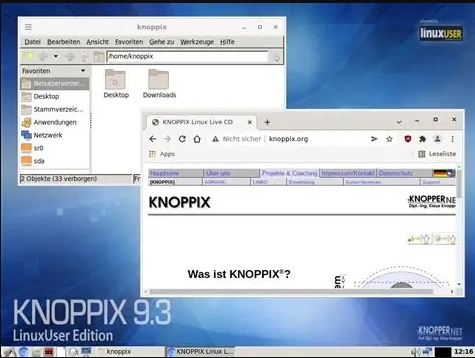
The core philosophy of Knoppix is to provide a fully functional, hardware-detecting operating system that does not require installation to a hard drive. It is designed to automatically detect and configure a wide range of hardware components, including graphics cards, sound cards, network adapters, and USB devices, making it highly accessible for users of all skill levels. Unlike Finnix, which focuses on a command-line interface, Knoppix includes a full graphical desktop environment, typically KDE or LXDE, making it usable for both system administration and general-purpose computing.
- Hardware Detection: Knoppix is renowned for its excellent hardware auto-detection capabilities. It can boot and run on a vast array of systems, often successfully recognizing and configuring components that other distributions struggle with.
- Live Environment: The system runs entirely from the boot media, loading the operating system into RAM. Changes made during a session are temporary and are lost upon shutdown, leaving the host system unchanged.
- Debian-Based: Knoppix is built on Debian’s stable branch, providing a reliable and well-tested foundation. It uses the APT package management system, allowing users to install additional software if running with persistent storage.
- Pioneering Role: Knoppix was the first major Linux distribution to popularize the concept of a live CD, influencing many other distributions such as Ubuntu, which later adopted the live boot approach.
Primary Use Cases
Knoppix serves a variety of purposes, ranging from system rescue to education and demonstration.
- System Recovery and Data Rescue: Knoppix can be used to boot a non-functioning computer, mount internal hard drives, and recover important files. It includes tools for filesystem repair, data recovery, and disk cloning.
- Hardware Testing and Diagnosis: The distribution includes diagnostic tools like Memtest86+ for memory testing and utilities for checking hard drive health. Its ability to run without modifying the hard drive makes it safe for testing unknown or problematic hardware.
- Education and Demonstration: Because it requires no installation, Knoppix is often used in educational settings to demonstrate Linux without altering school computers. It provides a complete desktop environment with office applications, web browsers, and multimedia tools.
- Portable Workspace: Users can carry Knoppix on a USB drive and use it as a portable workspace on any compatible computer, accessing files and applications without leaving traces.
- Security and Forensics: Knoppix includes specialized editions like Knoppix STD (Security Tools Distribution) for penetration testing and digital forensics, although this edition is no longer actively maintained.
Tools and Utilities
Knoppix comes with a comprehensive set of pre-installed software. The standard edition includes office productivity tools (LibreOffice), web browsers (Firefox, Chromium), multimedia codecs and players, and numerous system administration utilities. For recovery tasks, it includes tools like dd, partimage, and various filesystem repair utilities for ext, NTFS, and FAT.
Knoppix also supports persistent storage, allowing users to save changes and installed software to a USB drive for use in later sessions, although this requires specific configuration during boot.
Comparison with Finnix and BartPE
Knoppix, Finnix, and BartPE all serve as emergency recovery tools, but they differ significantly in their approach and target audience.
| Feature | Knoppix | Finnix | BartPE |
|---|---|---|---|
| Base System | Debian Linux | Debian Linux | Windows XP / 2003 |
| User Interface | Full graphical desktop (KDE/LXDE) | Command-line only | Graphical Windows shell |
| Primary Focus | General-purpose live system, recovery | System administration, command-line tools | Windows recovery |
| Hardware Support | Excellent, includes proprietary drivers often | Good, but requires manual configuration | Poor for modern hardware |
| Development Status | Actively maintained | Actively maintained | Discontinued |
| Size | Large (DVD or multiple CDs) | Small (under 500 MB) | Small (CD size) |
Knoppix is more accessible for users who need a graphical environment and a broader range of applications. Finnix is tailored for experienced system administrators who prefer a minimal, command-line-driven toolkit. BartPE served a similar purpose for Windows users but is now obsolete. Knoppix remains a relevant and versatile tool, while Finnix is more specialized for Linux professionals.
Important Considerations
- Knoppix is primarily available in DVD ISO format, with a smaller CD version also offered. The DVD version contains a vast collection of software, making it suitable for use without an internet connection.
- Due to its comprehensive software selection and hardware detection, Knoppix is one of the larger live distributions, which can result in longer boot times compared to minimalist systems.
- Knoppix is free to download and use, distributed under the GPL license.
Official website: www.knoppix.org