Noise related to PCB in WD HDDs (Part I)

Now discuss the Causes & Solutions of Two Main types of Noise which is occurred in WD HDDs (Especially Related To L-shape PCBs).

Clicking Noise and Continuous Noise:

1- The Clicking Noise
when you power on the hard drive u will hear a noise like (click,click….click,click…click,click)
this noise may be related to the head stack or PCB, the first thing you have to do is to check the PCB By The following steps:

1)- first you have to clean the Whole PCB With a Solvent & Toothbrush then wipe it with a piece of smooth handkerchief to remove the dust & dirt from it.
Caution: Cleaning of the PCB must be done carefully to avoid removal of any small electronic components.

2)- Check the Resistor (R120), [the right value of this Resistor is (0.12 Ohm)], you may adjust your multimeter to Resistor Measuring Mode to determine its Value, if its damaged you have to replace it. but before that, you have to check Transistor Q3 , it’s a 6 pins transistor , for measuring this transistor you may adjust your multimeter to Diode Mode,[ the right Value will be: (first two pins = 0.000 , second two pins =0.000 , Third two pins = nearly over 600)]
if Q3 is Damaged it will burn ur R120 after u replace it , so be sure that Q3 is ok before replacing R120 & u may also Check Transistor Q6 by the previous method to be completely sure it’s safe to replace R120.
Note: ( to be sure of The right values of these electronic components u may compare the values u have measured with the values of a working PCB’s Components)

3)- Check The Coils (such as L2 & L7) – adjust your multimeter to diode mode then the right value must be ( 0.000 ) for any coil as u all know.

4) – inspect the whole PCB for any removed component (such as small capacitors or Resistors) … the removal of these small components may occurred while forced cleaning of the PCB…. so be careful while cleaning it.

5) – in rare cases the firmware microchip may be damaged.

Read More

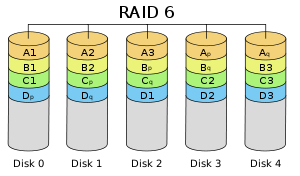
Raid Level 6

Striped set with dual distributed parity. Provides fault tolerance from two drive failures; array continues to operate with up to two failed drives. This makes larger RAID groups more practical, especially for high availability systems. This becomes increasingly important because large capacity drives lengthen the time needed to recover from the failure of a single drive. Single parity RAID levels are vulnerable to data loss until the failed drive is rebuilt: the larger the drive, the longer the rebuild will take. Dual parity gives time to rebuild the array without the data being at risk if a (single) additional drive fails before the rebuild is complete.

Raid Level 6
Advantages

  • RAID 6 is essentially an extension of RAID level 5 which allows for additional fault tolerance by using a second independent distributed parity scheme (dual parity).
  • Data is striped on a block level across a set of drives, just like in RAID 5, and a second set of parity is calculated and written across all the drives; RAID 6 provides for an extremely high data fault tolerance and can sustain multiple simultaneous drive failures
  • RAID 6 protects against multiple bad block failures while non-degraded
  • RAID 6 protects against a single bad block failure while operating in a degraded mode
  • Perfect solution for mission critical applications

Disadvantages

  • More complex controller design
  • Controller overhead to compute parity addresses is extremely high
  • Write performance can be brought on par with RAID Level 5 by using a custom ASIC for computing Reed-Solomon parity
  • Requires N+2 drives to implement because of dual parity scheme

Recommended Applications

  • File and Application servers
  • Database servers
  • Web and E-mail servers
  • Intranet servers
  • Excellent fault-tolerance with the lowest overhead

RAID 6 VS RAID 5

RAID 6
In complex arrays (12-24 drives), RAID 6 applications would be a preferred choice due to the fact that Serial ATA drives used in the arrays have a lower duty cycle and may be more likely to fail in 24/7 or business-critical applications.

Raid 5
In small arrays (4-12 drives), RAID 5 applications can quickly repair a failed drive and restore lost data-without taking down the array. It’s perhaps the most cost-effective, fault-tolerant data protection solution currently available for small storage devices.

Pro
Raid 6
Designed for tolerating two simultaneous HDD failures by storing two sets of distributed parities.

Raid 5

  • Simplified hardware implementation
  • A matured industry standard

Con
Raid 6

  • For RAID 6, one needs a more complex system with a method for encoding, as well as XOR calculations. For that, one really needs hardware acceleration, otherwise the performance suffers.
  • Uses 2 drives for parity

Raid 5

  • The risk of simultaneous drive failures grows in proportion to the drive array and can increase if customers purchase all of the disks in an enclosure at one time.
  • If the system finds a faulty sector on another drive during this degraded state (one drive down, spare drive being rebuilt), the RAID 5 system would be unable to restore the data onto the spare drive, resulting in data loss.

Recommended Configuration
Raid 6
Disk array consists of 12 disks or more

Raid 5
Disk array consists of 10 disks or less

Recommended Solutions

Raid 6

  • Desktop: EnhanceRAID T8
  • Rackmount: EnhanceRAID R14; UltraStor RS16

Raid 5

  • Desktop: EnhanceRAID T4HCR, T5,T8
  • Rackmount: EnhanceRAID R4,R6,R8; UltraStor RS8 or RS2080

Raid 6 Rebuild Software

Read More

Hard Disk Details(11)

Random Notes and Ideas For Data Recovery

    1. Drive goes to sleep, replace the board live
    2. Partitions start on Cylinder Boundaries
    3. Hard Drives have a Safe Mode
    4. You can fix LaCie problems with a Mac mounting them in the system
    5. Drives that you plug in that cause windows to Crash – Use Ubuntu to Read Files
    6. When problems with MFT then retry smaller blocks
    7. If drive parts are good then rewriting the SA area is the part that needs repairing
    8. SA Code can be replaced to do data destruction or encryption
    9. If you are thinking of a hard drive as 0’s 1’s then you are wrong. The equipment interprets signals to make the representation of 0s or 1s. Designers have taken into account the signal distortion and interface problems to make the work
    10. Remove a chip from the PCB and re-solder the chip onto a good board to fix specific problems with chips that are burned, cracked, etc
    11. Soft resets on SATA also need to do a hard reset the controller as it cannot be reset any other way like the bus is reset in a PCI or ATA
    12. ATA-3 Spec – hard drive read without retry was disabled and now is internal on the drive
    13. Seagate Drives use a serial interface of which you can find online. It will show you stats on the drive. If you see FFFF mask FFFF mask it is a head error
    14. If a drive is read with a standard read then it does not need to be read again but it might be good to use ECC to compare in a later pass
    15. Force the drive to use PIO mode instead of DMA/UDMA modes. Some hard drive failures cause the drive to fail reading UDMA but might still work in PIO
    16. Powers on good drive, while board is still in use move it to a new drive. Wrong defect tables and can be cleared
    17. If the platters are misaligned you can write data over the servo wedge and thereby destroying any chance that you can ever read the data
    18. As the thermal heat increases stability of the bits drop rapidly and with the addition of Areal density – degradation is much higher. There are fewer atoms in each bit to retain the bit orientation. Currently the drive will test for decay and if detected will automatically rewrite the data it detects
    19. Hard drives stored in heat for long term storage is extremely bad
    20. Adaptec ATA Raid 1200A Controller in combination with MHDD is great for recovery software.
    21. To determine if there is an HPA – Look at the LBA Maximum and if it is equal to Maximum Native LBA then there is no HPA
    22. Partitions created using standard disk partitioning tools, fdisk, Windows Disk Management, Partition Magic, will all be cylinder aligned. You only have to scan cylinder boundaries for partitions. Dynamic disks do not use partition tables, they use LDM which is at the end of the disk and needs to be done backwards. It uses one single partition occupying the entire disk minus one cylinder. When volumes are added or deleted the partition table is not updated. There are only 4 partitions possible with the standard Windows tools
    23. All partition table signatures end in 55 AA – if this is gone the OS will regard this as not existing. 80 is active 0B fat32 0F extended
    24. Everything in NTFS is a file – $boot
    25. Sector is the smallest addressable unit on the disk. You can read more than one sector but you cannot read less
    26. If doing a head replacement try straws for head stack replacements around the heads to keep them protected. Cut off a small piece of a drinking straw and place it over the head area of each and every head
    27. Even when the lower part of a head stack does not have heads they are still numbered.
    28. Increasing numbers of drive have no chance for parts replacement due to changes in the hardware
    29. Some drives store the lists in the NV Ram on the PCB. The table on one drive will not match the table on another drive and are unique. That might cause the same logical blocks to be mapped to different physical blocks on different hard drives. It is possible to have a swapped board cause a space on the hard drive to be overwritten due to the mapping problem.
Read More

2060-701675-001 WD PCB Circuit Board

HDD Printed circuit board (PCB) with board number 2060-701675-001 is usually used on these Western Digital hard disk drives: WD2500BMVV-11DCLS0, DCM HHBVJHN, Western Digital 250GB USB 2.5 Hard Drive; WD10TMVV-11A27S2, DCM EHBVJHBB, Western Digital 1TB USB 2.5 Hard Drive; WD6400BMVV-11A1CS0, DCM HHCVJHBB, Western Digital 640GB USB 2.5 Hard Drive; WD5000BMVV-11A1CS0, DCM HBCTJABB, Western Digital 500GB…

Read More

Virus Protection Key to Healthy Computing

Computer viruses are proving to be highly complex but preventing viruses from infecting your computer systems is simple. Use two well-known brands of anti-virus software and keep them as current as possible.

Beyond that, there are some simple, common sense procedures that everyone should use, whether at work or in the home computing environment. Never open a file whose origins are unknown. In a simpler day, that wisdom only applied to executable files, or files that did something. They have the suffixes .exe, .com and .bat and each can start a program on your computer. These viruses spread through games downloaded from the Internet, on borrowed diskettes and through the old ‘bulletin board’ services.

Today, unfortunately, a whole new wave of viruses has been unleashed on unsuspecting computer users because software manufacturers introduced feature-rich new programs without considering how vulnerable they are to viruses. Now, almost any document and many email messages can carry and spread ‘macro’ viruses at lightning speed. That’s why it is so important never to open messages or documents from unknown sources. Viruses can delete data, change file names or even damage the physical media the data where the data is stored.

How important is virus protection?
If your data is critical to your business operations, there is nothing more important. Even though about 75 per cent of all data loss incidents are caused by human error or system malfunctions, a virus attack can still cripple your data center. A combination of regular, verified backups and constantly updated virus protection are absolutely essential to protect your data – and your organization.

Read More

How to Start a Data Recovey Business

What Procedure is Data Recovery assignment involved?

The following three issues are critical for your data recovery business. They includes the first (Technical Know-How) and the last two (Marketing Plan and Financial Resources) followed only if you can handle the first.

Technical Know-How: As this industry is professional, specialized know-how is required to handle the varied types of data recovery assignments. Generally speaking, there is 3+1 work flow applicable to all data recovery case:

Of all the stages, Stage 3–data retrieval, is the most widely spread and long-running; all data recovery companies, even end users, by downloading software, can handle mission of this stage easily. But according to SalvationDATA experts only 30 to 40 percent of all data recovery cases are simply stage 3 cases. The left percentage requires an ability to handle with the stage 2 and stage plus 1 issue.

Stage 2, disk data extraction, is also widely known and adopted as “disk imaging” by data recovery services nowadays. But to SalvationDATA, according our experience with lots of potential clients, they perform this important stage using ghosting tools designed for and work on good HDDs only, not the patient HDDs that are unstable or inaccessible because of media defects and instable head, which are common challenges of Stage 2 in practice. Even more, with those traditional imaging tools, the time involved and the ordinary user-level repeated-read access to the media bring a risk of damaging the disk and head, making data lost irretrievable.

Stage 1, drive diagnosis & restoration, is the primary stage in a broad sense data recovery flow but in fact deals with the deepest level in 3+1 broad sense data recovery flow. Unfortunately this Stage 1 is missing from most of the data recovery services or even noticed but was being done in a zigzag procedure or simply incorrectly due to lack of proper tools, meaning that they are putting away customers and profits. Our data has shown that up to 40% of data recovery cases have Stage 1 issues; and that IS NOT what going to happen that we can skip Stage 1 and perform Stage 2 and 3 and still to get certain percentage of data. You CAN NOT get anything in case you are not capable for the primary stage
Plus 1, it refers to Head or Platter Exchanger when encountered with motor seizure or head crash. This kind of problem often happens where the Drive is clicking or dropping from height. Concerning this issue, you need to replace the components and fix the mechanical malfunction first.

From above 3+1 work flow, you may get know the basic guidance of data recovery.
Then let’s move the following 2 factors which are relevant to your data recovery service.

Marketing Plan: It is the same as other service you are engaged in. It needs marketing plans and strategy. You should think more about customers’ convenience, satisfaction, price setting, and target market. If possible, you need advertising on different mediums too.

Financial Resources: Of course you need budget to get the business started before you benefit from your investment. You need facilities like a Clean Room and equipments to carry out the assignments. You also need to pay expensive technicians.

Supposing the Marketing and Financial investment are not the barriers to stop you, then you need think more about the facilities and data recovery equipments.

I have to admit that Data Recovery is a game for professionals and engineers to play, it is impossible to get started without any HDD Data Recovery Equipments provider.

SalvationDATA technology LLC, not unacquainted name in Data Recovery Industry, is the biggest and cost-effective solution provider all over the world. Their free technical support & Remote assistance and free updates, enhance the industry beginners’ confidence greatly and assist them to enter the industry as soon as possible.


Read More