Hard Disk Details(4)

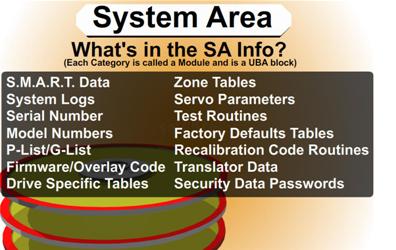
Slide 1781: What is in the System Area Info. Each category is called a Module and is a UBA block.

1.    Smart Data
2.    System Logs
3.    Serial Number
4.    Model Numbers
5.    P-List (Primary Defects List – i.e.: manufacture defect info that does not change)
6.    G-List (Grown Defects Lists – sector relocation table)
7.    Program Overlays – Firmware, Executable Code, or updates
8.    Specific Tables like RRO – (recalibrate repeatable run-out and head offsets)
9.    Zone Tables
10. Servo Parameters
11. Test Routines
12. Factory Defaults Tables
13. Recalibration Code Routines
14. Translator Data
a.    Converts Logical and Physical Address to locations on the drive
b.    Heads and Track Skewing Info
15. Security Data Passwords for drive – possible encrypted info.

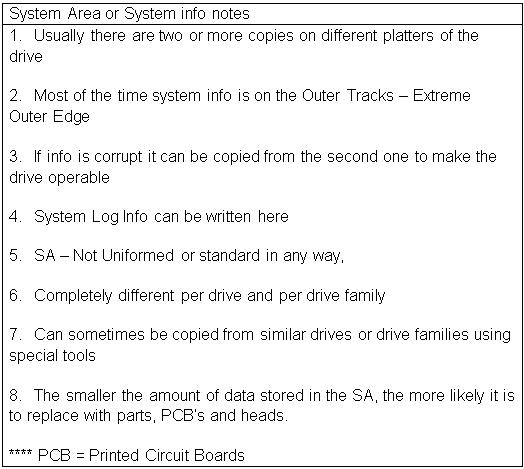
System Area or System info notes
1.    Usually there are two or more copies on different platters of the drive
2.    Most of the time system info is on the Outer Tracks – Extreme Outer Edge
3.    If info is corrupt it can be copied from the second one to make the drive operable
4.    System Log Info can be written here
5.    SA – Not Uniformed or standard in any way,
6.    Completely different per drive and per drive family
7.    Can sometimes be copied from similar drives or drive families using special tools
8.    The smaller the amount of data stored in the SA, the more likely it is to replace with parts, PCB’s and heads.
**** PCB = Printed Circuit Boards

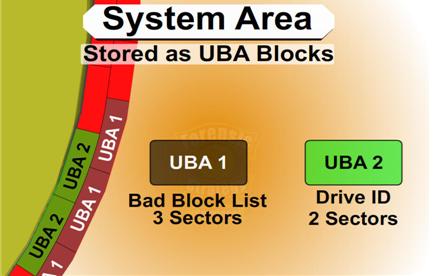
Slide 1816: The System Area is made of UBA Modules (Utility Block Addressing) which are sector blocks logically grouped together that contain a specific MODULE.  Each UBA block might be different per a drive manufacturer. The UBA # might be Smart Data on one drive and a different type of data on another drive. The UBA area is inaccessible over the standard interface. Most of the commands to talk to the UBA modules are vendor specific and which is generally not made publically available. There are certain pieces of hardware that can be used to communicate with this area such as the PC3000.

For example: In the UBA 1 Area it could be a Bad Block List.  As larger drives have been created there has been a need for larger bad block areas.  So this might be expanded from two sectors in a previous drive to three sectors in a newer drive. But the firmware for the drive can still refer to each of them as UBA 1 and does not have to have any changes made to the code in the firmware regardless of the size change.

Read More

Seagate® Barracuda® 7200.11 Hard Drive

image The Seagate® Barracuda® 7200.11 hard drive offers an unmatched combination of reliability, performance and capacity, and is backed by a 5-year limited warranty. The Barracuda 7200.11 drive—the eleventh generation of this award-winning desktop hard drive family—delivers up to 1 TB of reliable digital storage. The drive is the ideal choice for mainstream PCs, performance PCs, gaming and workstations, desktop RAID and external storage devices.

Kit Includes:

  • Hard drive
  • Product Manual
  • 5 years Limited Warranty

Product Highlights:

  • Designed with four disks to provide the optimal balance of advanced technology and low total cost of ownership
  • Eleventh-generation drive in the successful, award-winning Barracuda® product family
  • Enables up to 1 TB of storage capacity (other capacities at 500 GB and 750 GB)
  • Industry’s most reliable hard drive with proven second-generation perpendicular magnetic recording (PMR) technology
  • Leverages best combination of technology (areal density, PMR) and proven components for volume shipping
  • Industry-leading acoustics and power consumption levels
  • 105-MB/s sustained data rate
  • 32-MB cache
Read More

Data Backup Glossary (Letter M)

Magnetic drum
A direct-access, or random-access, storage device. A magnetic drum, also referred to as drum, is a metal cylinder coated with magnetic iron-oxide material on which data and programs can be stored. Magnetic drums were once used as a primary storage device but have since been implemented as auxiliary storage devices.

Magneto-optical
Magneto-optical (MO) is a type of data storage technology that combines magnetic disk technologies with optical technologies, such as those used in CD-ROMs. Like magnetic disks, MO disks can be read and written to. And like floppy disks, they are removable. However, their storage capacity can be more than 200 megabytes, much greater than magnetic floppies. In terms of data access speed, Mo disks are faster than floppies but not as fast as hard disk drives.

Mass storage
The various techniques and devices for storing large amounts of data. Modern mass storage devices include all types of disk drives and tape drives. Mass storage is distinct from memory, which refers to temporary storage areas within the computer. Unlike main memory, mass storage devices retain data even when the computer is turned off.

Massive array of idle disks
In storage terminology a massive array of idle disks (MAID) is a technology that uses a large group of hard disk drives (hundreds or even thousands), with only those drives that are needed actively spinning at any given time. MAID is a storage system solution that reduces both wear on the drives and also reduces power consumption. Because only specific disks spin at a given time, what is not in use is literally a massive array of idle disks, which also means the system produces less heat than other large storage systems.

Mean time to repair
In data storage, mean time to repair (MTTR) is the average time before an electronic component can be expected to require repair.

Mean time until data loss
In data storage, mean time until data loss (MTDL) is the average time until a component failure can be expected to cause data loss.

Media
Plural of medium.

Objects on which data can be stored. These include hard disks, floppy disks, CD-ROMs, and tapes.

In computer networks, media refers to the cables linking workstations together. There are many different types of transmission media, the most popular being twisted-pair wire (normal electrical wire), coaxial cable (the type of cable used for cable television), and fiber optic cable (cables made out of glass).

The form and technology used to communicate information. Multimedia presentations, for example, combine sound, pictures, and videos, all of which are different types of media.

Metadata catalog service
Metadata catalog service (MCS) is a mechanism for storing and accessing descriptive metadata and allows users to query for data items based on desired attributes. MCS may be used for storing and accessing metadata about logical files.

Mixed platform environment
A heterogeneous environment that includes multiple platform types.

Mount
In the network file system (NFS), a protocol and set of procedures to specify a remote host and file system or directory to be accessed, and their location in the local directory hierarchy.

ms, MS
When spelled ms, short for millisecond, one thousandth of a second. Access times of mass storage devices are often measured in milliseconds.
When spelled MS, short for Microsoft or mobile subscribers.

Multi-platform
See heterogeneous environment.

Multi-site
Geographically dispersed; having more than one location.

Read More