EaseUS Data Recovery Now Supports Windows 8 & Mac OS X 10.8

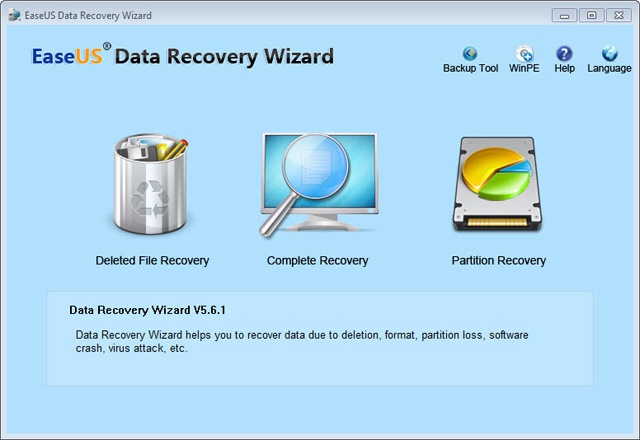
easeus-logo EaseUS, a leading provider of data backup and disaster recovery and storage management solutions, today announces the general availability of EaseUS Data Recovery Wizard 5.6.1 and EaseUS Mac Data Recovery Wizard 5.6.1 for a better user experience.

1. EaseUS® Data Recovery Wizard: 5.6.1 brings a new interface that makes the data recovery process easy even for a beginner. It ensures a safe and precise data recovery against numerous threats like: formatted or corrupted drives, missing critical file system structures, file deletion, application crash and computer viruses.

Another benefit for this update is that EaseUS Data Recovery Wizard is totally compatible with the up-coming Windows 8. Besides, this new version is designed to activate with the license number, in this way, you do not have to download and search a second time.

data-recovery-wizard

EaseUS Data Recovery Wizard Key Features:

  • English & German language support.
  • New! Windows 8 compatible – recover any data under Win 8.
  • New! Brand-new user interface for more intuitive data recovery process.
  • New! Faster scan lost files by skipping bad sectors automatically.
  • New! Once you have purchased you do not have to download and search a second time.
  • Recover deleted or lost files emptied from the Recycle Bin.
  • File recovery after accidental format, even Windows reinstallation.
  • Disk recovery after a hard disk crash.
  • Get back files after a partitioning error.
  • Get data back from RAW hard drives.
  • Specify file types before file recovery to find lost files quickly.
  • Recover office document, photo, image, video, music, email, etc.
  • Recover from hard drive, USB drive, memory card, memory stick, camera card, Zip, floppy disk or other storage media.
  • Support FAT12, FAT16, FAT32, NTFS/NTFS5 file systems.
  • Windows 2012/2000/XP/2003/Vista/2008/Windows 7/Windows 8.
  • Free file repair service.

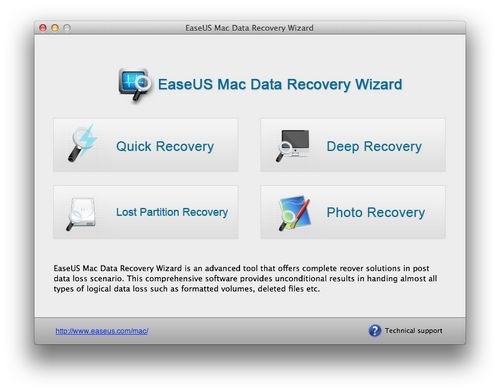
2. EaseUS Mac Data Recovery Wizard: which can restore files from formatted disk, deleted or lost partition with original file names and storage paths, now supports to recover lost data from Mac OS X 10.8 (Mountain Lion). Having this tool in hand, you won’t be bothered by data loss any more.

mac-data-recovery-wizard

EaseUS Mac Data Recovery Wizard Key Features

  • Hot! Fast and safely recover unlimited types of data from deleted/lost/formatted/corrupted/damaged Mac hard drives and any other media storages devices, for example, supporting USB recovery, CF card recovery, SD card recovery and so on.
  • Show preview of your recovered photo, audios and videos to specify what you want to recover to save time.
  • An interactive and user friendly interface for better user experience.
  • Hot! Support Mac data recovery from NTFS, HFS, HFS+, HFSX, HFS Wrapper and FAT file system volumes.
  • Fast and accurately performs the complete recovery of data from Mac OS X 10.8 (Mountain Lion) & Mac OS X 10.7 (Lion) & 10.6 (Snow Leopard) & 10.5 (Leopard).
Read More

Choosing a Data Recovery Company, You should do

data recoveryFirst, you should consider what kind of service you are going to need from a data recovery company.

1) Local Company: you can physically take the hardware to them.

2) A company that can recover your data using remote sources.

Also you should determine how much money you are willing to spend to recover your data. Recovery rates will vary depending on whether you need remote, in-lab or on-site recovery services.

Second, use an internet “Search Engine” to find websites for data recovery companies. Search specifically for local companies if you are going to need in-lab or on-site service.

Third, visit the websites of potential data recovery companies. Make note of each company’s available services, pricing system and testimonials or references. Feel free to eliminate any companies that don’t offer the services you are looking for or whose prices are not close to what you are willing to spend. Many websites will list testimonials, but the testimonials are more dependable if they are from a recognizable company. Any company that lists a Fortune 500 company as a client should top your list of candidates. Check the “Privacy Policy” of any company you are considering. Many companies have specific privacy policies and some will follow your specific instructions on handling your recovered data.

Fourth, call the data recovery companies that you feel offer the service you need at a price you can afford. Eliminate companies that cannot be reached over the phone. You will want a company you know you can contact when necessary.

Fifth, verify with each company the service provided, whether remote, in-lab or on-site, and pricing structure that you are looking for. Answers that differ from what is stated on the company’s website should be looked into further. Consistency in policy is something you should look for in a trustworthy data recovery company.

Sixth, ask the phone representative for each company about their success rate. Any company which claims a 100% success rate is either not being honest with you or has not been in business very long. Also, ask about any service guarantees and whether or not the rates are determined by the amount of data recovered. Finally, ask about the equipment they will use in the data recovery process. The equipment of companies to be considered for in-lab services will use a class 100 clean room and nondestructive methods.

Last, consider your findings with each company and decide which company is trustworthy to recover your lost data.

Read More

SCSI Levels

SCSI Levels SCSI – Small Computer System Interface

An intelligent peripheral interface characterized by its use of high level communication between devices. Communications are defined as being between an “Initiator” and a “Target”. The Initiator is normally a computer, and the Target is normally a peripheral. Data may be transferred in asynchronous (not clocked) or synchronous (clocked) mode. All messages and commands are always transferred in asynchronous mode.

This term is often used to describe the published ANSI standard now called SCSI-1 (X3.131-1986).

SCSI-2

This is a term describing the published ANSI standard (X3.131-1994). SCSI-2 was an upgrade from the original SCSI interface. Changes included faster data rates and mandated message and command structure to improve compatibility. Synchronous data transfer rate for SCSI-2 is 2.5 to 10 Mbytes/sec for an 8-bit data bus (N/ND models), and 5.0 to 20 Mbytes/sec for a 16-bit data bus (W/WC/WD/DC models).

SCSI-3

This term describes a set of related ANSI standards that are currently being developed for the SCSI bus. The SCSI-2 document is very large (400+ pages) and covers the full range of topics. SCSI-3 split this large document into a series of smaller documents, each covering a “layer” of the interface definition.

The basic layers are:

physical (connectors, pin assignments, electrical specifications)

protocol (physical layer activity is organized into bus phases, packets, etc.)

architecture (a description of how command requests are organized, queued, and responded to by any protocol)

primary commands (description of commands that must be supported by all SCSI devices)

device specific commands (commands that are specific to a particular class of devices; CD-ROMs or -WORM drives, for example)

The set of standards needed to do a SCSI-3 parallel interface disc drive implementation are:

SPI (SCSI Parallel Interface) for the physical layer
SIP (SCSI Interlocked Protocol) for the protocol layer
SAM (SCSI Architecture Model) for the architecture
SPC (SCSI Primary Commands) for the primary command set
SBC (SCSI Block Commands) for the disc drive specific command set
The SCSI-3 standards are layered in this manner to allow substitution of parts of the structure as new technology emerges. For example, a comparable set of standards for a SCSI Fiber Channel interface disc drive replaces the physical and protocol layers with new documents but uses the same documents for the other 3 layers. The main point to remember here is that the terms SCSI-2 or SCSI-3 do not imply any particular performance per se, rather they refer to the generation of documents to which a product conforms. Since the newest features are only in SCSI-3 and tend to be higher performing, SCSI-3 devices should demonstrate better performance than SCSI-2 in most cases.

SCSI FAST

This refers to timings defined in SCSI-2 for a 10 MegaTransfer/sec transfer rate. A “MegaTransfer” (MT) is a unit of measure referring to the rate of signals on the interface regardless of the width of the bus. For example, a 10 MT/sec rate on a 1 byte wide (narrow) bus results in a 10 Mbytes/sec transfer rate, but on a 2 byte (wide) bus, it results in a 20 Mbytes/sec transfer rate.

SCSI FAST-20

This refers to timings defined in SCSI-3 SPI for a 20 MT/sec transfer rate, which achieves data rates twice as fast as SCSI FAST rates. For example, a 20 MT/sec rate on a 1 byte wide (narrow) bus results in a 20 Mbytes/sec transfer rate, but on a 2 byte (wide) bus, it results in a 40 Mbytes/sec transfer rate.

SCSI FAST-40

This refers to timings being defined for a future revision of the SCSI-3 SPI that achieve 40 MT/sec, which is twice as fast as SCSI FAST-20 rates. For example, a 40 MT/sec rate on a 1 byte wide (narrow) bus results in a 40 Mbytes/sec transfer rate, but on a 2 byte (wide) bus, it results in an 80 Mbytes/sec transfer rate. For more information, see Ultra2 SCSI.

SCSI FAST-80

This refers to timings being defined for a future revision of the SCSI-3 SPI that achieve 80 MT/sec, which is twice as fast as SCSI FAST-40 rates. For example, an 80 MT/sec rate on a 1 byte wide (narrow) bus results in an 80 Mbytes/sec transfer rate, but on a 2 byte (wide) bus, it results in a 160 Mbytes/sec transfer rate.

Ultra SCSI

This is a term describing the latest published ANSI standard (X3T10/1071D rev. 6), commonly known as Fast-20. Ultra SCSI, like all synchronous transfers, is a negotiated clock rate. For more information, see The UltraSCSI Buzz.

Ultra2 SCSI

This is a term describing the latest published ANSI standard (X3T10/1071D rev. 6), commonly known as Fast-40. Ultra2 SCSI, like all synchronous transfers, is a negotiated clock rate.

SCSI Narrow

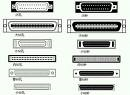
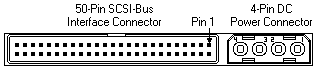
This term refers to the 1 byte wide data bus on a 50-pin parallel interface that is defined in the ANSI standard SCSI-1 (X3.131-1986).  The narrow bus consists of 8 data lines with parity, a series of control lines and the matching ground lines.  Seagate designates a narrow SCSI interface with an “n” in the model number.

image

SCSI WIDE

This term usually refers to the 2 byte wide data bus on a 68 pin parallel interface that is defined in the SCSI-3 SPI document. The term can be generically applied to any implementation wider than 1 byte, but at the time of this writing, there are no implementations wider than 2 bytes. Future implementations may include more data bytes because FAST transfer rates are giving plenty of life to 2 byte transfers until serial interfaces (like Fibre Channel or FireWire) become more popular. Seagate designates a wide SCSI interface with a “w” in the model number.

image

SCSI FAST-WIDE

This refers to a combination of a FAST transfer rate with a 2 byte wide connector, resulting in an increased data transfer rate. Wide FAST-20 (40 Mbytes/sec) products will be available in the year of this writing. Wide FAST-40 (80 Mbytes/sec) and FAST-80 (160 Mbytes/sec) products will be available in the near future.

Differential or High Voltage Differential (HVD)

Differential (D, ND, WD, WDC) is a logic signal system used in some SCSI drives. It uses a paired plus and minus signal level to reduce the effects of noise on the SCSI bus. Any noise injected into the signal would be present in both a plus and minus state, thereby being canceled. Seagate designates a differential (high voltage) SCSI interface with a “d” in the model number.

Due to changing definitions, Differential is now often referred to as High Voltage Differential (HVD).

Low Voltage Differential (LVD)

Low Voltage Differential is a differential logic scheme using lower voltage levels than HVD. For more information, see Ultra2 SCSI. Seagate designates low voltage differential SCSI interface with an “l” in the model number.

Fibre Channel Arbitrated Loop (FCAL)

This is the formal name for the Fibre Channel system used by SCSI. It is more commonly known as Fibre Channel SCSI. The loop part of the name refers to the way the system is connected as one large ring. Because of the loop characteristics, this interface has more in common with local area networks than with parallel SCSI.

Fibre Channel SCSI

This refers to products with fibre channel physical and protocol layers using the SCSI command set. The Fibre Channel interface is completely different from parallel SCSI in that it is a serial interface, meaning command and data information is transmitted on one signal stream organized into packets. The fibre may be either a copper coaxial cable or a fiber optic cable. The signal on the first implementation of fibre channel uses a 1 GHz rate, thereby achieving 100 Mbytes/sec over the cable. Fibre channel also implements increased software control of configuration and pushes the total device count on the bus to 126 IDs, as opposed to only 8 or 16 on a parallel bus. For more information, see our Technology Paper on Fibre Channel. Seagate designates a fiber channel SCSI interface with an “fc” in the model number.

ASA-2 SCSI

This is a Seagate specific term describing the basic structure of the SCSI firmware included with a Seagate disc drive and standing for Advanced SCSI Architecture, generation 2. It provides better performance than ASA-1 code in certain user environments (such as sequential 1 block data transfers). The labels ASA-1 and ASA-2 can apply to code shipped on a wide range of products, meaning different products have firmware originating from the same base firmware, but such firmware is individually adapted to the particular servo and read/write channel hardware on that product. The performance of a disc drive is still primarily determined by the seek times and data transfer rates, but the code base label provides a level of commonality and lack of bugs assurance in SCSI features for all drives with that label.

The most attractive feature of a common code architecture is that most enhancements made on one drive (such as a Barracuda 4) can be quickly migrated to other drives (such as the Barracuda 2 or Hawk 4) developed from the same code base. All new products since January 1995 use the ASA-2 code base, and many older products developed with ASA-1 code have been updated to the new structure.

SCA-2

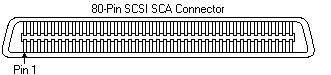
This is a miniature D style, 80 pin connector used on SCSI drives to plug to backplane connections. The SCA-2 connector provides grounds, voltage, and control lines needed to allow hot-plugging of parallel interface SCSI drives. Seagate designates an SCA-2 SCSI interface with a “c” in the model number.


image

Read More

Seagate Announced Restructuring Plan To Further Reduce Operating Costs

Seagate Technology announced it has initiated a restructuring plan that includes a reduction of approximately 1,100 employees or 2.5% of the company’s global workforce. This reduction is required to support a targeted run rate of product development and marketing and administrative costs of less than $300 million per quarter and to position the company to be cash flow and earnings positive within its fiscal year 2010.
The restructuring plan, which the company expects to be largely complete by the end of July 2009, is expected to result in total pretax restructuring charges of approximately $72 million. These charges will primarily be incurred in the June 2009 quarter and consist mainly of cash based employee termination costs which are expected to be substantially paid in the September 2009 quarter. The annual savings generated from this restructuring action is expected to be approximately $125 million.

Since the beginning of fiscal year 2009, and including today’s announcement, the company has reduced its global headcount through attrition and restructuring, resulting in a reduction in the company’s labor costs in excess of 25%. In addition, Seagate previously announced the realignment of its organizational structure to increase efficiency, as well as the closures of two recording media facilities and its Pittsburgh research facility, company-wide salary reductions announced in January 2009, and other cost reduction initiatives. Seagate continues to assess options to further reduce manufacturing operating costs.

Read More

Linux Recovery Software For Linux Based Computer

Linux Data Recovery Software Linux is a great and powerful operating system that has included unique features, advanced technologies and great applications. The reason behind its popularity is its great maintenance and security of data stored into their hard disk. Linux operating system is a multi-user and multi-tasking operating system that is the need of today’s world where unlimited data storage required into the computer. It is very powerful and easy to use operating system that has no required extra efforts. Anyone can use this that has technical sound or not.

Since it has multi-user & multitasking capacities, it is widely used around the world and there is a big community of Linux users. Although it is a high quality product, but sometimes it also face problems like data crash or data corruption. The corrupted data can be user stored data of system data which is necessary to run the system properly. If this kind of unfortunate event happens and you found that you can not access your files then you need to use certain recovery software so save yourself from this disaster. The software which is used to do certain critical operations are known as Linux Data Recovery Software.

The Linux Data Recovery Software can do all kind of recovery based on Ext2, Ext3 & ReiserFS file system recovery, recovers Linux deleted files or other kind of files. It first searches the bad sector, corrupted or deleted files and then it recovers it. Then it repairs all the files. After the repairing process finishes, it stores it on the specified location where you want to store the repaired files.

The Linux data recovery software is a must have product for all the Linux users who are professionals and thoroughly use their Linux based computer. The Linux data recovery software is made to recover all kinds of corrupted or damaged files which are on the Linux operating system. It helps you in following conditions:

  • When your files & folders are lost on your Linux desktop
  • You have accidentally formatted your hard disk
  • You have deleted the files from the trash or recycle bin
  • Operating System corruption
  • Missing files & folders
  • Missing Volumes
  • Deleted Volumes

Linux Data Recovery Software is software which can solve all your problems on your Linux based computers. To save your precious data, you must need to go for the Linux data recovery.

Read More

Free Hard Drive Erasing Tools

If you need to remove sensitive data totally from your harddisk, simply deleting these files is not enough! Using advanced methods, it is even possible to recover data that’s been overwritten, unless it has been overwritten using carefully selected platterns!

Operating systems usually do not totally delete the file, but just mark the file as being ‘deleted’ so it can not be accessed when you view the contents of a directory. This means that you can not see the file anymore with normal tools, but specialized recovery tools can still access your data.

To prevent this from happening, you need to totally erase your files, using one of the specialized data removal tools you can find in this section. These removal tools totally erase your data by replacing the contents of your files with effective data-patterns before deleting them the normal way.

After Work
Free Windows utility which can be used to wipe sensitive data from your computer, such as: temporary internet files, IE history, visited sites, opened documents, started programs, temporary registry values.

CleanDisk
Non-free. Total deletion of files, clean the Windows swap file, clean temporary files. Contains disk viewer to view the real contents of your disk including ‘deleted’ entries. Suitable for Win95, Win98, WinME, WinNT, Win2000, WinXP.

Eraser
Freeware for Windows. Eraser can remove sensitive data from your hard drive by overwriting it with carefully selected patterns. You can drag and drop files and folders to the on-demand eraser, use the convenient Explorer shell extension or use the integrated scheduler to program overwriting of unused disk space or, for example, browser cache files to happen regularly, at night, during your lunch break, at weekends or whenever you like.

HandyBits file shredder
Freeware for personal, non-profit use. Can overwrite files with random data up to 15 times. Multi-language support, integration with Windows Explorer, with icon on desktop to use as recycle bin, etc.

How to destroy a CD or DVD
Don’t just throw away your CD’s and DVD’s when they contain personal or sensitive data. First you need to make sure that the data is unretrievable.

KillDisk
Harddisk, floppy and partition eraser. Free and non-free editions are available.

No File Recovery
Free disk wipe utility for Windows.

SuperShredder
Freeware. SuperShredder gives you the ability to delete files using not only common methods such as Gutmann and NISPOM (DoD), but can be completely customized to give you all the security and/or performance you may need. It can receive files via drag-and-drop onto the application or the icon, selecting files from inside the program, command line, and can even add a shortcut to your ‘Send To’ menu inside the Windows Explorer so it’s simple to delete files in a secure and convenient fashion.

Read More