WD Hard Drive Circuit Boards Swap Guide

As we know:  Western Digital HDD can’t spin; board/chip be burnt; interface broken; etc. These problems are caused by PCB malfunction. Swap PCB of your WD hard drives can resolve the problems. (See also Noise related to PCB in Western Digital hard Drives)

1. WD Hard Drives PCB Swap Guide:

For Western Digital HDDs, just need the donor PCB has the same board number as yours.
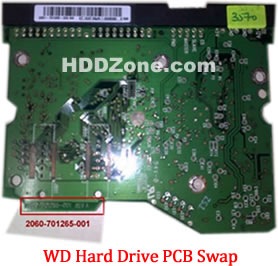
western-digital-hard-drive-pcb-swap

2. Before WD PCB Swap you should know:

1. Most PCB’s BIOS chip(ROM Chip) store the unique information. We need change the BIOS form original PCB to replacement PCB, in order to make the replacement PCB compatible with the HDD.  The 8pins (4 pins on each sides) with 25P05VP、25P10VP、25F512、25F1024、25F1024AN、SST25VF512、SST25VF010, etc. are the BIOS Chip.

Tips: Most of the TV/Phone Repair Shop can offer these services for just $5-%20

2. Some PCB don’t have separate BIOS. The BIOS be integrated on the Main Controller IC(The biggest chip on the board, also named Main Chip). We should exchange the Main Controller IC to let the HDD be recognized.

3. Where to buy WD Hard Drive Circuit Boards?

WD 2.5″ Laptop Hard Drives PCB:

WD 2060-771692-002 PCB
WD 2060-771692-005 PCB
WD 2060-771737-000 PCB
WD 2060-771814-001 PCB
WD 2060-771820-000 PCB
WD 2060-771823-000 PCB
WD 2060-771714-002 PCB
WD 2060-771754-000 PCB
WD 2060-701675-004 PCB
WD 2060-701572-002 PCB
WD 2060-771672-004 PCB
WD 2060-771672-001 PCB
WD 2060-701675-001 PCB
WD 2060-701499-005 REV A PCB
WD 2060-701402-002 PCB
WD 2060-701401-002 PCB
WD 2060-701578-001 PCB
WD 2060-701499-000 REV A PCB
WD 2060-701450-011 REV A PCB
WD 2060-701424-007 REV A PCB
WD 2060-701510-000 PCB

WD Hard Drives PCB(SATA)

Western Digital PCB 2060-771702-001
Western Digital PCB 2060-771590-001
Western Digital PCB 2060-701477-001
Western Digital PCB 2060-771640-002
Western Digital PCB 2060-771577-001
Western Digital PCB 2060-771698-002
Western Digital PCB 2060-701640-006
Western Digital PCB 2060-771640-003
Western Digital PCB 2060-701640-005
Western Digital PCB 2060-771668-000
Western Digital PCB 2060-771642-000
Western Digital PCB 2060-701640-007
Western Digital PCB 2060-701567-000
Western Digital PCB 2060-701640-000
Western Digital PCB 2060-701640-001
Western Digital PCB 2060-701640-002
Western Digital PCB 2060-771642-001
Western Digital PCB 2060-701590-001
Western Digital PCB 2060-701563-000
Western Digital PCB 2060-701520-000
Western Digital PCB 2060-701310-004
Western Digital PCB 2060-701537-004
Western Digital PCB 2060-701383-001
Western Digital PCB 2060-701384-002
Western Digital PCB 2060-701453-000
Western Digital PCB 2060-701293-001
Western Digital PCB 2060-701393-002
Western Digital PCB 2060-701444-003
Western Digital PCB 2060-701444-004
Western Digital PCB 2060-701477-002
Western Digital PCB 2060-701537-003
Western Digital PCB 2060-701552-003
Western Digital PCB 2060-701577-001
Western Digital PCB 2060-701590-000
Western Digital PCB 2060-701335-003
Western Digital PCB 2060-701335-005
Western Digital PCB 2060-701310-003
Western Digital PCB 2060-001293-000
Western Digital PCB 2060-001252-000
Western Digital PCB 2060-701537-002
Western Digital PCB 2060-001293-001
Western Digital PCB 2060-701335-002

Western Digital Hard Drives PCB(IDE)

Western Digital PCB 2060-701596-001
Western Digital PCB 2060-001113-001
Western Digital PCB 2060-001092-007
Western Digital PCB 2060-001092-006
Western Digital PCB 2060-001127-003
Western Digital PCB 2060-001076-002
Western Digital PCB 2060-001062-004
Western Digital PCB 2060-001047-001
Western Digital PCB 2060-001100-003
Western Digital PCB 2060-701494-001
Western Digital PCB 2060-701552-002
Western Digital PCB 2060-001068-001
Western Digital PCB 2060-001092-006
Western Digital PCB 2060-001113-001
Western Digital PCB 2060-001129-001
Western Digital PCB 2060-001179-003
Western Digital PCB 2060-701265-001
Western Digital PCB 2060-701292-000
Western Digital PCB 2060-701292-001
Western Digital PCB 2060-701292-002
Western Digital PCB 2060-001130-012
Western Digital PCB 2060-701508-001
Western Digital PCB 2060-701494-002
Western Digital PCB 2060-001130-010
Western Digital PCB 2060-001128-005
Western Digital PCB 2060-001266-001
Western Digital PCB 2060-001266-000
Western Digital PCB 2060-001265-001
Western Digital PCB 2060-001189-003
Western Digital PCB 2060-001177-000
Western Digital PCB 2060-001175-000
Western Digital PCB 2060-001173-004
Western Digital PCB 2060-001159-006
Western Digital PCB 2060-001292-000

Note: These are just PCB (Printed Circuit Boards), not the whole HDD (Hard Disk Drive). More other pcb(Seagate, Maxtor, Samsung, Hitachi) swap guide please refer to this post: hard Drive PCB Swap
Read More

2060-771960-000 WD PCB Circuit Board

HDD Printed circuit board (PCB) with board number 2060-771960-000 is usually used on these Western Digital hard disk drives: WD10JPVX-22JC3T0, DCM HBMTJHKB, Western Digital 1TB SATA 2.5 Hard Drive; WD10JPVX-75JC3T0, DCM SBKT2BN, Western Digital 1TB SATA 2.5 Hard Drive; WD7500BPVX-60JC3T0, DCM HBOT2HB, Western Digital 750GB SATA 2.5 Hard Drive; WD10JPVX-22JC3T0, DCM SBOTJHN, Western Digital 1TB…

Read More

Samsung Hard Disk Drive Data Recovery Partners

Samsung Hard Disk Drive Data Recovery For your reference, below is a list of data recovery service providers that can open your Samsung HDD product and (if connected through the link below) provide a seal or proof of data recovery that will not void your Samsung HDD limited warranty.

Samsung Hard Disk Data recovery partners:

1. CBL data recovery technologies

At CBL, They provide data recovery services for failed hard drives in laptops, desktop computers, data servers, RAID arrays, tapes and all other data storage media. Recommended by major manufacturers, CBL’s hard drive recovery services are ‘warranty-safe’ and backed by our ‘No Data, No Charge Guarantee’.

CBL’s Data Recovery Service Advantages:

  • Free Evaluation With Written Quote
  • 24/7/365 Customer Service
  • 100% Customer Privacy and Confidentiality
  • Worldwide Data Recovery Service Coverage
  • Discount Price

2.  Ontrack Data Recovery

Samsung have partnered with Ontrack Data Recovery, the world leader in data recovery services, to offer you:

Ontrack Data Recovery can offer you:

  • Affordable solutions
  • Report showing recoverable files – before you pay
  • $100 instant rebate
  • 100% guaranteed price quotes – no hidden charges
  • Additional 10% discount
  • Professional support – before, during and after the recovery

3. RECOVERY LABS

With 3,000+ new SATISFIED CUSTOMERS every year, Recovery Labs provides you with DEMONSTRATED SUCCESS RATES of over 90%, on top of FREE LISTING REPORTS.

RECOVERY LABS’ Data Recovery Service Advantages:

  • Discount 20%(up to 40%) in data recovery.
  • Free of charge door to door delivery service.
  • Free of charge diagnosis and quotation.
  • If you are not completely satisfied with your recovery, you will not be billed.
  • Continuous customized support all along a 24/7 process.
  • ISO 9000:2001 certified Data recovery and Secure Data Deletion.
  • A dedicated laboratory equipped with a Class 100 Clean Room.

4. MYUNG INFORMATION TECHNOLOGIES.,Ltd

Who shall be a company working for happiness of customers and a company working condition rather than excellence data recovery company.

MIT can offer you:

  • Discount in data recovery.
  • Free of charge diagnosis and quote.
  • If you are not completely satisfied with your recovery, you will not be billed.
  • ISO 9000:2001 certified Data recovery and Secure Data Deletion.
  • A dedicated laboratory equipped with a Class 100 Clean Room.

Note: SAMSUNG IS NOT LIABLE IN ANY WAY FOR LOSS OF DATA WRITTEN TO OR SAVED ON ANY SAMSUNG HDD PRODUCT, OR FOR ANY DATA RECOVERY OR ATTEMPTED DATA RECOVERY.

Read More

How to Install A (PATA) Hard Disk Drive?

Step 1. Opening The Computer Case

Important: Each computer has a different way of opening the case and location of the hard disk drive. Refer to the user’s manual of your computer for detailed instructions.

Warning: The following procedure listed below will have you working within the chassis of the system. Following a few simple rules will keep you and your hardware safe.

1. Always power OFF your computer and disconnect the power cable before opening the case.

2. Always use an anti-static wrist strap before connecting or disconnecting anything within your computer.

Step 2. Installing The Hard Disk Drive

3. When the hard disk drive is level with the hard drive rack, gently push it in place without exerting too much force. Tighten the hard disk drive in place using the screws supplied with the product.

Note: If screws other than those supplied are used, the PCB board of the hard disk drive may get damaged and cause the hard disk drive to malfunctio.

Step 3. Making Your Connections

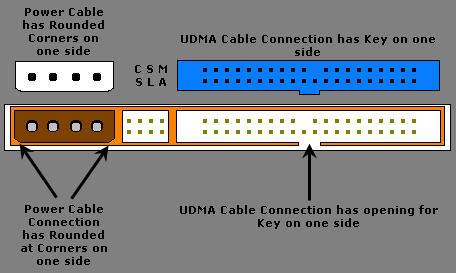
4. Line the key on the UDMA cable with the opening on the hard disk drive.

Note: Make sure the cable is not inserted in reverse since this can damage the connector and hard disk drive. Do not force or rock the connection into it’s socket on the hard disk drive. Push it in straight until it is seated.

Pata UDMA and Power Cable Connections

5. Line the Molex power cable connector with the opening on the hard disk drive.

Note: Make sure the cable is not inserted in reverse since this can damage the connector and hard disk drive. Do not force or rock the connection into it’s sockets on the hard disk drive. Push it in straight until it is seated.

Read More

Data Storage to Be Priority in 2012 – KeepItSafe

Data Storage,KeepItSafeThe storage, securement, access and management of growing volumes of information will mark 2012 within the technology sector, handled online backup and disaster recovery services provider KeepItSafe forecasts.

This rise in the quantity of data does mean using USB stays for data storage will decrease as companies be conscious of the potential risks that may include while using products.

USB sticks are small , portable, and therefore they are able to easily finish up lost or stolen. Research because of it security and data protection company Sophos also says two-thirds of 50 USB stays available on Australian trains and buses were have contracted adware and spyware and contained unencrypted details about their former proprietors.

Therefore, KeepItSafe stated, the virtualisation of servers and desktop computers increases as companies will have to adjust their storage systems to support the growing quantity of data they produce.

“It is impossible for service companies to carry on to handle storage needs with traditional local storage, this can pressure natural evolution to disaster-recovery solutions and data backup towards the cloud. This change won’t be viewed among large businesses but additionally among SMBs. stated Eoin Blacklock, controlling director, KeepItSafe.

“All companies will have to look for flexible, scalable and affordable storage options that may grow using their companies, putting data support high on the diary for 2012.”

Tape has become progressively hard to rely on and it is receding of favour with lots of organisations, Blacklock added.

Technology research and advisory firm Gartner discovered that 71pc of backup tape reinstates fail.

The escape from tape may also benefit companies financially, based on EMC Ireland?¡¥s country manager Jason Ward.

“Companies and public-sector organisations can significantly spend less and be slimmer by eliminating tape, that is cumbersome and susceptible to security breaches,” Ward stated.

Read More

G003309A Toshiba PCB Circuit Board

HDD Printed circuit board (PCB) with board number G003309A is usually used on these Toshiba hard disk drives: MQ01UBB200, AA00/AY000U, HDKFD00AYA31 T, Toshiba 2TB USB 2.5″ Hard Drive; MQ01UBF050, AA00/AM001U, HDKCD02AYA01 T, Toshiba 500GB USB 2.5″ Hard Drive; MQ01UBB200, AA00/AY000U, HDKFD00AYA01 T, Hitachi 2TB USB 2.5″ Hard Drive; MQ01UBB200, AA00/AY000U, HDKFD00AYA01 T, Toshiba 2TB USB…

Read More